1. Кіріспе
This manual provides essential instructions for the proper setup, operation, and maintenance of your KYOCERA DuraXV Extreme+ E4811 ultra-rugged flip phone. Designed for durability, this device features IP68 dust and waterproof rating, MIL-STD-810G protection, 4G LTE connectivity, and a 5MP camera. Please read this manual thoroughly before using your device to ensure optimal performance and longevity.
2. Пакет мазмұны
Пакетте келесі элементтер бар екенін тексеріңіз:
- KYOCERA DuraXV Extreme+ E4811 Handset
- Қуат адаптері
- USB кабелі
- Батарея (алдын ала орнатылған немесе бөлек)
3. Құрылғының орналасуы
Familiarize yourself with the physical components of your DuraXV Extreme+ E4811.
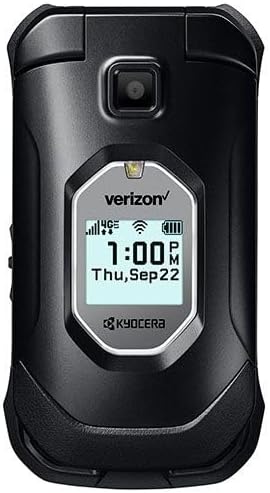
3.1-сурет: Алдыңғы view of the KYOCERA DuraXV Extreme+ E4811 in its closed position, displaying the external screen with time and network status.
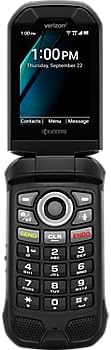
3.2-сурет: Алдыңғы view of the KYOCERA DuraXV Extreme+ E4811 in its open position, revealing the main display and the physical keypad with navigation buttons.

3.3-сурет: Артқа view of the KYOCERA DuraXV Extreme+ E4811 in its open position, showing the rear casing and charging contacts.
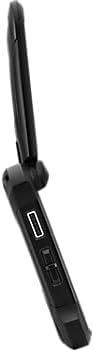
3.4-сурет: Бүйір view of the KYOCERA DuraXV Extreme+ E4811, highlighting the USB charging port and other side buttons.
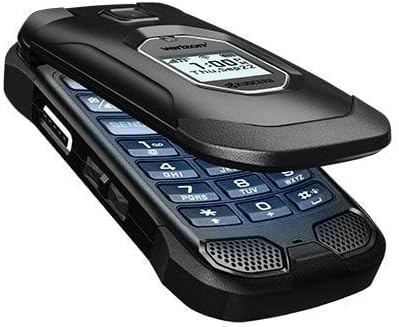
3.5-сурет: Бұрыштық view of the KYOCERA DuraXV Extreme+ E4811 in its open state, providing a perspective of both the display and keypad.
4. Орнату
4.1. Аккумуляторды орнату және зарядтау
- If the battery is not pre-installed, remove the back cover of the phone.
- Align the battery (1770 mAh) contacts with the phone's terminals and gently press it into place.
- Replace the back cover, ensuring it is securely latched to maintain water and dust resistance.
- Connect the USB cable to the phone's charging port and the power adapter. Plug the adapter into a wall outlet.
- Allow the phone to charge fully before initial use. The charging indicator will show progress.
4.2. SIM картасын орнату
Your DuraXV Extreme+ E4811 requires a Nano-SIM card for cellular service.
- Телефонды өшіріп, артқы қақпағын алыңыз.
- SIM картасының ұясын табыңыз.
- Insert the Nano-SIM card with the gold contacts facing down and the notched corner aligned with the slot. Push until it clicks into place.
- Артқы қақпақты орнына салыңыз.
4.3. Қосу / Өшіру
- Қосу үшін: Экран жанғанша Қуат/Қоңырауды аяқтау түймесін басып тұрыңыз.
- Қуатты өшіру үшін: Press and hold the Power/End Call button, then select 'Power off' from the options on the screen.
5. Пайдалану нұсқаулары
5.1. Негізгі шарлау
Use the directional pad and center select button to navigate menus and select options. The 'Send' button initiates calls, and the 'End' button terminates calls or returns to the home screen.
5.2. Қоңырау шалу және қабылдау
- Қоңырау шалу үшін: Enter the phone number using the keypad and press the 'Send' button.
- Қоңырауға жауап беру үшін: When the phone rings, press the 'Send' button.
- Қоңырауды аяқтау үшін: Press the 'End' button.
5.3. Хабарламаларды жіберу және алу
- Негізгі мәзірден «Хабарламалар» қолданбасына өтіңіз.
- Select 'New Message' to compose a text message. Enter the recipient's number and your message.
- Press the 'Send' option to transmit the message.
- Received messages will appear as notifications on the screen and can be accessed through the 'Messages' application.
5.4. Камераны пайдалану
Your phone is equipped with a 5MP camera.
- Open the 'Camera' application from the main menu.
- Frame your subject using the display.
- Press the center select button or a dedicated camera button (if available) to capture a photo.
5.5. Connectivity (Bluetooth, Wi-Fi, 4G LTE)
- Блютез: Access Bluetooth settings from the main menu to pair with compatible devices like headsets or car kits.
- Сымсыз дәлдiк: Connect to available Wi-Fi networks via the settings menu to access the internet without using cellular data.
- 4G LTE: The phone automatically connects to the 4G LTE network for high-speed data and calls, provided a valid SIM card and service plan are active.
6. Техникалық қызмет көрсету
- Тазалау: Жұмсақ пайдаланыңыз, damp телефонның сыртын тазалауға арналған шүберек. Қатты химиялық заттардан немесе абразивті материалдардан аулақ болыңыз.
- Суға және шаңға төзімділік: The phone is IP68 rated. Ensure all port covers are securely closed to maintain water and dust resistance. Do not expose the phone to saltwater or other liquids. If exposed to water, rinse with fresh water and dry thoroughly.
- Батареяға күтім жасау: Avoid extreme temperatures. Do not puncture or disassemble the battery. Use only approved chargers.
- Қоршаған ортаны қорғау: The phone is MIL-STD-810G compliant, offering protection against drops, shock, vibration, and extreme weather conditions. However, avoid unnecessary harsh treatment.
7. Ақаулықтарды жою
If you encounter issues with your phone, refer to the following common solutions:
- Phone Does Not Power On: Ensure the battery is charged. Connect the phone to the charger and attempt to power on after a few minutes.
- Желі сигналы жоқ: Check that the SIM card is correctly inserted. Move to an area with better network coverage. Contact your service provider if the issue persists.
- Қоңырау шалу/қабылдау мүмкін емес: Verify that you have active cellular service. Check call barring settings. Ensure the phone is not in Airplane Mode.
- Screen is Unresponsive: If the screen is frozen, try performing a soft reset by removing and reinserting the battery (if accessible) or holding the Power button for an extended period.
- Аудио сапасы нашар: Check the volume settings. Ensure the speaker or earpiece is not obstructed.
8. Техникалық сипаттамалар
| Ерекшелік | Техникалық сипаттама |
|---|---|
| Үлгі нөмірі | E4811 |
| Операциялық жүйе | Android 11.0 |
| CPU моделі | MediaTek Helio |
| CPU жылдамдығы | 2 ГГц |
| Жедел Жадтау Құрылғысы | 2 ГБ |
| Ішкі жад | 16 ГБ |
| Дисплей ажыратымдылығы | 480 x 800 |
| Артқы камера | 5 МП |
| Батарея сыйымдылығы | 1770 мАч |
| Қосылу мүмкіндігі | 4G LTE, Wi-Fi, Bluetooth |
| Төзімділік рейтингтері | IP68 Dust & Waterproof, MIL-STD-810G |
| Форма факторы | Төңкеру |
| Аудио ұясы | 3.5 мм |
| Элемент салмағы | 8 унция |
9. Кепілдік және қолдау
Your KYOCERA DuraXV Extreme+ E4811 is covered by a manufacturer's warranty. For specific warranty terms and conditions, please refer to the warranty card included with your product or visit the official KYOCERA website. For technical support, product registration, or further assistance, please visit the KYOCERA support page or contact their customer service directly.
Желідегі қолдау: www.kyoceramobile.com/support/


