Кіріспе
Thank you for choosing the MOTPK Gaming Desk. This manual provides detailed instructions for assembly, operation, maintenance, and troubleshooting to ensure you get the most out of your new desk. Please read this manual thoroughly before assembly and use, and retain it for future reference.
Қауіпсіздік туралы ақпарат
- Жұмыс үстелін сызаттардың алдын алу үшін әрқашан жұмсақ, таза бетке жинаңыз.
- Қолданар алдында барлық бұрандалар мен бекіткіштердің мықтап тартылғанына көз жеткізіңіз. Мерзімді түрде тексеріп, қажет болған жағдайда қайта бекітіңіз.
- Do not overload the desk or shelves beyond their weight capacity.
- Keep liquids away from the power outlet and LED light strip to prevent electrical hazards.
- Do not allow children to climb on or play with the desk.
- Use only the provided power cord and ensure it is properly routed to avoid tripping hazards.
Пакет мазмұны
Құрастыруды бастамас бұрын барлық компоненттердің бар екенін тексеріңіз. Егер қандай да бір бөліктер жоқ немесе зақымдалған болса, тұтынушыларды қолдау қызметіне хабарласыңыз.
- Үстел үстіңгі панельдері
- Монитор сөресі
- Металл жақтаудың құрамдас бөліктері
- Мата тартпасы
- Recessed Power Outlet with USB Ports
- Контроллері бар RGB жарықдиодты жарық жолағы
- Құлаққап ілгегі
- Adjustable Non-slip Foot Pads
- Құрастыру жабдықтары (бұрандалар, болттар және т.б.)
- Assembly Tools (Allen wrench, screwdriver)
- Нұсқаулық
Орнату және құрастыру
This desk is designed for hassle-free assembly with clearly labeled parts and a detailed, step-by-step illustrated manual included in the package. All necessary assembly tools are provided.
Құрастырудың негізгі мүмкіндіктері:
- Қайтарылатын дизайн: The fabric drawer and PC stand can be assembled on either the left or right side of the desk to suit your preference and room layout.
- Монитор сөре: The integrated monitor shelf provides an ergonomic viewing height, reducing neck and eye strain.
- Құлаққап ілгегі: A convenient hook is included for hanging headphones or bags.

Figure 1: Product Dimensions and Reversible Design. This diagram illustrates the overall dimensions of the desk and highlights the reversible nature of the side storage unit, allowing it to be installed on either the left or right side.

Figure 2: Assembled MOTPK Gaming Desk in a typical setup. This image provides a visual reference of the fully assembled desk with accessories, showcasing оның функционалдық дизайны.
Пайдалану нұсқаулары
Recessed Power Outlet
The desk is equipped with a built-in power panel for convenient access to power for your devices.
- 3 айнымалы ток розеткалары: 120В/12А
- 2 USB порты: 5В/2А
Simply plug your laptop, tablet, smartphone, or gaming peripherals directly into the outlets or USB ports located on the desk surface.
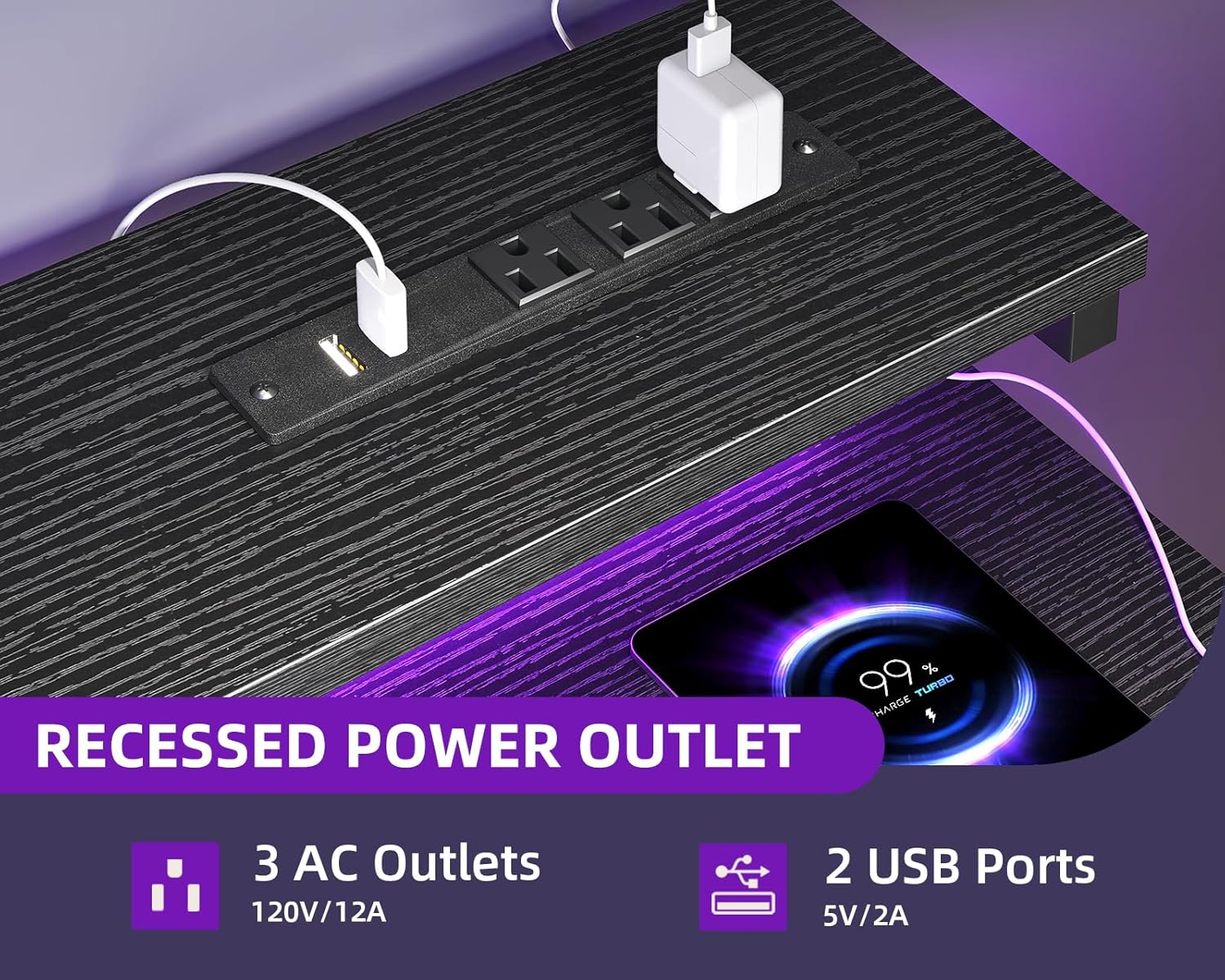
Figure 3: Recessed Power Outlet. This image details the integrated power strip with AC and USB ports, designed for easy device charging and power access.
RGB жарықдиодты шамдар
The integrated RGB LED strip under the monitor shelf offers customizable lighting to enhance your workspace or gaming ambiance.
- 10 Static Colors: Choose from a variety of solid colors.
- 10 динамикалық режим: Experience different lighting effects.
How to Control the LED Lights:

Figure 4: LED Light Controller. This diagram illustrates the control panel for the RGB LED lights, explaining the function of each button for color, mode, speed, and brightness adjustments.
- Static Color Button (C): Press once to switch to static color mode. Each subsequent press changes the color.
- Dynamic Mode Button (M): Press once to switch to dynamic effect mode. Each subsequent press changes the dynamic mode. Press and hold for 3 seconds to enter demo mode, where the strip cycles through various dynamic modes automatically.
- Speed & Brightness & Power Button (S/B/Power):
- In static mode, press to adjust brightness levels.
- In dynamic mode, press to adjust dynamic mode speed.
- Press and hold to shut down the LED strip when it is on. Press briefly to turn it on.
The product features a power-off memory function, meaning the strip will restore the last color, brightness, and mode settings upon the next power-on.
Мата тартпасы
The fabric drawer provides discreet storage for your items.

Figure 5: Fabric Drawer. This image showcases the pull-out fabric drawer, emphasizing its ease of use, durability, and simple assembly.
- The drawer is designed for easy pushing and pulling.
- It is easy to clean.
Техникалық қызмет көрсету
- Тазалау: Үстел беттерін жарнамамен сүртіңізamp cloth. Avoid harsh chemicals or abrasive cleaners that may damage the laminated finish.
- Мата тартпасы: The fabric drawer can be spot cleaned with a mild detergent and water. Allow to air dry completely.
- Электрлік компоненттер: Ensure the power outlet and LED strip are dry before use. Do not attempt to disassemble or repair electrical components yourself.
- Тұрақтылықты тексеру: Барлық бұрандалар мен қосылымдарды мезгіл-мезгіл тексеріп, олардың тығыз және сенімді болуын қамтамасыз етіңіз.
Ақаулықтарды жою
| Мәселе | Ықтимал себебі | Шешім |
|---|---|---|
| Құрастырғаннан кейін үстел дірілдейді. | Screws are not fully tightened. Uneven floor. | Ensure all assembly screws are tightened securely. Adjust the non-slip foot pads to level the desk on uneven surfaces. |
| Жарықдиодты шамдар қосылмайды. | Power cable not connected. Controller malfunction. | Check if the LED light strip's power cable is securely plugged into a working outlet. Ensure the controller is properly connected to the LED strip. Try pressing the power button on the controller. |
| Қуат розеткалары/USB порттары жұмыс істемейді. | Desk power cord not plugged in. Overload. | Verify the desk's main power cord is securely plugged into a functional wall outlet. Check if too many high-power devices are connected, potentially tripping a circuit breaker (if applicable). |
| Fabric drawer does not slide smoothly. | Improper installation. Obstruction. | Ensure the drawer frame is assembled correctly and free of obstructions. Check if the drawer is overloaded. |
Техникалық сипаттамалар
| Ерекшелік | Мәлімет |
|---|---|
| Бренд | MOTPK |
| Үлгі нөмірі | B01170401006 |
| Өнім өлшемдері (D x W x H) | 18.9"D x 47.2"W x 29.9"H |
| Түс | Қара |
| Стиль | Қазіргі заманғы |
| Негізгі материал | Металл |
| Жоғарғы материал түрі | Инженерлік ағаш |
| Аяқтау түрі | Ламинатталған |
| Арнайы мүмкіндіктер | Built-In USB Outlet, Built-in Power Outlet, Compact, Reversible, Monitor Shelf, Headphone Hook |
| Тартпалардың саны | 1 (Fabric Drawer) |
| Элемент салмағы | 12.8 келі |
| Құрастыру қажет | Иә (құралдар кіреді) |
| Өнімді күту нұсқаулары | D көмегімен сүртіңізamp Шүберек |
Кепілдік және қолдау
For warranty information or customer support, please refer to the documentation included with your purchase or contact MOTPK customer service directly. Please have your model number (B01170401006) and purchase details ready when contacting support.


