Кіріспе
Welcome to the user manual for your Tibuta Smartpad A40 tablet. This guide provides essential information on setting up, operating, maintaining, and troubleshooting your device. The Smartpad A40 is designed for versatile use, featuring a large 10.1-inch display, a powerful quad-core processor, and the Android 14 operating system.

Image: The Tibuta Smartpad A40 tablet, shown with its protective case, highlighting its Android 14 operating system and 6GB RAM + 64GB ROM configuration.
Орнату нұсқаулығы
1. Қораптан шығару және бастапқы тексеру
Carefully remove all components from the packaging. Ensure the tablet, protective case, charging cable, and power adapter are present. Inspect the tablet for any physical damage.

Image: The Tibuta Smartpad A40 tablet with its included case and headphones, illustrating its core features such as Android 14, IPS display, memory, battery capacity, and camera specifications.
2. Планшетті зарядтау
Before first use, fully charge the tablet. Connect the Type-C charging cable to the tablet's charging port and the other end to the power adapter. Plug the adapter into a wall outlet. The charging indicator will show the charging status.

Image: The Tibuta Smartpad A40 tablet connected to a Type-C charger, emphasizing its 5000mAh battery capacity and estimated usage times for video playback and overall endurance.
3. Қосу / Өшіру
- Қосу үшін: Press and hold the Power button located on the side of the tablet until the Tibuta logo appears.
- Қуатты өшіру үшін: Қуат параметрлері мәзірі пайда болғанша Қуат түймесін басып тұрыңыз. «Өшіру» тармағын таңдап, растаңыз.
- Қайта бастау үшін: Қуат параметрлері мәзірінен «Қайта іске қосу» тармағын таңдап, растаңыз.
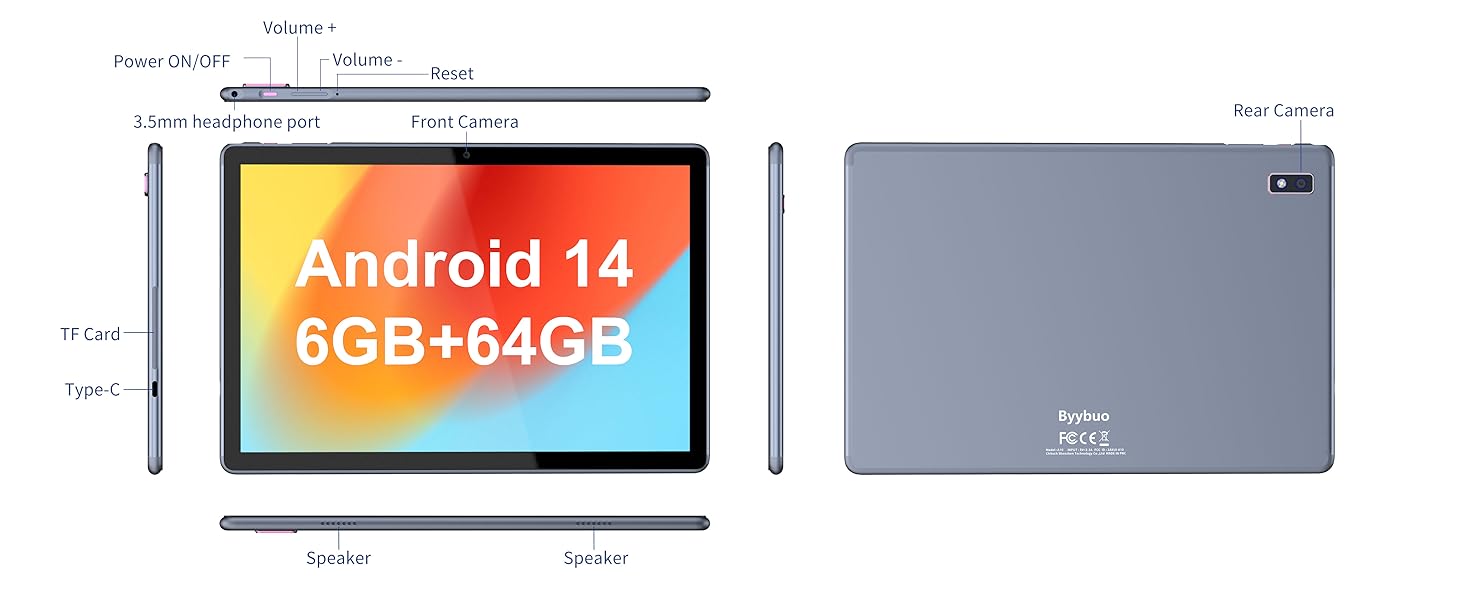
Image: A detailed diagram illustrating the physical layout of the Tibuta Smartpad A40, including the positions of its buttons, ports, and cameras for easy identification.
4. Бастапқы орнату шебері
Алғаш рет қосылғанда, планшет бастапқы орнату процесінде сізге нұсқау береді. Экрандағы нұсқауларды орындаңыз:
- Тіліңізді таңдаңыз.
- Wi-Fi желісіне қосылыңыз.
- Google есептік жазбаңызбен кіріңіз немесе жаңасын жасаңыз.
- Экран құлпын орнату (PIN, үлгі, құпия сөз).
- Review және шарттарды қабылдайды.
Operating Your Tibuta Smartpad A40
1. Navigation and Touchscreen Gestures
The Smartpad A40 features a responsive multi-touch display. Common gestures include:
- Түртіңіз: Элементті таңдау немесе қолданбаны ашу.
- Түртіп, ұстап тұрыңыз: Мәтінмәндік мәзірлерге кіру немесе белгішелерді жылжыту.
- Сырғыту: To scroll through pages or navigate between screens.
- Масштабтау үшін шымшу: Суреттерді үлкейту немесе кішірейту үшін және web беттер.
2. Дисплей және аудио
Experience vibrant visuals on the 10.1-inch IPS HD display with a resolution of 1280 x 800 pixels. The tablet also features an eye protection mode to reduce strain during prolonged use. Enjoy clear audio through the integrated dual high-fidelity speakers.

Image: The Tibuta Smartpad A40 tablet showcasing its IPS Full HD display and dual speakers, emphasizing its 10.1-inch screen size, 1280x800 IPS resolution, eye protection mode, and high-fidelity audio output.
3. Performance and Operating System
Powered by a robust Quad-Core processor and running on Android 14, the Smartpad A40 delivers smooth performance for multitasking, gaming, and streaming. The Android 14 system ensures access to the latest features and security updates.

Image: The Tibuta Smartpad A40 tablet showcasing its Android 14 operating system and GMS certification, with various application icons visible on the screen.
4. Сақтау және жад
The tablet comes with 6GB of RAM (2GB + 4GB virtual) and 64GB of internal storage, providing ample space for your applications, photos, videos, and documents. Storage can be expanded up to 128GB using a microSD card (not included).

Image: The Tibuta Smartpad A40 tablet highlighting its 6GB RAM and 64GB internal storage, along with the option to expand storage up to 128GB via a microSD card.
5. Камералар
Capture moments with the tablet's dual cameras: a 5 MP front camera for video calls and selfies, and an 8 MP rear camera for photos and videos.

Image: Demonstrates the Tibuta Smartpad A40's camera capabilities, featuring a 5.0 MP front camera for HD video and an 8.0 MP rear camera with autofocus for capturing photos.
6. Қосылу мүмкіндігі
The Smartpad A40 supports Wi-Fi (802.11ac) for fast internet access and Bluetooth for connecting to wireless peripherals like headphones and speakers.
7. Versatile Use Cases
The Tibuta Smartpad A40 is designed for a wide range of activities, from entertainment to productivity. Its portability makes it ideal for on-the-go use, while its features support various daily needs.

Image: Illustrates the diverse applications of the Tibuta Smartpad A40, including watching videos, assisting with daily tasks, and serving as a tablet for both children and seniors.
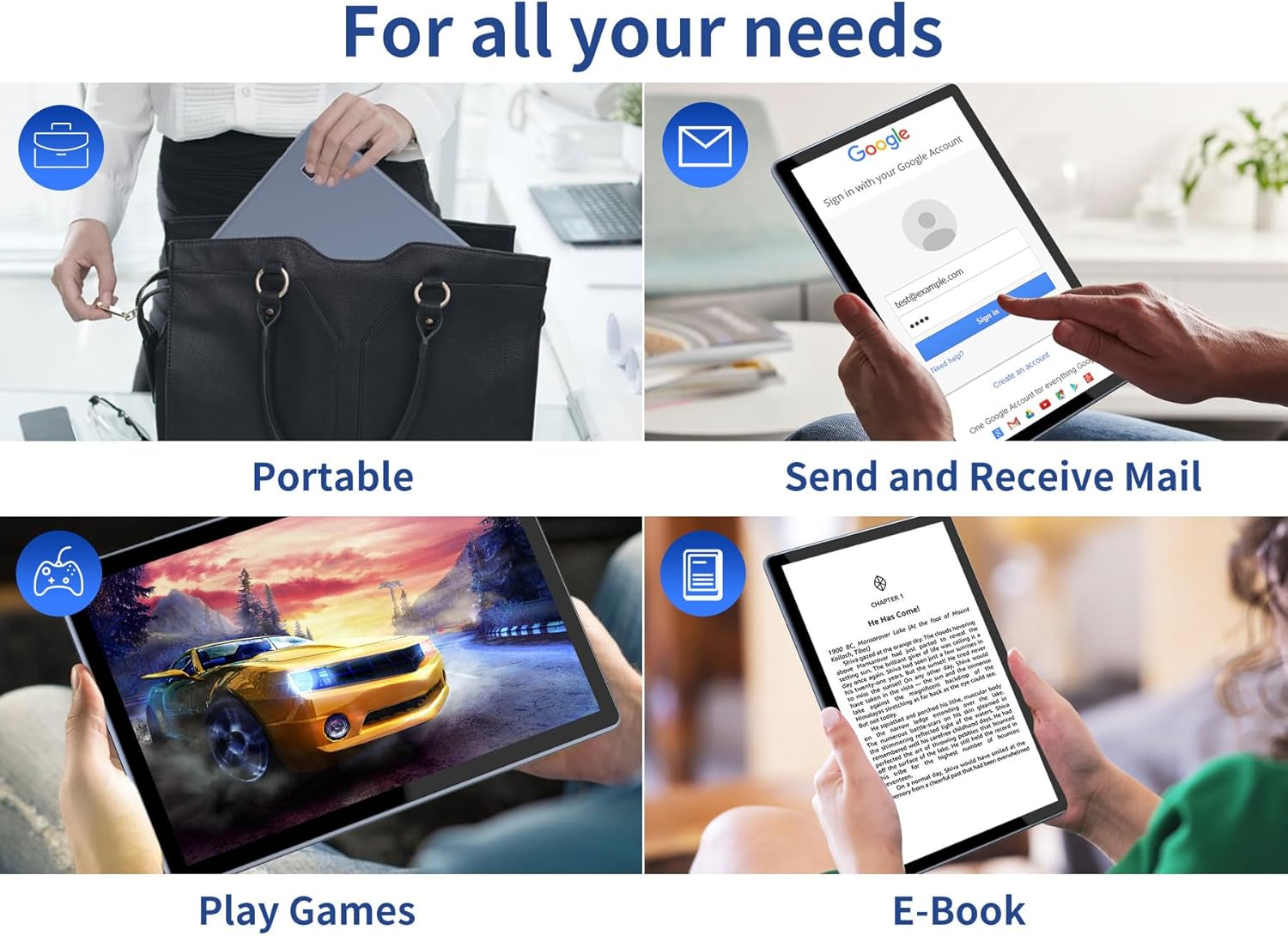
Image: Depicts the versatility of the Tibuta Smartpad A40 for various user needs, including portability, email communication, gaming, and e-book reading.
Техникалық қызмет көрсету
1. Планшетті тазалау
Планшеттің экраны мен корпусын тазалау үшін жұмсақ, түксіз матаны пайдаланыңыз. Қатты дақтар үшін, аздап dampшүберекті сумен немесе экран тазалағышпен салыңыз. Қатты химиялық заттарды немесе абразивті материалдарды пайдаланбаңыз.
2. Бағдарламалық құралды жаңарту
Планшетіңізде ең соңғы мүмкіндіктер, қауіпсіздік патчтары және өнімділік жақсартулары бар екеніне көз жеткізу үшін жүйелік жаңартуларды үнемі тексеріп, орнатыңыз. Өту бөліміне өтіңіз. Параметрлер > Жүйе > Жүйені жаңарту жаңартуларды тексеру үшін.
3. Батареяны күту
Батареяның қызмет ету мерзімін ұзарту үшін:
- Төтенше температурадан аулақ болыңыз.
- Жиі қайта зарядтау алдында батареяның толық таусылуына жол бермеңіз.
- Батарея толған кезде зарядтағышты розеткадан ажыратыңыз.
4. Сақтауды басқару
Мерзімді түрде қайтаview орнатылған қолданбаларыңыз және fileс. Пайдаланылмаған қолданбаларды жойыңыз және қажетсіз қолданбаларды жойыңыз files to free up storage space and maintain optimal performance. Utilize the microSD card slot for additional storage if needed.
Ақаулықтарды жою
| Мәселе | Ықтимал себебі | Шешім |
|---|---|---|
| Планшет қосылмайды. | Батарея заряды аз; жүйенің істен шығуы. | Charge the tablet for at least 30 minutes. Press and hold the Power button for 10-15 seconds to force restart. If unresponsive, locate the small reset pinhole (refer to diagram in Setup Guide) and gently press it with a paperclip. |
| Wi-Fi байланысы мәселелері. | Incorrect password; router issue; tablet Wi-Fi off. | Ensure Wi-Fi is enabled in Settings. Re-enter Wi-Fi password. Restart your Wi-Fi router. Forget the network and reconnect. |
| Баяу өнімділік. | Тым көп қолданбалар жұмыс істейді; төмен сақтау; ескірген бағдарламалық қамтамасыз ету. | Close background apps. Clear cache. Uninstall unused apps. Check for system updates. Restart the tablet. |
| Apps crashing or freezing. | App bug; insufficient resources. | Force close the app (Settings > Apps > [App Name] > Force Stop). Clear app cache/data. Reinstall the app. Ensure system is updated. |
Техникалық сипаттамалар
| Ерекшелік | Мәлімет |
|---|---|
| Бренд | Тибута |
| Үлгі нөмірі | A40 |
| Операциялық жүйе | Android 14 (Android 13 listed in some specs, but product title indicates 14) |
| Экран өлшемі | 10.1 дюйм |
| Экран ажыратымдылығы | 1280 x 800 Pixels (IPS HD) |
| Процессор бренді | Allwinner (Quad-Core) |
| Орнатылған RAM өлшемі | 6 GB (2+4GB) |
| Жад сақтау сыйымдылығы | 64 ГБ |
| Кеңейтілетін сақтау орны | Micro SD (128 ГБ дейін) |
| Алдыңғы камера | 5 МП |
| Артқы камера | 8 МП |
| Батарея сыйымдылығы | 5000 мАч |
| Қосылу мүмкіндігі | Wi-Fi (802.11ac), Bluetooth |
| Зарядтау порты | C түрі |
| Элемент өлшемдері (L x W x H) | 25.8 x 15.8 x 2 см |
| Элемент салмағы | 1.16 кг |
Кепілдік және қолдау
Кепілдік туралы ақпарат
Specific warranty details for the Tibuta Smartpad A40 are typically provided with your purchase documentation or on the product packaging. Please refer to these resources for information regarding warranty period, coverage, and terms. In general, manufacturer warranties cover defects in materials and workmanship under normal use.
Тұтынушыларды қолдау
For technical assistance, troubleshooting beyond this manual, or warranty claims, please contact Tibuta customer support through the following channels:
- Өнімнің қаптамасында берілген байланыс ақпаратын қараңыз.
- Visit the official Tibuta webқолдау ресурстарына, жиі қойылатын сұрақтарға және байланыс пішіндеріне арналған сайт.
- If purchased through an online retailer, their customer service portal may also offer support or direct you to the manufacturer.


