Кіріспе
This manual provides essential information for the proper installation, operation, and maintenance of your TELE System TS6105 DVB-T2 HEVC Digital Terrestrial Decoder. Please read these instructions carefully before using the device to ensure optimal performance and safety.
The TS6105 decoder is designed to receive DVB-T2 HEVC 10-bit digital terrestrial television broadcasts, offering Full HD resolution up to 1080p@60Hz. It includes features such as automatic channel scanning (AUTOSCAN), an Electronic Program Guide (EPG), and multimedia playback capabilities via USB.
Пакет мазмұны
Пакетте барлық элементтер бар екеніне көз жеткізіңіз:
- TELE System TS6105 DVB-T2 HEVC Digital Terrestrial Decoder
- Қашықтан басқару құралы
- Қуат адаптері
- Пайдаланушы нұсқаулығы (бұл құжат)

This image shows the compact design of the TS6105 decoder, highlighting the TELE System logo, model number TS6105 DVB-T2 HEVC, Dolby Audio, and HDMI branding on the front, with ventilation on the side.
Орнату
1. Connecting the Decoder
Before connecting, ensure your television and the decoder are turned off.

This image displays the rear panel of the TS6105 decoder, featuring the ANT IN, ANT OUT, COAXIAL, HD OUT (HDMI), SCART, and DC IN ports for power and signal connections.
- Антенна қосылымы: Жер үсті антеннасының кабелін мынаған қосыңыз Құмырсқа IN port on the rear of the decoder. If you wish to loop the signal to another device, connect a coaxial cable from the ҚҰЖЫРМАША port to the next device.
- TV Connection (HDMI): For the best picture quality, connect an HDMI cable from the HD OUT port on the decoder to an available HDMI input on your television. Select the corresponding HDMI input on your TV.
- TV Connection (SCART): If your TV does not have an HDMI input, connect a SCART cable from the SCART port on the decoder to the SCART input on your television.
- Қуат қосылымы: Қуат адаптерін DC IN port on the decoder, then plug the adapter into a wall outlet.
2. First-Time Installation and Channel Scan
After connecting the decoder and turning on your TV, switch on the decoder. The first time you use it, an installation wizard will guide you through the initial setup.
- Тіл таңдау: Choose your preferred language using the remote control's navigation buttons and press OK.
- Country Selection: Select your country. This helps the decoder apply the correct regional settings for channel scanning.
- АВТОСКАН: The decoder will automatically initiate the AUTOSCAN function. This process searches for all available digital terrestrial channels and organizes them logically using the LCN (Logical Channel Number) system. This may take several minutes.
- Аяқталу: Once the scan is complete, the decoder will save the channels and display the first available channel.
Operating the Decoder
Қашықтан басқару құралыview
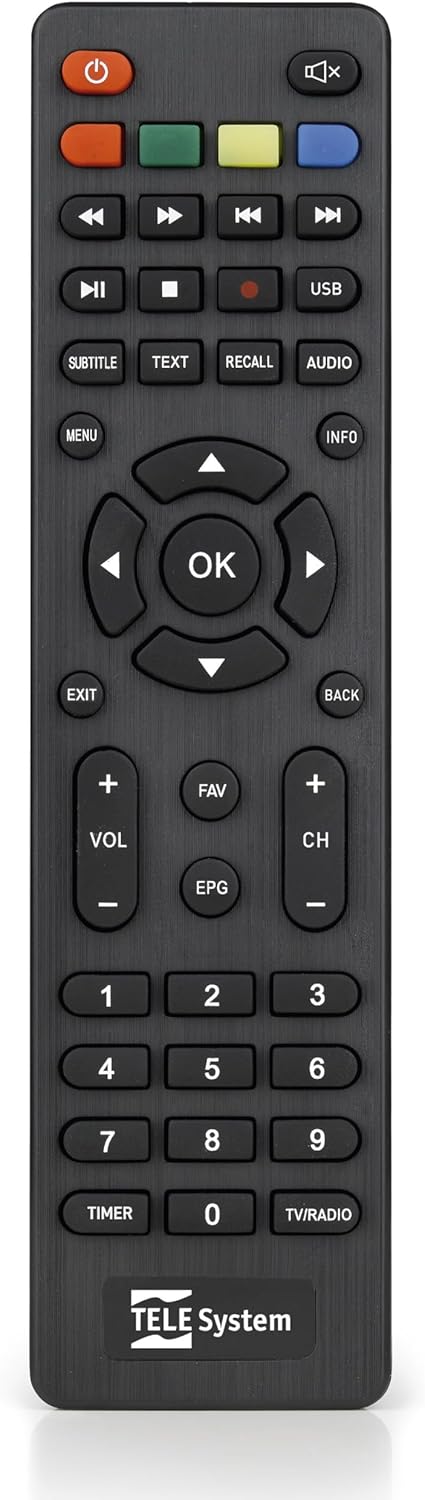
This image presents the remote control for the TS6105 decoder, featuring power, mute, channel, volume, navigation, EPG, media playback, and numeric buttons for comprehensive control.
- Қуат түймесі (U): Turns the decoder on or off (standby).
- CH +/-: Арналарды жоғары немесе төмен өзгертеді.
- VOL +/-: Дыбыс деңгейін реттейді.
- OK: Confirms selections in menus or displays channel information.
- МЕНЮ: Accesses the main menu for settings and features.
- EXIT/BACK: Ағымдағы мәзірден шығады немесе алдыңғы экранға оралады.
- EPG: Электрондық бағдарлама нұсқаулығын ашады.
- МӘТІН: Телемәтінді іске қосады.
- Субтитр: Toggles subtitles on/off or selects subtitle language.
- USB: Accesses the multimedia player.
- Түсті түймелер (қызыл, жасыл, сары, көк): Functionality varies depending on the current menu or EPG.
Электрондық бағдарлама нұсқаулығы (EPG)
түймесін басыңыз EPG түймесін басыңыз view the Electronic Program Guide. The EPG provides information about current and upcoming programs for all channels. You can navigate through channels and time slots to see program details.
Multimedia Player (USB)
The TS6105 can play multimedia fileUSB сақтау құрылғысынан.
- Insert a USB drive into the USB port on the decoder.
- түймесін басыңыз USB button on the remote control or navigate to the multimedia section via the МӘЗІР.
- Select the type of media you wish to play (Music, Photo, Video).
- Сіздің files және түймесін басыңыз OK ойнау.
Pause TV / Timeshift
The Pause TV / Timeshift function allows you to pause live television and resume viewing later. This feature requires a USB storage device connected to the decoder.
- While watching a program, press the ТОҚТАТУ button (usually represented by two vertical bars) on the remote control.
- Ойнатуды жалғастыру үшін түймесін басыңыз ОЙНАУ button (usually represented by a right-pointing triangle).
- You can also fast-forward or rewind using the respective buttons.
Техникалық қызмет көрсету
Тазалау
To clean the decoder, ensure it is unplugged from the power outlet.
- Сыртқы беттерді сүрту үшін жұмсақ, құрғақ шүберекті пайдаланыңыз.
- Do not use liquid cleaners, aerosols, or abrasive materials, as these can damage the device.
- Желдету саңылауларын шаң мен кедергілерден таза ұстаңыз.
Бағдарламалық құрал жаңартулары
Мерзімді түрде өндірушіні тексеріңіз website for available software updates. Updates can improve performance, add new features, or resolve issues. Follow the instructions provided with the update file мұқият.
Ақаулықтарды жою
If you encounter problems with your decoder, refer to the following common issues and solutions:
- Сурет/дыбыс жоқ:
- Ensure all cables (antenna, HDMI/SCART, power) are securely connected.
- Verify that your TV is set to the correct input source (e.g., HDMI 1, AV).
- Check if the decoder is powered on and not in standby mode.
- No Channels Found:
- Perform an AUTOSCAN again from the menu.
- Check your antenna connection and ensure the antenna is properly positioned and functional.
- Verify that your region has DVB-T2 HEVC broadcasts.
- Қашықтан басқару пульті жауап бермейді:
- Қашықтан басқару пультіндегі батареяларды ауыстырыңыз.
- Ensure there are no obstructions between the remote control and the decoder's IR sensor.
- Picture Freezing or Pixelation:
- This often indicates a weak or unstable signal. Check your antenna connection and position.
- Try rescanning channels.
Техникалық сипаттамалар
- Үлгі: TS6105
- Бренд: TELE жүйесі
- Түсі: Қара
- Тюнер түрі: DVB-T2 HEVC 10-bit
- Бейне ажыратымдылығы: Up to 1080p@60Hz (Full HD)
- Қосылу мүмкіндігі: HDMI, USB, SCART, Coaxial (ANT IN/OUT)
- Ерекше өзгешеліктері: AUTOSCAN, LCN, EPG, Pause TV/Timeshift, Multimedia Player (USB), Teletext, Subtitle Support
- Модель нөмірі: 21005353
Кепілдік және қолдау
Кепілдік туралы ақпарат
This product comes with a manufacturer's warranty of 2 years. Please retain your proof of purchase for warranty claims. The warranty covers defects in materials and workmanship under normal use. It does not cover damage caused by misuse, accidents, unauthorized modifications, or improper installation.
Тұтынушыларды қолдау
For technical assistance, troubleshooting beyond this manual, or warranty inquiries, please contact TELE System customer support. Refer to the official TELE System webең соңғы байланыс ақпаратын алу үшін сайт немесе өнім қаптамасы.