Кіріспе
Welcome to the world of music with The ONE Digital Piano. This instrument combines the authentic feel of a traditional piano with cutting-edge smart technology to make learning and playing an enjoyable experience. With its unique lighted-up teaching keys and comprehensive app integration, you can embark on your musical journey at your own pace.

The ONE Digital Piano in white, showcasing its elegant design and full 88-key layout.
Негізгі мүмкіндіктер
-
88 Балға әрекет пернелері
The PLAY electronic keyboard features 88 hammer progressive weighted keys, designed to precisely match finger strength changes, restoring the authentic feel of a traditional piano. Keys are heavier in the low end and lighter in the high end, providing a pleasant and authentic playing experience.

Егжей-тегжейлі view of the 88 hammer action keys, highlighting the realistic feel.
-
Intelligent Light-up Keys & Beginner Friendly
Equipped with advanced teaching light technology, the keys can be synchronized with music scores on the exclusive app to light up, guiding beginners to quickly master playing skills. This feature transforms the piano into a personal teacher.

A user interacting with the intelligent light-up keys and the accompanying app.
-
Керемет дыбыс сапасы
Built-in 4 Hi-Fi speakers (two 20W-tweeters and two 25W-woofers), grand piano sound sampling, and 16-bit stereo sampling techniques ensure that the PLAY electric piano restores the real piano tone with exceptional clarity and richness.

Visual representation of the piano's sound system and quality.
-
Leading Intelligent Digital Piano & Extensive Music Library
The ONE PLAY is an easy-to-operate smart piano controlled by the exclusive 'The ONE Smart Piano' app. This app allows for switching tones, adjusting volume, metronome, recording, USB-MIDI editing, AUX in/out, dual headphone jacks, and dual keyboard mode. The piano also boasts 426 tones, 64 polyphony, and access to 4,000 music scores, 100 videos, and games for all skill levels.

The intuitive interface of The ONE Smart Piano app, offering various learning modes.
Орнату нұсқаулығы
Your ONE Digital Piano comes with essential components for assembly and immediate use. Please ensure all parts are present before beginning assembly.
Қорапта не бар:
- Home digital piano x1
- Құралдар жинағы x1
- Қуат сымы x1
- Кабель x1
- Пайдаланушы нұсқаулығы x1
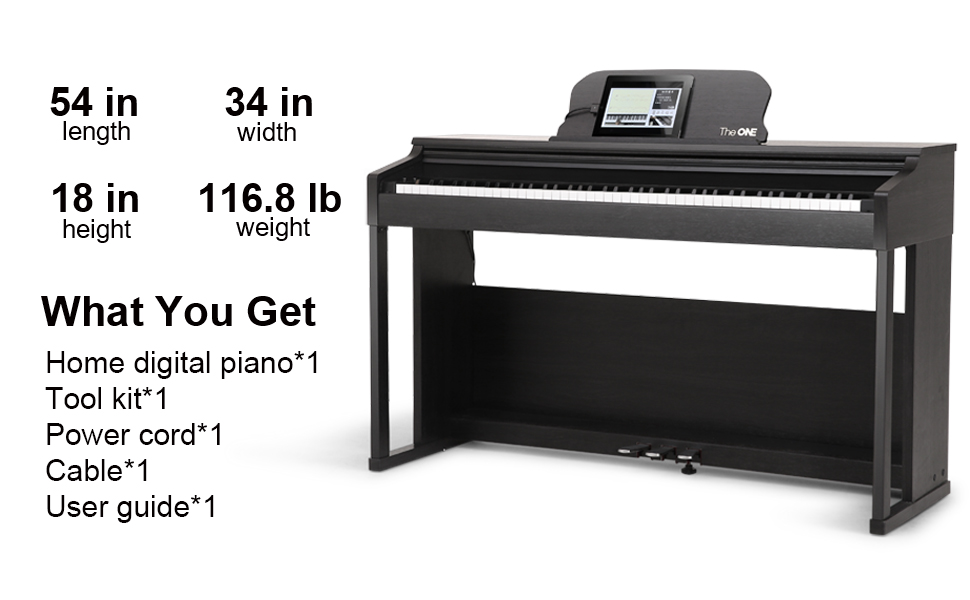
Contents of the product packaging, including the piano, accessories, and manual.
Ассамблея:
Assembly typically involves attaching the main piano unit to the stand and connecting the pedal unit. A detailed tool kit and user guide are provided for step-by-step instructions. It is recommended to have two people for lifting the main piano unit due to its weight (approximately 116.8 pounds).
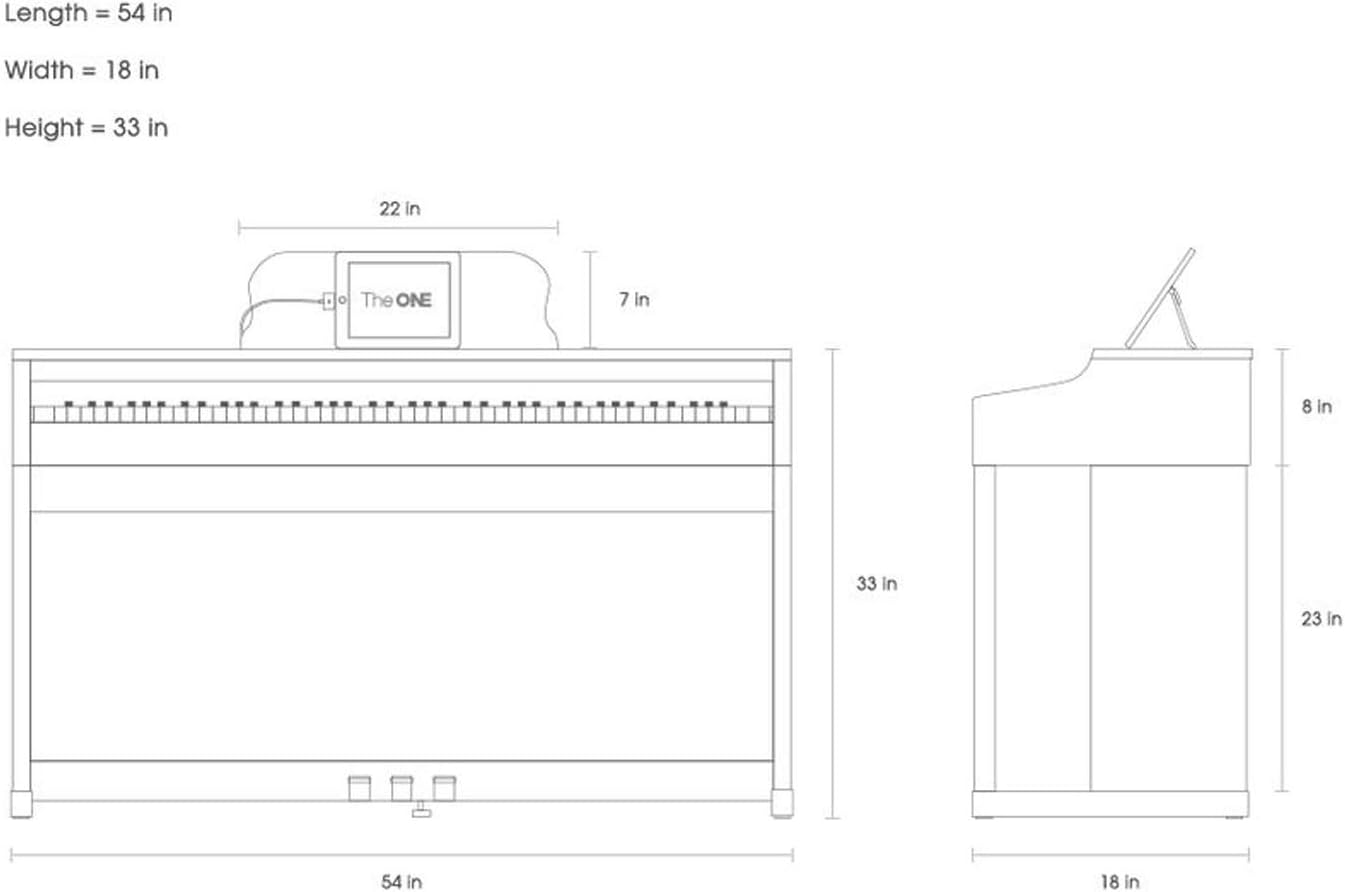
Dimensions of the piano: 54.3 inches (Length) x 18.1 inches (Width) x 33.1 inches (Height).
Пайдалану нұсқаулары
The ONE Digital Piano is designed for intuitive operation, primarily through its dedicated mobile application. Follow these steps to get started:
1. Қуат қосулы:
Locate the power button on the side of the keyboard and press it to turn on the piano. A red indicator light will confirm it is powered on.
2. Connect to App:
Download 'The ONE Smart Piano' app from your device's app store (iOS and Android compatible). Connect your phone or tablet to the piano via Bluetooth or the provided cable. The app will guide you through the connection process.

A young user engaging with the piano and its smart app for an interactive learning experience.
3. Using the App Features:
- Light-up Keys: Select a song or lesson in the app, and the keys on the piano will light up, indicating which notes to play.
- Tones & Volume: Adjust the piano's tone and master volume directly through the app for a customized sound experience.
- Метроном және темп: Utilize the built-in metronome and adjust the tempo to practice at your desired speed.
- Жазу: Record your performances directly through the app to track your progress and share with others.
- Dual Headphone Jacks: Connect two sets of headphones for silent practice or duet lessons.
- USB-MIDI & AUX: Use the USB-MIDI port for music editing software or connect external audio devices via AUX in/out.
Нұсқаулық бейнелер:
Explore the capabilities of The ONE Digital Piano through these official instructional videos:
Бұл бейне жалпы мәлімет бередіview of The ONE Smart Piano, demonstrating its features and user experience.
This video highlights the 88-key hammer action feature of The ONE Home Digital Piano, showcasing its realistic touch and feel.
Техникалық қызмет көрсету
Proper care will ensure the longevity and optimal performance of your ONE Digital Piano.
- Тазалау: Use a soft, dry cloth to wipe down the piano's surface. For keys, a slightly damp матаны қолдануға болады, бірақ шамадан тыс ылғалдан аулақ болыңыз.
- Орналастыру: Place the piano on a stable, level surface away from direct sunlight, extreme temperatures, and high humidity to prevent damage.
- Негізгі күтім: Avoid placing heavy objects on the keys or applying excessive force, which could damage the hammer action mechanism.
- Педальдар: Ensure the pedals are free from obstructions and operate smoothly.
Ақаулықтарды жою
If you encounter any issues with your ONE Digital Piano, please refer to the following common solutions:
- Дыбыс жоқ: Check that the piano is powered on, the master volume is turned up, and any connected headphones are properly plugged in. Ensure the app's volume is also adjusted.
- Қолданбаның қосылу мәселелері: Verify Bluetooth is enabled on your device and the piano. Try restarting both the app and the piano. Ensure your app is updated to the latest version.
- Keys Not Lighting Up: Confirm the piano is connected to the app and you have selected a song or lesson that utilizes the light-up key feature.
- Unresponsive Keys/Pedals: Power cycle the piano. If the issue persists, contact customer support.
Техникалық сипаттамалар
| Атрибут | Мәлімет |
|---|---|
| Модель атауы | ОЙНАУ |
| Кілттер саны | 88 |
| Кілт түрі | Hammer Action, Weighted Keys, Lighted Keys, Touch-Sensitive Keys |
| Өнім өлшемдері | 18.1"D x 54.3"W x 33.1"H |
| Элемент салмағы | 116.8 фунт |
| Түс | Ақ |
| Қосылу технологиясы | Блютез |
| Қосқыш түрі | 3.5 мм ұяшық |
| Құлаққап ұясы | 3.5 мм ұяшық |
| Қолдау көрсетілетін бағдарламалық құрал | The ONE Smart Piano app |
| Өндіруші | The ONE Music Group |
| UPC | 854558006003, 850023927101 |
| Бірінші қолжетімді күн | 29 жылдың 2015 қаңтары |
Кепілдік және қолдау
The ONE Music Group is committed to providing excellent after-sales service. For any concerns regarding your product or the app, please reach out to our dedicated support team.
For detailed information, you can also refer to the official User Manual (PDF) available online:


