
1. Кіріспе
This manual provides essential instructions for the safe and efficient use of your DCHK Haribo HBT-03 Wireless Earbuds. Please read this manual thoroughly before using the product and retain it for future reference.
Пакет мазмұны:
- Haribo HBT-03 Wireless Earbuds (Left and Right)
- Charging Case with LCD Touchscreen
- USB-C-ден USB-A-ға дейін зарядтайтын кабель
- Three (3) Pairs of Eartips (Small, Medium, Large)
- Пайдаланушы нұсқаулығы (осы құжат)

Image 1.1: Haribo HBT-03 Wireless Earbuds and Charging Case. The image displays the white earbuds seated in their open charging case, which features an LCD screen displaying 'HARIBO' and 'Swipe to Unlock'. A red gummy bear charm is attached to the case.
2. Өнім аяқталдыview
The DCHK Haribo HBT-03 Wireless Earbuds are designed for a high-quality audio experience with convenient features.
Негізгі ерекшеліктері:
- Bluetooth 5.4: Тұрақты және тиімді сымсыз байланыс қамтамасыз етеді.
- LCD Touchscreen Case: Offers intuitive control over various functions directly from the charging case.
- Белсенді шуды болдырмау (ANC): Тыңдау тәжірибесі үшін қоршаған шуды азайтады.
- Мөлдірлік режимі: Аудио тыңдау кезінде айналаңызды естуге мүмкіндік береді.
- 13 мм динамикалық драйверлер: Delivers powerful bass and clear audio.
- IPX4 суға төзімділігі: Шашыраудан және терден қорғайды.
- Кеңейтілген ойнату: Зарядтау қапшығымен жалпы ойнату уақыты 12 сағатқа дейін.

Image 2.1: Key features of the Haribo HBT-03 Earbuds. Icons illustrate wireless earbuds, pocket size, LCD display, Bluetooth 5.4, 12-hour play time, and 13mm driver.
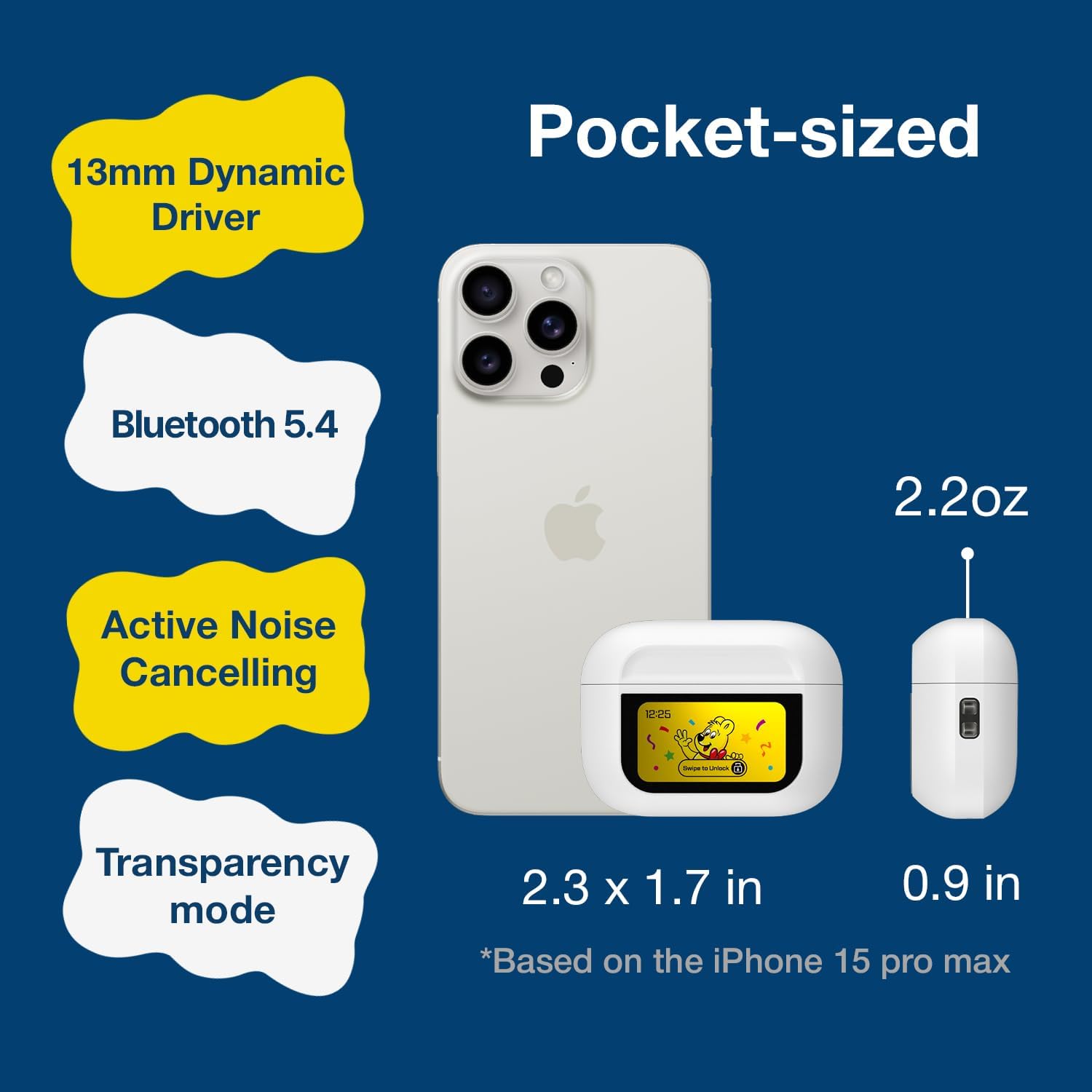
Image 2.2: The compact size of the Haribo HBT-03 Earbuds and case, shown next to a smartphone for scale. The case dimensions are approximately 2.3 x 1.7 inches, and the earbuds weigh 2.2 ounces.
3. Орнату
3.1 Құлақаспаптар мен қорапты зарядтау
- Құлақаспаптарды зарядтау корпусына салыңыз. Олардың дұрыс орнатылғанына көз жеткізіңіз.
- Connect the USB-C end of the charging cable to the port on the charging case.
- Connect the USB-A end of the charging cable to a compatible USB power source (e.g., wall adapter, computer USB port).
- The LCD screen on the case will display the charging status and battery levels.
A full charge for the case takes approximately 1.5 hours. The earbuds charge while inside the case.

Image 3.1: Charging information for the Haribo HBT-03 Earbuds. The image indicates a 1.5-hour charging time, 5 hours of single play time, and up to 12 hours of total play time with the charging case.
3.2 Құрылғымен жұптастыру
- Құлаққаптардың зарядталғанына және зарядтау қорабының ішіне салынғанына көз жеткізіңіз.
- Зарядтау қорапшасының қақпағын ашыңыз. Құлақаспаптар жұптау режиміне автоматты түрде кіреді.
- Құрылғыда (смартфон, планшет, ноутбук) Bluetooth қосыңыз.
- Іздеу available Bluetooth devices and select "HBT-03" from the list.
- Once connected, the earbuds will indicate successful pairing, and the device will show them as connected.
The Bluetooth 5.4 technology provides an improved transmission range of up to 32 feet (10 meters).

Image 3.2: Bluetooth 5.4 connectivity features of the Haribo HBT-03 Earbuds, highlighting a 32ft improved transmission range, high-quality audio, optimized energy consumption, and extraordinary connection stability.
3.3 Құлақаспаптарды орнату
- Select the eartips that provide the most comfortable and secure fit for your ears. A proper seal is crucial for optimal sound quality and noise cancellation.
- Gently insert each earbud into your ear canal and twist slightly to ensure a snug fit.

Image 3.3: Available eartip sizes (Small: 0.45in, Medium: 0.47in, Large: 0.51in) for the Haribo HBT-03 Earbuds, designed for a perfectly fitting and secure experience.
4. Операция
4.1 Құлаққапты сенсорлық басқару элементтері
The earbuds feature touch-sensitive areas for controlling various functions:
- Ойнату/кідірту: Кез келген құлаққапты бір рет түртіңіз.
- Келесі трек: Оң жақ құлаққапты үш рет түртіңіз.
- Алдыңғы трек: Сол жақ құлаққапты үш рет түртіңіз.
- Дыбыс деңгейі: Swipe up on either earbud.
- Дыбыстың төмендеуі: Swipe down on either earbud.
- Қоңырауға жауап беру/аяқтау: Кез келген құлаққапты бір рет түртіңіз.
- Қоңырауды қабылдамау: Кез келген құлаққапты ұзақ басыңыз.
- Activate Voice Assistant (Siri, Bixby, Google Assistant): Сол жақ құлаққапты ұзақ басып тұрыңыз.
- Toggle ANC/Transparency/Normal Mode: Оң жақ құлаққапты ұзақ басып тұрыңыз.
- Ойын режимі/Музыка режимі: Кез келген құлаққапты төрт рет түртіңіз.
4.2 LCD Touchscreen Case Functions
The charging case features a full-color LCD touchscreen for advanced controls and settings. Swipe to unlock the screen and navigate through the options.

4.1-сурет: аяқталдыview of the various functions available on the Haribo HBT-03 Earbuds' LCD touchscreen case. These include Battery Level Display, Change Song, Volume Control, Screen Brightness Adjustment, Equalizing (EQ modes), Like Button (for TikTok), Find My Earbuds, Remote Photo Capture, Set Current Time, Noise Reduction (ANC/Transparency), Flashlight, Screen Lock, Language Switch, Settings Menu (Power Off, Factory Reset), and Set Alarm.
Available functions on the LCD screen include:
- Батарея деңгейінің дисплейі: Shows battery status of both earbuds and the case.
- Музыканы ойнатуды басқару элементтері: Тректерді ойнату, кідірту, өткізіп жіберу.
- Дыбыс деңгейін реттеу: Control audio output level.
- Қоңырауларды өңдеу: Answer, end, or reject calls.
- Noise Cancelling & Transparency: ANC, Transparency және Normal режимдері арасында ауысыңыз.
- EQ режимдері: Select from 5 adjustable EQ modes (Standard, Classic, Jazz, Rock, Popular).
- Камераны басқару: Remotely trigger your smartphone camera.
- Тілді ауыстыру: Дисплей тілін өзгертіңіз.
- Wallpaper Customization: Personalize the screen background.
- Экранның жарықтығын реттеу: Modify display intensity.
- Құлақаспаптарды табу: Helps locate misplaced earbuds.
- Шам: Activates a small light on the case.
- Таймер: Кері санақ таймерін орнатыңыз.
- Параметрлер мәзірі: Access options like Power Off and Factory Reset.
4.3 Қуатты қосу/өшіру
- Қуат қосулы: Зарядтау қорабының қақпағын ашыңыз, сонда құлаққаптар автоматты түрде қосылады.
- Қуат көзін өшіру: Place the earbuds back into the charging case and close the lid. They will automatically power off and begin charging. You can also power off via the LCD screen settings.
5. Техникалық қызмет көрсету
5.1 Тазалау
- Құлақаспаптар мен зарядтау қорабын жұмсақ, құрғақ, түксіз шүберекпен жүйелі түрде тазалаңыз.
- Құлақ ұшын алыңыз және қажет болса, жұмсақ сабынмен және сумен тазалаңыз. Қайта жалғамас бұрын олардың толық құрғақ екеніне көз жеткізіңіз.
- Use a cotton swab to gently clean the charging contacts on both the earbuds and inside the case.
- Абразивті материалдарды, спиртті немесе химиялық тазартқыштарды пайдаланбаңыз.
5.2 Сақтау
- Қолданбаған кезде, құлаққаптарды қорғау және зарядталған күйде ұстау үшін оларды зарядтау қорабында сақтаңыз.
- Өнімді салқын, құрғақ жерде, төтенше температурадан және тікелей күн сәулесінен алыс жерде сақтаңыз.
5.3 Суға төзімділік (IPX4)
The earbuds are rated IPX4, meaning they are resistant to splashing water from any direction. This makes them suitable for workouts and light rain. They are емес designed for submersion in water or exposure to pressurized water jets.
6. Ақаулықтарды жою
Құлақаспапқа қатысты мәселелерге тап болсаңыз, келесі жалпы мәселелер мен шешімдерді қараңыз:
| Мәселе | Мүмкін шешім |
|---|---|
| Құлақаспаптар құрылғымен жұптаспайды |
|
| Бір немесе екі құлаққаптан дыбыс шықпайды |
|
| Зарядтау қорабы зарядталмайды |
|
| Сенсорлық басқару элементтері жауап бермейді |
|
| LCD экран жауап бермейді |
|
7. Техникалық сипаттамалар
| Ерекшелік | Мәлімет |
|---|---|
| Модель атауы | HBT-03 |
| Bluetooth нұсқасы | 5.4 |
| Bluetooth диапазоны | 32.8 футқа дейін (10 метр) |
| Аудио драйвер өлшемі | 13 мм динамикалық драйвер |
| Жиілік реакциясы | 20 Гц - 20 КГц |
| Кедергі | 32 Ом |
| Шуды бақылау | Шуды белсенді жою (ANC) |
| Суға төзімділік | IPX4 |
| Құлаққап батареясының қызмет ету мерзімі | Approx. 4.5 - 8 hours (depending on usage) |
| Жалпы ойнату уақыты (қораппен) | 12 сағатқа дейін |
| Зарядтау корпусының батарея сыйымдылығы | 300 мАч |
| Зарядтау уақыты (қорап) | Шамамен 1.5 сағат |
| Зарядтау порты | USB-C |
| Басқару түрі | Touch Control (Earbuds), Touch Screen (Case) |
| Материал | ABS пластик |
| Элемент салмағы | 2.2 унция (барлығы) |
| Іс өлшемдері | 2.4 x 0.95 x 1.8 дюйм (шамамен) |
8. Қауіпсіздік туралы ақпарат
- Өнімді бөлшектемеңіз немесе өзгертпеңіз.
- Avoid exposing the product to extreme temperatures, direct sunlight, or open flames.
- Keep the product away from water and liquids, except for the IPX4-rated resistance to splashes.
- Есту қабілетінің зақымдалуын болдырмау үшін құлаққаптарды ұзақ уақыт бойы тым жоғары дыбыс деңгейінде пайдаланбаңыз.
- Балалар мен үй жануарларының қолы жетпейтін жерде сақтаңыз.
- Батареялар мен электрондық компоненттерді жергілікті ережелерге сәйкес жауапкершілікпен тастаңыз.
9. Кепілдік және қолдау
DCHK provides a limited warranty for this product. For specific warranty terms and conditions, please refer to the warranty card included in your package or contact DCHK customer support.
Тұтынушыларды қолдау:
If you have any questions, require technical assistance, or need to report an issue, please contact our customer support team through the retailer's platform or the official DCHK webсайт.


