
1. Кіріспе
Сатып алғаныңыз үшін рахметasing the Audizio Laredo Bluetooth Turntable. This manual provides essential information for the safe and correct operation of your device. Please read it thoroughly before use and keep it for future reference.
Негізгі ерекшеліктері:
- Integrated HiFi speakers with 160W total power output.
- Bidirectional Bluetooth for wireless audio streaming (in and out).
- High-quality Audio Technica cartridge for precise playback.
- Supports 7, 10, and 12-inch vinyl records at 33 and 45 RPM.
- Adjustable counterweight on the aluminum tonearm.
- RCA Line Out for external ampкөтергіш/динамиктер.
- AUX Input for connecting external audio sources.
- Elegant bamboo finish.
Қорапта не бар:
- Audizio Laredo Turntable Unit
- Нұсқаулық
- Қуат адаптері
- 45 RPM Adapter for singles
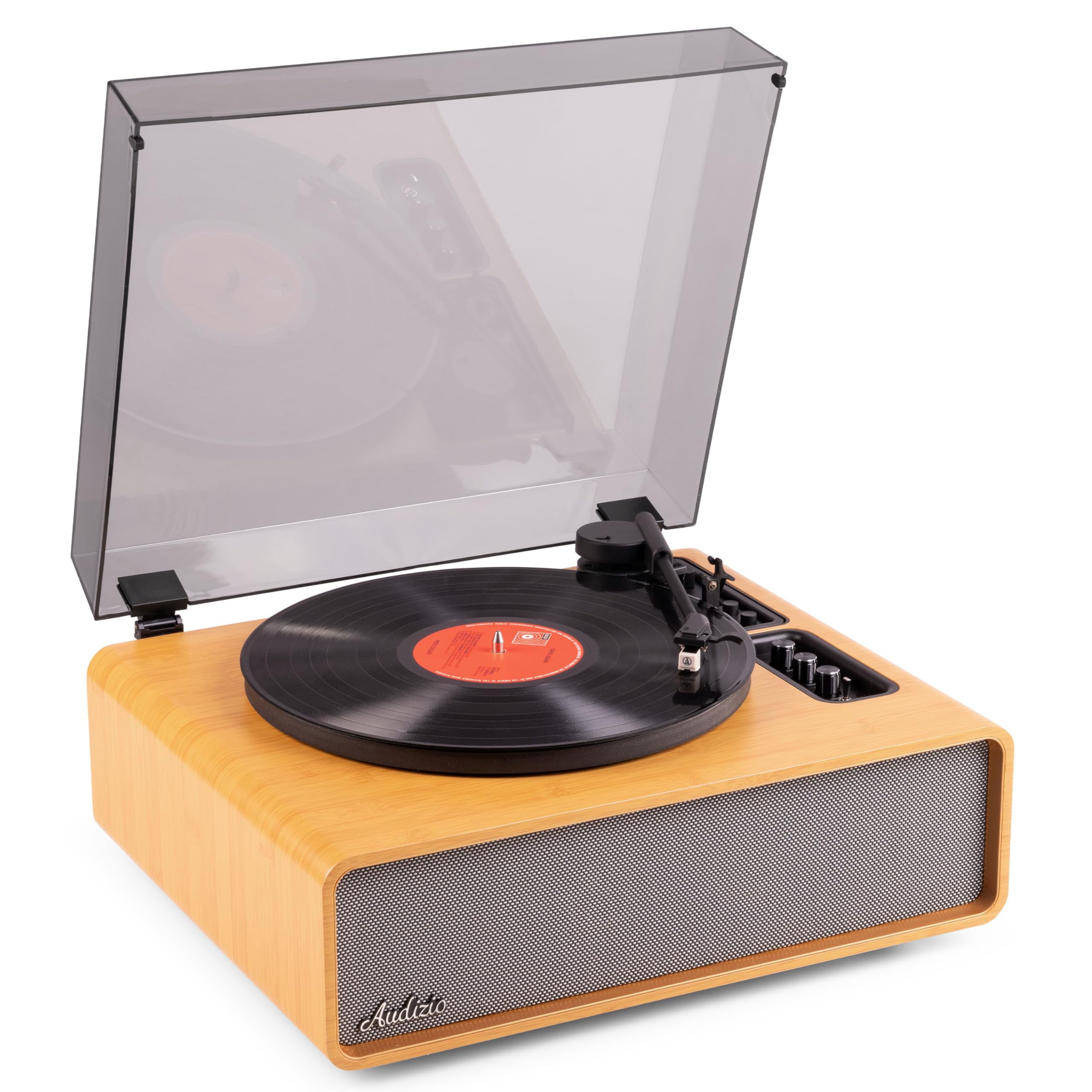
Figure 1.1: Audizio Laredo Turntable, overall view.
2. Қауіпсіздік нұсқаулары
Please read and follow these safety instructions carefully to prevent damage to the unit and ensure your safety.
- Өрт немесе электр тогының соғуын болдырмау үшін құрылғыны жаңбырға немесе ылғалға ұшыратпаңыз.
- c ашпаңызasing. Ішінде пайдаланушы жөндеуге болатын бөліктер жоқ. Барлық қызмет көрсетуді білікті мамандарға тапсырыңыз.
- Құрылғы құлап кетпес үшін оны тұрақты, тегіс жерге қойыңыз.
- Құрылғыны тікелей күн сәулесінен, жылу көздерінен және шамадан тыс шаңнан алыс ұстаңыз.
- Құрылғының айналасында дұрыс желдетуді қамтамасыз етіңіз. Желдету саңылауларын жаппаңыз.
- Тек берілген қуат адаптерін пайдаланыңыз.
- Найзағай кезінде немесе ұзақ уақыт пайдаланбаған кезде құрылғыны электр желісінен ажыратыңыз.
3. Өнім аяқталдыview
Familiarize yourself with the components and controls of your Audizio Laredo turntable.
Негізгі компоненттер:
- Табақ: Винил жазбасын қолдайды.
- Тонерм: Картридж мен қаламды ұстайды.
- Картридж және қалам: Reads the grooves of the record. (Audio Technica ATN-3600)
- Шаңды жабу: Табақты және қолды шаңнан қорғайды.
- Біріктірілген спикерлер: For direct audio playback.
- Басқару тақтасы: For power, volume, tone, and mode selection.
- Артқы қосылымдар: RCA Line Out, AUX In, Power Input.

3.1-сурет: Жоғарғы view of the turntable with key components visible.

Figure 3.2: Control Panel for volume, bass, and treble adjustments.

Figure 3.3: Audio Technica ATN-3600 Cartridge and Stylus.

Figure 3.4: Tonearm base with speed and auto-stop controls.

Figure 3.5: Rear connection panel.
4. Орнату
4.1 Қаптаманы ашу
- Carefully remove the turntable from its packaging.
- Remove all protective materials, including the stylus guard.
- Қаптаманы болашақта тасымалдау немесе сақтау үшін сақтаңыз.
4.2 Орналастыру
- Place the turntable on a stable, level surface to prevent vibrations and ensure proper playback.
- Avoid placing the unit near strong magnetic fields, heat sources, or areas with high humidity.
4.3 Шаң қақпағын орнату
- Align the hinges of the dust cover with the slots on the back of the turntable.
- Gently push down until the cover is securely in place.
- The dust cover can be removed for playback if desired.

Figure 4.1: Turntable with dust cover.
4.4 Қуат қосылымы
- Connect the power adapter to the DC IN port on the rear of the turntable.
- Plug the adapter into a suitable wall outlet (220V).
4.5 Tonearm and Cartridge Setup
- The Audio Technica cartridge is pre-installed.
- The tonearm features an adjustable counterweight. Refer to the detailed instructions in the included manual for precise counterweight adjustment to optimize tracking force.
5. Пайдалану нұсқаулары
5.1 Жазбаны ойнату
- Place a vinyl record on the platter. If playing a 7-inch single, use the included 45 RPM adapter.
- Select the appropriate speed (33 or 45 RPM) using the speed selector switch near the tonearm base.
- Кю рычагын пайдаланып, тонер қолын ақырын көтеріңіз.
- Тонер тұтқасын жазбаның қажетті жолына орналастырыңыз.
- Дыбыс тұтқасын пайдаланып, дыбыс тұтқасын баяу түсіріңіз. Стилус жазбаға тиіп, ойнату басталады.
- At the end of the record, the auto-stop function will automatically stop the platter rotation. Lift the tonearm and return it to its rest.

Figure 5.1: Playing a vinyl record.
5.2 Bluetooth Operation (Bidirectional)
The Laredo turntable supports both Bluetooth input (receiving audio from a device) and Bluetooth output (sending audio to a Bluetooth speaker/headphones).
Bluetooth Input (BT IN):
- Press the MODE/POWER button to select Bluetooth mode. The LED indicator will flash.
- On your smartphone or tablet, enable Bluetooth and search for 'Audizio Laredo'.
- Select the turntable to pair. Once connected, the LED will glow solid.
- You can now stream audio from your device to the turntable's integrated speakers.
Bluetooth Output (BT OUT):
- Bluetooth құлақаспаптары немесе динамиктері жұптастыру режимінде екеніне көз жеткізіңіз.
- Set the BT OUT switch (located near the tonearm base) to 'ON'.
- The turntable will automatically search for and connect to the nearest Bluetooth audio device.
- Once connected, the audio from your vinyl record will be transmitted to your Bluetooth device.

Figure 5.2: Bidirectional Bluetooth functionality.
5.3 AUX кірісі
- Connect an external audio device (e.g., MP3 player, CD player) to the AUX IN port on the rear of the turntable using a 3.5mm audio cable.
- Press the MODE/POWER button to select AUX mode.
- Audio from the external device will play through the turntable's speakers.
5.4 RCA желісінің шығысы
- To connect the turntable to an external amplifier or powered speakers, use an RCA cable (not included) to connect the LINE OUT ports on the rear of the turntable to the corresponding input on your audio system.
- Ensure the 'Speaker ON/OFF' switch on the rear is set to 'OFF' if you only want sound from external speakers.
5.5 Дыбыс деңгейін және дыбысты басқару
- Use the VOLUME knob on the control panel to adjust the overall playback volume.
- Adjust the BASS and TREBLE knobs to fine-tune the audio output to your preference.
6. Техникалық қызмет көрсету
6.1 Құрылғыны тазалау
- Шаң жинағыш қақпақ пен корпусты жұмсақ, құрғақ шүберекпен сүртіңіз.
- Абразивті тазартқыштарды, балауызды немесе еріткіштерді пайдаланбаңыз.
- For the platter, use a slightly damp шүберекпен сүртіңіз және мұқият құрғатыңыз.
6.2 Stylus Care and Replacement
- The stylus is a delicate component. Handle it with care.
- Clean the stylus regularly using a soft brush designed for stylus cleaning, brushing from back to front.
- A stylus typically lasts for approximately 300-500 hours of playback. If you notice a decrease in sound quality or increased skipping, it may be time to replace the stylus.
- Replacement styli (e.g., Audio Technica ATN-3600L or compatible) can be purchased from authorized dealers. Refer to the detailed instructions provided with the replacement stylus for installation.
7. Ақаулықтарды жою
If you encounter issues with your turntable, please consult the following table before contacting support.
| Мәселе | Ықтимал себебі | Шешім |
|---|---|---|
| Қуат жоқ | Қуат адаптері қосылмаған; розеткасы жұмыс істемейді. | Ensure power adapter is securely connected to the unit and a working outlet. |
| Динамиктерден дыбыс жоқ | Volume too low; Speaker ON/OFF switch is OFF; Incorrect mode selected. | Increase volume; Set 'Speaker ON/OFF' switch to ON; Select correct input mode (Phono, BT IN, AUX). |
| Жазбаларды өткізіп жіберу | Record is dirty or damaged; Stylus is worn or dirty; Turntable not level; Tracking force incorrect. | Clean record; Clean or replace stylus; Place turntable on a level surface; Adjust tonearm counterweight. |
| Bluetooth жұптастыру мәселелері | Device too far; Turntable not in pairing mode; Interference. | Ensure devices are within range; Re-enter pairing mode; Turn off other Bluetooth devices. |
| Дыбыстың бұрмалануы | Volume too high; Stylus worn; Record damaged. | Reduce volume; Replace stylus; Try a different record. |
8. Техникалық сипаттамалар
Technical specifications for the Audizio Laredo Turntable.
| Ерекшелік | Техникалық сипаттама |
|---|---|
| Модель атауы | Laredo (101.537) |
| Өлшемдері (L x W x H) | 43.2 x 43.2 x 21 см (17 x 17 x 8.3 дюйм) |
| Өнімнің салмағы | 7.65 кг (16.86 фунт) |
| Материал | Wood (Bamboo finish) |
| Айналу жылдамдықтары | 33 айн/мин, 45 айналым/мин |
| Картридж түрі | Audio Technica (ATN-3600) |
| Мотор түрі | Белдік жетек |
| Сигнал форматы | Аналогтық |
| Біріктірілген спикерлер | Yes, 160W total output |
| Bluetooth нұсқасы | 5.4 (Bidirectional) |
| Қосылу мүмкіндігі | Bluetooth (In/Out), RCA Line Out, AUX In |
| Қуат көзі | Сымды электр |
| Тtage | 220 вольт |
| Үйлесімді құрылғылар | Speakers, Headphones, Smartphone, Tablet |
9. Кепілдік және қолдау
9.1 Кепілдік туралы ақпарат
This Audizio Laredo Turntable comes with a 2 жылдық кепілдік from the date of purchase. This warranty covers manufacturing defects and faults under normal use. It does not cover damage caused by misuse, accidents, unauthorized modifications, or normal wear and tear (e.g., stylus wear).
Кепілдік шағымдары үшін сатып алуды растайтын құжатты сақтаңыз.
9.2 Тұтынушыларды қолдау қызметі
If you have any questions, require technical assistance, or need to make a warranty claim, please contact your retailer or visit the official Audizio webқолдау ресурстары мен байланыс ақпаратына арналған сайт.
Official Audizio Webсайт: www.audizio.com