
1. Маңызды қауіпсіздік нұсқаулары
Осы құрылғыны қолданар алдында барлық нұсқауларды мұқият оқып шығыңыз және оларды болашақта анықтама үшін сақтап қойыңыз. Осы нұсқауларды орындамау электр тогының соғуына, өртке немесе ауыр жарақатқа әкелуі мүмкін.
- Аударылып кетпес үшін желдеткішті әрқашан тұрақты, тегіс бетке қойыңыз.
- Желдеткішті зақымдалған сымы немесе ашасымен іске қоспаңыз. Егер қоректендіру сымы зақымдалған болса, қауіпті болдырмау үшін оны өндіруші, оның қызмет көрсету агенті немесе сол сияқты білікті мамандар ауыстыруы керек.
- Желдеткішті судан немесе басқа сұйықтықтардан алыс ұстаңыз. Желдеткішті суға батырмаңыз.
- Do not insert fingers or foreign objects into the fan grille during operation.
- Желдеткішті пайдаланбаған кезде, тазалау алдында немесе жылжытпас бұрын розеткадан ажыратыңыз.
- Бұл құрылғы физикалық, сенсорлық немесе ақыл-ой қабілеттері шектеулі немесе тәжірибесі мен білімі жоқ адамдардың (соның ішінде балалар) пайдалануына арналмаған, егер олардың қауіпсіздігіне жауапты адамның қадағалауынсыз немесе құрылғыны пайдалану туралы нұсқау болмаса.
- Балалардың құрылғымен ойнамауын қадағалау керек.
- Do not use the fan near curtains, plants, or other objects that could be drawn into the fan.
- томды қамтамасыз етіңізtage indicated on the fan matches the local power supply voltage қосу алдында.
2. Пакет мазмұны
Қаптаманы ашқан кезде барлық заттардың бар екенін және жақсы күйде екенін тексеріңіз.
- 1 x DREO Tower Fan (DR-HTF024S)
- 1 x Remote Control (includes 2 x AAA Batteries)
- 1 x Пайдаланушы нұсқаулығы
- A Set of Accessories (for base assembly)
3. Өнім диаграммасы
Familiarize yourself with the components of your DREO Smart Tower Fan.

Сурет: Жалпы view of the DREO Smart Tower Fan, highlighting its sleek design and powerful airflow.

Image: The fan demonstrating its adjustable height feature, extending from 40 to 45 inches.
The fan features a control panel on top, a main tower body with air outlets, and a stable circular base. The adjustable height mechanism is located at the base of the tower.
4. Орнату
Follow these steps to assemble and prepare your tower fan for use.
- Негізгі жинақ: Take the two halves of the circular base. Align them and rotate until they securely snap together to form a single unit.
- Attach Tower: Carefully place the main tower fan body onto the assembled base. Ensure it is firmly seated and locked into position. The cord can be routed through designated channels underneath the base.
- Қуат қосылымы: Қуат сымын стандартты электр розеткасына қосыңыз.

Image: Illustration of the fan's one-step height adjustment, allowing it to extend from 40 to 45 inches.
5. Пайдалану нұсқаулары
Your DREO Smart Tower Fan offers multiple ways to control its functions.
5.1 Басқару тақтасы
The intuitive control panel located on the top of the fan allows for direct operation.
- Қуат түймесі: Желдеткішті қосады/өшіреді.
- Режим түймесі: Cycles through Normal, Natural, Sleep, and Auto modes.
- Жылдамдық түймелері (+/-): Adjusts fan speed from 1 to 9.
- Тербеліс түймесі: 90° тербелісті қосады/өшіреді.
- Таймер түймесі: Автоматты түрде өшіру таймерін орнатады (12 сағатқа дейін).
5.2 Қашықтан басқару құралы
The included remote control provides convenient access to all fan functions from a distance.
- Ensure the remote control batteries (2 x AAA) are correctly installed.
- Point the remote control directly at the fan's receiver for optimal response.
5.3 DREO App Control & Smart Integration
For enhanced control and smart features, download the DREO app and connect your fan.
- Download the DREO app from your smartphone's app store.
- Follow the in-app instructions to pair your fan via Bluetooth or Wi-Fi.
- Once connected, you can control all fan functions, set schedules, and customize modes from your phone.
- The fan is compatible with Google Assistant and Amazon Alexa for voice control. Refer to the DREO app for instructions on linking your fan to these smart home platforms.

Image: A user controlling the DREO Smart Tower Fan via the DREO mobile application.

Image: Screenshot of the DREO app demonstrating customizable sleep modes and scheduling options.
5.4 Режимдер мен жылдамдықтар
The fan offers 4 distinct modes and 9 speed settings for personalized comfort.
- Қалыпты режим: Provides a constant airflow at your selected speed.
- Табиғи режим: Желдеткіш жылдамдығын өзгерту арқылы табиғи самалды имитациялайды.
- Ұйқы режимі: Operates at a lower speed with reduced noise for undisturbed rest.
- Авто режим: Adjusts fan speed automatically based on ambient room temperature.
- 9 жылдамдықтар: Fine-tune the airflow intensity from a gentle breeze (Speed 1) to powerful cooling (Speed 9).
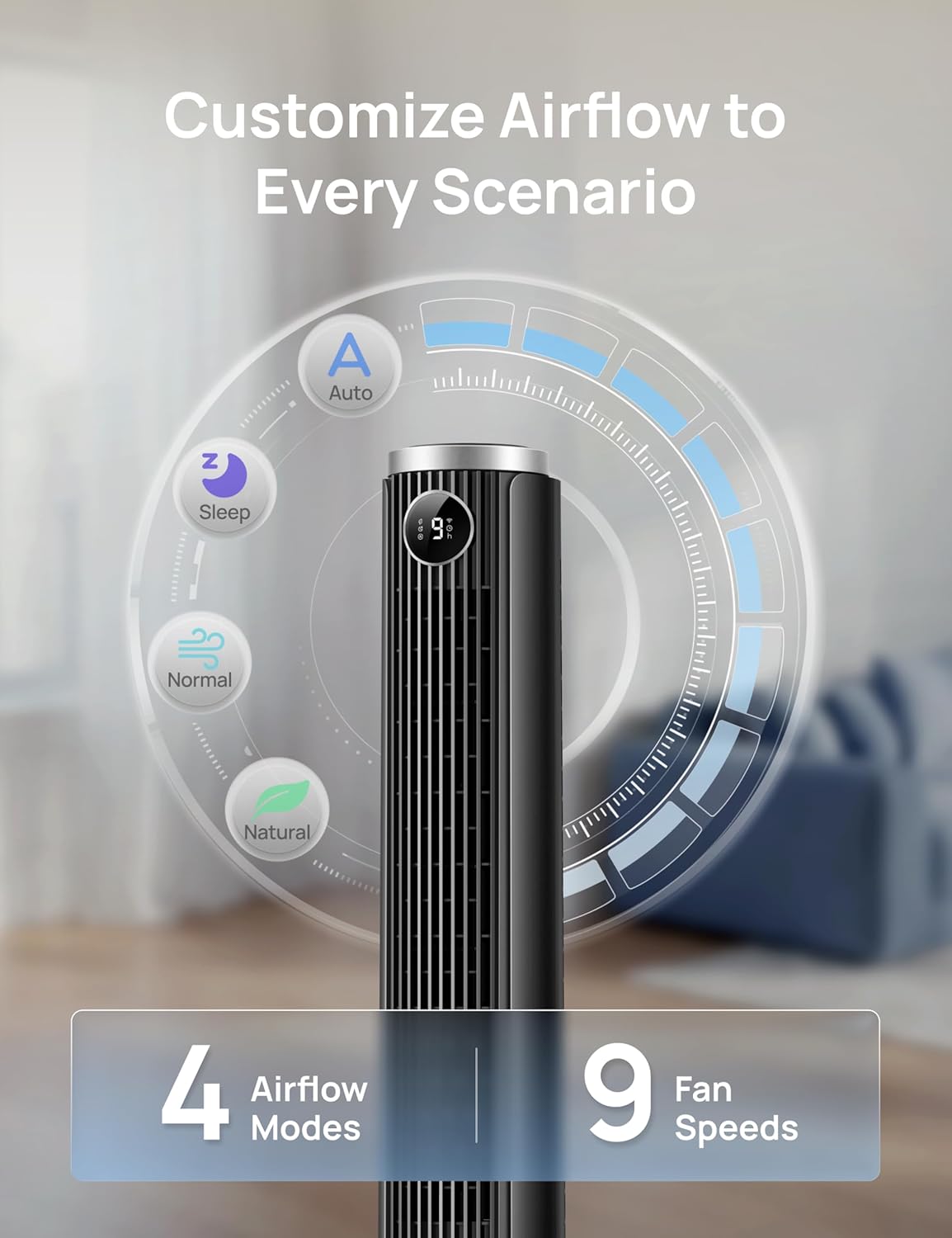
Image: Visual representation of the fan's 4 airflow modes (Auto, Sleep, Normal, Natural) and 9 speed settings.
5.5 Тербеліс
Activate oscillation for wider air distribution.
- The fan oscillates 90° to cover a larger area, ensuring even air circulation throughout the room.

Image: The DREO Smart Tower Fan demonstrating its 90-degree oscillation feature, distributing air across a wide area.
5.6 таймер
Желдеткішті көрсетілген уақыттан кейін автоматты түрде өшірілетіндей етіп орнатыңыз.
- The timer can be set for up to 12 hours, allowing you to conserve energy and enjoy cooling as you fall asleep.
5.7 Биіктігі реттелетін
Customize the fan's height to suit your needs.
- The fan's height can be adjusted from 40 inches to 45 inches by pressing the foot pedal at the base. This allows you to direct airflow effectively whether you are sitting or standing.
6. Техникалық қызмет көрсету
Тұрақты техникалық қызмет көрсету желдеткіштің оңтайлы өнімділігі мен ұзақ қызмет ету мерзімін қамтамасыз етеді.
6.1 Тазалау
- Тазалау алдында әрқашан желдеткішті розеткадан ажыратыңыз.
- Жұмсақ пайдаланыңыз, damp сыртқы беттерді сүртуге арналған шүберек. Абразивті тазартқыштарды немесе еріткіштерді қолданбаңыз.
- Ауа қабылдайтын және шығатын торлардағы шаңды ақырын кетіру үшін щетка қондырмасы бар шаңсорғышты пайдаланыңыз.
- Желдеткіштің ішкі бөлігіне су тамшылауға жол бермеңіз.
6.2 Сақтау
- Егер желдеткішті ұзақ уақыт сақтасаңыз, оны мұқият тазалаңыз.
- Store the fan in its original packaging or a suitable box in a cool, dry place.
- Avoid placing heavy objects on top of the fan during storage.
7. Ақаулықтарды жою
Жалпы мәселелердің шешімдері үшін осы бөлімді қараңыз.
| Мәселе | Ықтимал себебі | Шешім |
|---|---|---|
| Желдеткіш қосылмайды. | Қуат көзі жоқ. Қуат сымы дұрыс қосылмаған. Қашықтан басқару пультінің батареялары таусылған. | Қуат розеткасының жұмыс істеп тұрғанын тексеріңіз. Ensure the power cord is securely plugged into the outlet and the fan. Қашықтан басқару пультінің батареяларын ауыстырыңыз. |
| Әлсіз ауа ағыны. | Желдеткіш жылдамдығы тым төмен. Ауа кірістері/шығарулары бітеліп қалған. | Желдеткіш жылдамдығы параметрін арттырыңыз. Торлардан шаңды немесе кедергілерді тазалаңыз. |
| Желдеткіш шулы. | Fan is on a high speed setting. Желдеткіш тұрақты бетте емес. Ішкі кедергі. | Желдеткіш жылдамдығын азайтыңыз. Желдеткішті тегіс, тұрақты бетке қойыңыз. Unplug and check for any foreign objects inside the grilles. |
| Қашықтан басқару пульті жұмыс істемейді. | Батареялар біткен немесе дұрыс салынбаған. Пульт пен желдеткіш арасындағы кедергі. | Батареяларды ауыстырыңыз және дұрыс полярлықты тексеріңіз. Ensure a clear line of sight between the remote and the fan. |
| Қолданбаны басқару жұмыс істемейді. | Fan not connected to Wi-Fi/Bluetooth. App requires update. | Check app for connection status and re-pair if necessary. Ensure Wi-Fi is active. Update the DREO app to the latest version. |
8. Техникалық сипаттамалар
Detailed technical specifications for the DREO Smart Tower Fan (DR-HTF024S).
| Ерекшелік | Техникалық сипаттама |
|---|---|
| Бренд | DREO |
| Модель атауы | DR-HTF024S |
| Түс | Қара |
| Электр желдеткішінің дизайны | Floor Fan (Tower) |
| Қуат көзі | Сымды электр |
| Өнім өлшемдері (D x W x H) | 33D x 33W x 115H Сантиметр |
| Реттелетін биіктік | 40" - 45" |
| Арнайы мүмкіндіктер | App Operable, Oscillating, Portable, Quiet Operation, Remote Controlled |
| Ұсынылатын пайдаланулар | Ауа айналымы, салқындату, желдету |
| Контроллер түрі | App Control, Remote Control, Touchpad Control |
| Жылдамдық саны | 9 |
| Шу деңгейі | 20 децибел (ең аз) |
| Ватtage | 50 ватт |
| Ауа ағынының сыйымдылығы | Минутына 1473 текше фут |
| Тербеліс бұрышы | 90° |
| Таймер | 12 сағат |
| Материал түрі | Пластмасса |
| Элемент салмағы | 7.92 фунт |
| Сертификаттау | ETL |
9. Кепілдік және қолдау
DREO provides a warranty for this product. Please refer to the official DREO website or your purchase documentation for the most current and detailed warranty information.
- Кепілдік мерзімі: Typically, DREO products come with a 1-year limited warranty from the date of purchase.
- Қайтарулар: Products purchased from Amazon.ca generally have a 30-day return policy for refund or replacement.
- Тұтынушыларды қолдау: For technical assistance, warranty claims, or general inquiries, please contact DREO customer support through their official webсайтында немесе өнім қаптамасында берілген байланыс ақпаратында.
- Онлайн ресурстар: Visit the official DREO webЖиі қойылатын сұрақтарға, өнімді тіркеуге және қосымша қолдау ресурстарына арналған сайт.