
1. Кіріспе
This manual provides detailed instructions for the setup, operation, maintenance, and troubleshooting of your GMKtec G3 Pro Mini PC. Please read this guide thoroughly before using your device to ensure optimal performance and longevity.
The GMKtec G3 Pro is a compact desktop computer designed for various applications, including office work, business, multimedia, and online learning. It features an Intel Core i3-10110U processor, 16GB DDR4 RAM, and a 512GB PCIe M.2 SSD, offering efficient performance in a small form factor.
2. Қорапта не бар
Барлық элементтер пакетте бар екенін тексеріңіз:
- GMKtec Nucbox G3 Pro Mini PC (16GB RAM, 512GB SSD)
- HDMI кабелі
- Қуат адаптері
- Пайдаланушы нұсқаулығы
- VESA Mount with Screws

3. Өнім аяқталдыview
The GMKtec G3 Pro Mini PC is designed for compact and efficient computing. It features a robust set of ports and internal components to support various tasks.
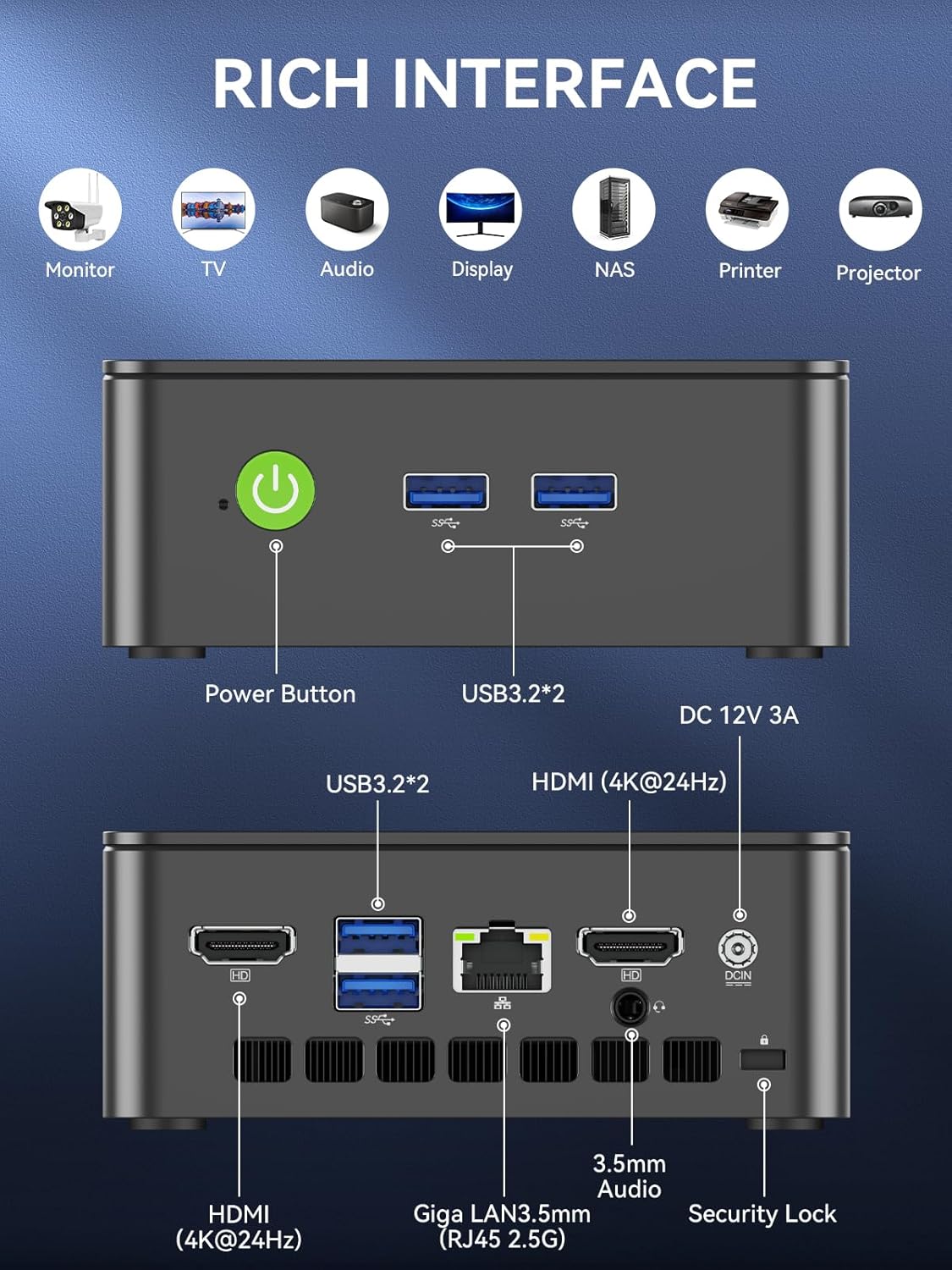
Алдыңғы панель
- Қуат түймесі: Құрылғыны қосу/өшіру үшін.
- USB 3.2 x 2: Пернетақталар, тышқандар немесе сыртқы сақтау құрылғылары сияқты перифериялық құрылғыларды қосуға арналған.
Артқы панель
- HDMI (4K@60Hz) x 2: For connecting to displays, supporting dual 4K output.
- USB 3.2 x 2: Additional ports for peripherals.
- 3.5 мм аудио ұясы: Құлаққаптарды немесе сыртқы динамиктерді қосуға арналған.
- Giga LAN (RJ45 2.5GbE): Сымды желі қосылымы үшін.
- DC IN: Қуат енгізу порты.
- Қауіпсіздік құлыпының ұясы: For securing the device to a desk.
Ішкі құрамдас бөліктер
- Dual DDR4 RAM Slots: Supports up to 64GB RAM.
- M.2 2280 PCIe Gen3*4 Slot: For NVMe SSDs, supporting up to 8TB.
- M.2 2242 SATA3.0 Slot: For SATA SSDs, supporting up to 1TB.
- Cooling Fan & Vents: Integrated cooling system to maintain optimal operating temperatures.

4. Орнату нұсқаулығы
Бастапқы орнату үшін мына қадамдарды орындаңыз:
- Перифериялық құрылғыларды қосу: Connect your keyboard, mouse, and any other necessary USB devices to the available USB 3.2 ports.
- Дисплейді қосу: Use an HDMI cable to connect your monitor(s) to the HDMI ports on the rear panel. The device supports dual 4K@60Hz displays.
- Қуатты қосу: Plug the power adapter into the DC IN port on the mini PC, then plug the adapter into a power outlet.
- Қуат қосулы: Шағын компьютерді қосу үшін алдыңғы панельдегі қуат түймесін басыңыз.
- Initial Operating System Setup: Windows 11 Pro орнатуды аяқтау үшін экрандағы нұсқауларды орындаңыз.
- Желілік байланыс: For faster setup, avoid connecting to a wired LAN initially. Connecting LAN might trigger long updates, delaying desktop access. Connect to Wi-Fi 6 or connect to the 2.5GbE LAN port after initial setup is complete.

5. Пайдалану нұсқаулары
Қуатты қосу/өшіру
- Қосу үшін: Қуат түймесін бір рет басыңыз.
- Қуатты өшіру үшін: From the operating system, select 'Shut down'. Alternatively, press and hold the power button for 5 seconds to force a shutdown (use only when necessary).
BIOS Settings and Performance Modes
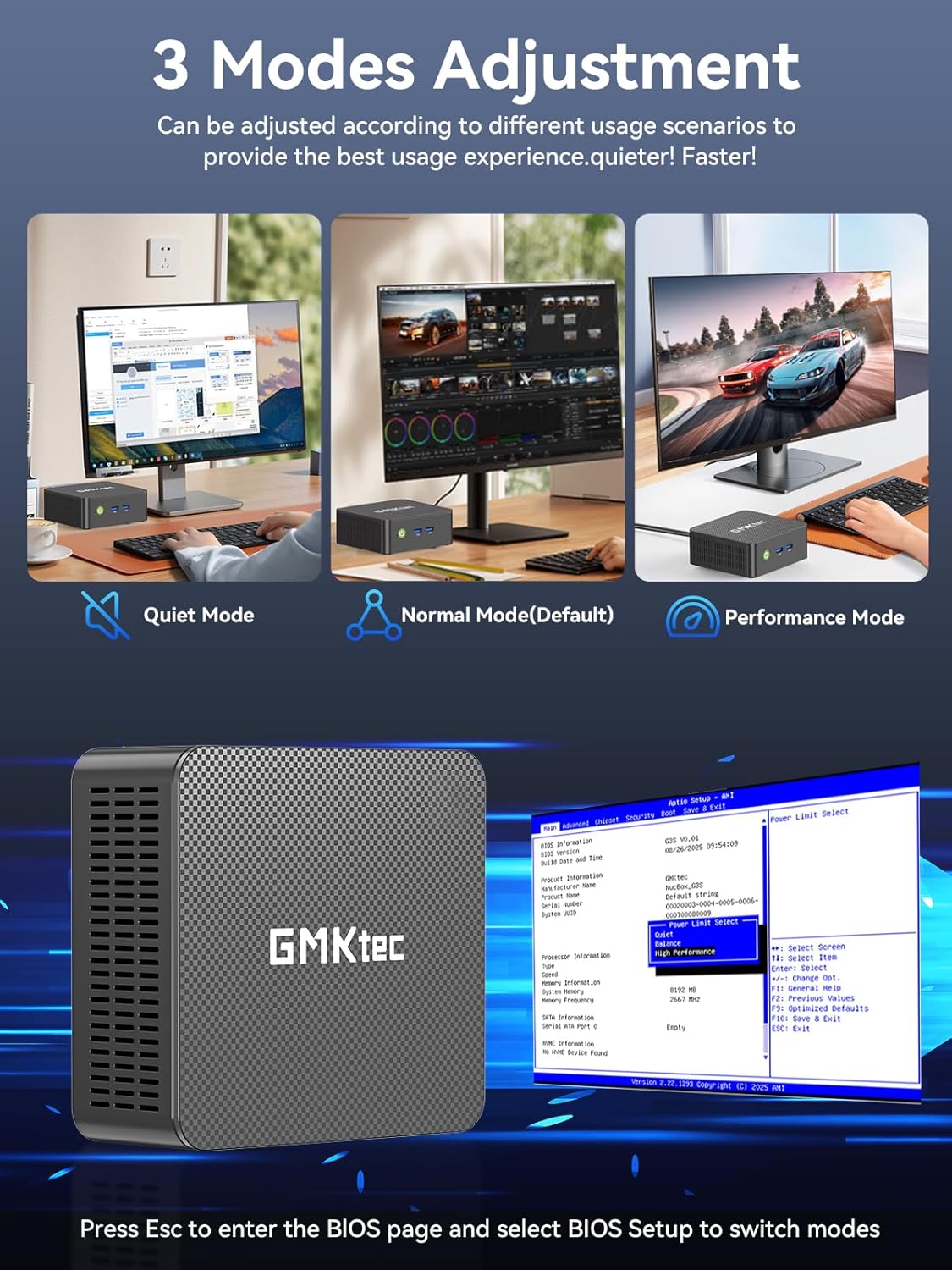
The GMKtec G3 Pro supports different performance modes that can be adjusted via the BIOS settings to optimize for quiet operation, normal use, or maximum performance.
- BIOS-қа кіру: Press the 'Esc' key repeatedly during startup to enter the BIOS page.
- Реттеу режимдері: Navigate to the BIOS Setup and select your desired mode (Quiet Mode, Normal Mode, Performance Mode) based on your usage scenario.
6. Сақтауды кеңейту
The GMKtec G3 Pro offers flexible storage expansion options:
- M.2 2280 NVMe PCIe Slot: Supports high-speed NVMe SSDs up to 8TB for primary storage or additional high-performance storage.
- M.2 2242 SATA Slot: Supports SATA SSDs up to 1TB for additional storage capacity.
To install or upgrade storage, refer to the detailed instructions in the full user manual or consult a qualified technician.
7. Қосылу мүмкіндігі
The Mini PC provides comprehensive connectivity options:
- Wi-Fi 6 (802.11ax): Offers high-speed wireless internet access up to 600Mbps.
- Bluetooth 5.2: For connecting wireless devices such as keyboards, mice, and headphones.
- 2.5GbE Ethernet (RJ45): Provides ultra-fast wired network speeds, up to 2.5 times faster than standard Gigabit Ethernet.

8. Dual Display Setup
The GMKtec G3 Pro supports connecting two 4K@60Hz displays simultaneously via its two HDMI 2.0 ports. This allows for an extended desktop experience, enhancing productivity for multitasking, content creation, or entertainment.
Simply connect two monitors using HDMI cables to the respective ports on the rear of the mini PC. The operating system will automatically detect the displays, and you can configure their arrangement and resolution through the display settings.

9. Салқындату жүйесі
The GMKtec G3 Pro is equipped with a smart quiet cooling fan and strategically placed cooling vents to ensure efficient heat dissipation. This design allows for ultra-quiet operation, typically below 38dB, even under load, providing a comfortable working environment.

10. Техникалық сипаттамалар
| Ерекшелік | Техникалық сипаттама |
|---|---|
| Бренд | GMKtec |
| Модель атауы | G3Pro |
| Операциялық жүйе | Windows 11 Pro |
| CPU моделі | Intel Core i3-10110U |
| CPU жылдамдығы | 4.1 ГГц дейін |
| Графикалық сопроцессор | Intel UHD графикасы 1200 МГц |
| Орнатылған жедел жад | 16 GB DDR4 (Dual Channel) |
| ЖЖҚ жадының максималды өлшемі | 64 ГБ |
| Қатты диск сипаттамасы | 512 GB M.2 2280 PCIe Gen3*2 + 1*M.2 2242 SATA |
| Қосылу технологиясы | Bluetooth 5.2, WiFi 6, Ethernet (2.5GbE), HDMI (4K@60Hz) |
| Бейне шығысы | HDMIx2 |
| Дисплейдің максималды ажыратымдылығы | 4096 × 2160 пиксель |
| Жалпы USB порттары | 4 3.2 (USB XNUMX) |
| Қуатты тұтыну | 6 Вт (әдеттегі) |
| Арнайы мүмкіндіктер | Wake On LAN, PXE Boot, RTC Wake, Auto Power On |
11. Техникалық қызмет көрсету
To ensure the longevity and optimal performance of your GMKtec G3 Pro Mini PC, consider the following maintenance tips:
- Таза ұстаңыз: Regularly clean the exterior of the mini PC with a soft, dry cloth. Ensure cooling vents are free from dust and obstructions.
- Бағдарламалық құрал жаңартулары: Қауіпсіздік пен өнімділікті жақсарту үшін операциялық жүйеңіз бен драйверлеріңізді соңғы нұсқаларға жаңартып отырыңыз.
- Тиісті өшіру: Always shut down the mini PC properly through the operating system to prevent data corruption.
- Қоршаған орта жағдайлары: Operate the mini PC in a well-ventilated area, away from direct sunlight, excessive heat, and moisture.
12. Ақаулықтарды жою
If you encounter issues with your GMKtec G3 Pro Mini PC, try the following basic troubleshooting steps:
- Қуат жоқ: Ensure the power adapter is securely connected to both the mini PC and a working power outlet. Try a different outlet if necessary.
- Дисплей жоқ: Verify that the HDMI cables are securely connected to both the mini PC and the monitor(s). Ensure monitors are powered on and set to the correct input source.
- Интернет қосылымы жоқ: For Wi-Fi, check your router and network settings. For wired Ethernet, ensure the cable is properly connected and the network adapter is enabled in the operating system.
- Баяу өнімділік: Close unnecessary applications, check for background processes, and ensure sufficient free storage space. Consider adjusting performance modes in BIOS.
- Перифериялық мәселелер: Try connecting USB devices to different ports. Ensure drivers are installed correctly for specialized peripherals.
Күрделі мәселелер бойынша толық пайдаланушы нұсқаулығындағы кешенді ақаулықтарды жою бөлімін қараңыз немесе тұтынушыларды қолдау қызметіне хабарласыңыз.
13. Кепілдік және қолдау
Your GMKtec G3 Pro Mini PC comes with a 1 жылдық шектеулі кепілдік from the date of purchase, covering defects due to design and workmanship.
For any questions, technical assistance, or warranty claims, please utilize the following support channels:
- Электрондық поштаны қолдау: Contact the professional after-sales team at support@gmktec.com.
- Желідегі қолдау: Visit the GMKtec store on Amazon or the official GMKtec webЖиі қойылатын сұрақтар мен қосымша ресурстарға арналған сайт.
- 24/7 Client Support: Dedicated support is available to assist you with your needs.