
JONR H2 PRO MAX
JONR H2 PRO MAX Wet Dry Vacuum Cleaner User Manual
Model: H2 PRO MAX
Кіріспе
Thank you for choosing the JONR H2 PRO MAX Wet Dry Vacuum Cleaner. This manual provides essential information for the safe and efficient operation, maintenance, and troubleshooting of your appliance. Please read this manual thoroughly before using the product and retain it for future reference.
Маңызды қауіпсіздік нұсқаулары
ЕСКЕРТУ: Өрт, электр тогының соғуы немесе жарақат алу қаупін азайту үшін қолданар алдында барлық нұсқауларды оқып шығыңыз.
- Құралды әрқашан құрғақ, тегіс жерде пайдаланыңыз.
- Құралды суға немесе басқа сұйықтықтарға батырмаңыз.
- Шашты, бос киімдерді, саусақтарды және дененің барлық бөліктерін тесіктерден және қозғалатын бөліктерден алыс ұстаңыз.
- Тек осы нұсқаулықта сипатталғандай пайдаланыңыз. Тек өндіруші ұсынған қосымшаларды пайдаланыңыз.
- Зақымдалған сыммен немесе ашамен қолданбаңыз. Құрылғы дұрыс жұмыс істемесе, құлап кетсе, зақымданса, далада қалдырылған немесе суға түсіп кетсе, оны қызмет көрсету орталығына қайтарыңыз.
- Ашаны немесе құрылғыны дымқыл қолмен ұстамаңыз.
- Саңылауларға ешбір зат қоймаңыз. Бұғатталған саңылаулармен қолданбаңыз; шаңнан, талшықтан, шаштан және ауа ағынын азайтатын кез келген нәрседен аулақ ұстаңыз.
- Баспалдақта тазалау кезінде аса сақтық танытыңыз.
- Бензин сияқты жанғыш немесе жанғыш сұйықтықтарды алу үшін пайдаланбаңыз немесе олар болуы мүмкін жерлерде қолданбаңыз.
- Темекі, сіріңке немесе ыстық күл сияқты жанып жатқан немесе шегетін заттарды алмаңыз.
- Кездейсоқ іске қосуды болдырмаңыз. Батарея жинағына қосу, құрылғыны алу немесе тасымалдау алдында қосқыштың өшірулі күйде екеніне көз жеткізіңіз.
- Өндіруші көрсеткен зарядтағышпен ғана зарядтаңыз.
- Қолайсыз жағдайларда батареядан сұйықтық шығуы мүмкін; байланыстан аулақ болыңыз. Байқаусыз байланыс болса, сумен шайыңыз. Егер сұйықтық көзге тисе, қосымша медициналық көмекке жүгініңіз.
Пакет мазмұны
Орамнан шығарған кезде барлық компоненттердің бар екенін және жақсы күйде екенін тексеріңіз.
- JONR H2 PRO MAX Main Unit
- Тұтқаны құрастыру
- Зарядтау қондырғысы
- Қуат адаптері
- Cleaning Solution (Starter Bottle)
- Тазалау щеткасы
- Аксессуар ұстаушысы
- Пайдаланушы нұсқаулығы
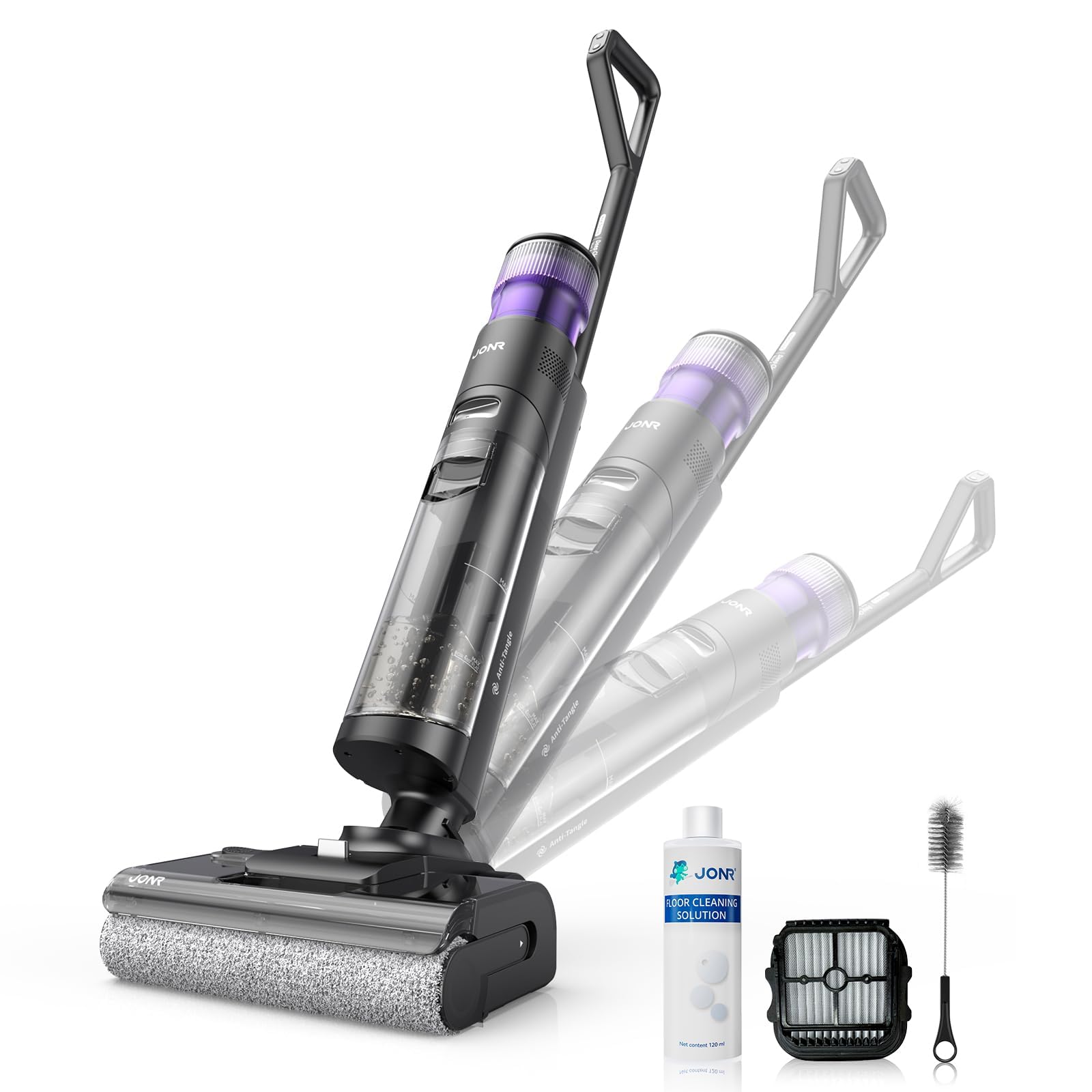
Image: JONR H2 PRO MAX Wet Dry Vacuum Cleaner and its included accessories. This image shows the main unit, handle, charging dock, and various cleaning tools.
Өнім диаграммасы
Familiarize yourself with the parts of your JONR H2 PRO MAX.
- Таза су ыдысы (CWT)
- Лас су ыдысы (DWT)
- Шығару түймесі
- Экранды көрсету
- Қуат түймесі
- Режимді таңдау түймесі
- Өзін-өзі тазалау түймесі
- Brush Roll Cover
- Brетка орамы
- Контактілерді зарядтау
- Зарядтау қондырғысы

Image: Labeled diagram illustrating the main parts of the JONR H2 PRO MAX Wet Dry Vacuum Cleaner, including tanks, buttons, and brush roll area.
Орнату
1. Тұтқа жинағы
- Insert the handle assembly into the main unit until you hear a click, ensuring it is securely locked.
- To disassemble, press the handle release button and pull the handle upwards.
2. Батареяны зарядтау
- Place the main unit onto the charging dock, ensuring the charging contacts align.
- Қуат адаптерін зарядтау қондырмасына қосып, қабырғадағы розеткаға қосыңыз.
- The display screen will indicate charging status. A full charge takes approximately 4 hours.
- For optimal battery life, fully charge the unit before first use.

Image: The JONR H2 PRO MAX Wet Dry Vacuum Cleaner positioned on its charging dock, with the power adapter connected.
3. Filling the Clean Water Tank (CWT)
- Press the CWT release button and remove the tank.
- Open the tank cap and fill with clean tap water. For enhanced cleaning, add a small amount of JONR cleaning solution (do not exceed the MAX line).
- Close the cap securely and reinsert the CWT into the main unit until it clicks into place.
Пайдалану нұсқаулары
1. Қуатты қосу/өшіру
- Press the Power Button to turn the unit on. The display screen will illuminate.
- Press the Power Button again to turn the unit off.
2. Selecting Cleaning Mode
The JONR H2 PRO MAX offers multiple cleaning modes:
- Авто режим: Default mode for general cleaning. The unit automatically adjusts suction and water flow based on floor dirt detection.
- Максималды режим: Қатты ластанған жерлер үшін максималды сору және су ағынын қамтамасыз етеді.
- Сору режимі: For vacuuming liquids without dispensing water.
Press the Mode Selection Button to cycle through the available cleaning modes. The selected mode will be displayed on the screen.
3. Cleaning Your Floors
- Tilt the main unit back to engage the brush roll and start cleaning.
- Move the unit slowly forward and backward over the desired area.
- The unit will dispense water and cleaning solution, scrub the floor, and vacuum up dirty water simultaneously.
- The display screen provides real-time information such as battery level, current mode, and dirty water tank status.

Image: The JONR H2 PRO MAX Wet Dry Vacuum Cleaner actively cleaning a hard floor surface, demonstrating its wet and dry cleaning capabilities.
Техникалық қызмет көрсету
Regular maintenance ensures optimal performance and extends the lifespan of your JONR H2 PRO MAX.
1. Emptying and Cleaning the Dirty Water Tank (DWT)
- After each use, or when the DWT full indicator appears, remove the DWT.
- Open the DWT lid and carefully pour out the dirty water.
- Rinse the DWT thoroughly with clean water. Clean the filter inside the DWT if necessary.
- Allow the DWT and filter to air dry completely before reassembling.
2. Өзін-өзі тазалау функциясы
- Place the unit on the charging dock. Ensure the CWT has sufficient clean water.
- Press the Self-Cleaning Button. The unit will perform an automatic cleaning cycle for the brush roll and internal pipes.
- After the self-cleaning cycle, empty and clean the DWT.
- The hot air drying function will then activate to dry the brush roll, preventing odors.

Image: The JONR H2 PRO MAX Wet Dry Vacuum Cleaner on its charging dock, with indicators suggesting the self-cleaning cycle is active.
3. Қылқалам орамын тазалау
- Turn off the unit and remove it from the charging dock.
- Open the brush roll cover.
- Remove the brush roll. Use the provided cleaning brush to remove any hair, debris, or tangled material.
- Қылқалам орамын ағынды сумен шайыңыз.
- Allow the brush roll to air dry completely before reinstalling. Ensure it is properly aligned.
4. Сүзгіні тазалау
- The filter is located within the DWT. Remove it and rinse under clean water.
- Қайта кіргізбес бұрын сүзгіні толығымен құрғатыңыз.
- Replace the filter every 3-6 months, or as needed, for optimal performance.
Ақаулықтарды жою
Жалпы мәселелер және олардың шешімдері үшін осы бөлімді қараңыз.
| Мәселе | Ықтимал себебі | Шешім |
|---|---|---|
| Құрылғы қосылмайды. | Батарея таусылды. | Құрылғыны толығымен зарядтаңыз. |
| Құрылғы қосылмайды. | Қуат түймесі дұрыс басылмады. | Қуат түймесі мықтап басылғанына көз жеткізіңіз. |
| Нашар сору. | Dirty Water Tank (DWT) is full. | Empty and clean the DWT. |
| Нашар сору. | Brush roll or air path is clogged. | Clean the brush roll and check for blockages in the air path. |
| Нашар сору. | Сүзгі лас немесе бітелген. | Сүзгіні тазалаңыз немесе ауыстырыңыз. |
| Су ағызылмайды. | Clean Water Tank (CWT) is empty. | Refill the CWT. |
| Су ағызылмайды. | CWT not installed correctly. | Ensure the CWT is securely in place. |
| Құрылғы су ағып кетеді. | Tanks not properly sealed or installed. | Check that both CWT and DWT are correctly installed and their caps are sealed. |
| Жағымсыз иіс. | Dirty Water Tank (DWT) needs cleaning. | Empty and thoroughly clean the DWT after each use. Run self-cleaning cycle. |
Техникалық сипаттамалар
| Модель атауы | H2 PRO MAX |
| Бренд | JONR |
| Қуат көзі | Батареямен жұмыс істейтін (сымсыз) |
| Батарея Түрі | Литий-ион |
| Зарядтау уақыты | Шамамен 4 сағат |
| Ватtage | 200 ватт |
| Таза су сыйымдылығы | 850 миллилитр |
| Шу деңгейі | 80 децибел |
| Өнім өлшемдері | 10.6"L x 9"W x 44"H |
| Элемент салмағы | 16.97 фунт |
| Сүзгі түрі | Губка |
| Арнайы мүмкіндік | Hot Air Drying, Tangle-Free Brush Roll, Smart Hard Floor Cleaner |
Кепілдік және қолдау
JONR products are manufactured to high-quality standards. For warranty information, technical support, or service inquiries, please contact JONR customer service.
Please visit the official JONR website or refer to your purchase documentation for specific warranty terms and contact details.
Ескертпе: Сатып алу түбіртегін кепілдік талаптары үшін сатып алудың дәлелі ретінде сақтаңыз.
Ask a question about this manual
Ask about setup, troubleshooting, compatibility, parts, safety, or missing instructions. Manuals+ will review the question and use this page’s manual context to help answer it.