
1. Кіріспе
Welcome to the user manual for your TOOLTOP TT-Yihua-872D 2-in-1 Hot Air Rework Station and Soldering Iron. This versatile device integrates a hot air rework station and a precision soldering iron, making it an essential tool for electronic assembly, repair, and desoldering tasks. Designed with accurate temperature control and robust components, the TT-Yihua-872D ensures reliable performance for both professional and hobbyist use.
Негізгі ерекшеліктері:
- Температураны дәл бақылау: Utilizes microprocessor-PID programming for stable outlet temperatures and real-time calibration.
- Қос функционалдылық: Combines a hot air gun and a soldering iron in one compact unit.
- Celsius/Fahrenheit Display: User-selectable temperature units to suit regional preferences.
- Тұрақты құрылыс: Features high-temperature silicone wire, a silent brushless-motor fan, and stainless steel tubing.
- Self-Detection Functionality: Machine components are equipped with self-detection for enhanced safety and operational reliability.
2. Қауіпсіздік нұсқаулары
Please read and understand all safety instructions before operating the TOOLTOP TT-Yihua-872D. Failure to follow these instructions may result in electric shock, fire, or serious injury.
- Электр қауіпсіздігі: Ensure the unit is connected to a properly grounded power outlet. Do not operate with wet hands or in damp шарттар. Тазалау немесе техникалық қызмет көрсету алдында электр қуатын ажыратыңыз.
- Жылу қаупі: The hot air gun and soldering iron tip reach very high temperatures. Avoid direct contact with skin or flammable materials. Allow tools to cool completely before storing.
- Желдету: Use the rework station in a well-ventilated area to dissipate fumes generated during soldering and desoldering.
- Жеке қорғаныс құралдары (ЖҚҚ): Always wear safety glasses to protect your eyes from solder splatter and fumes. Consider using heat-resistant gloves.
- Жанғыш материалдар: Keep the work area clear of flammable liquids, gases, and materials.
- Балалар мен үй жануарлары: Құрылғыны балалар мен үй жануарларының қолы жетпейтін жерде сақтаңыз.
- Дұрыс пайдалану: Use the tool only for its intended purpose. Do not modify the unit or its components.
3. Пакет мазмұны
Төменде тізімделген барлық заттардың бумаңызда бар екенін тексеріңіз:
- 1 x TOOLTOP TT-Yihua-872D Main Unit
- 1 x Ыстық ауа тапаншасы
- 1 x Дәнекерлеу темірі
- 1 x Soldering Iron Stand with Cleaning Sponge
- 1 х қуат сымы
- 3 x Ыстық ауа форсункалары (әртүрлі өлшемдер)
- 1 x Пайдаланушы нұсқаулығы (осы құжат)
4. Өнім аяқталдыview
Familiarize yourself with the main components and controls of your rework station.
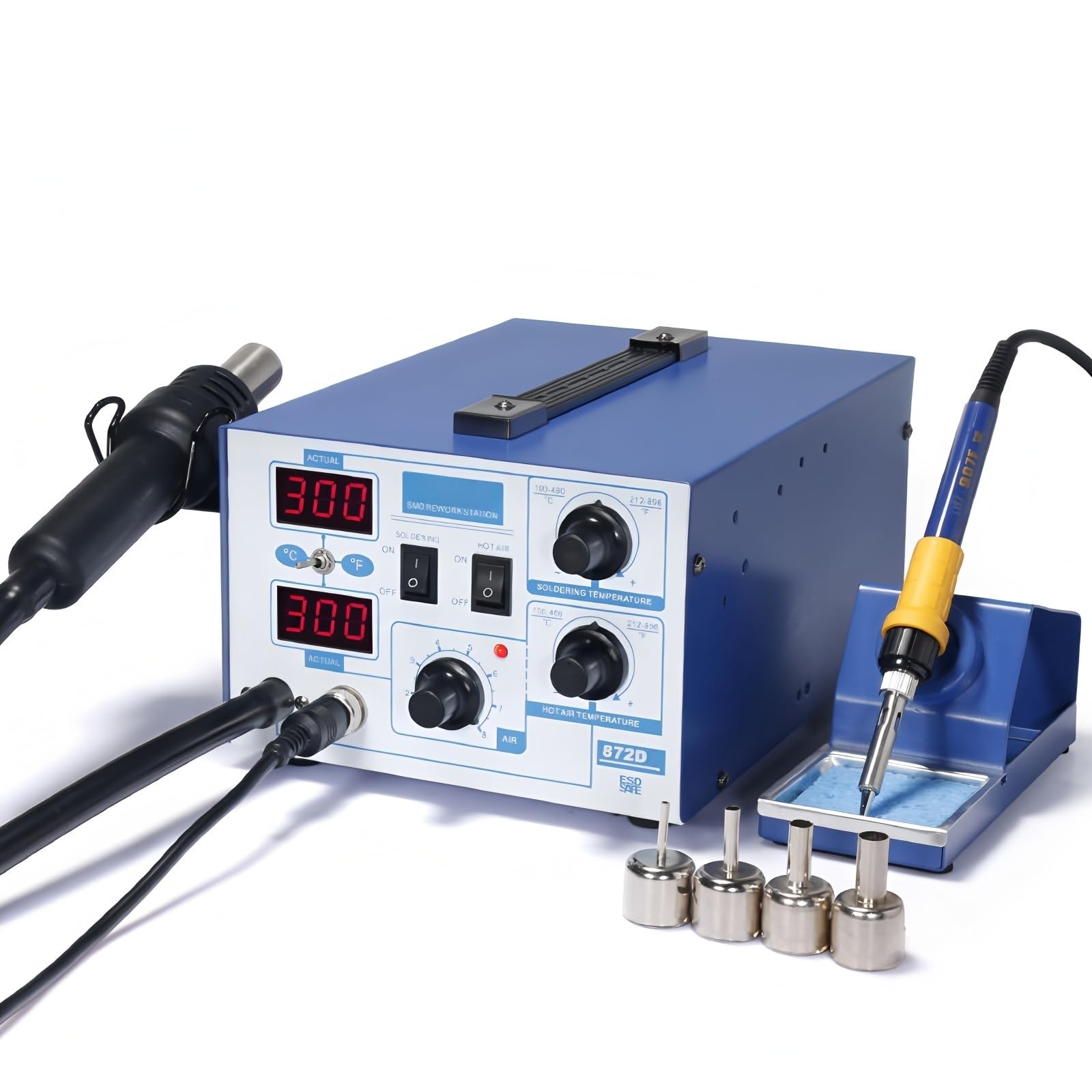
1-сурет: Алдыңғы view of the TT-Yihua-872D main unit with hot air gun and soldering iron connected. The control panel features digital displays for actual and set temperatures, power switches for soldering and hot air, and adjustment knobs for temperature and airflow.

2-сурет: Артқы view of the TT-Yihua-872D main unit, highlighting the main power switch and the power cord input socket.
Негізгі блоктың басқару элементтері:
- Сандық дисплейлер: Two LED displays show the actual and set temperatures for both the hot air gun and soldering iron.
- Celsius/Fahrenheit Button: Toggles temperature display units.
- SOLDERING ON/OFF Switch: Activates/deactivates the soldering iron.
- HOT AIR ON/OFF Switch: Activates/deactivates the hot air gun.
- SOLDERING TEMPERATURE Knob: Adjusts the soldering iron temperature.
- HOT AIR TEMPERATURE Knob: Adjusts the hot air gun temperature.
- AIR Knob: Adjusts the airflow rate for the hot air gun.
- Негізгі қуат қосқышы: Located on the rear of the unit, controls overall power to the station.
5. Орнату
- Қаптамадан шығару: Қаптамадан барлық компоненттерді мұқият алып тастаңыз.
- Ыстық ауа тапаншасын қосыңыз: Plug the hot air gun connector into the designated port on the front of the main unit. Ensure it is securely fastened.
- Дәнекерлеу үтігін қосу: Plug the soldering iron connector into its designated port on the front of the main unit.
- Place Soldering Iron Stand: Position the soldering iron stand on a stable, heat-resistant surface near your work area. Insert the soldering iron into the stand.
- Қуатты қосу: Insert the power cord into the power input socket on the rear of the main unit, then plug the other end into a grounded electrical outlet.
- Бастапқы қуат қосулы: Flip the main power switch on the rear of the unit to the 'ON' position. The digital displays should illuminate.
6. Пайдалану нұсқаулары
6.1. Ыстық ауаны қайта өңдеу станциясының жұмысы
- Ensure the main power switch on the rear is ON.
- Press the 'HOT AIR' ON/OFF switch on the front panel to activate the hot air gun.
- Adjust the 'HOT AIR TEMPERATURE' knob to set the desired temperature (range: 100°C-480°C). The display will show the set temperature, then the actual temperature as it heats up.
- Adjust the 'AIR' knob to control the airflow rate. Start with a lower setting and increase as needed for your application.
- To change temperature units, press the '°C/°F' button.
- After use, turn off the 'HOT AIR' switch. The hot air gun will enter a cooling mode before shutting down completely.
6.2. Дәнекерлеу темірінің жұмысы
- Ensure the main power switch on the rear is ON.
- Press the 'SOLDERING' ON/OFF switch on the front panel to activate the soldering iron.
- Adjust the 'SOLDERING TEMPERATURE' knob to set the desired temperature (range: 200°C-480°C). The display will show the set temperature, then the actual temperature as it heats up.
- To change temperature units, press the '°C/°F' button.
- Before and after each use, clean the soldering iron tip with the damp sponge in the stand and tin it with a small amount of solder.
- After use, turn off the 'SOLDERING' switch and place the iron back in its stand.
6.3. Температураны калибрлеу
The TT-Yihua-872D features advanced PID digitally programmed calibration and real-time temperature proofreading. This ensures high temperature stability and accuracy. Under normal operating conditions, user calibration is not typically required. If you suspect a significant temperature discrepancy, refer to advanced service procedures or contact customer support.
7. Техникалық қызмет көрсету
Regular maintenance ensures the longevity and optimal performance of your rework station.
- Құрылғыны тазалау: Disconnect power before cleaning. Wipe the main unit with a soft, damp мата. Абразивті тазартқыштарды немесе еріткіштерді қолданбаңыз.
- Дәнекерлеу ұшына күтім жасау: Always tin the soldering iron tip before and after use to prevent oxidation. Replace tips when they become pitted or corroded, as this affects heat transfer.
- Sponge Maintenance: Тазалау губкасын d күйінде сақтаңызamp (not soaking wet) for effective tip cleaning. Replace the sponge when it becomes worn or heavily soiled.
- Hot Air Nozzle Care: Ensure hot air nozzles are free from debris or blockages. Clean them gently if necessary.
- Сақтау орны: Store the unit in a dry, dust-free environment when not in use. Ensure all components are cool before storage.
8. Ақаулықтарды жою
If you encounter issues with your TT-Yihua-872D, refer to the following common problems and solutions:
| Мәселе | Ықтимал себебі | Шешім |
|---|---|---|
| Құрылғы қосылмайды | Power cord disconnected; Main power switch OFF; Power outlet issue | Check power cord connection; Ensure main power switch (rear) is ON; Test power outlet with another device. |
| Hot air gun or soldering iron not heating | Respective ON/OFF switch is OFF; Temperature set too low; Component connection issue | Ensure 'HOT AIR' or 'SOLDERING' switch is ON; Increase temperature setting; Check if hot air gun/soldering iron is securely connected. |
| Temperature display shows 'S-E' or similar error | Sensor error; Heating element fault | Turn off the unit, wait a few minutes, then restart. If the error persists, contact customer support. The unit's self-detection functionality may indicate internal issues. |
| Inconsistent hot air flow | Airflow knob set too low; Nozzle blocked | Adjust 'AIR' knob to a higher setting; Check and clean hot air nozzle for obstructions. |
Осы шешімдерді қолданып көргеннен кейін мәселе жойылмаса, қосымша көмек алу үшін тұтынушыларды қолдау қызметіне хабарласыңыз.
9. Техникалық сипаттамалар
Technical specifications for the TOOLTOP TT-Yihua-872D 2-in-1 Hot Air Rework Station and Soldering Iron.

Figure 3: Detailed technical specifications for the TT-Yihua-872D (referred to as 972D in the image, but specifications match the 872D model).
| Параметр | Техникалық сипаттама |
|---|---|
| Үлгі нөмірі | TT-Yihua-872D |
| Бағаланған томtage | Айнымалы ток 220В±10% 50Гц |
| Жалпы қуат | 670 Вт |
| Жұмыс ортасы | 0~40°C, Relative humidity <80% |
| Сақтау температурасы | -20~80°C, Relative humidity <80% |
| Өлшемдері (L×W×H) | 33 × 27 × 20.2 см |
| Салмағы | 4.7 кг |
| Ыстық ауа зеңбірегі | |
| Операциялық томtage | Айнымалы ток 220В±10% 50Гц |
| Шығу қуаты | 650 Вт |
| Температура диапазоны | 100°C - 480°C |
| Ауа беру режимі | Ауа сорғысы |
| Ауа шығыны | 24 L/min (max) |
| Температураның тұрақтылығы | ±5°C (static) |
| Дисплей режимі | Red LED Digital Display |
| Жылыту өзегі | Ceramic Framed Heating Corer |
| Дәнекерлеу үтік | |
| Операциялық томtage | Айнымалы ток 26В±10% 50Гц |
| Шығу қуаты | 60 Вт |
| Температура диапазоны | 200°C - 480°C |
| Температураның тұрақтылығы | ±5°C (static) |
| Дисплей режимі | Red LED Digital Display |
| Жылыту өзегі | Imported High-Powered Heating Core |
| Tip-to-Ground Impedance | <2Ω |
| Tip-to-Ground Voltage | <2мВ |
| Техникалық сипаттама | CE, RoHS |
10. Кепілдік және қолдау
The manufacturer provides a 1-year EU spare part availability duration for this product. For technical support, warranty claims, or service inquiries, please contact your retailer or the manufacturer directly. Please have your model number (TT-Yihua-872D) and purchase information ready when contacting support.
11. Жою туралы ақпарат
Do not dispose of electrical appliances as unsorted municipal waste. Use separate collection facilities. Contact your local government for information regarding available collection systems. If electrical appliances are disposed of in landfills or dumps, hazardous substances can leak into the groundwater and get into the food chain, damaging your health and well-being.