
1. Кіріспе
This manual provides detailed instructions for the safe and efficient operation of your TOOLTOP TT-Yihua-8858-I Portable Hot Air Station. This device is designed for various electronic repair tasks, including PCB SMD repair and BGA rework, offering precise temperature and airflow control. Please read this manual thoroughly before using the product and retain it for future reference.
2. Қауіпсіздік нұсқаулары
Жарақат алуды немесе құрылғыны зақымдауды болдырмау үшін әрқашан келесі қауіпсіздік шараларын орындаңыз:
- Жоғары температура қаупі: The hot air nozzle and emitted air reach very high temperatures. Avoid direct contact with skin or flammable materials.
- Желдету: Use the hot air station in a well-ventilated area to disperse fumes generated during soldering or desoldering.
- Нәр беруші: Қуат көзі көлемін қамтамасыз етіңізtage matches the specifications of the device. Do not use if the power cord is damaged.
- Балалар және рұқсатсыз пайдаланушылар: Keep the device out of reach of children and individuals not trained in its use.
- Басылыңыз: Сақтау алдында құрылғыны толығымен суытып алыңыз.
- Техникалық қызмет көрсету: Құрылғыны өзіңіз жөндеуге тырыспаңыз. Барлық қызмет көрсету жұмыстарын білікті мамандарға тапсырыңыз.
- Дұрыс пайдалану: Құрылғыны тек мақсаты бойынша пайдаланыңыз.
3. Пакет мазмұны
Төменде тізімделген барлық заттардың бумаңызда бар екенін тексеріңіз:
- TOOLTOP TT-Yihua-8858-I Portable Hot Air Station (Main Unit)
- Hot Air Nozzles (Various sizes)
- Қуат сымы
- Пайдаланушы нұсқаулығы (осы құжат)

Image 3.1: The TOOLTOP TT-Yihua-8858-I Portable Hot Air Station shown with three included nozzles.
4. Өнім аяқталдыview
Familiarize yourself with the components and controls of your hot air station.
4.1 Негізгі компоненттер
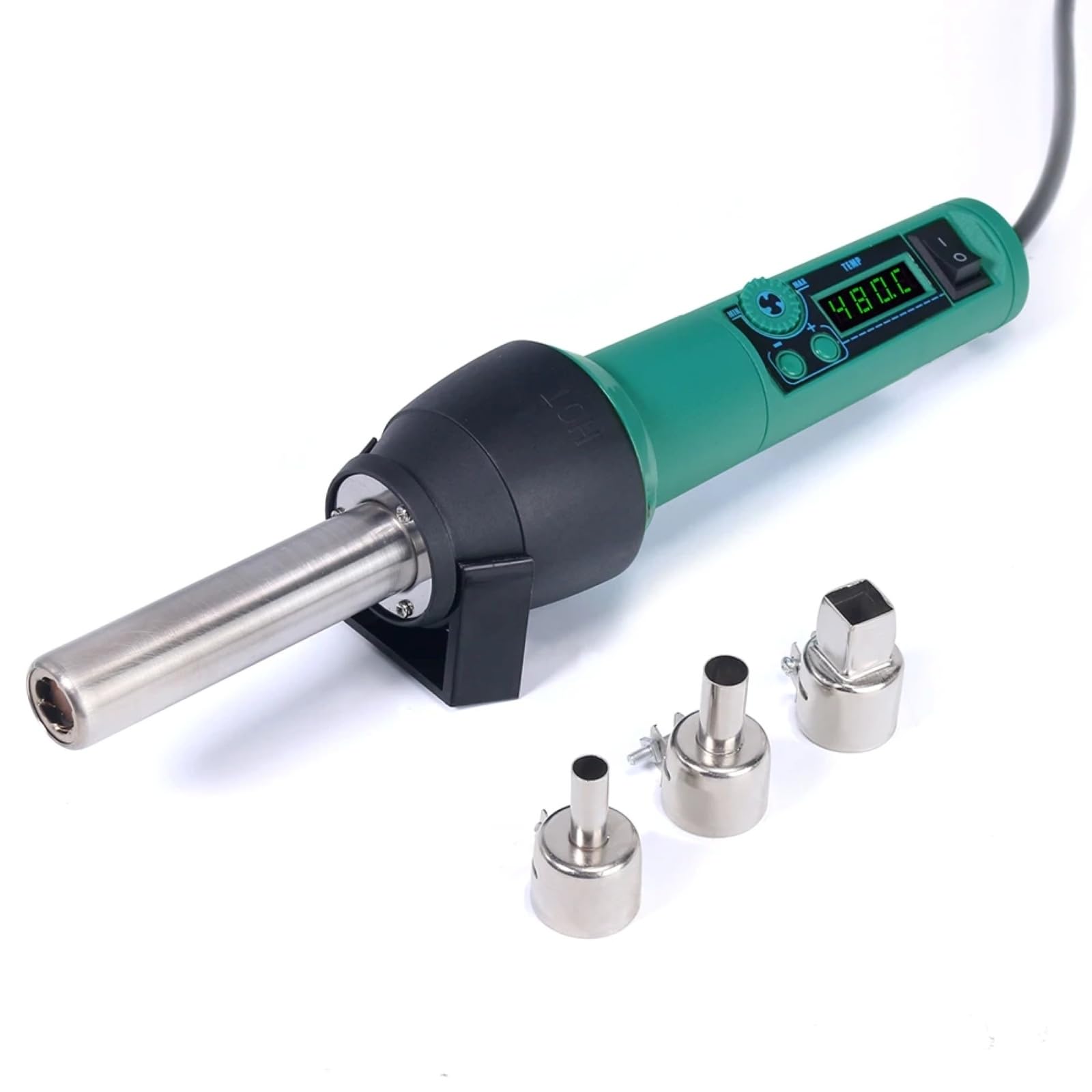
Image 4.1: The main unit of the hot air station, displaying the digital temperature display and control buttons.
4.2 Airflow System
The hot air station features a spiral wind airflow design for efficient and even heat distribution.

Image 4.2: Detail of the nozzle interior, illustrating the spiral wind air flow mechanism.
4.3 ауа кірісі
The air inlet is located at the rear of the unit, ensuring proper air circulation for heating.

Image 4.3: The air inlet grille, essential for the device's cooling and heating functions.
4.4 Басқару элементтері
The device features intuitive controls for adjusting air volume and temperature.

Image 4.4: The control panel showing buttons for adjusting air volume (MIN/MAX) and temperature (up/down arrows).
4.5 Hot Air Gun Holder
A dismountable holder is provided for safe placement of the hot air gun when not in use or during cool-down.
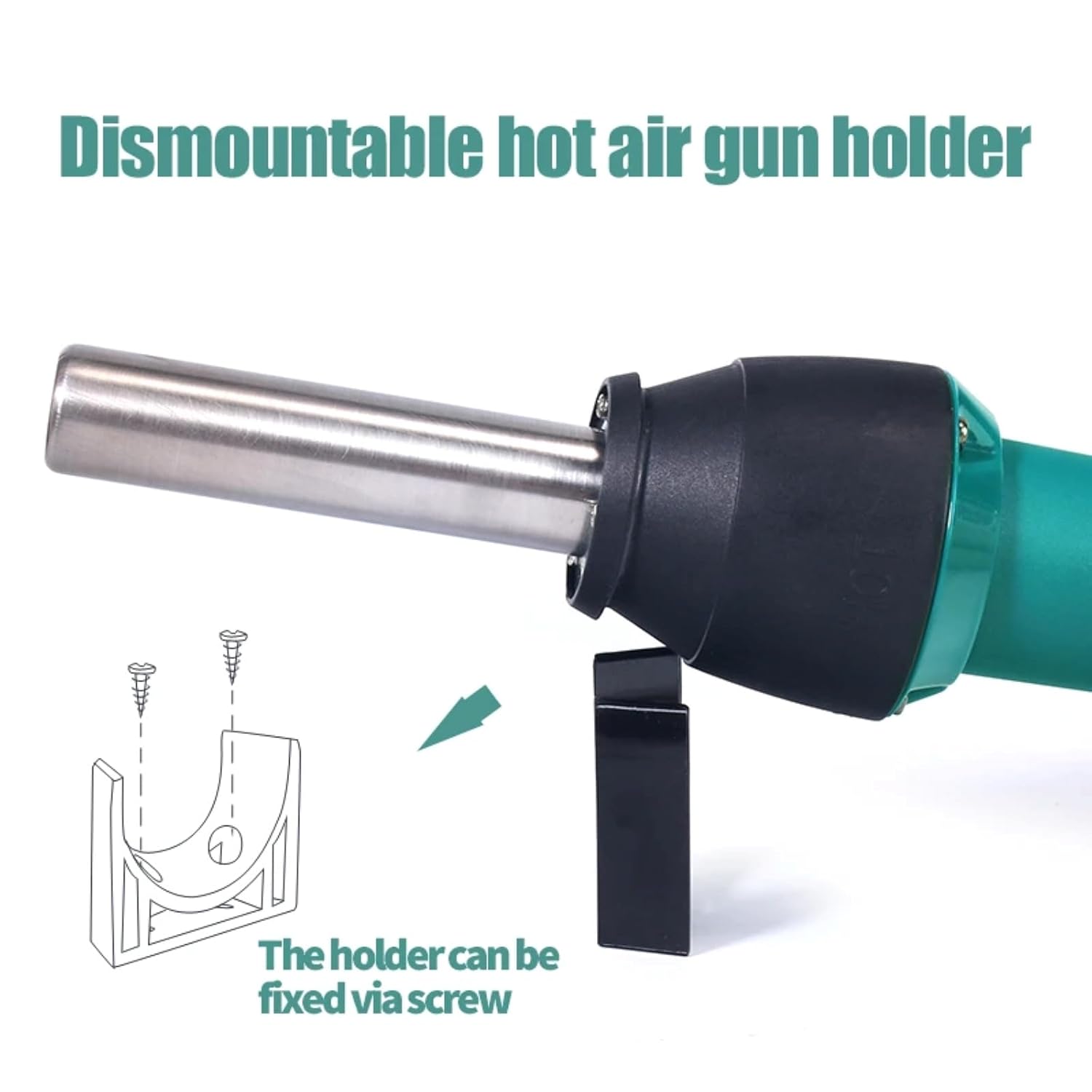
Image 4.5: The hot air gun holder, which can be fixed via screw for stability.
5. Орнату
- Қаптамадан шығару: Қаптамадан барлық компоненттерді мұқият алып тастаңыз.
- Тексеру: Check the device and accessories for any signs of damage. Do not use if damaged.
- Орналастыру: Place the hot air station on a stable, heat-resistant surface in a well-ventilated area. Ensure there is sufficient space around the air inlet and outlet for proper airflow.
- Саптаманы бекіту: Select the appropriate nozzle for your task and securely attach it to the hot air gun.
- Қуатты қосу: Plug the power cord into the hot air station and then into a suitable power outlet.
- Install Holder (Optional): If desired, attach the dismountable hot air gun holder to a workbench using screws for convenient and safe storage during operation.
6. Пайдалану нұсқаулары
- Қуат қосулы: Flip the power switch to the "ON" position. The LED digital display will illuminate, showing the current temperature.
- Температураны реттеу: Use the temperature adjustment buttons (up/down arrows) to set the desired temperature. The adjustable range is typically 100°C to 480°C. The display will show the set temperature and then the actual temperature as it heats up.
- Ауа көлемін реттеу: Use the air volume adjustment buttons (MIN/MAX) to set the desired airflow. Start with a lower setting and increase as needed for your application.
- Алдын ала қыздыру: Allow the unit to reach the set temperature before beginning work. This usually takes a few seconds.
- Операция: Direct the hot air nozzle towards the component or area you wish to work on. Maintain a safe distance to avoid overheating or damaging surrounding components.
- Басылыңыз: After use, place the hot air gun back into its holder. The unit will automatically enter a cool-down mode, blowing cool air until the temperature drops to a safe level. Do not switch off the power until the cool-down cycle is complete, as this protects the heating element.
- Қуат көзін өшіру: Once the unit has cooled down and the display indicates a safe temperature, you can switch off the power.
7. Техникалық қызмет көрсету
Regular maintenance ensures the longevity and optimal performance of your hot air station.
- Тазалау: Ensure the device is unplugged and completely cool before cleaning. Wipe the exterior with a soft, damp мата. Абразивті тазартқыштарды немесе еріткіштерді қолданбаңыз.
- Ауа кіріс/шығыс: Periodically check the air inlet and nozzle for any obstructions (dust, debris). Clean gently with a soft brush if necessary to maintain proper airflow.
- Саңылаулар: Clean the nozzles regularly to prevent solder or flux buildup, which can affect airflow and heat distribution.
- Сақтау орны: Store the hot air station in a dry, dust-free environment when not in use.
8. Ақаулықтарды жою
If you encounter issues with your hot air station, refer to the table below for common problems and solutions.
| Мәселе | Ықтимал себебі | Шешім |
|---|---|---|
| Құрылғы қосылмайды. | No power supply; power cord damaged; power switch off. | Check power connection; inspect power cord; ensure power switch is ON. |
| No hot air or insufficient heat. | Heating element failure; air inlet/outlet blocked; incorrect temperature setting. | Contact customer support; clean air inlets/outlets; verify temperature setting. |
| Ауа ағыны әлсіз немесе тұрақты емес. | Air volume set too low; fan malfunction; air path obstruction. | Increase air volume setting; clean air inlets/outlets; contact customer support. |
| Temperature display error. | Сенсордың дұрыс жұмыс істемеуі. | Power cycle the device; if error persists, contact customer support. |
Осы шешімдерді қолданып көргеннен кейін мәселе жойылмаса, тұтынушыларды қолдау қызметіне хабарласыңыз.
9. Техникалық сипаттамалар
| Үлгі нөмірі | TT-Yihua-8858-I |
| Бренд | ҚҰРАЛДЫҚ ТОП |
| Қуатты тұтыну | 700 Вт |
| Температура диапазоны | 100°C - 480°C (212°F - 896°F) |
| Дисплей түрі | Жарықдиодты сандық дисплей |
| Ауа ағынының түрі | Spiral Wind |
| Қосылған құрамдас бөліктер | Hot Air Station, Nozzles, Power Cord |
10. Кепілдік және қолдау
The TOOLTOP TT-Yihua-8858-I Portable Hot Air Station comes with a 1 жылдық өндірушінің кепілдігі сатып алған күннен бастап. Бұл кепілдік қалыпты пайдалану кезіндегі материалдар мен жұмыс ақауларын қамтиды.
For warranty claims, technical support, or any inquiries regarding your product, please contact TOOLTOP customer service through your retailer or the official TOOLTOP webсайт. Қолдау көрсету орталығына хабарласқанда үлгі нөмірі мен сатып алу күні қолжетімді болуын сұраймыз.