
1. Кіріспе
The Audizio Desio is a versatile digital radio that combines classic aesthetics with modern audio technology. It features DAB, DAB+, and FM tuning for clear radio reception, along with Bluetooth 5.0 for wireless streaming, a USB port for media playback, and a 3.5mm AUX input for wired connections. The radio is equipped with a 2.4-inch color LCD display and integrated stereo speakers, making it suitable for various environments such as living rooms, kitchens, or bedrooms.
This manual provides detailed instructions for setting up, operating, and maintaining your Audizio Desio radio. Please read it thoroughly before use to ensure proper functionality and to maximize your listening experience.
2. Қауіпсіздік туралы ақпарат
- Қуат адаптерінің дыбыс деңгейіне көз жеткізіңізtage қосылмас бұрын жергілікті қуат көзіне сәйкестендіреді.
- Құрылғыны жаңбырға, ылғалға немесе төтенше температураға ұшыратпаңыз.
- Құрылғыны жылу көздеріне жақын немесе тікелей күн сәулесі түсетін жерге қоймаңыз.
- c ашпаңызasing; барлық қызмет көрсетуді білікті мамандарға тапсырыңыз.
- Құрылғыны күшті магнит өрістерінен алыс ұстаңыз.
- Құрылғыны тек жұмсақ, құрғақ шүберекпен тазалаңыз.
3. Пакет мазмұны
Қаптамадан шығарған кезде барлық заттардың бар екеніне көз жеткізіңіз:
- Audizio Desio DAB/DAB+/FM Radio
- Қуат адаптері (DC 5V)
- Қашықтан басқару құралы
- Пайдаланушы нұсқаулығы
4. Басқару элементтері және байланыстар
Алдыңғы панельді басқару элементтері
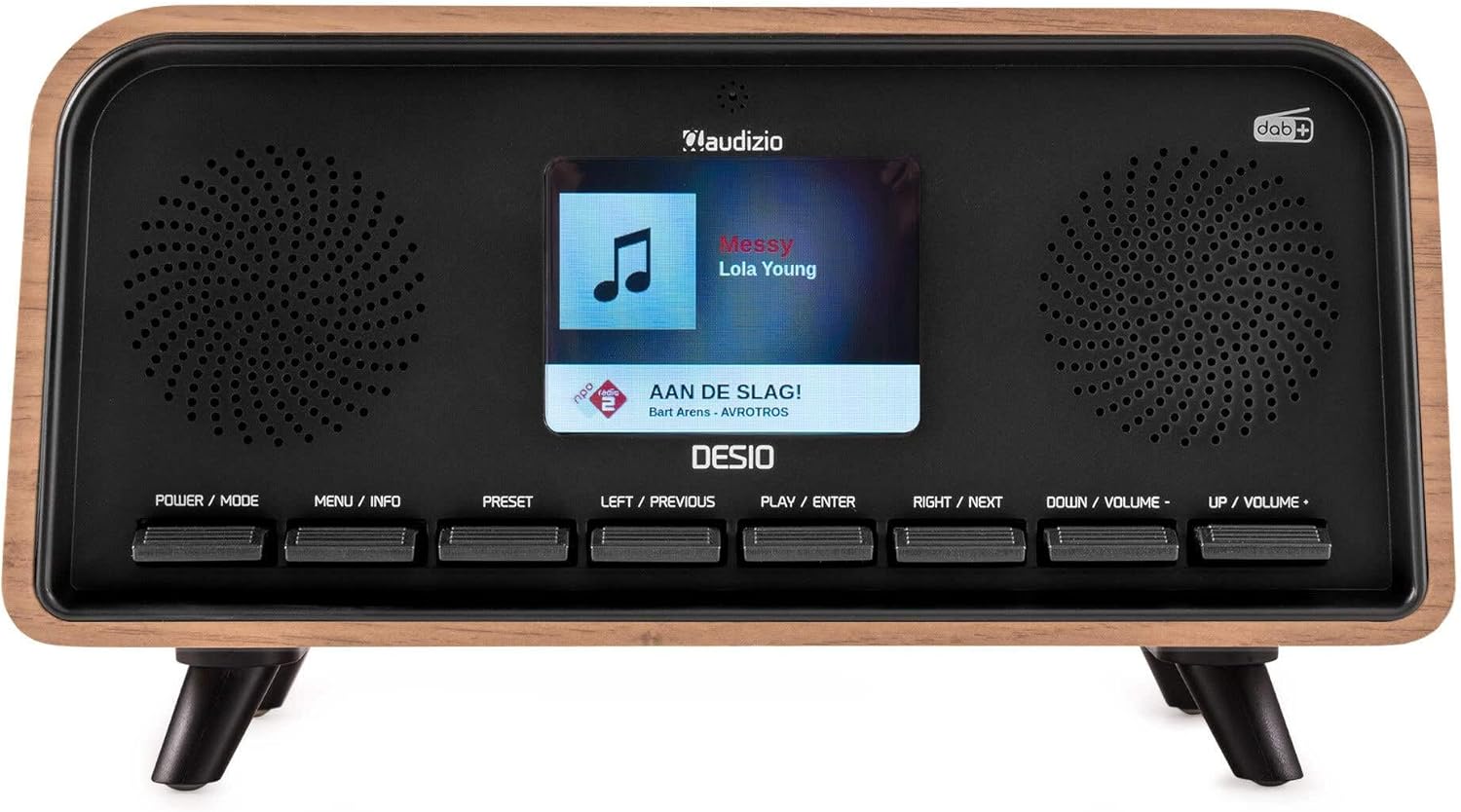
Алдыңғы view of the Audizio Desio radio, showing the display playing music with artist and track information. The control buttons are visible below the screen.
- POWER / MODE: Press to turn on/off. Press and hold to switch between DAB, FM, Bluetooth, USB, and AUX modes.
- MENU / INFO: Press to access menu options. In playback mode, press to cycle through information display.
- АЛДЫН АЛА ОРНАТУ: Press to recall saved stations. Press and hold to save current station.
- LEFT / PREVIOUS: Navigate left in menus, or skip to previous track/station.
- PLAY / ENTER: Confirm selection in menus, or play/pause media.
- RIGHT / NEXT: Navigate right in menus, or skip to next track/station.
- DOWN / VOLUME -: Decrease volume, or navigate down in menus.
- UP / VOLUME +: Increase volume, or navigate up in menus.
Артқы панель қосылымдары
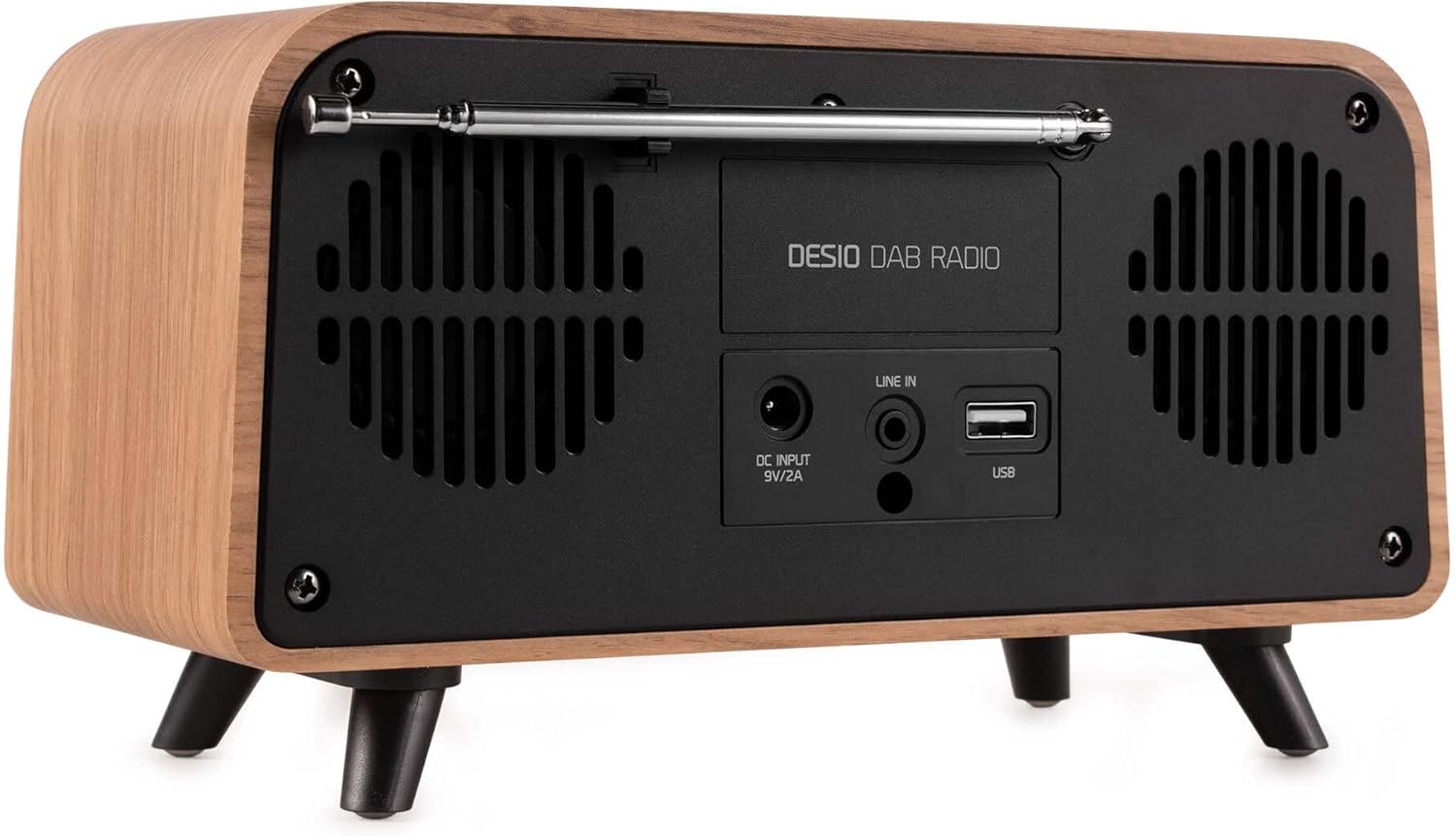
Артқы view of the Audizio Desio radio, highlighting the DC INPUT 9V/2A, LINE IN (3.5mm AUX), and USB ports. The telescopic antenna is extended.
- DC INPUT 9V/2A: Берілген қуат адаптерін осы жерге қосыңыз.
- LINE IN (3.5mm AUX): Сыртқы аудио құрылғыларын 3.5 мм аудио кабель арқылы қосыңыз.
- USB: MP3 ойнату үшін USB флэш-дискісін салыңыз.
- Телескопиялық антенна: Extend fully for optimal DAB/DAB+ and FM reception.
5. Бастапқы орнату
- Қуатты қосу: Plug the provided DC 5V power adapter into the DC INPUT port on the rear of the radio, then plug the adapter into a wall outlet.
- Антеннаны ұзарту: Fully extend the telescopic antenna located on the rear of the unit for best reception.
- Қуат қосулы: түймесін басыңыз ҚУАТ / РЕЖИМ радионы қосу үшін түймені басыңыз.
- First-time DAB Scan: Upon first power-on, the radio will automatically perform a full scan for DAB/DAB+ stations. This may take a few minutes. The display will show the scanning progress.
- Уақыт/күн орнату: The time and date will usually be set automatically via DAB signal. If not, you can manually set them via the menu.
6. Пайдалану нұсқаулары
6.1 DAB/DAB+ радио жұмысы

Алдыңғы view of the Audizio Desio radio, displaying a DAB radio station ('NPO Klassiek') and current time.
- Select DAB Mode: түймесін басыңыз ҚУАТ / РЕЖИМ button repeatedly until 'DAB' is displayed.
- Scan for Stations: If no stations are found or you wish to rescan, press МӘЗІР / АҚПАРАТ, содан кейін пайдаланыңыз LEFT / PREVIOUS or ОҢ / КЕЛЕСІ to select 'Full Scan' and press PLAY / ENTER.
- Select Station: пайдаланыңыз LEFT / PREVIOUS or ОҢ / КЕЛЕСІ buttons to browse available stations. Press PLAY / ENTER станцияны таңдау үшін.
- Алдын ала сақтау: Станцияны сақтау үшін түймесін басып тұрыңыз АЛДЫНДАҒЫ ОРНАТУ түймесі. Қолдану LEFT / PREVIOUS or ОҢ / КЕЛЕСІ to choose a preset number (1-50), then press PLAY / ENTER растау үшін.
- Алдын ала орнату: Сақталған станцияны шақыру үшін түймесін басыңыз АЛДЫНДАҒЫ ОРНАТУ button (do not hold). Use LEFT / PREVIOUS or ОҢ / КЕЛЕСІ to select the desired preset, then press PLAY / ENTER.

Алдыңғы view of the Audizio Desio radio, showing the 'Preset Recall' menu on the display, indicating empty preset slots.
6.2 FM радиосының жұмысы
- FM режимін таңдау: түймесін басыңыз ҚУАТ / РЕЖИМ «FM» көрсетілгенше түймесін қайта-қайта басыңыз.
- Автоматты сканерлеу: басып тұрыңыз PLAY / ENTER to automatically scan for and save available FM stations.
- Қолмен баптау: Қолдану LEFT / PREVIOUS or ОҢ / КЕЛЕСІ жиілікті дәл реттеу үшін.
- Save/Recall Presets: Follow the same procedure as for DAB radio (Section 6.1).
6.3 Bluetooth (BT) Operation

Алдыңғы view of the Audizio Desio radio, with the display showing 'BT' (Bluetooth) mode and 'Connected' status.
- BT режимін таңдаңыз: түймесін басыңыз ҚУАТ / РЕЖИМ button repeatedly until 'BT' is displayed. The radio will enter pairing mode, indicated by a flashing Bluetooth icon.
- Құрылғыны жұптау: On your smartphone, tablet, or laptop, enable Bluetooth and search for available devices. Select 'Audizio Desio' from the list.
- Қосылу: Once paired, the display will show 'Connected'. You can now stream audio from your device to the radio.
- Ойнатуды басқару: Use your connected device or the radio's PLAY / ENTER, LEFT / PREVIOUS, және ОҢ / КЕЛЕСІ ойнатуды басқаруға арналған түймелер.
6.4 USB арқылы ойнату

Алдыңғы view of the Audizio Desio radio, with the display showing 'USB' mode, current time, and details of an MP3 file ойналып жатыр.
- USB дискісін салыңыз: Insert a USB flash drive (formatted to FAT32) containing MP3 files into the USB port on the rear of the radio.
- Select USB Mode: түймесін басыңыз ҚУАТ / РЕЖИМ button repeatedly until 'USB' is displayed. The radio will automatically start playing the first compatible audio file.
- Шарлау Files: Қолдану LEFT / PREVIOUS or ОҢ / КЕЛЕСІ to skip tracks. Press PLAY / ENTER ойнатуды кідірту/жалғастыру.
6.5 AUX кірісі
- Құрылғыны қосу: Connect an external audio device (e.g., MP3 player, smartphone) to the 'LINE IN' (3.5mm AUX) port on the rear of the radio using a 3.5mm audio cable (not included).
- AUX режимін таңдаңыз: түймесін басыңыз ҚУАТ / РЕЖИМ button repeatedly until 'AUX' is displayed.
- Ойнатуды басқару: Playback is controlled directly from your connected external device. Adjust volume using the radio's volume controls.
6.6 Дабыл және таймер функциялары
- Дабылдарды орнату: Access the alarm settings via the МӘЗІР / АҚПАРАТ button. You can set multiple alarms with customizable sources (DAB, FM, Buzzer), volume, and recurrence (daily, weekdays, weekends).
- Ұйқы таймері: The sleep timer allows the radio to turn off automatically after a set period. Access this function via the МӘЗІР / АҚПАРАТ button and select the desired duration.
- Кейінге қалдыру функциясы: When an alarm sounds, press any button (except Power) to activate the snooze function for a short period.
7. Техникалық қызмет көрсету
- Тазалау: Радионың бетін тазалау үшін жұмсақ, құрғақ, мамықсыз шүберекті пайдаланыңыз. Абразивті тазартқыштарды, балауыздарды немесе еріткіштерді пайдаланбаңыз.
- Антенна күтімі: Handle the telescopic antenna carefully to avoid bending or breaking.
- Сақтау орны: Егер радионы ұзақ уақыт сақтасаңыз, оны қуат көзінен ажыратып, салқын, құрғақ жерде сақтаңыз.
8. Ақаулықтарды жою
| Мәселе | Ықтимал себебі | Шешім |
|---|---|---|
| Қуат жоқ | Қуат адаптері қосылмаған немесе ақаулы розетка. | Check power adapter connection and try a different outlet. |
| DAB/FM қабылдауы нашар | Antenna not fully extended or poor signal area. | Fully extend the antenna. Try repositioning the radio. Perform a full scan. |
| Bluetooth қосылмайды | Radio not in BT mode, device not in pairing mode, or too far away. | Ensure radio is in BT mode. Put your device in pairing mode. Move device closer to the radio (within 10m). |
| USB ойнату жұмыс істемейді | USB drive not inserted correctly, unsupported file format, or drive not FAT32. | Reinsert USB drive. Ensure files are MP3. Check USB drive format (FAT32). |
| No sound from AUX | Radio not in AUX mode, cable faulty, or external device volume low. | Select AUX mode. Check 3.5mm cable. Increase volume on both radio and external device. |
9. Техникалық шарттар
- Бренд: Аудизио
- Үлгі: Desio
- Тюнер технологиясы: FM, DAB+
- Блютез: Version 5.0 (Range: 10m)
- Ойнату опциялары: Bluetooth, USB, 3.5mm AUX input
- Алдын ала орнатылған станциялар: 50
- Көрсеткіш: 2.4 дюймдік түсті LCD
- Функциялары: Alarm, Sleep Timer, Snooze, Dimming, Week/Weekend Alarm
- Max Speaker Power: 30 Вт
- Нәр беруші: DC 5V (Power Adapter)
- Өнім өлшемдері (H x W x D): 32 x 16 x 18 см
- Салмағы: 1.66 кг
10. Кепілдік және қолдау
This product comes with a standard manufacturer's warranty. For detailed warranty terms and conditions, please refer to the documentation provided at the time of purchase or contact your retailer.
For technical support, troubleshooting assistance, or service inquiries, please contact the Audizio customer support team or your local dealer. Please have your product model number (Desio) and purchase information ready when contacting support.