
Кіріспе
Thank you for choosing the vretti PB821 Portable Thermal Printer. This compact and versatile device is designed for convenient, inkless printing from various devices, including smartphones, tablets, and laptops. Its portability makes it ideal for business, office, home, and travel use. This manual provides essential information on setting up, operating, maintaining, and troubleshooting your printer to ensure optimal performance.
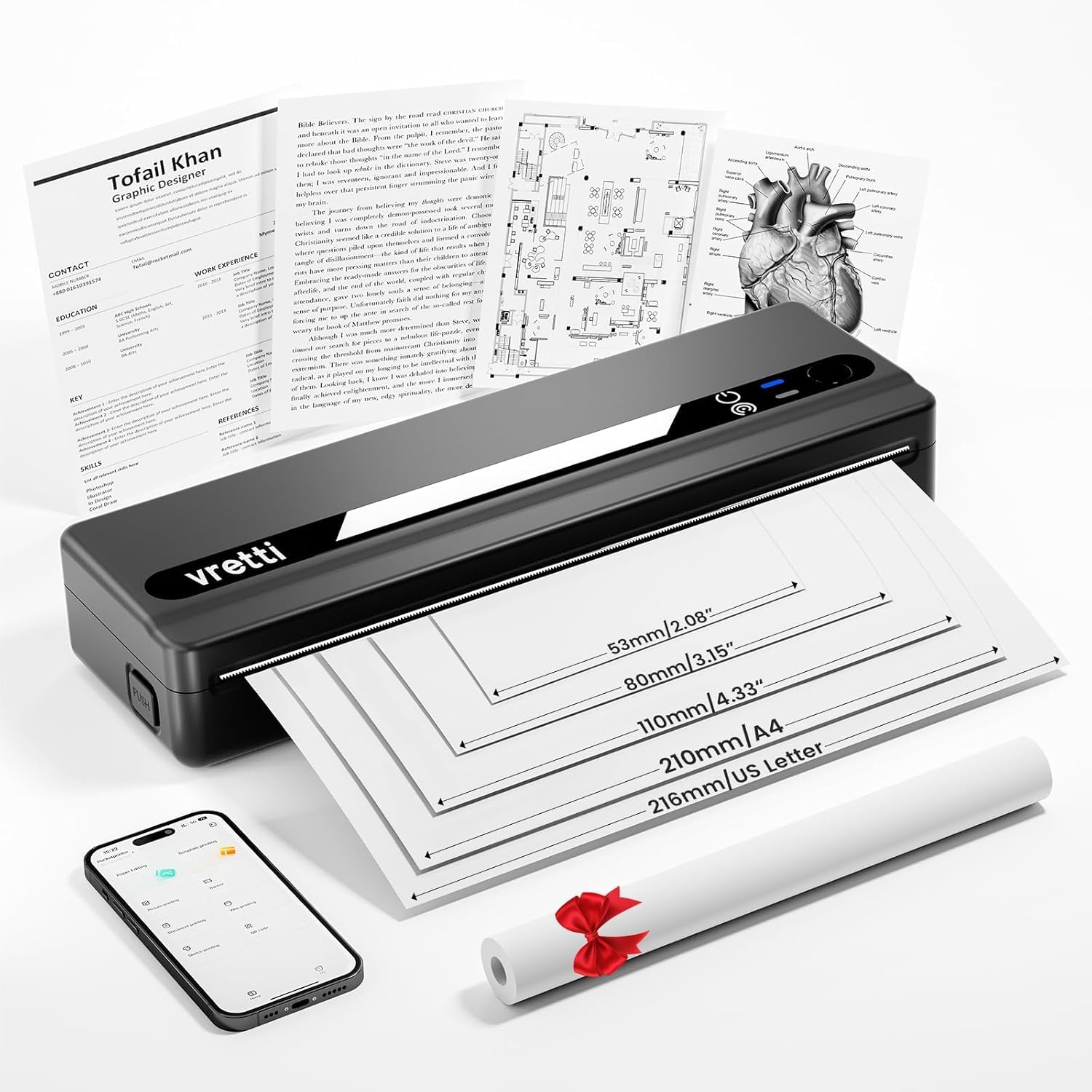
Image: The vretti PB821 Portable Thermal Printer, a sleek black device, ready for use.
Пакет мазмұны
Барлық элементтердің бар екеніне көз жеткізу үшін қораптан шығарған кезде пакеттің мазмұнын тексеріңіз:
- vretti PB821 Portable Thermal Printer
- 1 Roll of Thermal Paper
- USB-C зарядтау кабелі
- Пайдаланушы нұсқаулығы
Өнім аяқталдыview
Негізгі мүмкіндіктер
- Сымсыз Bluetooth басып шығару: Connects wirelessly to phones and tablets via the "XLifePro" app.
- Портативті және ықшам: Small and lightweight design for easy transport.
- Cost-effective Inkless Printing: Utilizes advanced thermal printing technology, eliminating the need for ink, toner, or ribbons.
- High-quality Printing: Delivers clear prints with a 203 DPI resolution.
- Ұзақ жұмыс істейтін батарея: Built-in 1500mAh rechargeable battery supports printing up to 223 A4 sheets on a full charge.
- Multi-size Paper Support: Compatible with A5, A4, Letter, and 2-4 inch labels.
Қосылу опциялары

Image: The vretti PB821 printer supports both Bluetooth and USB connections for versatile use with Android, iOS, iPad, Windows, Mac OS, Linux, and Chromebook devices.
The vretti PB821 printer offers flexible connectivity, allowing you to print wirelessly via Bluetooth from mobile devices or directly via USB from computers. This ensures compatibility across various operating systems and devices.
Портативті дизайн

Image: A visual comparison highlighting the compact and portable design of the vretti PB821 printer against a larger, traditional printer, emphasizing its convenience.
The PB821 is designed for maximum portability, making it easy to carry in a backpack or bag. Its compact form factor does not compromise on functionality, offering easy setup and smooth, inkless printing.
Орнату
1. Бастапқы зарядтау
Before first use, fully charge the printer using the provided USB-C cable. Connect the cable to the printer's USB-C port and a compatible power adapter (not included) or computer USB port. The charging indicator light will show the charging status.

Image: Visual representation of the printer's 1500mAh battery capacity, USB-C charging, and its ability to print up to 223 A4 sheets on a single charge.
2. Термалды қағазды жүктеу
The vretti PB821 supports various thermal paper types. To load paper:
- Принтердің қағаз қақпағын ашыңыз.
- Термиялық қағазды басып шығарылатын жағын жоғары қаратып салыңыз. Қағаздың бағыттауыштар ішінде дұрыс тураланғанына көз жеткізіңіз.
- Қағаз қақпағын мықтап жабыңыз.

Image: The vretti PB821 printer showcasing its compatibility with different thermal paper types, including folding thermal paper and roll paper, along with various paper sizes.
3. Bluetooth арқылы қосылу (мобильді құрылғылар)
To print wirelessly from your smartphone or tablet:
- Download the "XLifePro" app from the App Store (iOS) or Google Play Store (Android).
- Turn on the vretti PB821 printer. The Bluetooth indicator light will blink.
- Open the XLifePro app, navigate to the device connection settings, and select the PB821 printer from the list of available Bluetooth devices.
- Қосылғаннан кейін Bluetooth индикатор шамы тұрақты болып жанады.

Image: Step-by-step guide on connecting the vretti PB821 printer via Bluetooth, including downloading the XLifePro app and pairing the device.
4. Connecting via USB (Computers)
To print from your Windows, Mac OS, or Linux computer:
- Download the appropriate printer driver from the official vretti webсайт: vrettitech.com/pages/p83-support.
- Install the driver on your computer following the on-screen instructions.
- Connect the vretti PB821 printer to your computer using the provided USB-C cable.
- The computer should recognize the printer, and you can now select it as your printing device.

Image: Instructions for USB connection, detailing driver download from the vretti website and connecting the PB821 printer to a laptop.
Пайдалану нұсқаулары
Printing from Mobile Devices
Once connected via Bluetooth:
- Құжатты, суретті немесе ашыңыз file you wish to print within the XLifePro app. The app supports various formats including TXT, PDF, Excel, and Word documents.
- Select the print option within the app.
- Confirm print settings such as paper size and quantity.
- Initiate printing.
Printing from Computers
Once connected via USB and drivers are installed:
- Құжатты ашыңыз немесе file компьютеріңізде басып шығарғыңыз келеді.
- Select the print option from your application (e.g., File > Басып шығару).
- Choose "vretti PB821" from the list of available printers.
- Adjust print settings as needed (e.g., paper size, orientation).
- «Басып шығару» түймесін басыңыз.
Supported Paper Types and Sizes
The PB821 printer is compatible with various thermal paper types and sizes, including:
- A4 (210мм)
- Letter (8.5" x 11" / 216mm)
- A5 (148мм)
- B5 (175mm)
- 2-inch (53mm) labels
- 3-inch (80mm) labels
- 4-inch (110mm) labels

Image: The vretti PB821 printer demonstrating its support for multiple paper sizes, including standard document sizes and various label sizes.
Using the XLifePro App
The XLifePro app provides additional functionalities beyond basic printing, including:
- Access to multiple templates for creative printing.
- Options for document printing, picture printing, and more.
- Customization features for various printing needs.

Image: Screenshots of the XLifePro app interface, illustrating its diverse range of templates and printing options.
Техникалық қызмет көрсету
Принтерді тазалау
To maintain print quality and prolong the printer's lifespan:
- Ensure the printer is turned off and disconnected from power before cleaning.
- Аздап жұмсақ, түксіз матаны пайдаланыңыз dampened with water or isopropyl alcohol to gently wipe the print head and paper path.
- Абразивті тазартқыштарды немесе еріткіштерді қолданбаңыз.
- Allow the printer to dry completely before turning it on.
Батареяға күтім жасау
Батареяның қызмет ету мерзімін оңтайландыру үшін:
- Батареяны жиі толық зарядсыздандырудан аулақ болыңыз.
- Принтерді ұзақ уақыт пайдаланбаған кезде салқын, құрғақ жерде сақтаңыз.
- Charge the printer regularly, even if not in frequent use, to prevent deep discharge.
Ақаулықтарды жою
| Мәселе | Ықтимал себебі | Шешім |
|---|---|---|
| Принтер қосылмайды | Төмен батарея; Қуат түймесі дұрыс басылмады | Charge the printer; Press and hold the power button for a few seconds |
| Bluetooth арқылы қосылу мүмкін емес | Bluetooth off on device; Printer not in pairing mode; App issue | Ensure Bluetooth is enabled; Restart printer; Reinstall XLifePro app |
| Нашар басып шығару сапасы | Low battery; Dirty print head; Incorrect paper type | Charge printer; Clean print head; Use recommended thermal paper |
| Қағаз кептелісі | Improper paper loading; Damaged paper | Turn off printer, carefully remove jammed paper, reload correctly; Use undamaged paper |
| Принтерді компьютер танымайды | Missing/incorrect drivers; Faulty USB cable/port | Install/reinstall drivers from vretti website; Try a different USB cable/port |
Техникалық сипаттамалар
| Ерекшелік | Мәлімет |
|---|---|
| Үлгі | PB821 |
| Бренд | вертти |
| Баспа технологиясы | Жылулық |
| Қосылу технологиясы | Bluetooth, USB |
| Максималды басып шығару ажыратымдылығы | 203 DPI (Black and White) |
| Баспа құралдары | Thermal Paper (plain) |
| Қолдау көрсетілетін парақ өлшемдері | 2'', 3'', 4'', A4, 8.5''x 11'' US Letter |
| Максималды кіріс парағы сыйымдылығы | 30 парақ |
| Батарея сыйымдылығы | 1500 мАч (литий-ион) |
| Өнім өлшемдері | 25.7 x 7 x 4.7 см |
| Элемент салмағы | 900 г |
| Екі жақты басып шығару | Жоқ |
| Сия түсі | Қара |
Кепілдік және қолдау
The vretti PB821 Portable Thermal Printer comes with a standard manufacturer's warranty. For specific warranty details, technical support, or service inquiries, please refer to the warranty card included in your package or visit the official vretti webсайт. Сатып алу түбіртегін кепілдік талаптары үшін сатып алудың дәлелі ретінде сақтаңыз.
Өнім туралы бейне
Video: An official product video demonstrating the features and usage of the vretti PB821 Portable Thermal Printer, including its compact design, wireless connectivity, and printing capabilities.