
1. Кіріспе
This manual provides essential information for the safe and efficient operation of your Thomson 43FT2S15 FHD LED Smart TV. Please read this manual thoroughly before using the television and retain it for future reference.
2. Қауіпсіздік туралы ақпарат
Өрт, электр тогының соғуы және жарақат алу қаупін азайту үшін осы өнімді пайдаланған кезде әрқашан негізгі қауіпсіздік шараларын орындаңыз.
- Теледидарды жаңбырға немесе ылғалға ұшыратпаңыз.
- Желдету саңылауларын жаппаңыз.
- Қуат сымын жерге дұрыс қосуды қамтамасыз етіңіз.
- Теледидарды тұрақсыз арбаға, тірекке, штативке, кронштейнге немесе үстелге қоймаңыз.
- Найзағай кезінде немесе ұзақ уақыт пайдаланбаған кезде теледидарды розеткадан ажыратыңыз.
- Барлық қызмет көрсетуді білікті қызмет көрсету қызметкерлеріне тапсырыңыз.
3. Пакет мазмұны
Төменде тізімделген заттардың барлығы пакетіңізге қосылғанын тексеріңіз:
- Thomson 43FT2S15 FHD LED Smart TV
- Қуат адаптері
- Қашықтан басқару құралы
- Пайдаланушы нұсқаулығы (бұл құжат)
- Кепілдік картасы

Сурет: алдыңғы view of the Thomson 43FT2S15 Smart TV.
4. Орнату
4.1 Физикалық орнату
The Thomson 43FT2S15 TV is designed for table mounting. Ensure the TV is placed on a stable, flat surface.

Image: Diagram showing the dimensions of the Thomson 43FT2S15 Smart TV. The screen size is 109 cm (43 inches) diagonally, with a width of 95 cm and height of 60 cm (including stand). The depth is 6 cm.
Өлшемдері (W x H x D): 95 cm x 60 cm x 6 cm (without stand, depth is 6 cm). The screen diagonal is 109 cm (43 inches).
4.2 Құрылғыларды қосу
Connect your external devices to the appropriate ports on the TV. Refer to the diagram below for port locations.
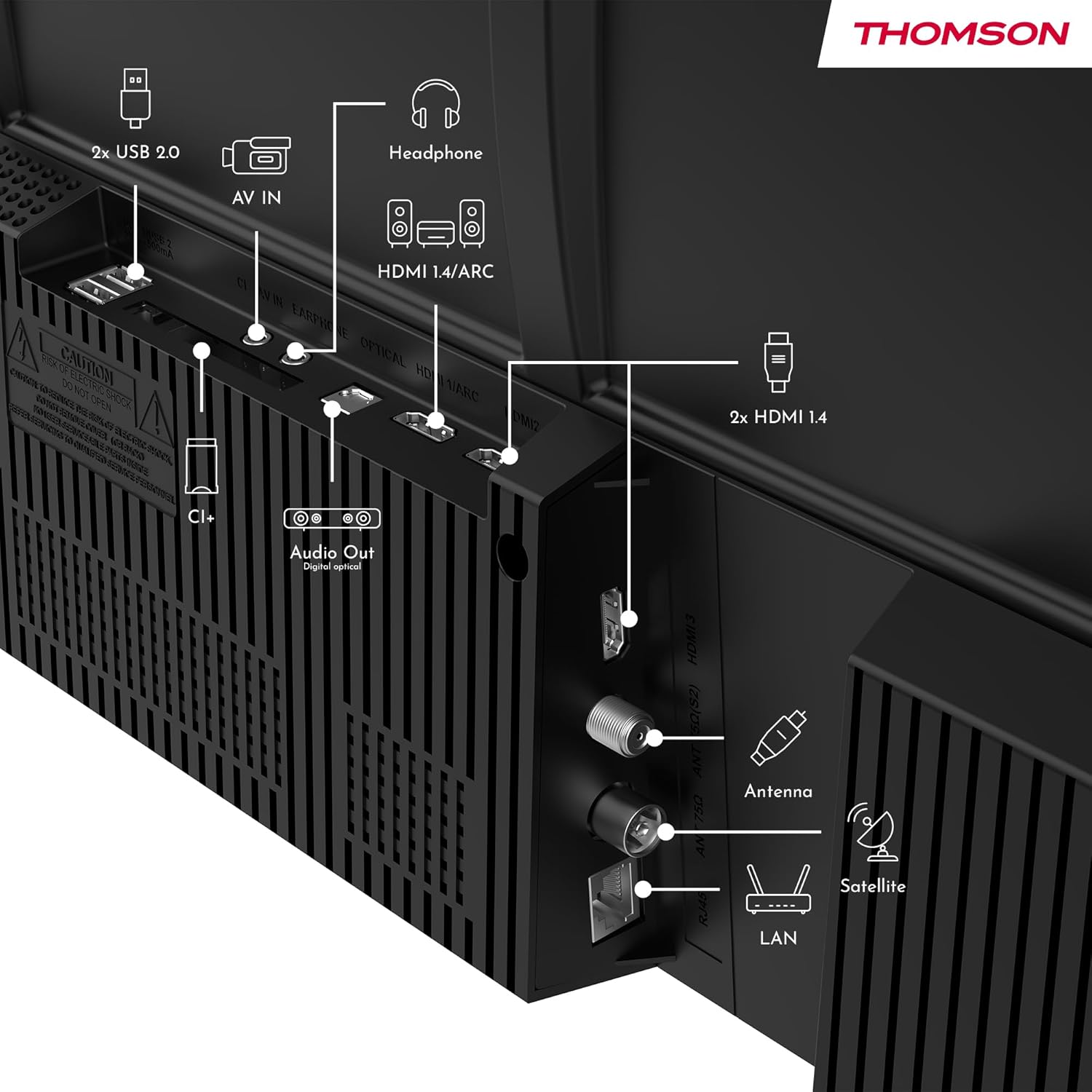
Сурет: артқы view of the Thomson 43FT2S15 Smart TV showing various connection ports. These include 2x USB 2.0, AV IN, Headphone out, HDMI 1.4/ARC, Optical Audio Out, CI+, Antenna (DVB-T2/C), Satellite (DVB-S2), and LAN (Ethernet).
- HDMI: Connect external devices like Blu-ray players, game consoles, or set-top boxes. The TV has 2 HDMI 1.4 ports, one with ARC support.
- USB: For connecting USB storage devices. The TV has 2 USB 2.0 ports.
- Антенна/Спутник: Connect your terrestrial or satellite antenna for live TV.
- LAN (Ethernet): Сымды интернет қосылымы үшін.
- Сымсыз дәлдiк: Сымсыз интернетке қосылу үшін.
- Блютез: For connecting compatible wireless accessories.
- Аудио шығысы (оптикалық): Сыртқы дыбыс жүйесіне қосылу үшін.
- Құлаққап: Құлаққаптарды қосу үшін.
- CI+ ұясы: For inserting a Conditional Access Module (CAM) for encrypted channels.
5. Пайдалану нұсқаулары
5.1 Қуатты қосу/өшіру
Connect the power adapter to the TV and a power outlet. Press the power button on the remote control to turn the TV on or off.
5.2 TiVo OS and Smart Features
Your Thomson Smart TV is powered by TiVo OS, which integrates live TV, streaming applications, and on-demand services into a single, intuitive interface. Personalized recommendations help you discover new content.

Image: The Thomson Smart TV displaying the TiVo OS interface with various streaming apps like Netflix, Canal+, Prime Video, YouTube, and Disney+.
5.3 Дауыспен басқару
Use the TiVo Voice Control feature to navigate channels, open applications, or search for content across different platforms using voice commands. The remote control includes a microphone for this function.

Image: The Thomson Smart TV remote control highlighting the voice control microphone, backlit buttons, and direct access buttons for streaming services.
5.4 Wireless Display
Mirror content from your smartphone, tablet, or laptop to the TV screen using the Wireless Display function. This allows for easy sharing of videos, photos, and applications.
5.5 Аудио және бейне жақсартулары
- Dolby Audio: Experience enhanced sound quality with Dolby Audio, providing clear dialogue and immersive, multi-dimensional effects.

Image: A Thomson Smart TV displaying content with visual representations of sound waves, indicating the Dolby Audio feature.
- HDR10: Enjoy sharper contrast and lifelike colors with HDR10 technology, revealing details in both bright highlights and deep shadows.

Image: A split-screen comparison showing the difference between SDR (Standard Dynamic Range) and HDR10 (High Dynamic Range) image quality on a Thomson Smart TV, demonstrating improved contrast and color.
5.6 Қашықтан басқару құралы
The ergonomic remote control features backlit buttons for easy navigation in low light conditions. It also includes direct access buttons for popular streaming services such as Netflix, YouTube, Prime Video, Disney+, and Canal+.
6. Техникалық қызмет көрсету
Теледидардың ұзақ қызмет ету мерзімі мен оңтайлы өнімділігін қамтамасыз ету үшін мына техникалық қызмет көрсету нұсқауларын орындаңыз:
- Экранды тазалау: Экранды жұмсақ, талшықсыз шүберекпен ақырын сүртіңіз. Қыңыр іздер үшін экранға тікелей емес, матаға жағылған теледидарлар үшін арнайы жасалған экран тазалағышты пайдаланыңыз.
- Шкафты тазалау: Теледидар шкафын сүрту үшін жұмсақ, құрғақ шүберекті пайдаланыңыз. Абразивті тазартқыштарды немесе еріткіштерді қолданбаңыз.
- Желдету: Қызып кетудің алдын алу үшін теледидардың артқы жағындағы желдету саңылауларының бітелмегеніне көз жеткізіңіз.
- Қуат сымы: Қуат сымының зақымдалуын жүйелі түрде тексеріңіз. Зақымдалған болса, ауыстыру үшін білікті қызмет көрсету қызметкерлеріне хабарласыңыз.
7. Ақаулықтарды жою
Теледидарға қатысты мәселелерге тап болсаңыз, келесі жалпы ақауларды жою қадамдарын қараңыз:
- Қуат жоқ:
- Қуат сымының теледидарға және розеткаға мықтап қосылғанын тексеріңіз.
- Басқа құрылғыны қосу арқылы розетканың жұмыс істеп тұрғанына көз жеткізіңіз.
- Тек қашықтан басқару құралында емес, теледидардың өзінде қуат түймесін басып көріңіз.
- Сурет/дыбыс жоқ:
- Дұрыс кіріс көзінің таңдалғанын тексеріңіз (мысалы, HDMI 1, антенна).
- Теледидар мен сыртқы құрылғылар арасындағы барлық кабель қосылымдарын тексеріңіз.
- Adjust the volume and ensure the TV is not muted.
- Қашықтан басқару пульті жұмыс істемейді:
- Қашықтан басқару пультіндегі батареяларды ауыстырыңыз.
- Қашықтан басқару пульті мен теледидардың инфрақызыл сенсоры арасында кедергілер жоқ екеніне көз жеткізіңіз.
- Smart TV Features Not Working (Wi-Fi/Apps):
- Check your internet connection. Restart your router if necessary.
- Go to the TV's network settings to ensure it's connected to Wi-Fi or Ethernet.
- Теледидарды қайта қосып көріңіз.
For more complex issues, please contact customer support or refer to the manufacturer's webсайт.
8. Техникалық сипаттамалар
Key technical specifications for the Thomson 43FT2S15 FHD LED Smart TV:
| Ерекшелік | Техникалық сипаттама |
|---|---|
| Бренд | Томсон |
| Үлгі | 43FT2S15 |
| Экран өлшемі | 43 дюйм (109 см) |
| Көрсету технологиясы | Жарық диодты индикатор |
| Ажыратымдылық | 1920 x 1080 (FHD) |
| Жаңарту жылдамдығы | 60 Гц |
| Аспект қатынасы | 16:9 |
| Операциялық жүйе | TiVo OS |
| Аудио технологиясы | Dolby Audio (Dolby Atmos encoding) |
| HDR қолдауы | HDR10 |
| Қосылу мүмкіндігі | Wi-Fi, Ethernet, Bluetooth, 2x HDMI 1.4 (1x ARC), 2x USB 2.0, Optical Audio Out, AV In, Headphone, CI+ |
| Тюнерлер | DVB-T2/C/S2 (Triple Tuner) |
| Қолдау көрсетілетін Интернет қызметтері | Netflix, YouTube, Prime Video, Disney+, Canal+, Browser |
| Өлшемдер (өнім) | 6 x 95 x 60 см; 6.5 кг |
| Энергия тиімділігі класы | E |

Image: Energy efficiency label for the Thomson 43FT2S15 Smart TV, showing an energy class of E and energy consumption of 42 kWh/1000h (SDR) and 46 kWh/1000h (HDR).
Өнім туралы толық ақпаратты EPREL дерекқорынан қараңыз: https://eprel.ec.europa.eu/qr/1969521
9. Кепілдік және қолдау
Your Thomson 43FT2S15 TV comes with a warranty. Please refer to the included Warranty Card for specific terms and conditions.
For technical support or service inquiries, please contact the manufacturer:
- Өндіруші: Ағынview GmbH
- Webсайт: www.streamview.com
- Электрондық пошта: contact@streamview.com
- Телефон: +4318900066
Please have your model number (43FT2S15) and purchase information ready when contacting support.