
Кіріспе
Thank you for choosing the LIORQUE Wireless Weather Station YGH6208. This device provides accurate indoor and outdoor temperature and humidity readings, weather forecasts, and features a DCF radio-controlled clock with alarm functions. This manual will guide you through the setup, operation, and maintenance of your weather station.
Пакет мазмұны
- 1 x LIORQUE Wireless Weather Station (Main Unit)
- 1 x Сыртқы сенсор
- 3 x AAA Batteries (for Main Unit)
- 2 x AAA Batteries (for Outdoor Sensor)
- 1 x Пайдаланушы нұсқаулығы (осы құжат)
Өнім аяқталдыview
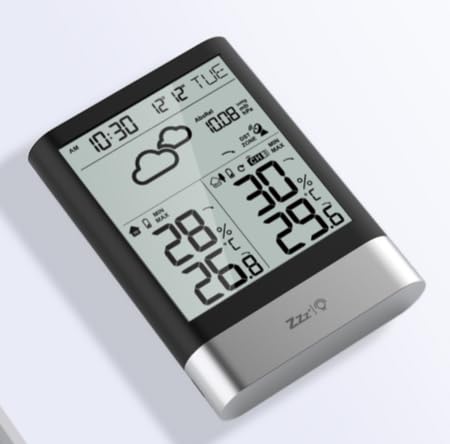
1-сурет: LIORQUE Wireless Weather Station Main Unit. This image shows the front view of the main display unit, highlighting its LCD screen and compact design.
Негізгі блоктың ерекшеліктері:
- 4.3-inch LCD screen with backlight
- Ішкі температура мен ылғалдылық көрсеткіші
- Сыртқы температура мен ылғалдылық дисплейі
- Ауа райы болжамының белгішелері
- DCF radio-controlled clock with manual setting option
- Double alarm clock with snooze function
- Calendar and day of the week display (7 languages)
- Max/Min temperature and humidity records
- Air pressure display and weather trend
- 12/24 сағаттық уақыт дисплейі
Outdoor Sensor Features:
- Wireless transmission up to 100m (open area)
- Температура мен ылғалдылықты өлшеу
- Supports hanging or standing placement
- Data updated every 30 seconds
- Supports up to 3 sensors (one included)
Орнату
1. Батареяны орнату
- Сыртқы сенсор: Open the battery compartment cover on the back of the outdoor sensor. Insert 2 x AAA batteries, ensuring correct polarity (+/-). Close the cover.
- Негізгі блок: Open the battery compartment cover on the back of the main unit. Insert 3 x AAA batteries, ensuring correct polarity (+/-). Close the cover.
- The main unit will power on and display indoor readings.
2. Sensor Pairing
After installing batteries in both units, the main unit will automatically search for the outdoor sensor. The outdoor temperature and humidity should appear on the main unit's display within a few minutes. If the outdoor readings do not appear:
- Ensure both units are within range (up to 100m in open air).
- Press the "TX" button inside the outdoor sensor's battery compartment to manually send a signal.
- On the main unit, press and hold the "CHANNEL" button to initiate a manual search for the sensor.
3. Initial Settings (Time, Date, Units)
The weather station will attempt to synchronize with the DCF radio signal for automatic time setting. This may take several hours, especially in areas with weak signals. You can manually set the time and date if needed.
- Уақытты қолмен орнату: Press and hold the "MODE" button to enter time setting mode. Use the "UP" and "DOWN" buttons to adjust values and "MODE" to confirm and move to the next setting (e.g., 12/24 hour format, hour, minute, year, month, day, language for day of week).
- Температура бірліктері: Цельсий және Фаренгейт арасында ауысу үшін «°C/°F» түймесін басыңыз.
- Air Pressure Units: Press the "BARO" button to cycle through air pressure units (e.g., hPa, inHg).
Пайдалану нұсқаулары
Ақпаратты көрсету
The 4.3-inch LCD screen displays various information:
- Уақыты мен күні: Current time, date, and day of the week.
- Ішкі оқулар: Current indoor temperature and humidity.
- Ашық ауадағы оқулар: Current outdoor temperature and humidity from the connected sensor.
- Ауа райы болжамы: Болжамды ауа райы жағдайларын көрсететін белгішелер (мысалы, күн шуақты, бұлтты, жаңбырлы).
- Ауа қысымы: Атмосфералық қысымның қазіргі деңгейі және оның өзгеру үрдісі.
- Артқы жарық: The screen backlight activates with a light touch and returns to normal brightness after 10 seconds to conserve battery.
Оятқыш функциясы
The weather station features a double alarm clock with snooze.
- Дабылдарды орнату: Press the "ALARM" button to view Alarm 1. Press "ALARM" again to view Alarm 2. Hold "ALARM" to enter alarm setting mode. Use "UP" and "DOWN" to adjust the hour and minute, and "ALARM" to confirm.
- Дабылдарды қосу/өшіру: Әзірге viewing an alarm, press "UP" to toggle it on or off. An alarm icon will appear when active.
- Кейінге қалдыру функциясы: When an alarm sounds, press any button (except "ALARM OFF") to activate snooze. The alarm will sound again after a set interval. Press "ALARM OFF" to stop the alarm completely.
Ең көп және ең аз жазбалар
The weather station records the maximum and minimum indoor/outdoor temperature and humidity values.
- Press the "MAX/MIN" button once to display maximum recorded values.
- Press "MAX/MIN" again to display minimum recorded values.
- Press "MAX/MIN" a third time to return to current readings.
- To clear records, hold the "MAX/MIN" button while viewжазбаларды енгізу.
Техникалық қызмет көрсету
- Батареяны ауыстыру: Replace batteries in both the main unit and outdoor sensor when the low battery indicator appears on the display. Always replace all batteries at the same time.
- Тазалау: Дисплей мен құрылғының беттерін жұмсақ, d шүберекпен тазалаңызamp мата. Абразивті тазартқыштарды немесе еріткіштерді қолданбаңыз.
- Сыртқы сенсорды орналастыру: For optimal performance and longevity, install the outdoor sensor in a shaded area, protected from direct sunlight and rain. Ensure it is within the 100m wireless range of the main unit.
Ақаулықтарды жою
| Мәселе | Мүмкін шешім |
|---|---|
| Сыртқы температура/ылғалдылық дисплейі жоқ. |
|
| Incorrect time display. |
|
| Дисплей күңгірт немесе бос. |
|
| Weather forecast seems inaccurate. |
|
Техникалық сипаттамалар
- Үлгі: YGH6208
- Бренд: ЛИОРК
- Дисплей түрі: СКД
- Қуат көзі (негізгі блок): 3 x AAA батареялары (жинаққа кіреді)
- Power Source (Outdoor Sensor): 2 x AAA батареялары (жинаққа кіреді)
- Сымсыз диапазон: 100 м дейін (ашық алаң)
- Температура дәлдігі: ±0.5 °C
- Сенсорлық технология: Funk (Wireless)
- Арнайы мүмкіндіктер: DCF Radio Clock, Alarm, Snooze, Weather Forecast, Max/Min Records, Backlight
- Қосылатын компоненттер: Weather Station Main Unit, Outdoor Sensor
Кепілдік және қолдау
LIORQUE products are designed for reliability and performance. For warranty information or technical support, please refer to the contact details provided with your purchase or visit the official LIORQUE webсайт. Кепілдік шағымдары үшін сатып алуды растайтын құжатты сақтаңыз.


