
1. Кіріспе
The AJAZZ AKP03 Macro Keypad Stream Controller is a versatile device designed to enhance productivity and streamline workflows for gamers, streamers, and professionals. Featuring six programmable keys with LCD displays, three physical knobs, and three toggle switches, it offers extensive customization options for various tasks.
This manual provides detailed instructions for setting up, operating, and maintaining your AKP03 device, ensuring optimal performance and user experience.
2. Өнімнің ерекшеліктері
- Six Programmable Macro Keys: Customizable LCD displays for single or continuous actions.
- Three Physical Knobs: For precise control over various functions.
- Three Toggle Switches: Additional control options.
- One-Click Operation: Instant execution of macro commands, text input, application launches, and media control.
- Intuitive Driver Software: Drag-and-drop functionality for easy key assignment and property configuration.
- Кең үйлесімділік: Seamless integration with platforms like Streamlabs, Twitch, YouTube, and various software applications on Windows and Mac.
- Removable 40° Stand: Эргономикалық қамтамасыз етеді viewing angle and stable placement.

2.1 -сурет: Аяқталдыview of the AJAZZ AKP03 Macro Keypad, highlighting its programmable buttons, toggle switches, and scroll wheels.
3. Пакет мазмұны
Пакетте барлық элементтердің бар екенін тексеріңіз:
- AJAZZ AKP03 Macro Keypad Stream Controller
- USB-C-USB-A кабелі
- Removable 40° Stand
- Пайдаланушы нұсқаулығы (бұл құжат)
4. Орнату
4.1 Физикалық байланыс
- Attach the removable 40° stand to the bottom of the AKP03 for an ergonomic angle, if desired.
- Connect the provided USB-C cable to the USB-C port on the AKP03.
- Кабельдің USB-A ұшын компьютеріңіздегі (ДК немесе Mac) қолжетімді USB портына қосыңыз.
- Құрылғы автоматты түрде қосылады.

Figure 4.1: Attaching the removable 40° stand to the AKP03.
4.2 Бағдарламалық құралды орнату
To unlock the full customization capabilities of your AKP03, you must install the dedicated driver software.
- Өзіңізді ашыңыз web browser and navigate to the official AJAZZ webсайт: www.a-jazz.com.
- Locate the 'Driver Download' section.
- Іздеу 'AKP03' or browse for the corresponding driver for your model.
- Download the driver software compatible with your operating system (Windows or macOS).
- Орнатушыны іске қосыңыз және орнатуды аяқтау үшін экрандағы нұсқауларды орындаңыз.
- Сұралса, компьютерді қайта іске қосыңыз.
Video 4.1: Demonstrates the software installation process and initial setup for the AJAZZ Macro Keypad.
5. Пайдалану нұсқаулары
5.1 Customizing Keys and Knobs
The AKP03's driver software provides a user-friendly interface for customization:
- Launch the 'Stream Dock AJAZZ' software from your desktop or applications folder.
- The software will display a visual representation of your AKP03.
- To assign an action, drag and drop a desired function (e.g., launch application, media control, macro command) from the software's library onto one of the six programmable keys.
- For knobs, select the knob in the software and assign functions such as volume control, scrolling, or zooming.
- You can configure properties for each assigned action, including specific file жолдар, web URLs, or macro sequences.
- The LCD displays on the keys will update to show the assigned icon or text.
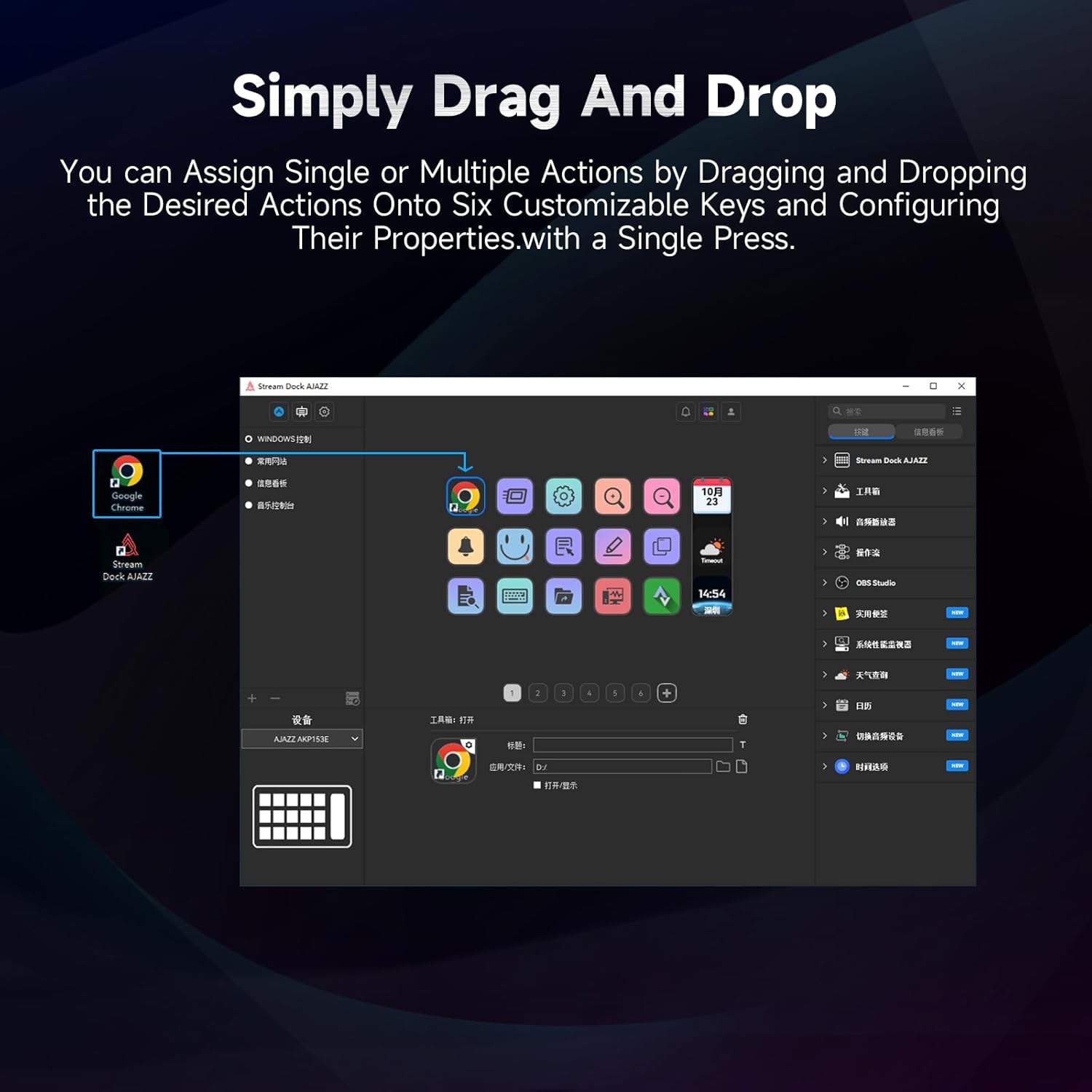
Figure 5.1: Customizing keys using the drag-and-drop interface in the AJAZZ software.
Video 5.1: Demonstration of assigning actions to keys for launching web pages and software with a single click.
5.2 Using Profiles and Pages
The software supports multiple profiles and pages, allowing you to switch between different sets of key assignments for various applications or tasks.
- Жаңа кәсіпқой жасаңызfiles for specific games, editing software, or streaming setups.
- Әрбір кәсіпқойдың ішіндеfile, you can create multiple pages of key assignments, accessible by navigating through the device's buttons or software interface.
- The AKP03 automatically switches to the relevant profile when a linked application is in focus.
Video 5.2: Illustrates the multi-functional capabilities and profile switching of the AKP03 for various tasks.
6. Техникалық қызмет көрсету
To ensure the longevity and optimal performance of your AJAZZ AKP03, follow these maintenance guidelines:
- Тазалау: Use a soft, dry cloth to wipe the surface of the device. Avoid abrasive cleaners or solvents.
- Сақтау орны: Құрылғыны салқын, құрғақ жерде, тікелей күн сәулесінен және төтенше температурадан алыс жерде сақтаңыз.
- Кабельге күтім жасау: Зақымдану үшін USB кабелін шамадан тыс майыстырмаңыз немесе бұрамаңыз.
- Бағдарламалық құрал жаңартулары: Regularly check the AJAZZ website for software and firmware updates to ensure compatibility and access to new features.
7. Ақаулықтарды жою
If you encounter issues with your AKP03, refer to the following common troubleshooting steps:
- Құрылғы танылмаған:
- Ensure the USB cable is securely connected to both the AKP03 and your computer.
- Басқа USB портына қосып көріңіз.
- Компьютеріңізді қайта іске қосыңыз.
- Verify that the driver software is correctly installed and up to date.
- Жауап бермейтін пернелер:
- Check the software to ensure keys are properly assigned and the correct profile белсенді.
- Ensure the driver software is running in the background.
- Бағдарламалық қамтамасыз ету мәселелері:
- Драйвер бағдарламалық жасақтамасын қайта орнатыңыз.
- Check for software updates on the AJAZZ webсайт.
8. Техникалық сипаттамалар
| Ерекшелік | Мәлімет |
|---|---|
| Бренд | AJAZZ |
| Модель атауы | AKP03 |
| Үйлесімді құрылғылар | Компьютер, ноутбук |
| Контроллер түрі | Пернетақта |
| Қосылу технологиясы | USB-C |
| Түйме саны | 6 Programmable Keys (with LCD displays), 3 Physical Knobs, 3 Toggle Switches |
| Элемент салмағы | 0.32 келі |
| Элемент өлшемдері (L x W x H) | 5 x 3 x 2 дюйм |
| Қуат көзі | Сымды электр |
9. Кепілдік және қолдау
9.1 Кепілдік туралы ақпарат
The AJAZZ AKP03 Macro Keypad Stream Controller comes with a 1 жылдық шектеулі кепілдік сатып алынған күннен бастап. Бұл кепілдік қалыпты пайдалану кезіндегі өндірістік ақаулар мен ақауларды қамтиды. Ол дұрыс пайдаланбау, апаттар, рұқсатсыз өзгертулер немесе дұрыс емес орнату салдарынан туындаған залалды қамтымайды.
Кепілдік шағымдары үшін сатып алуды растайтын құжатты сақтаңыз.
9.2 Тұтынушыларды қолдау қызметі
For technical assistance, troubleshooting, or warranty inquiries, please contact AJAZZ customer support:
- Webсайт: www.a-jazz.com (Refer to the 'Support' or 'Contact Us' section)
- Электрондық пошта: [Insert Customer Support Email, if available]
- Телефон: [Insert Customer Support Phone Number, if available]
Our support team is available to assist you with any questions or concerns regarding your product.