
1. Кіріспе
This manual provides detailed instructions for the proper use and maintenance of your BAOFENG UV-32 10W Ham Radio. The UV-32 is a multi-band two-way radio featuring 10W selectable power, GPS navigation, a 2.0-inch color display, and multiple programming options including wireless app connectivity. Please read this manual thoroughly before operating the device to ensure safe and efficient communication.
2. Қауіпсіздік туралы ақпарат
Observe the following safety precautions to prevent injury or damage to the radio:
- Радионы жарылғыш ортада (мысалы, жанғыш газдар, шаң бөлшектері, металл ұнтақтары) пайдаланбаңыз.
- Do not transmit without an antenna connected.
- Keep the antenna at least 2.5 cm (1 inch) away from your body when transmitting.
- Use only BAOFENG-approved batteries and chargers. Unauthorized accessories may cause damage or fire.
- Радионы бөлшектемеңіз немесе өзгертпеңіз. Жөндеу жұмыстарын тек білікті мамандар ғана жүргізуі керек.
- Тікелей күн сәулесінің немесе экстремалды температураның ұзақ әсерінен аулақ болыңыз.
- Do not operate the radio while driving or performing other activities that require full attention.
3. Пакет мазмұны
Пакетте барлық элементтердің бар екенін тексеріңіз:
- 1 x BAOFENG UV-32 Radio
- 1 x 2500 мАч батарея
- 1 x USB-C Charger
- 1 x Desktop Charger Base
- 1 x Standard UV Antenna
- 1 x Long Airband Antenna
- 1 x Гарнитура
- 1 x белдік қысқышы
- 1 x Radio Case Holder

Image: The BAOFENG UV-32 radio shown with its complete set of accessories, including the battery, charger, antennas, headset, belt clip, and case holder.
4. Өнім аяқталдыview
Familiarize yourself with the main components of your UV-32 radio.

Сурет: алдыңғы view of the BAOFENG UV-32 radio, highlighting the 2.0-inch color display, alphanumeric keypad, and function buttons.
Негізгі компоненттер:
- Антенна қосқышы: For attaching the standard UV or airband antenna.
- Қуат/дыбыс түймесі: Радионы қосады/өшіреді және дыбыс деңгейін реттейді.
- Көрсеткіш: 2.0-inch color screen showing frequency, channel, battery status, and other indicators.
- PTT түймесі: Push-To-Talk button for transmitting.
- Side Keys (P1, P2): Customizable function keys.
- Пернетақта: Alphanumeric input for frequencies, channels, and menu navigation.
- USB-C зарядтау порты: For direct battery charging.
- Қосалқы құрал ұясы: For connecting the headset or programming cable.
5. Орнату
5.1 Батареяны орнату және зарядтау
- Align the 2500mAh Li-ion battery with the grooves on the back of the radio.
- Батареяны орнына түскенше жоғары сырғытыңыз.
- To charge, connect the USB-C charger directly to the battery's USB-C port or place the radio with the battery attached into the desktop charging base.
- The charging indicator on the desktop base will show red during charging and green when fully charged.

Image: A close-up of the 2500mAh Li-ion battery for the UV-32, highlighting its integrated USB-C charging port.
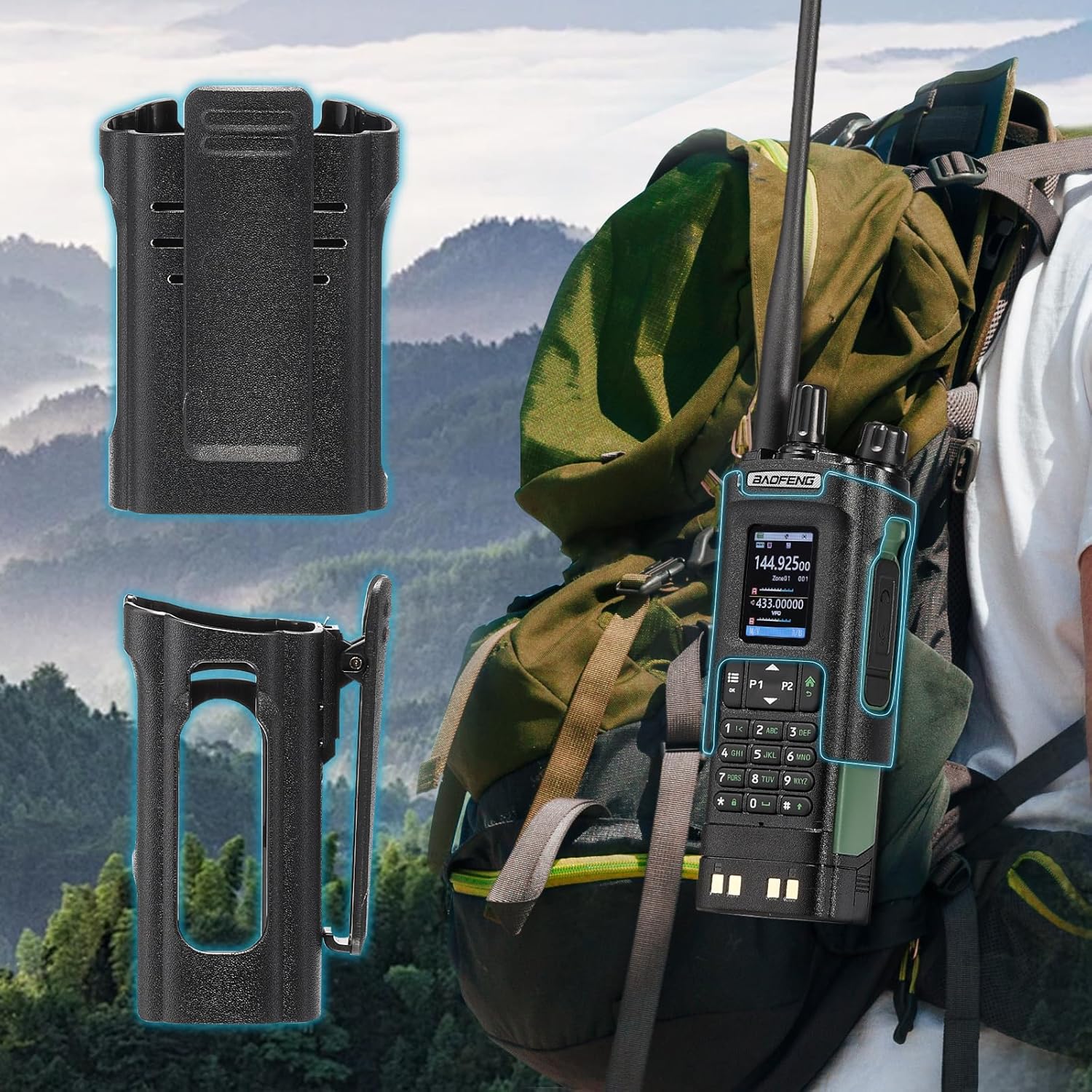
Image: The BAOFENG UV-32 radio demonstrating both direct USB-C charging and charging via its desktop cradle.
5.2 Антеннаны орнату
- Select the appropriate antenna: the standard UV antenna for general VHF/UHF use or the long airband antenna for enhanced aviation signal reception.
- Screw the chosen antenna clockwise onto the antenna connector at the top of the radio until it is finger-tight. Do not overtighten.

Image: The BAOFENG UV-32 radio illustrating the use of two different antennas: a standard antenna for UHF/VHF and a longer antenna specifically designed for airband reception.
5.3 Belt Clip Installation
- Align the belt clip with the screw holes on the back of the radio.
- Secure the belt clip using the provided screws.
- The radio case holder can be used to attach the radio to a backpack or belt for secure carrying.

Image: The BAOFENG UV-32 radio securely mounted to a backpack strap using its belt clip and an additional case holder, demonstrating portability.
6. Радионы пайдалану
6.1 Қуатты қосу/өшіру және дыбыс деңгейі
Rotate the Power/Volume knob clockwise to turn the radio on and increase volume. Rotate counter-clockwise to decrease volume and turn the radio off.
6.2 Өшіруview
The 2.0-inch color display provides essential information:
- Жиілік/арна: Displays the current operating frequency or channel number.
- Батарея деңгейі: Қалған батарея зарядын көрсетеді.
- Сигнал күші: Shows the strength of received signals.
- Режим индикаторлары: Icons for various functions like GPS, Bluetooth, power level, etc.

Image: A close-up of the BAOFENG UV-32's 2-inch color display, showing detailed frequency, channel, and status information.
6.3 Channel Mode vs. Frequency Mode
The radio operates in two primary modes:
- Жиілік режимі (VFO): Allows direct input of frequencies for scanning or temporary use.
- Арна режимі (MR): Uses pre-programmed channels for quick access to stored frequencies.
түймесін басыңыз МӘЗІР button and navigate to the mode setting to switch between VFO and MR modes.
6.4 Жиілікті таңдау
- Пернетақта: In Frequency Mode, directly enter the desired frequency using the numeric keypad.
- Quick Channel Knob: Rotate the top knob to quickly scroll through frequencies or channels.
- Жоғары/төмен көрсеткілер: Use the arrow keys (P1/P2) to fine-tune frequencies or navigate channels.
6.5 Тарату және қабылдау
- Ensure an antenna is properly connected.
- Select the desired frequency or channel.
- Тасымалдау үшін басып тұрыңыз PTT Радионың бүйіріндегі түймені басыңыз. Микрофонға анық сөйлеңіз.
- шығарыңыз PTT жіберуді тоқтату және қабылдау режиміне оралу үшін түймені басыңыз.
- Қуат деңгейлері: The UV-32 offers High (H), Medium (M), and Low (L) power settings. Adjust this in the menu to balance range and battery life.
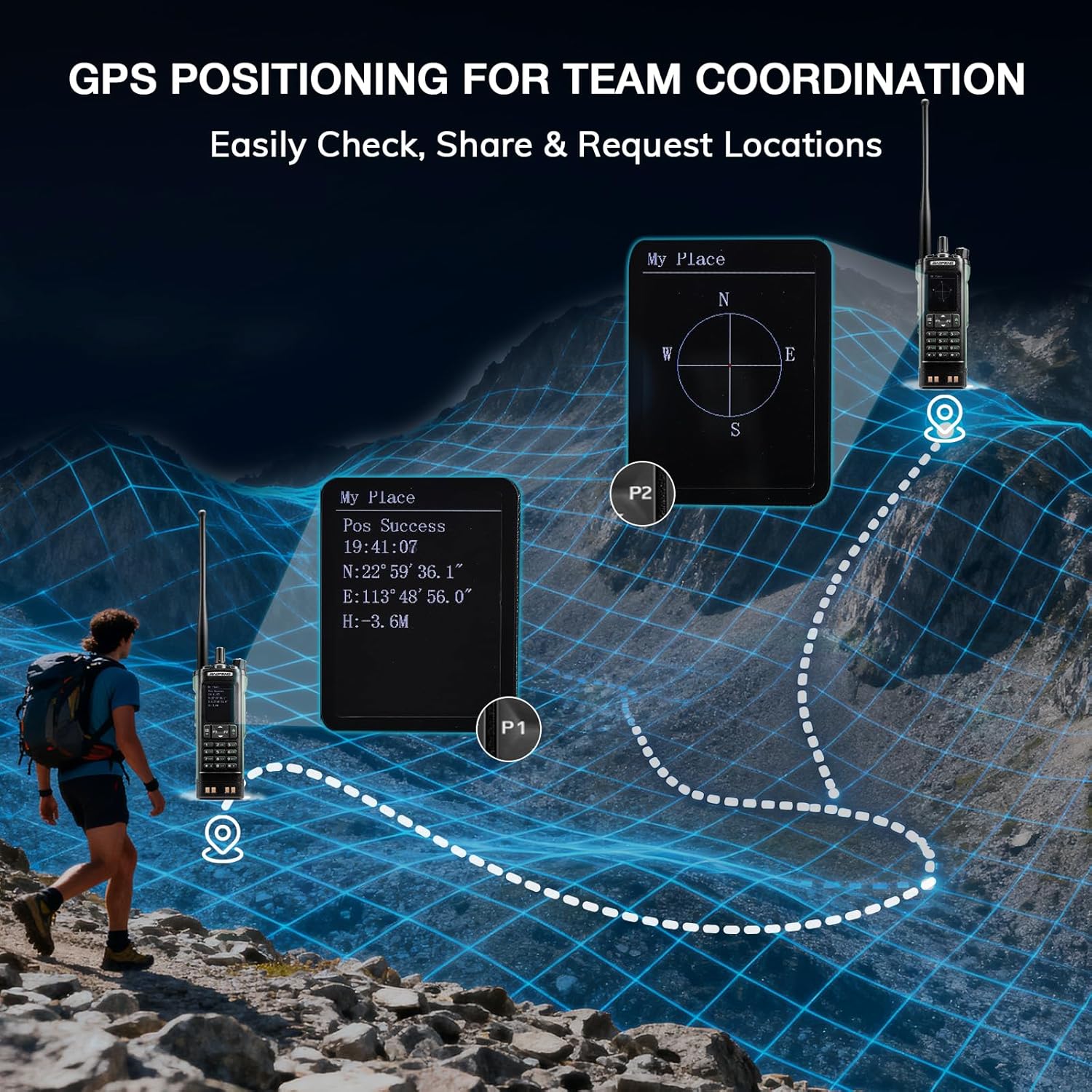
Image: The BAOFENG UV-32 radio's display showing different power output levels (High, Medium, Low) and an external SWR meter for measurement.
6.6 Programming Options
The UV-32 offers several methods for programming frequencies and settings:
- Wireless APP Programming: Connect your radio to a smartphone (iOS/Android) via Bluetooth using the dedicated BT app for quick and wireless programming.
- CHIRP Software: For advanced or bulk programming, use CHIRP software on a PC. Select "UV-17ProGPS" as the radio model in CHIRP.
- Keypad Programming: Basic programming can be done directly on the radio using the keypad and menu system.
- One-Key Frequency Copy: This feature allows for easy cloning of frequencies from another radio. Refer to the radio's on-screen prompts or full manual for specific steps.

Image: An illustration depicting the various programming methods available for the BAOFENG UV-32, including mobile app (Bluetooth), CPS software, CHIRP software, and direct keypad input.

Image: Two BAOFENG radios illustrating the one-key frequency copy function, allowing for quick and easy channel cloning between devices.
6.7 GPS навигациясы
The integrated GPS module provides real-time location data:
- Access the GPS function through the radio's menu.
- View your current latitude, longitude, and altitude.
- The radio supports sharing your location or requesting coordinates from other team members for improved coordination.

Image: A visual representation of the BAOFENG UV-32's GPS functionality, showing how it displays coordinates and facilitates location sharing for team coordination in outdoor environments.
6.8 Enhanced Airband Reception
For clearer reception of aviation signals, utilize the dedicated AM antenna included with your UV-32. This specialized antenna is designed to provide more accurate and stable airband listening compared to standard UV dual-band antennas.
6.9 NOAA ауа райы радиосы
The UV-32 can receive NOAA weather alerts. Consult the radio's menu for instructions on how to scan for and select NOAA channels in your area.
6.10 Реттелетін бүйірлік пернелер
The radio features four customizable side keys (P1, P2, and two others). These can be programmed via the menu or programming software to quickly access frequently used functions such as scan, monitor, or power level adjustment.

Image: A close-up of the BAOFENG UV-32's side, highlighting the customizable P1 and P2 function keys.
7. Техникалық қызмет көрсету
7.1 Радионы тазалау
Радионың бетін жұмсақ шүберекпен сүртіңіз, damp мата. Қатты химиялық заттарды немесе абразивті тазартқыштарды қолданбаңыз. Қолданар алдында барлық порттардың құрғақ екеніне көз жеткізіңіз.
7.2 Батареяға күтім жасау
- Алғашқы қолданар алдында батареяны толығымен зарядтаңыз.
- Батареяны шамадан тыс зарядтаудан немесе толығымен зарядтаудан аулақ болыңыз.
- Батареяны ұзақ уақыт пайдаланбаған кезде салқын, құрғақ жерде сақтаңыз.
7.3 Сақтау
When storing the radio for a long time, remove the battery and store it separately. Keep the radio in a dry, dust-free environment away from direct sunlight and extreme temperatures.
8. Ақаулықтарды жою
| Мәселе | Ықтимал себебі | Шешім |
|---|---|---|
| Радио қосылмайды | Батарея дұрыс орнатылмаған немесе заряды біткен. | Ensure battery is securely attached. Charge the battery fully. |
| Тасымалдау мүмкін емес | Antenna not connected. Incorrect frequency/channel. Low power setting. | Attach antenna. Verify frequency/channel. Increase power level. |
| Poor reception/transmission range | Obstructions. Low power setting. Incorrect antenna. | Move to an open area. Increase power. Ensure correct antenna is used and properly connected. |
| Programming errors with CHIRP/APP | Incorrect radio model selected. Connection issues. Outdated software/firmware. | Ensure "UV-17ProGPS" is selected in CHIRP. Re-establish Bluetooth connection. Update software/firmware if available. |
9. Техникалық сипаттамалар
| Ерекшелік | Мәлімет |
|---|---|
| Бренд | БАОФЕНГ |
| Үлгі нөмірі | УК-32 |
| Арналар саны | 1000 |
| Жиілік диапазоны | UHF, VHF |
| Қуат шығысы | Up to 10W (selectable High, Medium, Low) |
| Дисплей | 2.0 дюймдік түрлі-түсті дисплей |
| Батарея | 2500 мАч литий-ион (жинаққа кіреді) |
| Зарядталуда | USB-C, Desktop Charger Base |
| Арнайы мүмкіндіктер | Digital Display, Dual Band, USB-C Rechargeable, Wireless APP Programming, Wireless Channel Clone, GPS, NOAA Reception |
| Қосылу протоколы | Блютез |
| Өнім өлшемдері | 1.2"D x 2.2"W x 4"H |
| Суға төзімділік деңгейі | Суға төзімді емес |
10. Кепілдік және қолдау
Your BAOFENG UV-32 radio comes with an 18 айлық кепілдік. BAOFENG also provides өмір бойы қолдау көрсету осы өнім үшін.
For technical assistance, warranty claims, or further inquiries, please visit the official BAOFENG website or contact their customer support directly. Keep your purchase receipt as proof of purchase for warranty services.