
TOPUTURE TP5
TOPUTURE TP5 Folding Treadmill User Manual
Model: TP5 | Brand: TOPUTURE
Кіріспе
This manual provides essential instructions for the safe and efficient use of your TOPUTURE TP5 Folding Treadmill. Please read this manual thoroughly before operating the device and retain it for future reference.
Маңызды қауіпсіздік нұсқаулары
To reduce the risk of serious injury, read all important precautions and instructions in this manual before using the treadmill. The manufacturer assumes no responsibility for personal injury or property damage sustained by or through the use of this product.
- Always ensure the safety key is properly attached to your clothing before starting the treadmill.
- Жұмыс кезінде балалар мен үй жануарларын жүгіру жолынан алыс ұстаңыз.
- Place the treadmill on a level surface with adequate clearance around it.
- Жүгіру жолының сымы немесе ашасы зақымдалған болса немесе ол дұрыс жұмыс істемесе, оны пайдаланбаңыз.
- Кез келген жаттығу бағдарламасын бастамас бұрын дәрігермен кеңесіңіз.
Орнату және құрастыру
The TOPUTURE TP5 treadmill comes largely pre-assembled. Follow these steps for quick setup:
- Қаптаманы ашу: Carefully remove the treadmill from its packaging. Ensure all components are present.
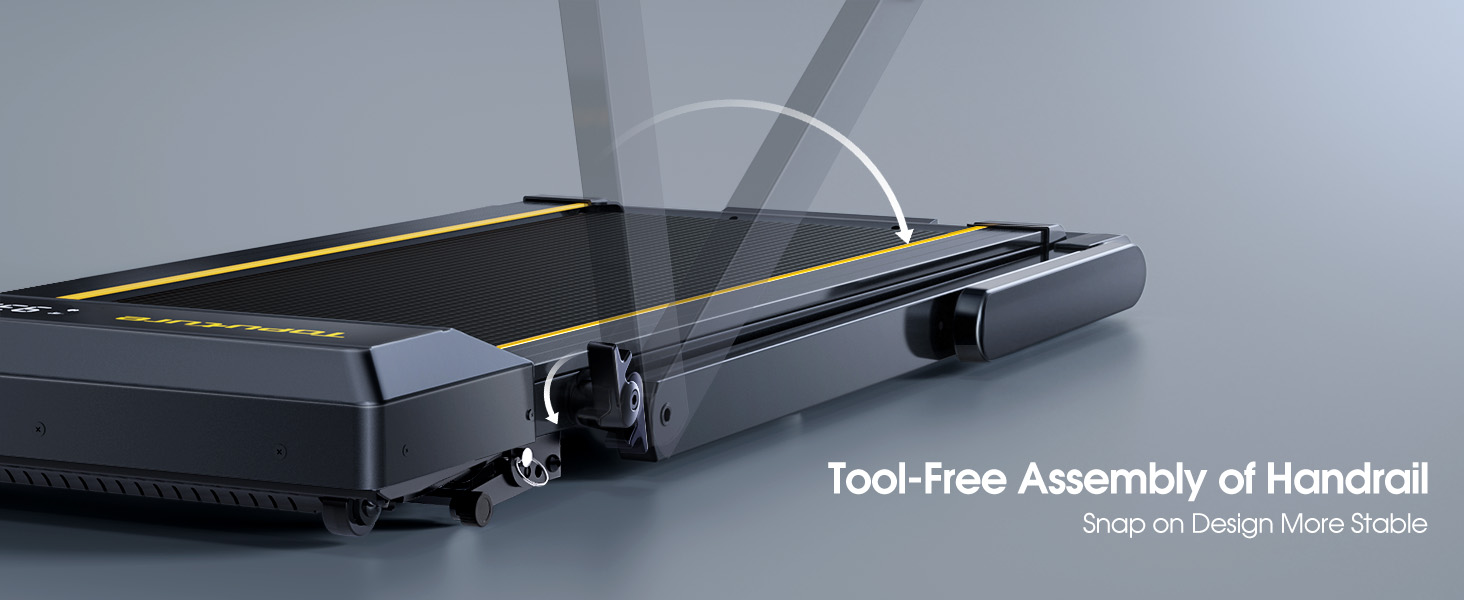
- Тұтқаны ашу: Gently lift the handlebar into its upright position until it locks securely. The quick-release snaps allow for easy transition between walking pad and running treadmill configurations.
- Қосылатын қуат: Қуат сымын жерге тұйықталған электр розеткасына қосыңыз.
- Бастапқы тексеру: Before first use, ensure the running belt is centered and properly tensioned. Refer to the maintenance section for belt adjustment if needed.

Пайдалану нұсқаулары
Басқару тақтасы және дисплей
The treadmill features a multifunctional LED display and touch controls. Information displayed includes time, speed, calories burned, distance, and heart rate.

Starting and Adjusting Speed
- Бастау/Тоқтату: Press the Start/Pause button on the control panel or remote to begin/end your workout.
- Жылдамдықты реттеу: Use the Speed +/- buttons on the control panel or remote to adjust the speed from 0.6 to 10 MPH.
- Қолданбаны басқару: Connect your smartphone or tablet via Bluetooth to control the treadmill and access guided workouts.

Көлбеу функциясы
The treadmill offers three manual incline levels: 1%, 6%, and 12%. Adjust the incline by manually setting the support legs at the rear of the treadmill to the desired position.

Bluetooth динамигі
Connect your device to the treadmill's built-in Bluetooth speaker to enjoy music or audio during your workout.
Жүрек соғу жиілігінің мониторы
Grip the hand sensors on both sides of the display to monitor your heart rate during exercise.
Техникалық қызмет көрсету
- Майлау: Regularly apply treadmill lubricant under the running belt to ensure smooth operation and prolong belt life. Refer to the lubricant instructions for frequency.
- Тазалау: Жарнамамен жүгіру жолын сүртіңізamp тер мен шаңды кетіру үшін әр қолданғаннан кейін шүберек.
- Белдікті реттеу: If the running belt feels loose or is off-center, use the provided tools to adjust the tension and alignment as per the detailed instructions in the full manual.

Ақаулықтарды жою
Егер сіз жүгіру жолағында қандай да бір мәселеге тап болсаңыз, келесі кең таралған шешімдерді қараңыз:
- Жүгіру жолы іске қосылмады: Ensure the power cord is securely plugged in and the safety key is correctly placed on the console. Check the power switch on the treadmill.
- Белдіктің сырғып кетуі: The running belt may need tensioning. Refer to the maintenance section or the full manual for instructions on adjusting belt tension.
- Ерекше шулар: Check for any loose parts or foreign objects under the belt. Lubricate the running belt if it has not been done recently.
- Дисплей жұмыс істемейді: Барлық қосылымдардың қауіпсіз екеніне көз жеткізіңіз. Мәселе шешілмесе, тұтынушыларды қолдау қызметіне хабарласыңыз.
Техникалық сипаттамалар
| Ерекшелік | Мәлімет |
|---|---|
| Бренд | TOPUTURE |
| Модель атауы | TP5 |
| Түс | Қара |
| Өнім өлшемдері | 52.3"D x 28.2"W x 5.1"H |
| Элемент салмағы | 78 фунт |
| Материал | Легірленген болат |
| Максималды жылдамдық | Сағатына 10 миль |
| Максималды көлбеу пайызыtage | 12% |
| Максималды ат күші | 2.5 HP |
| Максималды салмақ бойынша ұсыныс | 300 фунт |
| Дисплей | Жарық диодты индикатор |
| Қосылу технологиясы | Блютез |
| Арнайы мүмкіндіктер | Built-In Speaker, Foldable, Heart Rate Monitor, Portable, Shock Absorbent |
| Құрастыру қажет | No (Pre-assembled) |
| Қосылған құрамдас бөліктер | Қуат сымы |
Кепілдік және қолдау
Your TOPUTURE TP5 Treadmill comes with a бір жылдық кепілдік. For any assistance, questions, or warranty claims, please contact TOPUTURE customer support.
Қолдау қызметіне қалай хабарласуға болады:
- Amazon тіркелгіңізге кіріңіз.
- Go to "Your Orders".
- Find the order ID for your treadmill.
- «Сатушымен байланысу» түймесін басыңыз.
Please have your model name (TP5) and purchase details ready when contacting support.
Ask a question about this manual
Ask about setup, troubleshooting, compatibility, parts, safety, or missing instructions. Manuals+ will review the question and use this page’s manual context to help answer it.