
1. Кіріспе
This manual provides essential instructions for the installation, operation, and maintenance of your Generic P11 Dual 4K 6MP Outdoor Security Camera. This advanced security camera features dual 4K lenses and a 6MP sensor, delivering clear images for effective surveillance. It includes an integrated police siren for intruder deterrence and offers real-time monitoring via WiFi, accessible through a smartphone application. With infrared LED illumination and night vision capabilities, it ensures 24-hour vigilance. The camera detects suspicious movements and sends instant alerts to your mobile device. Designed for outdoor use, it boasts weather-resistant construction and two antennas for a stable connection. The system also supports two-way audio and high-definition recording. Please read this manual thoroughly before use to ensure proper functionality and safety.
2. Пакет мазмұны
Барлық элементтер пакетте бар екенін тексеріңіз:
- Generic P11 Dual 4K 6MP Outdoor Security Camera
- Қуат адаптері
- Бекіту бұрандалары мен қабырға тығындары
- Пайдаланушы нұсқаулығы (бұл құжат)
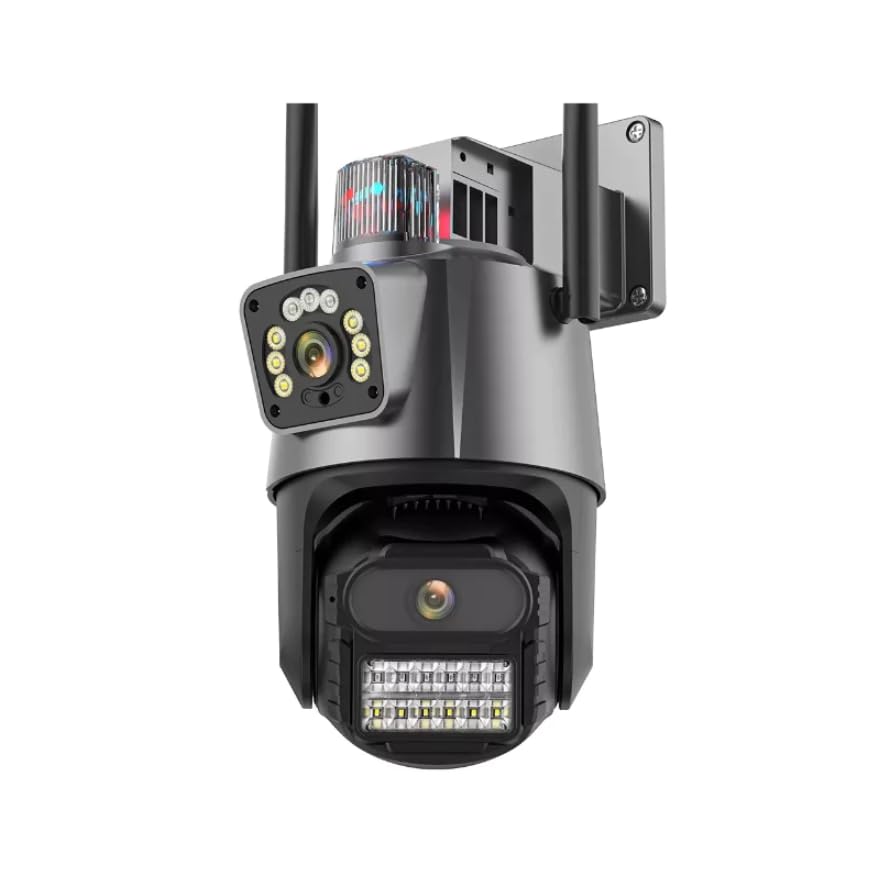
Image: The Generic P11 Dual 4K 6MP Outdoor Security Camera, showing its dual lens design and external antennas.
3. Орнату нұсқаулығы
3.1. Бастапқы дайындық
- Камераны қаптамадан шығару: Қаптамадан барлық компоненттерді мұқият алып тастаңыз.
- Қуат қосылымы: Connect the provided power adapter to the camera and plug it into a power outlet. The camera will initiate its startup sequence.
- Қолданбаны жүктеп алыңыз: Іздеу the recommended security camera application (refer to packaging or quick start guide for app name) on your smartphone's app store (iOS or Android) and install it.
- Аккаунты құру: Жаңа пайдаланушы тіркелгісін жасау үшін қолданбаны ашып, экрандағы нұсқауларды орындаңыз.
3.2. Wi-Fi қосылымы және жұптастыру
- Құрылғыны қосу: Қолданбада жаңа құрылғы қосу опциясын таңдаңыз.
- Select Camera Type: Choose the appropriate camera model or type from the list.
- Желі конфигурациясы: Follow the app's instructions to connect the camera to your 2.4GHz Wi-Fi network. Ensure your smartphone is connected to the same Wi-Fi network during this process.
- Жұптастыру: The app will guide you through the pairing process, which may involve scanning a QR code on the camera or listening for an audio prompt.
- Name Your Camera: Assign a name to your camera for easy identification (e.g., "Front Door," "Backyard").
3.3. Физикалық орнату
- Орынды таңдаңыз: Ашық аспан астындағы орынды таңдаңыз view of the area you wish to monitor, within range of your Wi-Fi signal and a power source. The camera is IP66 rated for outdoor use.
- Монтаждау: Use the provided mounting screws and wall plugs to securely attach the camera to a wall or suitable surface. Ensure the camera is mounted at an optimal height for surveillance.
- Бұрышты реттеу: Камераны реттеңіз viewing angle using the app to cover the desired area. The camera offers a 355-degree viewкіру бұрышы.
4. Пайдалану нұсқаулары
4.1. Нақты уақыттағы мониторинг
Open the security camera app on your smartphone. Select your camera from the device list to view the live feed. You can pan and tilt the camera remotely within the app to adjust the viewаймағы.
4.2. Қозғалысты анықтау және ескертулер
The camera features an advanced motion detection system. When motion is detected, the camera will send instant notifications to your smartphone. You can customize motion detection sensitivity and alert schedules within the app settings.
4.3. Түнгі көру
The camera automatically switches to night vision mode in low-light conditions, utilizing powerful infrared LEDs to provide clear images up to 15 meters. This ensures continuous surveillance day and night.
4.4. Екі жақты аудио
Use the two-way audio feature in the app to communicate with individuals near the camera. Press the microphone icon to speak and listen through the camera's built-in speaker and microphone.
4.5. Жазу және сақтау
The camera supports local storage via an SD card (up to 128GB, 32GB installed). Recordings can also be stored on cloud services, if subscribed. Access recorded footage through the app's playback function.
4.6. Police Siren
Activate the built-in police siren through the app to deter intruders. This feature emits a high-power sound designed to draw attention and scare off unwanted visitors.
5. Негізгі мүмкіндіктер
- Қос камера жүйесі: Equipped with two high-resolution 4K and 6MP lenses for detailed day and night monitoring.
- Integrated WiFi Connectivity: Allows real-time remote monitoring via a smartphone application.
- Powerful Alert System: Features a built-in police siren with high-power sound for effective intruder deterrence.
- Жетілдірілген түнгі көру: Powerful infrared LEDs ensure clear images even in low-light conditions, with a range of 15 meters.
- Ақылды қозғалысты анықтау: An advanced system that provides instant mobile notifications upon detecting movement.
- Екі жақты аудио: Enables communication through the camera via the mobile app.
- Ауа райына төзімді дизайн: IP66 international protection rating ensures durability for outdoor installation.
6. Техникалық қызмет көрсету
- Тазалау: Regularly clean the camera lenses with a soft, dry cloth to ensure optimal image clarity. Do not use harsh chemicals.
- Микробағдарламаны жаңарту: Check the app periodically for firmware updates. Keeping the camera's firmware updated ensures optimal performance and security.
- Қосылымды тексеру: Periodically verify the power and Wi-Fi connections to ensure stable operation.
- SD карталарын басқару: If using an SD card, ensure it is functioning correctly and consider formatting it periodically to maintain recording efficiency.
7. Ақаулықтарды жою
| Мәселе | Ықтимал себебі | Шешім |
|---|---|---|
| Камера қосылмайды | Қуат көзі жоқ; адаптер ақаулы | Check power connection; try a different outlet; ensure adapter is working. |
| Wi-Fi желісіне қосылу мүмкін емес | Incorrect Wi-Fi password; camera too far from router; 5GHz network selected | Wi-Fi құпия сөзін растаңыз; камераны маршрутизаторға жақындатыңыз; 2.4 ГГц желіге қосылып тұрғаныңызға көз жеткізіңіз. |
| Суреттің сапасы нашар | Dirty lens; insufficient lighting; network bandwidth issues | Clean the lens; ensure adequate lighting for non-night vision mode; check Wi-Fi signal strength. |
| Қозғалысты анықтау жұмыс істемейді | Settings incorrect; sensitivity too low; object too far | Adjust motion detection settings in the app; increase sensitivity; ensure objects are within detection range. |
| Дыбыс жоқ немесе дыбыс сапасы нашар | Microphone/speaker blocked; app volume low; network issues | Ensure microphone/speaker are clear; check app volume settings; verify stable network connection. |
8. Техникалық сипаттамалар
| Ерекшелік | Мәлімет |
|---|---|
| Модель атауы | P11 |
| Бренд | Жалпы |
| Қосылу технологиясы | Сымсыз (Wi-Fi) |
| Арнайы мүмкіндіктер | Night Vision, Motion Detection, Two-Way Audio, Police Siren |
| Ішкі/сыртқы пайдалану | Сыртқы аймақ |
| Үйлесімді құрылғылар | Смартфон |
| Басқару түрі | Мобильді қолданба |
| Монтаждау түрі | Қабырғаға аспа |
| Түс | Ақ және қара |
| Материал | ABS пластик |
| Суға төзімділік деңгейі | Суға төзімді (IP66) |
| Ескерту түрі | Motion Detection with App Notification |
| Қорытынды шешім | 6 MP (Dual 4K Lenses) |
| Фото сенсор ажыратымдылығы | 3 МП |
| Бейне түсіру рұқсаты | 2048x1536 |
| Кадр жиілігі | 30 кадр/сек |
| Viewбұрыш | 355 градус |
| Оптикалық масштабтау | 4x |
| Масштабтау түрі | Digital and Optical |
| Элемент өлшемдері | 15 x 12 x 15 сантиметр |
| Элемент салмағы | 450 грамм |
| Қуат көзі | Электр қуаты |
| Қуатты тұтыну | 5 ватт |
| Бейнені кодтау | H.264 |
| Бейне түсіру пішімі | MP4 |
| Түнгі көру диапазоны | 15 метр |
| IR жарық диодтарының саны | 8 |
| Installed Flash Memory Size | 32 ГБ |
| Флэш жады түрі | SD картасы |
| Maximum Supported Flash Memory Size | 128 ГБ |
9. Кепілдік және қолдау
9.1. Кепілдік туралы ақпарат
This product is typically covered by a manufacturer's warranty against defects in materials and workmanship. Specific warranty terms, duration, and conditions may vary by region and retailer. Please refer to the warranty card included with your purchase or contact your point of sale for detailed information. Extended warranty options may also be available from your retailer.
9.2. Тұтынушыларға қолдау көрсету
For technical assistance, troubleshooting not covered in this manual, or warranty claims, please contact the seller or manufacturer's customer support. Have your product model number (P11) and purchase details ready when contacting support.