
1. Кіріспе
The FNIRSI FPM-02 is a high-precision 3-in-1 environmental monitor designed for measuring illuminance (lux), temperature, and humidity. It features a 2-inch color display for clear data visualization and is suitable for various professional applications including office lighting assessment, horticulture, laboratories, and photography studios.
2. Қорапта не бар
- FNIRSI FPM-02 Environmental Monitor
- USB кабелі
- Тасымалдау қорабы
- Пайдаланушы нұсқаулығы
3. Негізгі мүмкіндіктер
- 3-і 1 өлшем: Monitors Lux, temperature, and humidity simultaneously.
- 2 дюймдік түсті экран: High-definition display with light and dark theme modes for optimal readability.
- Real-time Data & Curve Recording: Visualizes environmental changes over time.
- Adjustable Alarm Thresholds: Alerts users when measurements exceed set values.
- Жылдам Сampлинг ставкасы: 20Hz (50ms) for real-time monitoring.
- Dual-language Interface: Supports English and Chinese.
- Built-in Sleep Mode & Data Logging: Enhances battery efficiency and usage tracking.
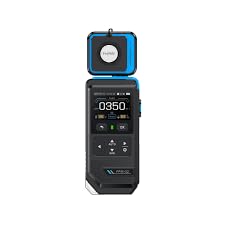
Figure 1: FNIRSI FPM-02 Environmental Monitor with key features highlighted on its color screen.
4. Орнату
4.1 Құрылғыны зарядтау
- Connect the provided USB cable to the FNIRSI FPM-02's charging port.
- USB кабелінің екінші ұшын стандартты USB қуат адаптеріне (жинаққа кірмейді) немесе компьютердің USB портына қосыңыз.
- The device will indicate charging status on its screen. A full charge typically takes approximately 2-3 hours.
4.2 Қуатты қосу/өшіру
- To power on: Press and hold the Power button (usually located on the side or front panel) until the screen illuminates.
- To power off: Press and hold the Power button until the device shuts down.
5. Пайдалану нұсқаулары
5.1 Интерфейсті шарлау
The FPM-02 features a user-friendly interface with a 2-inch HD color screen. Use the navigation buttons (up, down, left, right, OK/Enter) to move through menus and select options. The device supports both English and Chinese languages, which can be selected in the settings menu.
5.2 Taking Measurements (Illuminance, Temperature, Humidity)
Upon powering on, the device typically defaults to the main measurement screen, displaying real-time values for illuminance (Lux/FC), temperature (°C/°F), and relative humidity (%).
- Сәулелендіру: Ensure the light sensor (located at the top of the device) is unobstructed and pointed towards the light source or area to be measured. The device will display the light intensity in LUX or FC.
- Температура және ылғалдылық: The internal sensors continuously monitor ambient temperature and humidity. Allow a few minutes for readings to stabilize after significant environmental changes.
5.3 Real-time Data and Curve Recording
The device can display real-time data and record changes over time, presenting them as a curve. Access this feature through the main menu to visualize trends and fluctuations in environmental conditions.
5.4 Setting Alarm Thresholds
You can set custom alarm thresholds for Lux, temperature, and humidity. If a measured value exceeds or falls below the set threshold, the device will trigger an alert. Refer to the device's settings menu to configure these thresholds.
5.5 Sleep Mode and Data Logging
To conserve battery, the device features a configurable sleep mode. It also includes data logging capabilities, allowing you to store measurement data for later review and analysis. Consult the user manual for detailed instructions on activating and managing these functions.
6. Техникалық қызмет көрсету
- Тазалау: Use a soft, dry cloth to clean the device. Do not use abrasive cleaners or solvents. Ensure the light sensor and display are kept clean for accurate readings.
- Сақтау орны: Store the device in a cool, dry place away from direct sunlight and extreme temperatures. If storing for extended periods, ensure the battery is partially charged (around 50%) to prolong its lifespan.
- Батареяға күтім жасау: Avoid fully discharging the lithium battery frequently. Recharge the device when the battery level is low.
7. Ақаулықтарды жою
| Мәселе | Ықтимал себебі | Шешім |
|---|---|---|
| Құрылғы қосылмайды. | Төмен немесе таусылған батарея. | Құрылғыны берілген USB кабелі арқылы зарядтаңыз. |
| Дәл емес оқулар. | Sensor obstructed or dirty; device not calibrated. | Clean sensors. Ensure proper placement. If issues persist, contact support. |
| Экран жауап бермейді. | Бағдарламалық жасақтамадағы ақау; температураның күрт өзгеруі. | Restart the device. Ensure operating within specified temperature range. |
8. Техникалық шарттар
| Параметр | Мән |
|---|---|
| Үлгі нөмірі | FPM-02 |
| Жарықтандыру диапазоны | 0–1000 / 9999 / 99990 LUX; 10–1000 / 1000 / 10000 FC |
| Жарықтандыру ажыратымдылығы | 0.1 LUX (0–1000); 0.1 FC (10–1000) |
| Жарықтандыру дәлдігі | ±(3% + 5 LUX) with standard incandescent lamp (2854°K); ±(6% + 5 LUX) for other light sources |
| SampУақыт | 20Hz (50ms) |
| Дисплей | 2″ HD Color Screen |
| Қуат көзі | 3.7V / 1500mAh Lithium Battery |
| Құрылғы өлшемдері | 63 × 28 × 182 мм |
| Салмағы | 205 г |
| Түс | Қара және көк |
| Шығу елі | Қытай |
9. Кепілдік және қолдау
This FNIRSI FPM-02 Environmental Monitor comes with a standard manufacturer's warranty. Please refer to the warranty card included in your package for specific terms and conditions.
For technical support, troubleshooting assistance, or warranty claims, please contact the retailer or manufacturer directly. Keep your purchase receipt as proof of purchase.