
1. Кіріспе
This manual provides detailed instructions for the installation, operation, and maintenance of your CAMECHO Double Din Car Stereo Radio 7 Inch MP5 Player. Please read this manual thoroughly before using the product to ensure proper function and to prevent damage.
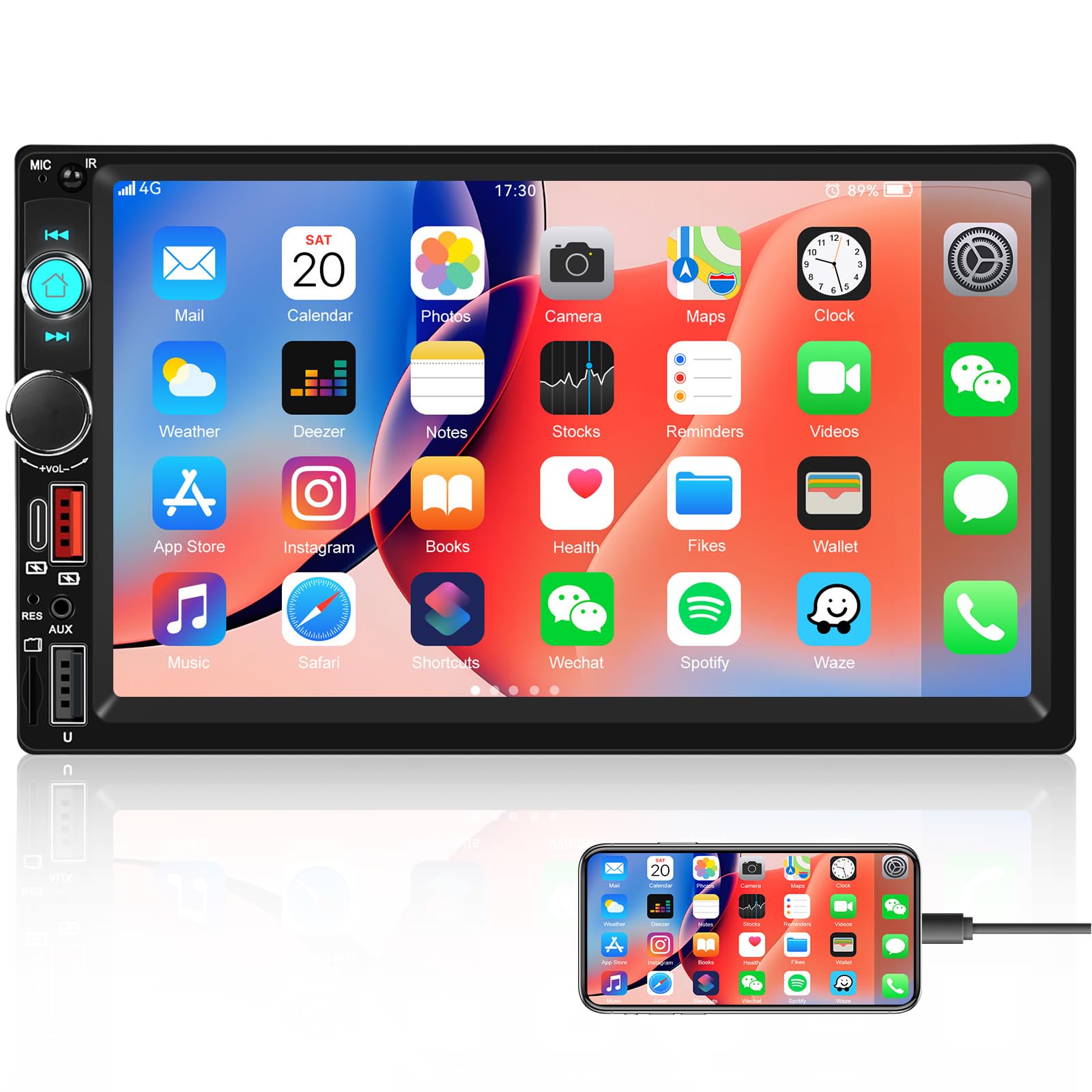
Сурет: алдыңғы view of the CAMECHO Double Din Car Stereo Radio with its 7-inch HD touch screen.
2. Қауіпсіздік туралы ақпарат
- Кәсіби орнату ұсынылады: Due to the complexity of car electrical systems, professional installation is highly recommended to avoid damage to the unit or your vehicle.
- Нәр беруші: Ensure the unit is connected to a 12V DC power supply with negative grounding. Incorrect voltage зақым келтіруі мүмкін.
- Сымдар: Do not short-circuit any wires. Insulate all unused wires.
- Жұмыс температурасы: Құрылғыны ұзақ уақыт шектен тыс температура немесе тікелей күн сәулесінің әсеріне ұшыратпаңыз.
- Ылғалдылық: Құрылғыны судан және шамадан тыс ылғалдылықтан алыс ұстаңыз.
- Жүргізу қауіпсіздігі: Құрылғыны көлік жүргізуден алаңдататындай пайдаланбаңыз. Әрқашан жол қауіпсіздігіне басымдық беріңіз.
3. Пакет мазмұны
Пакетті ашқаннан кейін келесі элементтердің барлығы қамтылғанын тексеріңіз:
- CAMECHO Double Din Car Stereo Unit
- Қуат кабелі
- Horn Cable (Speaker Wire Harness)
- Монтаждау кронштейндері (2 дана)
- Пайдаланушы нұсқаулығы (бұл құжат)
4. Орнату және орнату
4.1 Электр қосу схемасы
Арнайы қосылымдар үшін құрылғымен бірге берілген сым схемасын қараңыз. Жалпы байланыстарға мыналар жатады:
- Сары сым: Тұрақты 12 В (батарея оң)
- Қызыл сым: ACC (Тұтану қосқышы 12V)
- Қара сым: Ground (Chassis Ground)
- Қызғылт сары сым: Illumination (Connect to vehicle's headlight switch for dimming)
- Көк сым: Антенна/Amplifier Remote (12V output when unit is on)
- Қоңыр сым: Reverse Input (Connect to reverse light positive for automatic camera display)
- Динамик сымдары: Көлік динамиктеріне қосыңыз (дұрыс полярлықты қамтамасыз етіңіз).
Note: Incorrect wiring can damage the unit or vehicle. If unsure, consult a professional installer.
4.2 Құрылғыны орнату
- Көлігіңіздің бақылау тақтасынан бар автокөлік стереосын алып тастаңыз.
- Attach the provided mounting brackets to the sides of the CAMECHO unit using screws.
- Connect all necessary wiring harnesses (power, speakers, antenna, etc.) to the unit.
- Slide the unit into the double din opening in your dashboard until it clicks into place or can be secured with screws.
- Басқару тақтасының жиегін қайта құрастырыңыз.
5. Пайдалану нұсқаулары
5.1 Негізгі басқару элементтері
The unit features a 7-inch HD touch screen and physical buttons/knobs for essential functions.
- Қуат түймесі: Press to turn on/off. Long press for standby.
- Дыбыс қаттылығы: Дыбыс деңгейін реттеу үшін бұраңыз. Дыбысты өшіру/қосу үшін басыңыз.
- Басты түймесі: Негізгі мәзірге оралады.
- Артқа түймесі: Алдыңғы экранға оралады.
5.2 Bluetooth функциясы
The built-in Bluetooth allows for hands-free calling and audio streaming.
- On the main menu, select the "Bluetooth" icon.
- Мобильді құрылғыда Bluetooth қосыңыз және қолжетімді құрылғыларды іздеңіз.
- Select "CAMECHO" (or similar name) from the list on your phone to pair.
- Once paired, you can make/receive calls and stream music through the car stereo.

Image: Screen display showing the Bluetooth hands-free calling interface with a dial pad and call controls.
5.3 Mirror Link Function (for Navigation)
Connect your Android or iPhone via USB cable to mirror your phone's screen, including navigation apps, onto the stereo display.
- Connect your smartphone to the stereo's USB port using a high-quality USB cable.
- Follow the on-screen prompts on both your phone and the stereo to establish the Mirror Link connection.
- Once connected, your phone's display will appear on the stereo screen, allowing you to use navigation apps.
Note: This unit does not have built-in GPS. Navigation relies on your smartphone's GPS and data connection.

Image: Display showing the Mirror Link function with a smartphone connected, alongside icons for phone charging, USB, AUX IN, and TF Card playback options.
5.4 FM радиосының жұмысы
Access FM radio for news, traffic, and music.
- From the main menu, select the "Radio" icon.
- Use the touch screen to scan for stations or manually tune to a frequency.
- Press and hold a preset button (P1-P6) to save your favorite stations.
- The built-in EQ allows for sound adjustments to enhance your listening experience.

Image: Screen display showing the FM radio interface with frequency display, preset buttons, and an equalizer visualizer.
5.5 Multiple Playback Options
The stereo supports various media inputs:
- USB: Insert a USB drive into the USB port to play audio and video files.
- TF Card (Micro SD): Insert a TF card into the designated slot for media playback.
- AUX-in (3.5mm Jack): Сыртқы аудио құрылғыларды AUX кабелі арқылы қосыңыз.
- C түрі: Use the Type C port for compatible device connections and charging.
5.6 Руль дөңгелегін басқару (SWC)
If your vehicle supports it, you can program your steering wheel buttons to control the stereo.
- Access the "Steering Wheel Control" settings in the system menu.
- Follow the on-screen instructions to assign functions to your vehicle's steering wheel buttons.
- This allows for convenient control of volume, track changes, and calls without taking your hands off the wheel.

Image: Screen display showing the interface for setting up steering wheel controls, with various function icons.
5.7 UI Display and Color Key Lights
- UI Display: The unit offers multiple user interface themes. Navigate to "Settings" to customize the UI display.
- 7 Color Key Lights: Personalize the physical button backlighting. In "Settings," select "Color Lights" to cycle through red, green, blue, yellow, cyan, purple, and white options.

Image: The car stereo unit with its physical buttons illuminated in various colors, demonstrating the 7-color key light feature.
5.8 HD Reversing (Backup Camera Support)
The unit supports an optional backup camera (not included) for safe reversing.
- Connect a compatible backup camera to the dedicated video input.
- Ensure the reverse trigger wire (Brown wire) is correctly connected to your vehicle's reverse light positive.
- When the vehicle is shifted into reverse, the stereo will automatically display the camera feed.
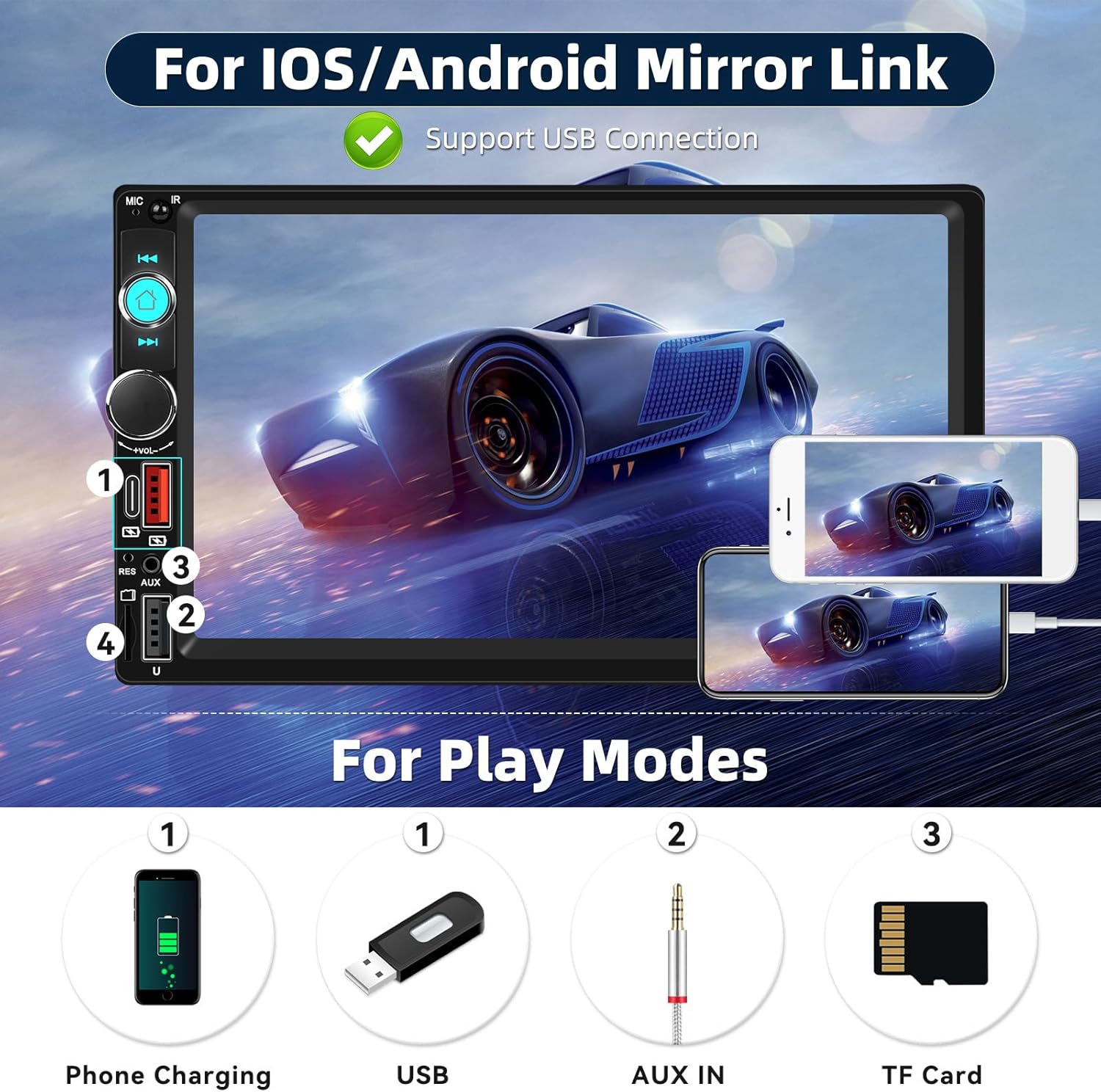
Image: Screen display showing a simulated reversing camera view with parking guidelines, and icons indicating HD, waterproof, 170-degree viewing angle, and night vision features for an optional camera.
6. Техникалық қызмет көрсету
- Экранды тазалау: Use a soft, lint-free cloth to gently wipe the touch screen. Do not use abrasive cleaners or solvents.
- Жалпы тазалау: Wipe the unit's exterior with a slightly damp cloth. Avoid getting moisture into openings.
- Температура: Do not leave the unit in direct sunlight or extreme temperatures for extended periods, as this can affect its lifespan.
7. Ақаулықтарды жою
| Мәселе | Ықтимал себебі | Шешім |
|---|---|---|
| Қуат жоқ | Дұрыс емес сымдар; Сақтандырғыш жарылған; Көлік батареясының мәселесі. | Check power and ground connections. Verify fuse. Check vehicle battery. |
| Дыбыс жоқ | Динамик сымдары ажыратылған; дыбыс деңгейі тым төмен; Дыбысты өшіру функциясы қосулы. | Check speaker connections. Increase volume. Disable mute. |
| Bluetooth қосылмайды | Bluetooth not enabled on phone/stereo; Device not in pairing mode. | Ensure Bluetooth is active on both devices. Put stereo in pairing mode. Delete previous pairings and try again. |
| Айна сілтемесі жұмыс істемейді | Faulty USB cable; Phone settings not configured; Incompatible phone. | Use a high-quality USB cable. Check phone's developer options (USB debugging for Android). Ensure phone is compatible. |
| Қосалқы камера көрсетілмейді | Camera not connected; Reverse trigger wire incorrect; Faulty camera. | Verify camera video input and power connections. Check reverse trigger wire connection. Test camera if possible. |
8. Техникалық сипаттамалар
- Бренд: КАМЕКО
- Модель нөмірі: B0FN39XH97
- Экран өлшемі: 7 дюймдік HD сенсорлық экран
- Қосылу технологиясы: Блютез
- Сымсыз технология: Bluetooth, FM
- Аудио шығыс режимі: Стерео
- Көлемді дыбыс арнасының конфигурациясы: 5.1
- Үйлесімді құрылғылар: Смартфон
- Кіріс порттары: USB, TF Card, AUX-in (3.5mm), Type C
- Арнайы мүмкіндіктер: Volume Control, 7 Color Key Lights, Steering Wheel Control Support, Fast Charging, Mirror Link, HD Reversing Input
- Өнім өлшемдері (D x W x H): 5" x 5" x 7" (Approximate)
9. Кепілдік туралы ақпарат
The product comes with a manufacturer's warranty. Please refer to the warranty card included in your package or contact CAMECHO customer support for detailed warranty terms and conditions. The warranty typically covers manufacturing defects for a specified period from the date of purchase.
Warranty Description: 1 (This usually refers to 1 year, but please confirm with the manufacturer).
10. Тұтынушыларға қолдау көрсету
For technical assistance, troubleshooting, or warranty inquiries, please contact CAMECHO customer support:
- Электрондық пошта: camechovip@126.com
- Онлайн анықтама: Visit the official CAMECHO store on Amazon or their webЖиі қойылатын сұрақтар мен қосымша ресурстарға арналған сайт.
Please have your model number (B0FN39XH97) and purchase date ready when contacting support.