
Кіріспе
Thank you for choosing the Bigben Karaoke Microphone. This all-in-one portable karaoke system combines a stereo microphone with a powerful 15W Bluetooth speaker and dynamic light effects, designed to enhance your singing and music listening experience. This manual provides essential information for safe and optimal use of your device.
Қауіпсіздік туралы ақпарат
- Құрылғыны қолданар алдында барлық нұсқауларды оқып шығыңыз.
- Құрылғыны су мен ылғалдан алыс ұстаңыз.
- Төтенше температураға немесе тікелей күн сәулесінің әсеріне ұшыратпаңыз.
- Құрылғыны өзіңіз бөлшектеуге немесе жөндеуге әрекеттенбеңіз. Білікті қызмет көрсету персоналына хабарласыңыз.
- Тек көрсетілген зарядтау керек-жарақтарын пайдаланыңыз.
- Балалардың қолы жетпейтін жерде сақтаңыз.
Пакет мазмұны
Пакетте барлық элементтердің бар-жоғын тексеріңіз:
- Bigben Karaoke Microphone (Model PARTYBTMIC2WH)
- Зарядтау кабелі (USB)
- Пайдаланушы нұсқаулығы (бұл құжат)
- Front Glass (as an included component, likely pre-installed or a protective cover)

1-сурет: The Bigben Karaoke Microphone shown in its retail packaging. The packaging highlights features such as Bluetooth connectivity, 4 vocal effects, and wireless speaker functionality.
Өнім аяқталдыview
The Bigben Karaoke Microphone features an integrated speaker and various controls for an interactive experience.
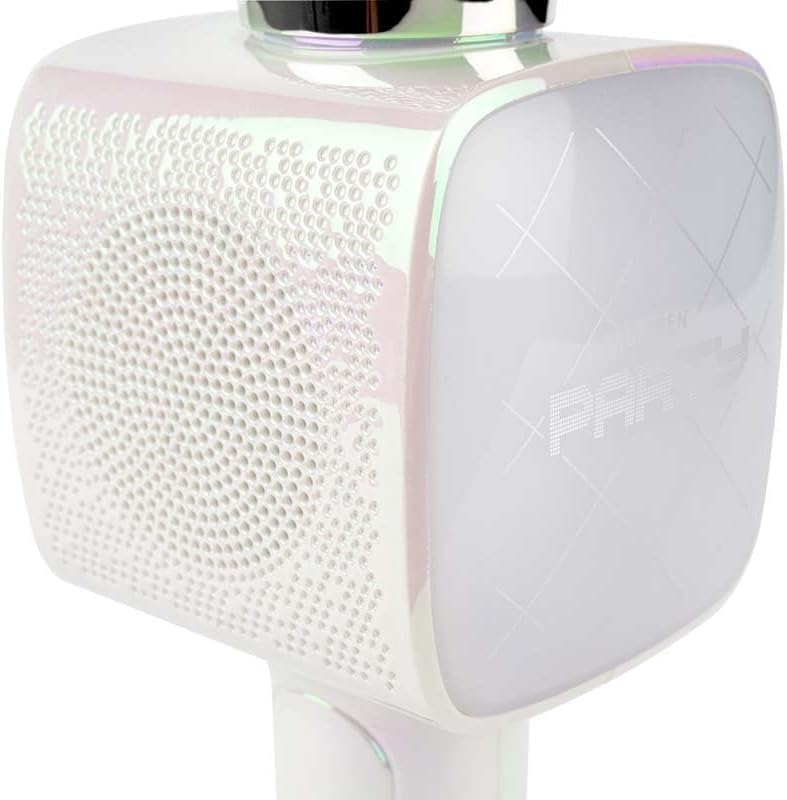
2-сурет: Жақын жоспар view of the Bigben Karaoke Microphone, focusing on the speaker grille and the light-up panel. The panel displays "PARTY" and shows dynamic light effects.
Негізгі ерекшеліктері:
- Bluetooth 5.0: For stable wireless connection to your devices.
- Біріктірілген спикер: 15W output for clear and powerful sound.
- Жарық әсерлері: Dynamic lighting to enhance the karaoke experience.
- Дыбыс әсерлері: 4 different vocal effects and an echo effect.
- Бірнеше кірістер: USB, Micro SD, and 3.5mm headphone jack.
Орнату
1. Микрофонды зарядтау
- Connect the provided USB charging cable to the microphone's charging port.
- USB кабелінің екінші ұшын үйлесімді USB қуат адаптеріне (жинаққа кірмейді) немесе компьютердің USB портына жалғаңыз.
- Зарядтау индикатор шамы жанады. Толық зарядталғаннан кейін шам түсі өзгеруі немесе өшуі мүмкін.
2. Қосу / Өшіру
- To power on, press and hold the Power button for a few seconds until the indicator light illuminates and you hear an audible prompt.
- Қуатты өшіру үшін, индикатор шамы сөнгенше Қуат түймесін қайтадан басып ұстап тұрыңыз.
3. Bluetooth жұптастыру
- Ensure the microphone is powered on and in Bluetooth pairing mode (usually indicated by a flashing light).
- Смартфонда, планшетте немесе басқа Bluetooth қосылған құрылғыда Bluetooth параметрлеріне өтіңіз.
- Іздеу available devices and select "Bigben Karaoke Mic" (or similar name) from the list.
- Once paired, you will hear a confirmation sound, and the indicator light will stop flashing.
Пайдалану нұсқаулары
1. Музыка ойнату
- Bluetooth арқылы: After successful pairing, play music from your connected device. The sound will output through the microphone's speaker.
- Via USB/Micro SD: Insert a USB drive or Micro SD card (with music files) into the respective port. The microphone will automatically detect and play music.
- Via 3.5mm Audio Cable: Connect an external audio source using a 3.5mm audio cable (not included) to the headphone input.
2. Микрофонды пайдалану
- Speak or sing directly into the microphone grille.
- Adjust the microphone volume using the dedicated controls on the device.
3. Дыбыс әсерлері
- Дауыстық эффектілер: The microphone offers 4 different vocal effects. Press the "Effect" button (or similar labeled button) to cycle through these effects.
- Эхо эффектісі: Activate or adjust the echo effect using its dedicated control.
4. Жарық әсерлері
The microphone features dynamic light effects. These lights typically activate automatically when the device is on and can often be toggled or changed using a dedicated light button, if available.
Техникалық қызмет көрсету
- Тазалау: Микрофонды жұмсақ, құрғақ шүберекпен сүртіңіз. Абразивті тазалағыштарды немесе еріткіштерді пайдаланбаңыз.
- Сақтау орны: Қолданбаған кезде құрылғыны тікелей күн сәулесі түспейтін салқын, құрғақ жерде сақтаңыз.
- Батареяға күтім жасау: For optimal battery life, charge the device regularly, even if not used frequently.
Ақаулықтарды жою
| Мәселе | Ықтимал себебі | Шешім |
|---|---|---|
| Қуат жоқ | Батарея таусылды. | Микрофонды толығымен зарядтаңыз. |
| Динамиктен дыбыс жоқ | Volume is too low; device not connected; incorrect input mode. | Increase volume; ensure Bluetooth is paired or cable is connected; check USB/Micro SD insertion. |
| Микрофон жұмыс істемейді | Microphone volume is too low; microphone function is off. | Increase microphone volume; ensure microphone is active. |
| Bluetooth байланысы тұрақсыз | Device is too far from the microphone; interference. | Move devices closer; avoid obstacles; disconnect and re-pair. |
Техникалық сипаттамалар
| Ерекшелік | Мәлімет |
|---|---|
| Бренд | Бигбен |
| Үлгі нөмірі | PARTYBTMIC2WH |
| Қосылу мүмкіндігі | Bluetooth 5.0, USB, Micro SD, 3.5mm Headphone Jack |
| Динамик шығысы | 15 Вт |
| Дыбыс әсерлері | 4 Vocal Effects, Echo Effect |
| Өнім өлшемдері (LxWxH) | 20 x 15 x 10 см |
| Элемент салмағы | 300 грамм |
| Түс | Ақ |
| Арналар саны | 2 |
| Батареялар қажет | Yes (type unknown, likely integrated rechargeable) |
Кепілдік және қолдау
For warranty information and customer support, please refer to the documentation provided with your purchase or visit the official Bigben webсайт. Кепілдік шағымдары үшін сатып алуды растайтын құжатты сақтаңыз.
For technical assistance or further inquiries, please contact Bigben customer service through their official channels.