
1. Өнім аяқталдыview
The bmani T16 Wireless Earbuds are designed for active lifestyles, offering an ultra-long 80-hour playtime with their dual LED display charging case. They feature immersive stereo sound with 10mm dynamic drivers, clear calls with dual microphones, and seamless Bluetooth connectivity. The adjustable over-ear hooks ensure a secure and comfortable fit for various activities. Easy button controls provide intuitive management of music and calls.
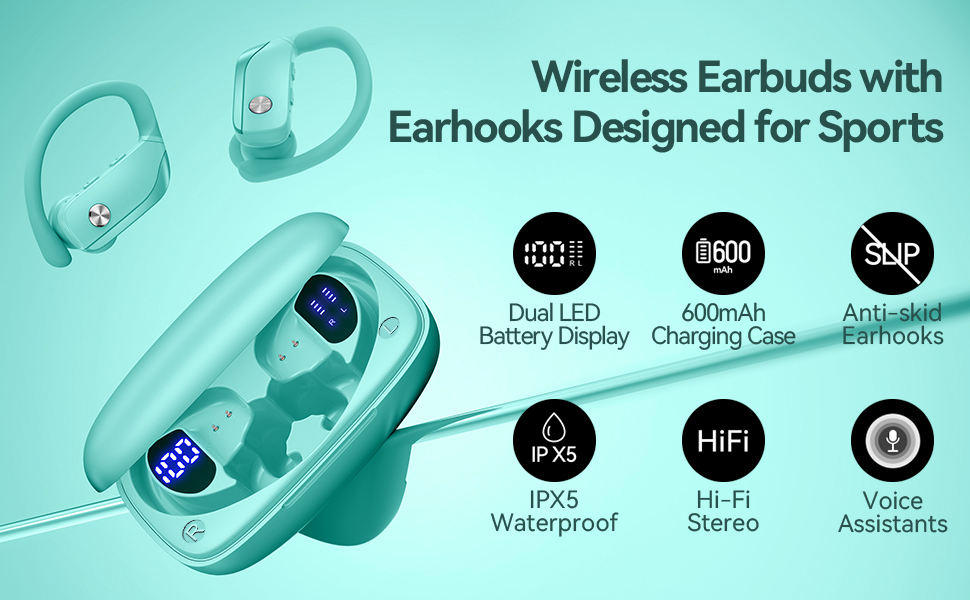
Image: bmani T16 Wireless Earbuds in their charging case, highlighting 80 hours of total playtime and the dual LED battery display.
2. Қорапта не бар
- bmani T16 Wireless Earbuds (Left and Right)
- Жарықдиодты дисплейі бар зарядтау корпусы
- Құлақ ұштары (кіші, орташа, үлкен өлшемдер)
- C типті зарядтайтын кабель
- Пайдаланушы нұсқаулығы (бұл құжат)

Image: The bmani T16 Wireless Earbuds, charging case, and various eartip sizes.
3. Орнату және жұптастыру
The bmani T16 earbuds feature one-step pairing for quick and easy connection to your devices.
- Бастапқы жұптау: Зарядтау қорабын ашыңыз. Құлақаспаптар автоматты түрде қосылады және жұптау режиміне өтеді.
- Смартфонда, планшетте немесе басқа Bluetooth қосылған құрылғыда Bluetooth параметрлеріне өтіңіз.
- Іздеу available devices and select "T16" from the list.
- Қосылғаннан кейін сәтті жұптастыруды растайтын дауыстық ескертуді естисіз.
- Автоматты қайта қосу: After the initial pairing, the earbuds will automatically reconnect to the last paired device when removed from the charging case.

Image: Illustration of the one-step pairing process for the bmani T16 earbuds with a smartphone and other compatible devices.
Video: An official seller video demonstrating the features and pairing process of the bmani T16 Wireless Earbuds.
4. Тағу нұсқаулары
For optimal sound quality and a secure fit, follow these steps to wear your bmani T16 earbuds:
- Choose the correct eartip size (S, M, L) that best fits your ear canal.
- Place the flexible ear hook over the back of your ear.
- Құлаққапты құлақ арнасына ақырын салыңыз.
- Adjust the earbud and hook by twisting until you achieve a comfortable and secure fit. The ear hooks are designed to adapt to different ear shapes, minimizing slippage during movement.

Image: Visual guide demonstrating how to correctly position the bmani T16 earbuds with their flexible ear hooks for a secure fit.
5. Операциялық басқару элементтері
The bmani T16 earbuds feature intuitive physical buttons for easy control of your audio and calls.
- Ойнату/кідірту: Click once on either earbud.
- Келесі трек: Quick double-click on the Right (R) earbud.
- Алдыңғы трек: Quick double-click on the Left (L) earbud.
- Дыбыс деңгейі: Press the "+" button on the earbud.
- Дыбыстың төмендеуі: Press the "-" button on the earbud.
- Қоңырауға жауап беру/аяқтау: Click once on either earbud.
- Қоңырауды қабылдамау: Hold either earbud button.
- Voice Assistant (Siri/Google Assistant) қызметін іске қосыңыз: Quick triple-click on either earbud.
- Қуатты қосу/өшіру: Hold the button on either earbud.
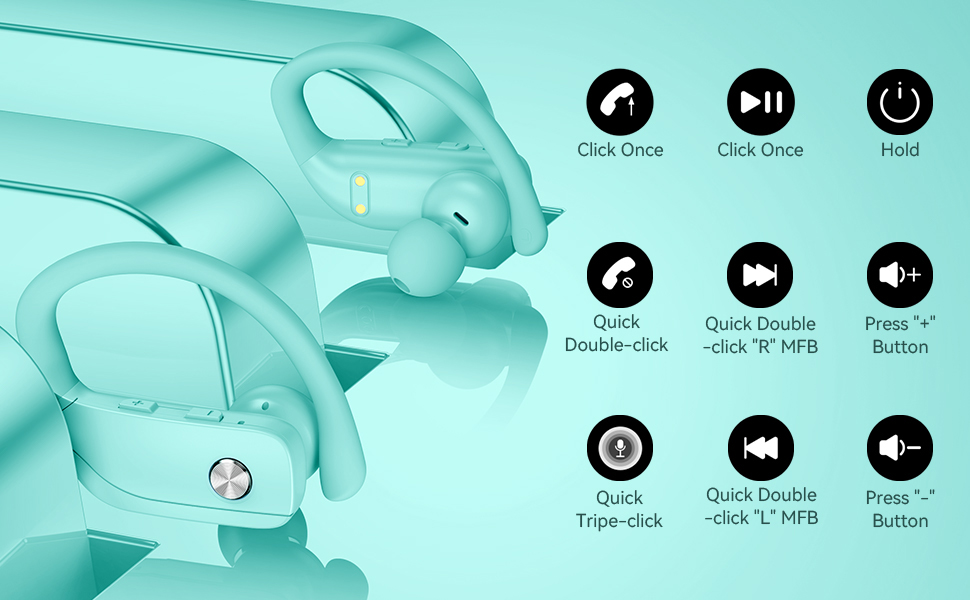
Image: Detailed diagram showing the various button controls on the bmani T16 earbuds for managing audio playback, calls, and voice assistant.
6. Зарядтау
The bmani T16 earbuds and charging case provide an impressive 80 hours of total playtime.
- Құлаққапты зарядтау: Place the earbuds back into the charging case. The LED indicators on the case will show the charging status of each earbud. Each earbud offers up to 8 hours of playtime per charge.
- Істі зарядтау: Connect the provided Type-C charging cable to the charging port on the case and to a USB power source. The digital display on the left side of the case will show the remaining power percentagзарядтау корпусы.
- The charging case can recharge the earbuds multiple times, extending total usage to 80 hours.
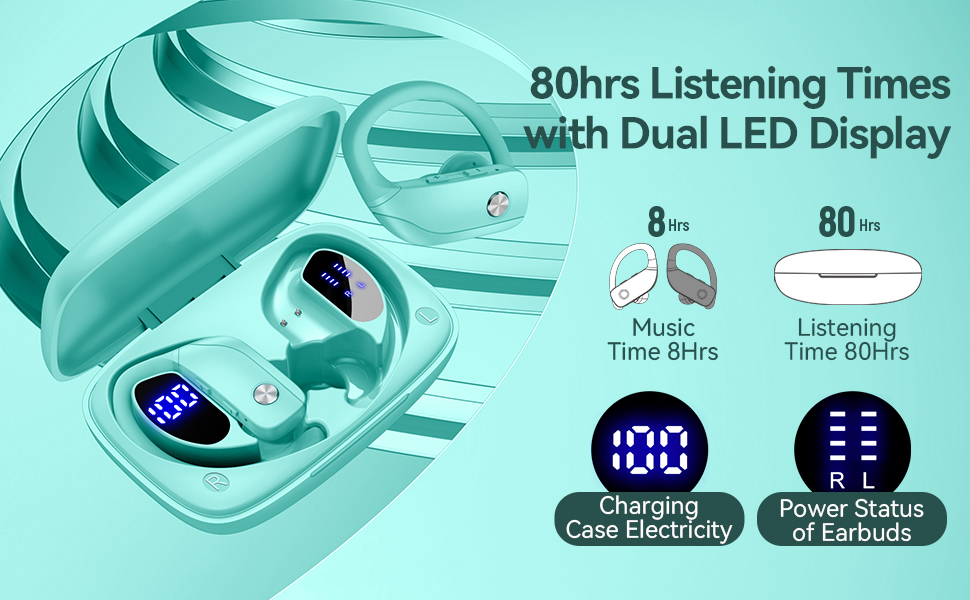
Image: The bmani T16 charging case with its dual LED digital display, indicating the battery percentagкорпустың e және әрбір құлаққаптың зарядтау күйі.
Video: An official seller video showcasing the 48-hour playback (note: product features state 80H) and LED display of the bmani T16 Sport Earphones.
7. Техникалық қызмет көрсету
- Шаң мен қоқыстың жиналуын болдырмау үшін құлаққаптар мен зарядтау контактілерін жұмсақ, құрғақ шүберекпен үнемі тазалаңыз.
- Құлақаспаптарды ұзақ уақыт экстремалды температураға немесе тікелей күн сәулесінің әсеріне ұшыратпаңыз.
- Құлақаспаптарды қорғау және зарядталғанын қамтамасыз ету үшін пайдаланбаған кезде оларды зарядтауға арналған қорапта сақтаңыз.
- The earbuds are sweat-resistant and dust-resistant, but avoid submerging them in water.
8. Ақаулықтарды жою
- Құлақаспаптар жұптаспайды: Ensure both earbuds are removed from the case and are powered on. Turn off Bluetooth on your device and turn it back on. If issues persist, try resetting the earbuds (refer to the full user manual for specific reset instructions).
- Дыбыс жоқ: Құрылғыңыз бен құлаққаптарыңыздың дыбыс деңгейін тексеріңіз. Құлаққаптардың құрылғыңызға Bluetooth арқылы дұрыс қосылғанына көз жеткізіңіз.
- Зарядтау мәселелері: Зарядтау кабелінің корпусқа да, қуат көзіне де мықтап жалғанғанын тексеріңіз. Құлаққаптардағы және корпустың ішіндегі зарядтау контактілерінің таза және қоқыссыз екеніне көз жеткізіңіз.
- Тұрақсыз байланыс: Ensure your device is within the Bluetooth range (approximately 33 feet/10 meters) and there are no significant obstacles between the earbuds and your device.
9. Техникалық сипаттамалар
| Модель атауы | T16 |
| Қосылу технологиясы | Сымсыз (Bluetooth 5.0) |
| Ойнату уақыты (құлаққаптар) | Бір зарядқа 8 сағатқа дейін |
| Жалпы ойнау уақыты (қораппен) | 80 сағатқа дейін |
| Аудио драйвер түрі | 10 мм динамикалық драйвер |
| Шуды бақылау мүмкіндіктері | Noise Cancellation (Dual Mics) |
| Суға төзімділік деңгейі | Sweat-resistant and Dust-resistant |
| Бақылау әдісі | Басқару түймелері |
| Құлақтың орналасуы | Құлақ үстінде |
| Элемент салмағы | 2 унция |
10. Кепілдік және қолдау
bmani offers a lifetime warranty for permanent replacement of damaged, defective, upgraded, or lost products. Please refer to the warranty card included in your package for activation details and terms. For further assistance, please contact bmani customer support.