
Oakcastle IR200
Oakcastle IR200 интернет радиосының пайдаланушы нұсқаулығы
Үлгі: IR200
1. Кіріспе
Thank you for choosing the Oakcastle IR200 Internet Radio. This manual provides essential information for the safe and efficient operation of your device. Please read it thoroughly before use and retain it for future reference.
The Oakcastle IR200 is a versatile audio system offering multiple listening options, including Internet Radio, DAB+, FM, Bluetooth 5.3, and AUX input. It features a color display, remote control, and podcast support for a comprehensive audio experience.
2. Пакет мазмұны
Қорапты абайлап ашыңыз және төменде көрсетілген барлық заттардың бар және жақсы күйде екеніне көз жеткізіңіз:
- Oakcastle IR200 Internet Radio Unit
- Қуат кабелі
- Қашықтан басқару құралы
- Пайдаланушы нұсқаулығы (бұл құжат)
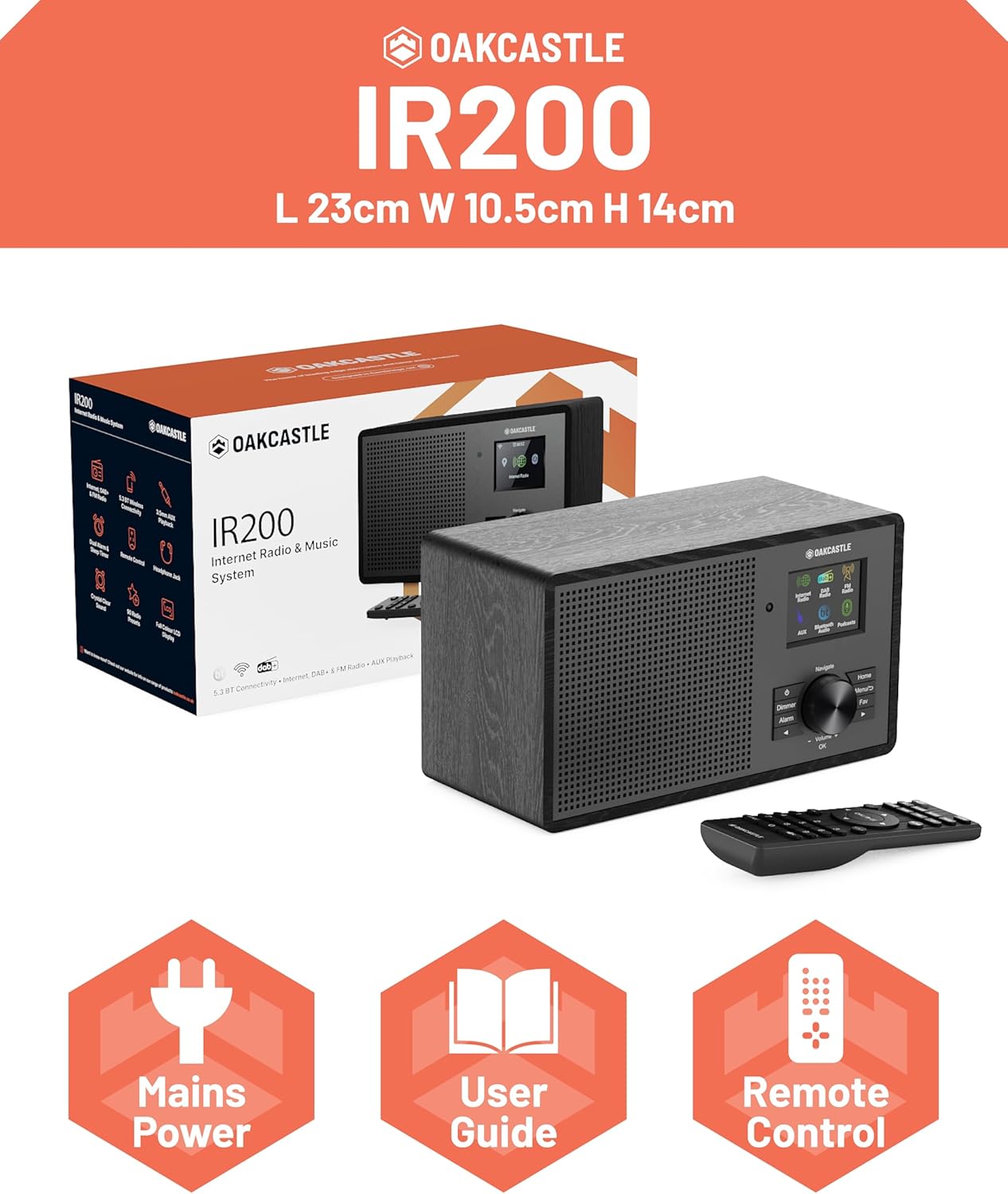
Image 2.1: Contents of the Oakcastle IR200 package, including the radio unit, its box, power cable, remote control, and user manual.
3. Өнім аяқталдыview
Familiarize yourself with the main components and controls of your Oakcastle IR200 radio.
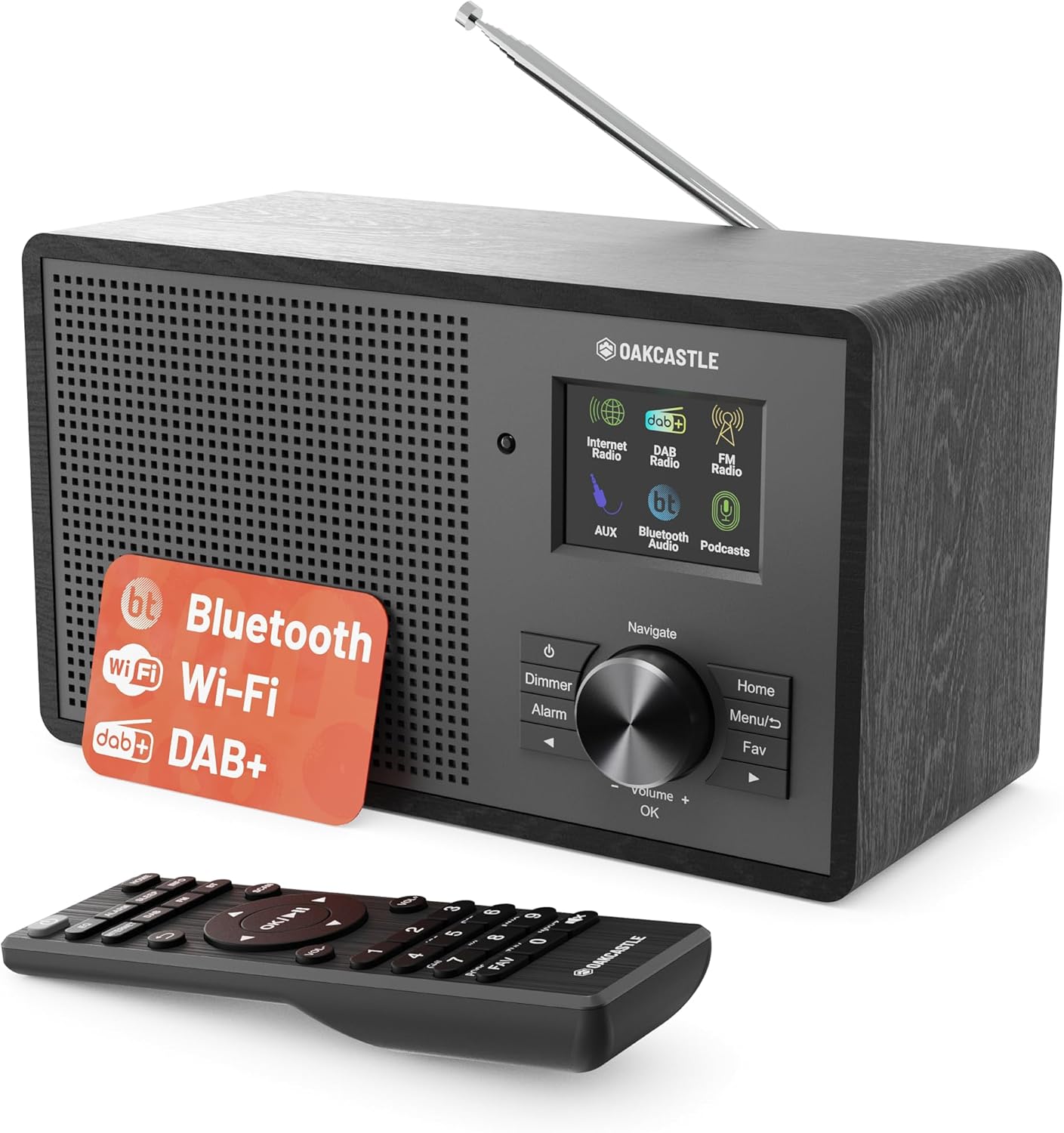
3.1-сурет: Алдыңғы view of the Oakcastle IR200 radio, showcasing the display, control knob, buttons, and the included remote control.
3.1 Алдыңғы панельді басқару элементтері
- Дисплей экраны: Станция туралы ақпаратты, уақытты және мәзір опцияларын көрсетеді.
- Navigate/Volume/OK Knob: Rotate to navigate menus or adjust volume; press to confirm selections.
- Қуат түймесі: Құрылғыны қосады/өшіреді немесе күту режиміне қояды.
- Диммер түймесі: Дисплей жарықтығын реттейді.
- Дабыл түймесі: Дабыл параметрлеріне кіреді.
- Басты түймесі: Негізгі мәзірге оралады.
- Мәзір түймесі: Accesses mode-specific menus.
- Fav Button: Accesses favorite station presets.
3.2 Артқы панель қосылымдары

3.2-сурет: артқы view of the Oakcastle IR200, highlighting the headphone output and AUX input ports.
- Телескопиялық антенна: For DAB+ and FM reception.
- AUX кірісі: Сыртқы дыбыс құрылғыларын қосыңыз.
- Құлаққап шығысы: Жеке тыңдау үшін құлаққапты қосыңыз.
- DC IN: Қуат адаптерін қосу.
4. Бастапқы орнату
4.1 Қуат қосылымы
- Insert the power cable into the DC IN port on the rear of the radio.
- Қуат кабелінің екінші ұшын қабырға розеткасына қосыңыз.
- Press the Power button on the front panel or remote control to turn on the radio.
4.2 Антеннаны реттеу
For optimal DAB+ and FM reception, fully extend the telescopic antenna located at the rear of the unit.
4.3 Network Connection (for Internet Radio)
- Upon first power-on, the radio will guide you through the network setup.
- Select "Network Wizard" or "Wi-Fi Setup" from the menu.
- Радио қолжетімді Wi-Fi желілерін сканерлейді. Тізімнен желіңізді таңдаңыз.
- Enter your Wi-Fi password using the navigation knob and OK button.
- Қосылғаннан кейін радио растау хабарламасын көрсетеді.
5. Жұмыс режимдері
The Oakcastle IR200 offers several listening modes. Press the "Home" button to access the main menu and select your desired mode.
5.1 Интернет радиосы
Access thousands of global radio stations via your Wi-Fi connection.

Image 5.1: The radio's display screen in Internet Radio mode, showing station information.
- From the main menu, select "Internet Radio".
- You can browse stations by location, genre, or search by name.
- Rotate the Navigate knob to scroll through options and press OK to select.
- To save a station as a favorite, press the "Fav" button during playback.
5.2 DAB+ радиосы
Жоғары сапалы сандық радио хабарларын тыңдаңыз.

Image 5.2: The radio's display screen in DAB+ Radio mode, showing the current station.
- From the main menu, select "DAB+ Radio".
- Радио қолжетімді DAB+ станцияларын автоматты түрде сканерлейді.
- Use the Navigate knob to select a station from the list.
- To save a station as a favorite, press the "Fav" button during playback.
5.3 FM радиосы
Tune into traditional analog FM broadcasts.
- Негізгі мәзірден «FM радиосы» таңдаңыз.
- To auto-scan for stations, press and hold the OK button or use the scan function via the menu.
- To manually tune, rotate the Navigate knob.
- To save a station as a favorite, press the "Fav" button during playback.
5.4 Bluetooth қосылымы
Bluetooth қолдайтын құрылғылардан дыбысты сымсыз ағынмен жіберіңіз.

Image 5.3: The radio's display screen in Bluetooth mode, indicating readiness for pairing.
- From the main menu, select "Bluetooth". The radio will enter pairing mode.
- On your external device (e.g., smartphone), enable Bluetooth and search for "Oakcastle IR200".
- Select "Oakcastle IR200" to pair. Once connected, you can stream audio.
5.5 AUX кірісі
Сыртқы аудио көздерін 3.5 мм аудио кабелін пайдаланып қосыңыз.
- Connect one end of a 3.5mm audio cable to the AUX IN port on the rear of the radio.
- Екінші ұшын сыртқы құрылғының құлақаспап ұясына немесе аудио шығысына қосыңыз.
- From the main menu, select "AUX".
- Сыртқы құрылғыдан ойнатуды басқарыңыз.
5.6 Подкаст
Browse and listen to a wide range of podcasts.
- From the main menu, select "Podcasts".
- Browse podcasts by category or search for specific titles.
- Select a podcast to start listening.
6. Параметрлер мен мүмкіндіктер
6.1 Жүйе параметрлері
Access general system settings via the main menu to configure time, language, display, and more.
- Уақыт/күн: Set time format, synchronize time.
- Тіл: Select your preferred language for the menu.
- Көрсеткіш: Adjust backlight, color scheme.
- Желі: Reconfigure Wi-Fi settings.
- Бағдарламалық құралды жаңарту: Микробағдарлама жаңартуларын тексеріп, орнатыңыз.
6.2 Эквалайзер (эквалайзер)
Customize the audio output to your preference using the equalizer settings, accessible via the remote control or system menu.
6.3 алдын ала орнатылған
The radio supports over 90 presets for your favorite Internet, DAB+, and FM stations. To recall a preset, press the "Fav" button and select from the list.
6.4 Дабылдар
Set alarms to wake up to your favorite radio station or a buzzer sound. Access alarm settings via the "Alarm" button on the front panel or remote.
7. Қашықтан басқару құралы
The included remote control provides convenient access to all radio functions from a distance.
Ensure batteries are correctly inserted. Point the remote control towards the front of the radio for optimal response.
7.1 Қашықтан басқару құралының функциялары
- Қуат: On/Off/Standby.
- Көлем +/-: Дыбыс деңгейін реттеу.
- Жылжу түймелері (жоғары/төмен/сол/оңға): Мәзірлерді шарлау.
- OK: Таңдауды растау.
- Mode Buttons (Internet, DAB, FM, Bluetooth, AUX): Режимдер арасында ауысу.
- Preset Buttons (1-90+): Directly select saved favorite stations.
- EQ: Эквалайзер параметрлеріне қол жеткізіңіз.
- Мәзір: Access mode-specific menus.
- Фав: Access favorite station list.
8. Техникалық қызмет көрсету
8.1 Тазалау
To clean the radio, use a soft, dry cloth. Do not use abrasive cleaners, waxes, or solvents as these may damage the finish.
8.2 Жалпы күтім
- Құрылғыны тікелей күн сәулесінен, жылу көздерінен және ылғалдан алыс ұстаңыз.
- Құрылғыны түсіріп алмаңыз немесе қатты соққыларға ұшырамаңыз.
- Құрылғының айналасында дұрыс желдетуді қамтамасыз етіңіз.
9. Ақаулықтарды жою
| Мәселе | Ықтимал себебі | Шешім |
|---|---|---|
| Қуат жоқ | Қуат кабелі қосылмаған; қабырға розеткасы белсенді емес. | Check power cable connection; try a different wall socket. |
| Дыбыс жоқ | Дыбыс деңгейі тым төмен; Дыбыс өшіру қосылған; Дұрыс емес көз таңдалған. | Increase volume; Check mute status; Select correct input mode. |
| Internet Radio not connecting | Incorrect Wi-Fi password; Weak Wi-Fi signal; Router issue. | Re-enter Wi-Fi password; Move radio closer to router; Restart router. |
| DAB+/FM қабылдауы нашар | Antenna not extended; Poor signal area. | Fully extend antenna; Reposition radio for better signal. |
| Bluetooth жұптаспайды | Radio not in pairing mode; Device too far; Device already paired. | Ensure radio is in Bluetooth mode; Move device closer; Unpair from other devices. |
10. Техникалық сипаттамалар
| Ерекшелік | Мәлімет |
|---|---|
| Бренд | Оккасл |
| Үлгі | IR200 |
| Түс | Қара |
| Қосылу технологиясы | Wi-Fi, Bluetooth 5.3, AUX |
| Тюнинг технологиясы | Интернет радиосы, DAB+, FM |
| Арнайы мүмкіндіктер | Bluetooth, EQ, Podcasts, Internet Radio, Remote Control |
| Қуат көзі | Electric Cable (Mains) |
| Өнім өлшемдері (H x W x D) | 14 см x 10.5 см x 23 см (шамамен) |
| Өнімнің салмағы | 0.94 кг |
| Үйлесімді құрылғылар | MP3 ойнатқыш, смартфон, планшет |
11. Кепілдік және қолдау
11.1 Кепілдік туралы ақпарат
The Oakcastle IR200 comes with a standard warranty. An extended 3-year warranty is available upon product registration on the manufacturer's website. Please refer to the warranty card included in your package or visit the official Oakcastle webмәліметтер алу үшін сайт.
11.2 Тұтынушыларды қолдау қызметі
For technical assistance, troubleshooting, or further inquiries, please contact Oakcastle customer support. Contact details can typically be found on the official Oakcastle webсайтында немесе кепілдік талонында.
Ask a question about this manual
Ask about setup, troubleshooting, compatibility, parts, safety, or missing instructions. Manuals+ will review the question and use this page’s manual context to help answer it.