
1. Кіріспе
The NZXT H2 Flow (CI-H21FB-01) is a compact vertical Mini-ITX PC case designed to maximize airflow and save space while accommodating high-performance components. It features smart cable management, tool-less access, and includes dual top fans and a premium PCIe 5.0 riser cable for a streamlined building experience.
Негізгі ерекшеліктері:
- Hybrid Glass-and-Mesh Side Panel: Showcases your build while supporting up to a 280 mm radiator for efficient cooling.
- Шағын дизайн: A 20.7 L volume fits most GPUs up to 331 mm, offering high-end power in a small footprint.
- High Airflow Panels: Ultra-fine mesh panels on multiple sides maximize fresh air intake and filter dust, keeping components cooler and cleaner.
- Effortless Building: Tool-less panels, integrated cable routing Velcro straps, and intuitive wire management channels simplify installation.
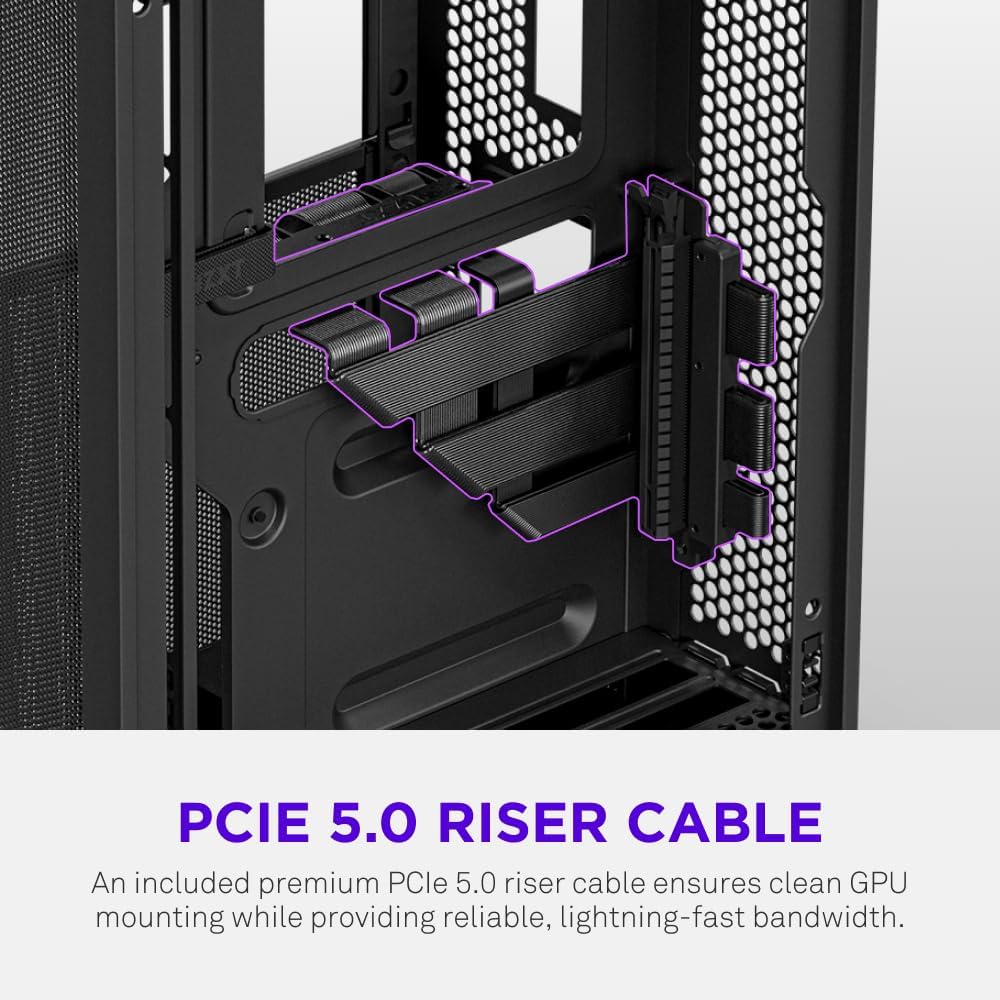
- Pre-Installed Performance: Includes a premium PCIe 5.0 riser cable for vertical GPU mounting and dual F120Q CV fans for immediate exhaust cooling.
2. Қауіпсіздік туралы ақпарат
WARNING: Always disconnect power from your PC before performing any installation, maintenance, or troubleshooting. Failure to do so may result in personal injury or damage to components.
- Орнату алдында барлық нұсқауларды мұқият оқып шығыңыз.
- Электростатикалық разрядтың (ЭЗР) компоненттерге тигізетін зақымдануын болдырмау үшін антистатикалық білезік тағыңыз немесе жерге қосылған металл затқа жиі тиіп тұрыңыз.
- Handle components with care. Avoid touching pins or exposed circuitry.
- Кішкентай бөлшектер мен орау материалдарын балалардан алыс ұстаңыз.
- Қызып кетудің алдын алу үшін компьютер корпусының айналасында дұрыс желдетуді қамтамасыз етіңіз.
3. Пакет мазмұны
Verify that all items are present in your NZXT H2 Flow package:
- NZXT H2 Flow Mini-ITX PC Case
- 2 x 120mm F120Q CV Top Fans (pre-installed)
- Premium PCIe 5.0 Riser Cable (pre-installed)
- Керек-жарақ қорабы (құрамында бұрандалар, кабель байламдары және басқа ұсақ бөлшектер бар)
4. Құрамдас бөліктердің үйлесімділігі
The NZXT H2 Flow case is designed to accommodate specific component sizes for optimal performance and fit:
- Аналық плата: Шағын ITX
- Графикалық карта (GPU): Up to 331 mm in length
- Радиатор: Up to 280 mm (for liquid cooling solutions)
- Қуат көзі (PSU): SFX/SFXL form factor is recommended for best compatibility and cable management.
- Жанкүйерлер: Includes 2 x 120mm top fans. Additional fan mounting options may be available depending on other component choices.
5. Орнату және орнату
Follow these steps to assemble your PC within the NZXT H2 Flow case. Refer to your individual component manuals for specific installation details.
5.1. Іс аяқталдыview және Өлшемдер
The NZXT H2 Flow is a compact vertical Mini-ITX case. Understanding its dimensions is crucial for planning your build.

5.2. Accessing the Case Interior
The H2 Flow features tool-less panels for easy access to the interior.

5.3. Аналық плата мен процессорды орнату
Install your Mini-ITX motherboard and CPU (with cooler) before placing it into the chassis.
5.4. Қуат блогын (PSU) орнату
The case supports SFX/SFXL power supplies. Mount the PSU in its designated area, typically at the bottom of the case.

5.5. Кабельді басқару
Utilize the integrated cable routing channels and Velcro straps for a clean and organized interior.
5.6. Графикалық картаны (GPU) орнату
The H2 Flow supports GPUs up to 331 mm in length and includes a premium PCIe 5.0 riser cable for vertical mounting.

5.7. Салқындату жүйесі
The case comes with two pre-installed 120mm F120Q CV fans at the top for exhaust. It also supports up to a 280mm radiator for liquid cooling.


5.8. Өнім аяқталдыview Бейне
Көру үшін осы ресми бейнені қараңызview of the NZXT H2 Flow Mini-ITX PC Gaming Case.
6. Пайдалану нұсқаулары
6.1. Қуатты қосу/өшіру
Press the power button located on the front I/O panel to turn your PC on or off.
6.2. Алдыңғы енгізу/шығару порттары
Алдыңғы енгізу/шығару панелі мыналарға ыңғайлы қол жеткізуді қамтамасыз етеді:
- USB 3.0 порттары
- USB-C порты
- Audio Jack (if applicable)
Connect your peripherals such as keyboards, mice, and headsets to these ports.
7. Техникалық қызмет көрсету
7.1. Шаң сүзгілерін тазалау
The NZXT H2 Flow features ultra-fine mesh panels that act as dust filters. Regularly clean these panels to maintain optimal airflow and prevent dust buildup inside your PC.
- Gently remove the mesh panels from the case.
- Жиналған шаңды кетіру үшін сығылған ауаны немесе жұмсақ щетканы пайдаланыңыз.
- Reattach the panels securely.
7.2. Жалпы тазалау
Жұмсақ пайдаланыңыз, damp cloth to wipe down the exterior of the case. Avoid abrasive cleaners or solvents.
8. Ақаулықтарды жою
Егер компьютеріңіздің құрастыруында мәселелер туындаса, келесі жалпы ақаулықтарды жою қадамдарын қарастырыңыз:
- Қуат жоқ: Барлық қуат кабельдерінің (PSU - қабырғаға, PSU - аналық платаға, CPU, GPU) қауіпсіз жалғанғанын тексеріңіз. PSU қуат қосқышын тексеріңіз.
- Дисплей жоқ: Verify that your monitor is connected to the graphics card (not the motherboard I/O unless using integrated graphics) and that the GPU has proper power connections. Reseat the GPU and RAM.
- Қызып кету: Check fan connections and orientation. Ensure mesh panels are clean and not obstructed. Verify CPU cooler installation and thermal paste application.
- Компонент анықталмады: Reseat the component (GPU, RAM, storage drives). Check power and data connections.
For more complex issues, consult your individual component manuals or NZXT customer support.
9. Техникалық сипаттамалар
| Ерекшелік | Мәлімет |
|---|---|
| Бренд | NZXT |
| Модель атауы | NZXT H2 Flow |
| Іс түрі | Шағын мұнара |
| Аналық платаның үйлесімділігі | Шағын ITX |
| GPU ұзындығын қолдау | 331 мм дейін |
| Радиаторды қолдау | 280 мм дейін |
| Жанкүйерлер кіреді | 2 x 120mm F120Q CV Top Fans |
| Included Riser Cable | Premium PCIe 5.0 |
| Қуат көзін орнату түрі | Bottom Mount (SFX/SFXL recommended) |
| Салқындату әдісі | Air, Liquid |
| Түс | Қара |
| Материал | Шыны, металл |
| Элемент салмағы | 4.55 келі |
| Total USB 3.0 Ports | 1 |
| Other Special Features | Tool-less Installation, Integrated Cable Management |
10. Кепілдік және қолдау
10.1. Кепілдік туралы ақпарат
The NZXT H2 Flow Mini-ITX PC Case comes with a Өндірушінің 2 жылдық кепілдігі. Кепілдік шағымдары үшін сатып алуды растайтын құжатты сақтаңыз.
10.2. Тұтынушыларға қолдау көрсету
For technical assistance, troubleshooting, or warranty inquiries, please visit the official NZXT support webсайтына өтіңіз немесе тұтынушыларға қызмет көрсету тобына хабарласыңыз.
NZXT Store: Visit the NZXT Store on Amazon


