
MOZOTER SP9i
MOZOTER SP9i Wireless Earbuds User Manual
Model: SP9i
Кіріспе
Thank you for choosing the MOZOTER SP9i Wireless Earbuds. These earbuds are designed to provide a comfortable and stable audio experience with advanced Bluetooth 5.3 technology, deep bass sound, and extended playtime. This manual will guide you through the setup, operation, and maintenance of your new earbuds to ensure optimal performance.
Қорапта не бар
- MOZOTER SP9i Wireless Earbuds (Left and Right)
- Зарядтау қорабы
- USB-C зарядтау кабелі
- Құлақ ұштары (S, M, L өлшемдері)
- Пайдаланушы нұсқаулығы
Өнім аяқталдыview
The MOZOTER SP9i earbuds feature an over-ear hook design for secure fit and comfort. Each earbud is equipped with intuitive touch controls for easy management of audio and calls. The compact charging case provides additional battery life and convenient storage.

Image: The MOZOTER SP9i Wireless Earbuds resting in their open charging case, showcasing the over-ear hook design and the charging contacts.
Сурет: егжей-тегжейлі view of an earbud highlighting the integrated Bluetooth 5.3 technology for stable and efficient wireless connectivity.
Орнату
1. Құлақаспаптар мен қорапты зарядтау
Before first use, fully charge the earbuds and the charging case. Connect the provided USB-C cable to the charging port on the case and a power source. The indicator lights on the case will show the charging status.
- Зарядтау уақыты: Толық зарядтау үшін шамамен 1.5 сағат.
- Құлаққапты ойнату уақыты: Бір зарядта 12 сағатқа дейін.
- Іспен ойнаудың жалпы уақыты: 60 сағатқа дейін.

Image: The charging case with earbuds inside, illustrating the 60-hour total playtime, 12-hour single charge, and 48-hour case capacity, along with the USB-C charging port.
2. Құрылғымен жұптастыру
- Зарядтау қорапшасында қуат бар екеніне және құлақаспаптардың ішінде екеніне көз жеткізіңіз.
- Зарядтау қорабын ашыңыз. Құлақаспаптар автоматты түрде қосылады және жұптау режиміне өтеді.
- Құрылғыда (смартфон, планшет, ноутбук) Bluetooth қосыңыз.
- Іздеу қолжетімді Bluetooth құрылғыларын таңдап, «SP9i" тізімнен.
- Қосылғаннан кейін растау дыбысын естисіз және құлаққаптардың индикатор шамдары сөнеді немесе баяу жыпылықтайды.
Егер құрылғыда Bluetooth қосулы болса, құлаққаптар қаптамадан шығарылған кезде соңғы жұптастырылған құрылғыға автоматты түрде қайта қосылады.

Image: An illustration showing the MOZOTER SP9i earbuds in their open case, with a smartphone screen displaying a successful Bluetooth connection to "SP9i".
Кию нұсқаулары
For optimal sound quality and comfort, it is important to wear the earbuds correctly and choose the appropriate eartip size.
1. Құлақ ұштарын таңдау
The earbuds come with small (S), medium (M), and large (L) eartips. Experiment with different sizes to find the pair that provides the best seal and comfort for your ears. A good seal enhances bass response and passive noise cancellation.
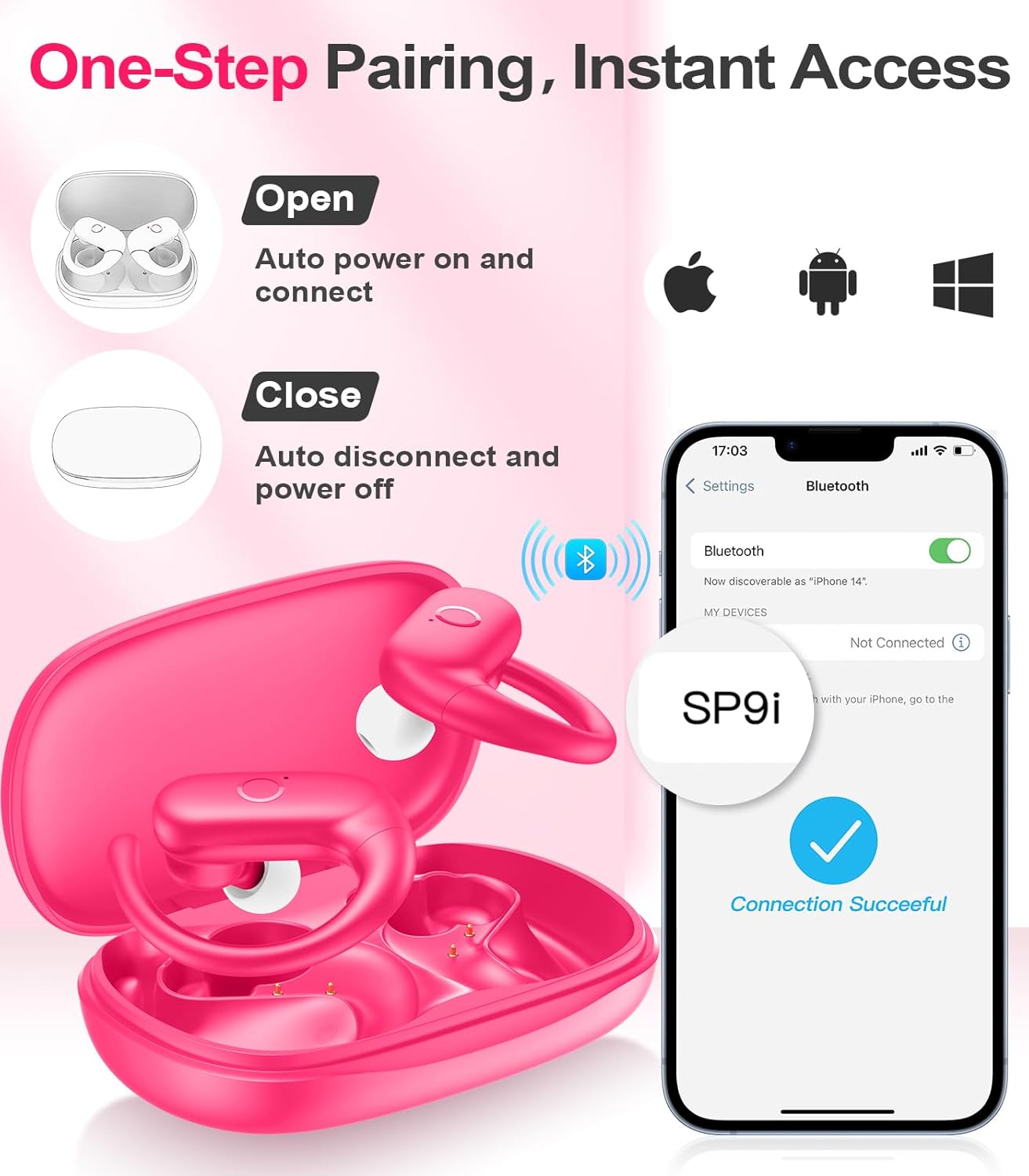
Image: A woman wearing an earbud, with an inset showing the three available eartip sizes (S, M, L) for a customized and comfortable fit.
2. Қауіпсіз сәйкестікке қол жеткізу
- 1-қадам: Құлақ ілмегін құлағыңыздың үстіне қойыңыз.
- 2-қадам: Құлаққапты құлақ арнасына ақырын салыңыз.
- 3-қадам: Rotate the earbud slightly to find a comfortable and secure angle. The flexible ear hooks ensure a stable fit, ideal for sports and active use.

Image: A three-step diagram illustrating the correct method to wear the MOZOTER SP9i earbuds, ensuring a secure and comfortable fit with the ear hook.

Image: A woman wearing the MOZOTER SP9i earbuds, demonstrating the ergonomic design that rests comfortably and securely on the ear.
Пайдалану нұсқаулары
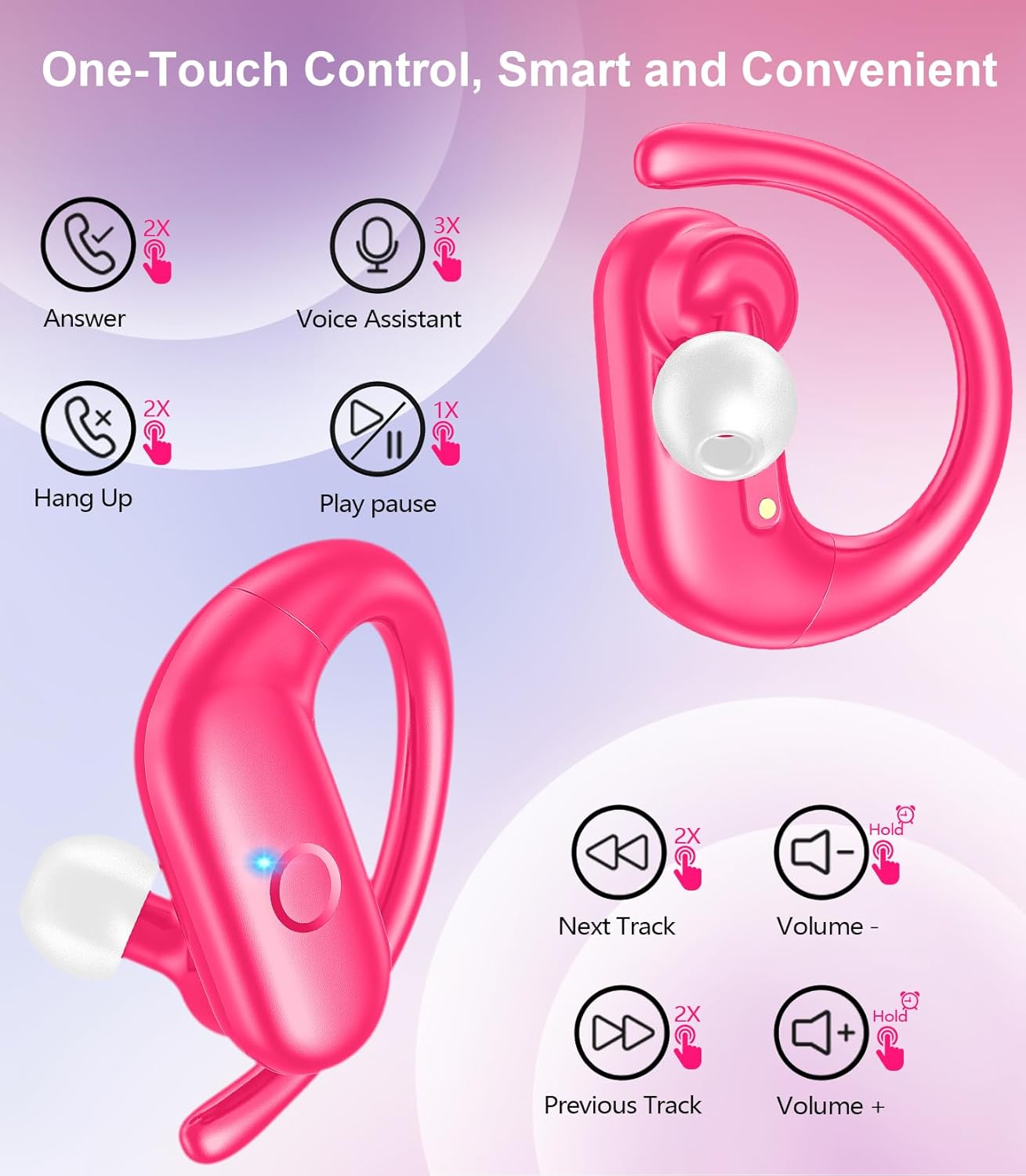
The MOZOTER SP9i earbuds feature intuitive touch controls on each earbud. The following table outlines the functions:
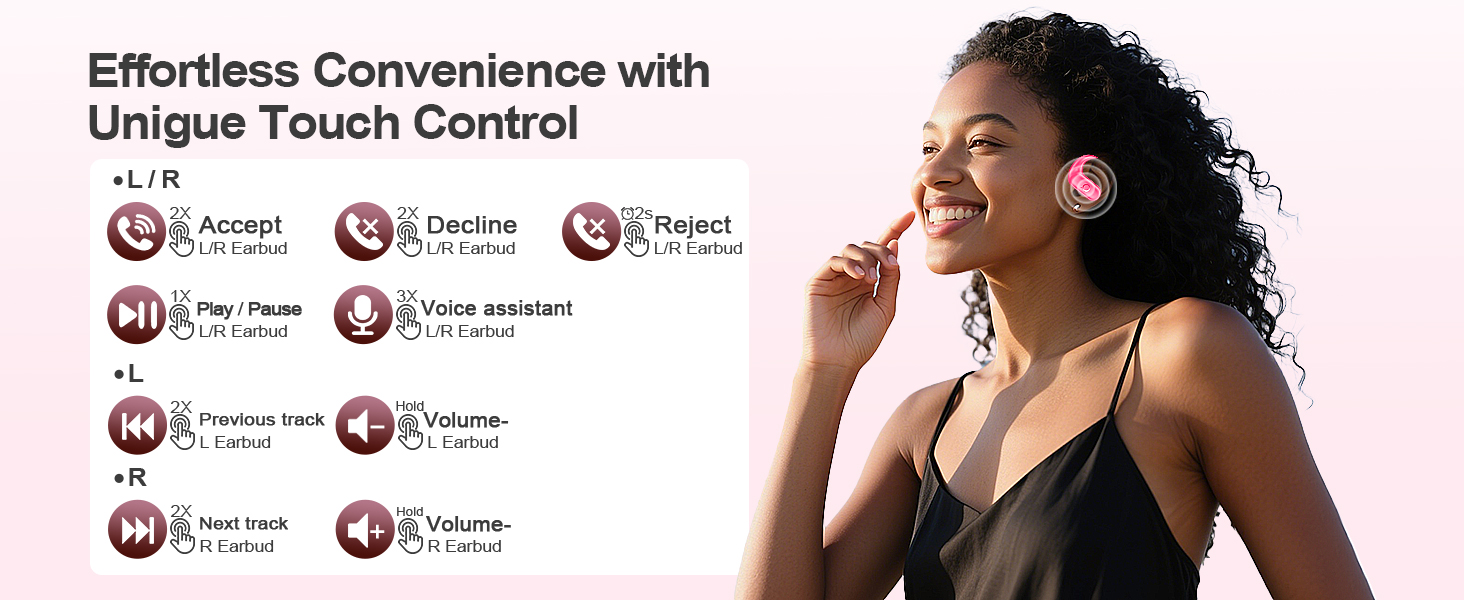
Image: A visual guide detailing the various touch control gestures for the MOZOTER SP9i earbuds, including call management, music playback, and volume adjustments.
| Әрекет | Қимыл (сол/оң құлаққап) |
|---|---|
| Қоңырауға жауап беру | Double-tap (2X) |
| Қоңырауды өшіру | Double-tap (2X) |
| Қоңырауды қабылдамау | Triple-tap (3X) |
| Музыканы ойнату/кідірту | Single-tap (1X) |
| Voice Assistant қолданбасын іске қосыңыз | Triple-tap (3X) |
| Келесі трек | Double-tap (2X) on Дұрыс құлаққап |
| Алдыңғы трек | Double-tap (2X) on Солға құлаққап |
| Дыбыс деңгейін жоғарылату | Күте тұр Дұрыс құлаққап |
| Дыбыс деңгейін төмендету | Күте тұр Солға құлаққап |
Техникалық қызмет көрсету
Тиісті техникалық қызмет көрсету құлаққаптарыңыздың ұзақ қызмет етуі мен өнімділігін қамтамасыз етеді.
- Тазалау: Regularly clean the eartips and the charging contacts on both the earbuds and the case with a soft, dry, lint-free cloth. Avoid using harsh chemicals or abrasive materials.
- Сақтау орны: Қолданбаған кезде, құлаққаптарды шаңнан және зақымданудан қорғау үшін зарядтау қорабында сақтаңыз.
- Суға әсер ету: While designed for sports, avoid submerging the earbuds in water. Wipe off sweat or moisture immediately after use.
Ақаулықтарды жою
If you encounter any issues with your MOZOTER SP9i earbuds, please refer to the following common solutions:
- Құлақаспаптар жұптаспайды: Ensure both earbuds are charged and removed from the case. Turn off and on your device's Bluetooth. If issues persist, try resetting the earbuds (refer to manufacturer's webнұсқаулықта болмаса, нақты қалпына келтіру нұсқауларын алу үшін сайтқа кіріңіз).
- Тек бір құлаққап жұмыс істейді: Place both earbuds back into the charging case, close the lid, wait a few seconds, then open the lid and remove them. This often resynchronizes them.
- Дыбыс сапасы нашар: Ensure the eartips provide a good seal in your ear. Clean any debris from the earbud speakers. Check your device's volume and audio settings.
- Зарядтау мәселелері: Зарядтау кабелінің қорапқа да, қуат көзіне де сенімді жалғанғанына көз жеткізіңіз. Құлаққаптардағы және қораптың ішіндегі зарядтау контактілерін тазалаңыз.
- Құлаққаптардың түсіп қалуы: Experiment with different eartip sizes and adjust the ear hooks for a more secure fit as described in the Wearing Instructions section.
Техникалық сипаттамалар
| Ерекшелік | Мәлімет |
|---|---|
| Модель атауы | SP9i |
| Қосылу технологиясы | Сымсыз (Bluetooth 5.3) |
| Шуды бақылау | Пассивті шуды жою |
| Кедергі | 4 Ом |
| Құлаққаптың салмағы | Әр құлаққапқа шамамен 8 г |
| Құлаққапты ойнату уақыты | 12 сағатқа дейін |
| Жалпы ойнау уақыты (қораппен) | 60 сағатқа дейін |
| Зарядтау порты | USB-C |
| Қосылған құрамдас бөліктер | Earbuds, Charging Case, Eartips, User Manual |
Кепілдік және қолдау
MOZOTER products are designed and manufactured to the highest quality standards. For warranty information and customer support, please refer to the documentation included with your purchase or visit the official MOZOTER website. If you require further assistance, please contact our customer service team.
Ask a question about this manual
Ask about setup, troubleshooting, compatibility, parts, safety, or missing instructions. Manuals+ will review the question and use this page’s manual context to help answer it.