
Кіріспе
This manual provides detailed instructions for the setup, operation, and maintenance of your SPYPOINT FORCE-PRO 30 Megapixel 4K Trail Camera. Designed for outdoor monitoring, this camera captures high-resolution photos and videos, making it ideal for wildlife observation and security. Please read this manual thoroughly to ensure proper use and optimal performance of your device.
Пакет мазмұны
Verify that all items listed below are present in your package. If any items are missing or damaged, please contact SPYPOINT customer support.
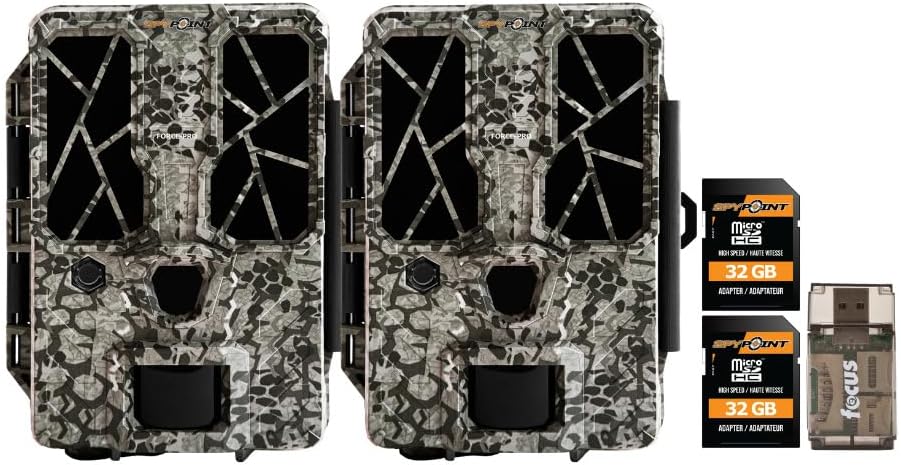
- 2 x SPYPOINT FORCE-PRO 30 Megapixel Trail Camera
- 2 x SPYPOINT MicroSD 32GB Ultra High Speed Class 10 Memory Card
- 1 x Focus All-In-One High Speed Card Reader

Өнім аяқталдыview
The SPYPOINT FORCE-PRO is a robust trail camera designed for reliable performance in outdoor environments. It features advanced imaging capabilities and user-friendly controls.
Негізгі мүмкіндіктер
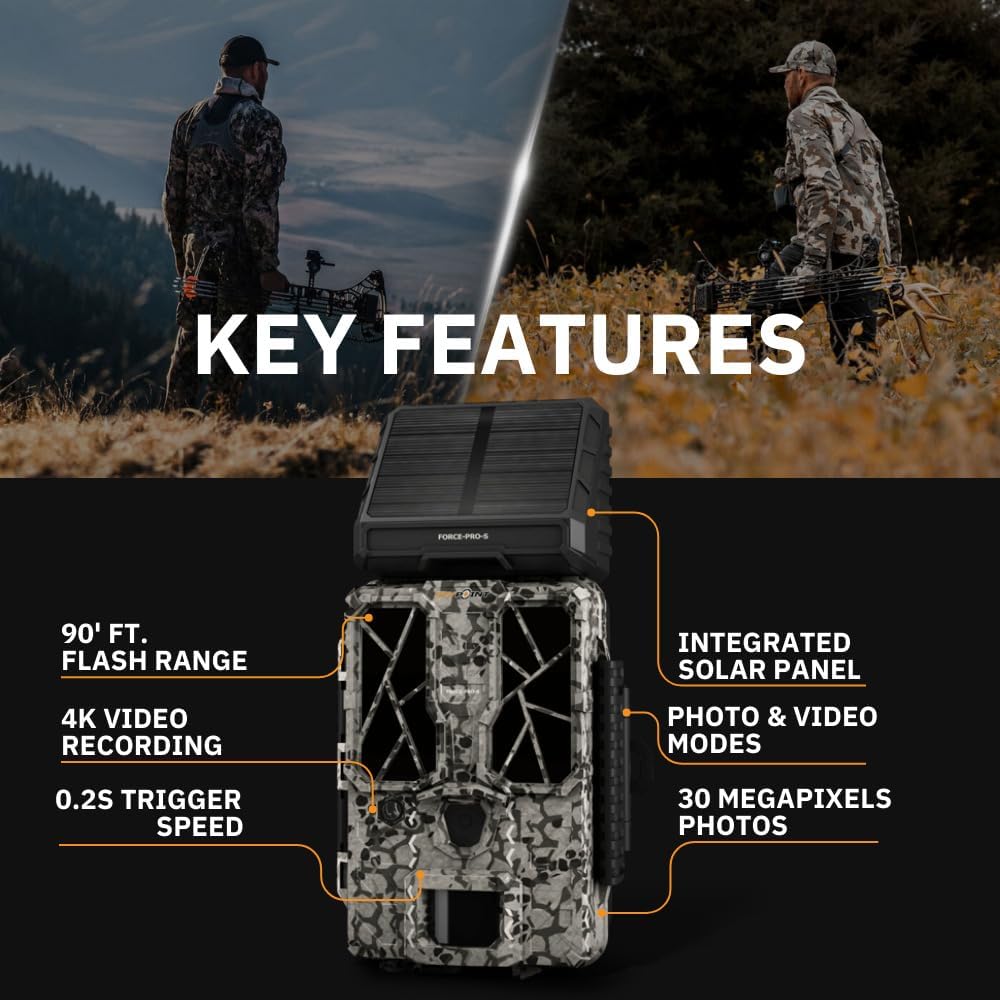
- Жоғары ажыратымдылық: 30 Megapixel photos and 4K video recording with sound.
- Жылдам іске қосу жылдамдығы: Ultra-fast 0.2-second trigger speed to capture quick movements.
- Кең анықтау диапазоны: 110-foot detection range.
- Powerful Flash: 90-foot flash range with 54 LEDs for clear night images.
- Біріктірілген күн панелі: For extended battery life and reduced maintenance.
- Dual-SIM Cellular: Automatically connects to the best available network for reliable transmission (if cellular model).



Орнату
1. Қуат көзін орнату
The FORCE-PRO camera is equipped with an integrated solar panel for charging its internal battery. For initial setup or extended use without sufficient sunlight, an external power source can be used.
- Ішкі батарея: Ensure the camera's internal battery is charged. The integrated solar panel will charge it during daylight hours.
- External Power (Optional): If using an external 12V power source (not included), connect it to the camera's 12V jack.
2. MicroSD картасын салу
A MicroSD card is required to store photos and videos. Two 32GB MicroSD cards are included in this bundle.
- Locate the MicroSD card slot on the camera.
- Insert the MicroSD card with the gold contacts facing the back of the camera until it clicks into place.
- Картаны алу үшін, ол серіппелі шыққанша ақырын басыңыз.
3. Бастапқы қуат қосу және негізгі конфигурация
- Turn the camera ON using the power switch.
- Follow the on-screen prompts (if available) or refer to the camera's menu for initial settings such as date, time, and language.
- Format the MicroSD card through the camera's menu for optimal performance.
4. Камераны орнату
The camera can be mounted using a strap, tripod, or other compatible mounting accessories. While specifications mention 'Tabletop Mount', for outdoor use, secure mounting is crucial.
- Таза орынды таңдаңыз view қалаған бақылау аймағының.
- Ensure the camera is securely fastened to prevent movement from wind or animals.
- Position the camera to avoid direct sunlight into the lens, which can cause overexposure.
Пайдалану нұсқаулары
Камера режимдері
- Фото режимі: Captures still images when triggered.
- Бейне режимі: Records video clips when triggered.
- Фото + Бейне режимі: Фотосуретке түсіріп, содан кейін бейнеклип түсіреді.
Параметрлерді реттеу
Access the camera's menu using the built-in screen and navigation buttons to customize settings:
- Ажыратымдылық: Select desired photo (up to 30MP) and video (up to 4K) resolution. Higher resolutions consume more storage.
- Триггердің кешігуі: Set the delay between consecutive triggers.
- Сезімталдық: Adjust the motion sensor sensitivity to suit the environment and avoid false triggers.
- Жұмыс уақыты: Define specific times the camera should be active.
- Күні/Уақыты Stamp: Enable or disable the date and time overlay on images/videos.
Деректерді іздеу
- MicroSD картасы: Remove the MicroSD card from the camera and insert it into the included Focus All-In-One High Speed Card Reader. Connect the card reader to a computer to access files.
- SPYPOINT App: For cellular models, use the SPYPOINT mobile application to view and manage captured media remotely. The app also allows for camera settings adjustments and firmware updates.
Техникалық қызмет көрсету
- Тазалау: Regularly clean the camera lens and housing with a soft, dry cloth. Avoid abrasive materials or harsh chemicals.
- Батареяны тексеру: Monitor battery levels, especially during periods of low sunlight. The integrated solar panel helps maintain charge, but supplemental charging may be needed.
- Микробағдарламаны жаңарту: Periodically check for and install firmware updates via the SPYPOINT app or webоңтайлы өнімділікті және жаңа мүмкіндіктерге қол жеткізуді қамтамасыз ететін сайт.
- Сақтау орны: When not in use, store the camera in a cool, dry place away from direct sunlight.
Ақаулықтарды жою
- Camera Not Triggering: Check motion sensor sensitivity, ensure no obstructions, and verify battery level.
- Кескін/бейне сапасы нашар: Clean the lens, check resolution settings, and ensure proper lighting conditions.
- Қуат мәселелері: Ensure the internal battery is charged or an external power source is properly connected. Check for any damage to power cables.
- MicroSD картасының қателері: Reformat the MicroSD card (backing up data first) or try a different card. Ensure the card is properly inserted.
- Connectivity Problems (Cellular Models): Verify cellular signal strength in the camera's location. Check your SPYPOINT app for data plan status.
Техникалық сипаттамалар
| Ерекшелік | Техникалық сипаттама |
|---|---|
| Үлгі | FORCE-PRO |
| Фотосурет ажыратымдылығы | 30 мегапиксель |
| Бейне ажыратымдылығы | 4K |
| Триггер жылдамдығы | 0.2 секунд |
| Анықтау диапазоны | 110 фут |
| Жарқыл диапазоны | 90 фут |
| Жарықдиодты шамдар | 54 |
| Қуат көзі | Integrated Solar Panel, Corded Electric (external 12V option) |
| Қосылу мүмкіндігі | USB, Wired (for data transfer), Cellular (for remote management) |
| Материал | Пластмасса |
| Суға төзімділік | Суға төзімді |
| Фокус түрі | Автоматты фокус |
| UPC | 196271434986 |
Кепілдік және қолдау
For warranty information, technical support, or service inquiries, please refer to the official SPYPOINT webсайтына кіріңіз немесе олардың тұтынушыларға қызмет көрсету бөліміне тікелей хабарласыңыз. Кепілдік талаптары үшін сатып алу құжатыңызды сақтаңыз.
СПЕПОИНТ Webсайт: www.spypoint.com