
Audiolab 9000A
Audiolab 9000A Flagship Integrated Amplifier/DAC/Phono Preamp
Пайдаланушы нұсқаулығы
1. Кіріспе
The Audiolab 9000A is a high-performance integrated amplifier designed to be the central component of any advanced audio system. It combines a powerful amplifier, a high-resolution Digital-to-Analog Converter (DAC), and a dedicated phono preamplifier, offering extensive connectivity and advanced features for audiophiles.
This manual provides essential information for setting up, operating, and maintaining your Audiolab 9000A to ensure optimal performance and longevity.
2. Қауіпсіздік туралы ақпарат
Құрылғыны пайдаланбас бұрын барлық қауіпсіздік нұсқауларын мұқият оқып шығыңыз. Бұл нұсқаулықты болашақта анықтама үшін сақтаңыз.
- Нәр беруші: Connect the unit only to a power supply of the type marked on the rear panel.
- Желдету: Жеткілікті желдетуді қамтамасыз етіңіз. Желдету саңылауларын жаппаңыз.
- Су және ылғал: Құрылғыны жаңбырға немесе ылғалға ұшыратпаңыз. Құрылғыға сұйықтық толтырылған заттарды қоймаңыз.
- Жылу: Құрылғыны радиаторлар, жылытқыштар, пештер немесе жылу шығаратын басқа құрылғылар сияқты жылу көздеріне жақын қоймаңыз.
- Тазалау: Тек құрғақ шүберекпен тазалаңыз. Сұйық тазалағыштарды немесе аэрозольді тазартқыштарды қолданбаңыз.
- Қызмет көрсету: Бұл құрылғыға өз бетіңізше қызмет көрсетуге тырыспаңыз. Барлық қызмет көрсетуді білікті қызмет көрсету қызметкерлеріне тапсырыңыз.
3. Қорапта не бар
Carefully unpack the contents of the box. You should find the following items:
- Audiolab 9000A интеграцияланған Ampқұтқарушы
- Қуат сымы
- Қашықтан басқару құралы
- Пайдаланушы нұсқаулығы (бұл құжат)
- Antennas (for Bluetooth connectivity)
4. Өнім аяқталдыview
Алдыңғы панель
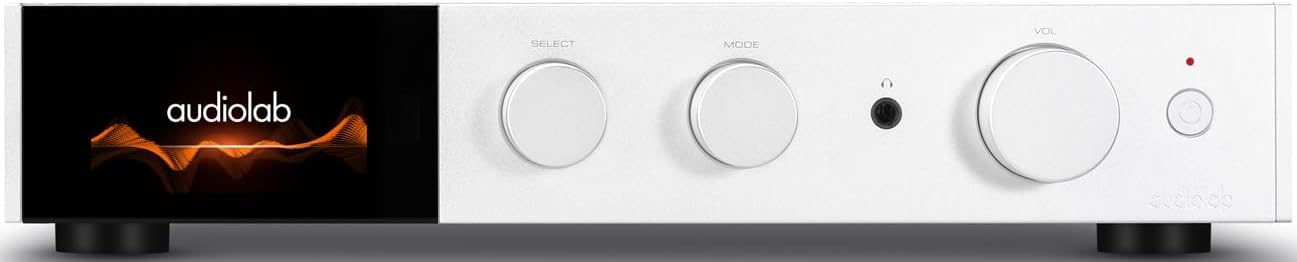
4.1-сурет: Алдыңғы view of the Audiolab 9000A, displaying the Audiolab logo on its full-color IPS LCD screen. The front panel features three rotary controls for Select, Mode, and Volume, along with a headphone jack and power button.

4.2-сурет: Алдыңғы view of the Audiolab 9000A, showcasing the full-color IPS LCD screen displaying VU meters. This visual option provides real-time audio level feedback.
The 9000A features a 4.3-inch (800 x 480mm) full-color IPS LCD screen, providing clear and informative playback, source, and file information. It also offers various display options, including two VU meter styles, allowing for visual feedback or a discreet appearance.
Артқы панель қосылымдары

Figure 4.3: Rear panel of the Audiolab 9000A, showing a comprehensive array of input and output connections. These include analog, XLR, phono (MM), power amplifier input, SPDIF (coaxial and optical), PC USB, Bluetooth antenna, pre-amplifier output, stereo speaker terminals, and 12V trigger connections.
The rear panel provides a wide range of connectivity options, including multiple analog and digital inputs, a dedicated phono input, balanced XLR input, and various outputs for speakers and external components. Bluetooth antennas are also located here for wireless streaming.
Негізгі мүмкіндіктер
- Ampөмір сүру: Discrete Class AB power amplifier delivering 100W per channel into 8 ohms (160W into 4 ohms). Features Audiolab's CFB (Complementary Feedback) topology for superior linearity.
- Digital-to-Analog Converter (DAC): Equipped with the ESS 9038PRO flagship 32-bit DAC chip, supporting PCM up to 32-bit/768kHz and DSD up to DSD512.
- MQA декодтауы: Full MQA decoding capability for high-resolution streaming.
- Фоно Сtage: Dedicated high-performance, low-noise Moving Magnet (MM) phono stage with JFET-based circuitry and precise RIAA equalization.
- Құлаққап Ampөмір сүруші: Арнайы ағымдағы кері байланыс құлаққаптары amplifier with wide bandwidth and high slew rate.
- Қосылу мүмкіндігі: Multiple analog inputs (3 x AUX, 1 x XLR), digital inputs (2 x Coaxial, 2 x Optical, 1 x PC USB), Bluetooth 5.1 with aptX HD/AAC/LDAC support.
- Жұмыс режимдері: Integrated, Pre-Power, and Pre Only modes for versatile system integration.
5. Орнату
5.1 Орналастыру
Place the Audiolab 9000A on a stable, level surface away from direct sunlight, heat sources, and excessive moisture. Ensure there is adequate space around the unit for ventilation.
5.2 Үндеткіштерді қосу
- Ensure the 9000A is powered off and unplugged from the mains.
- Connect your loudspeakers to the speaker terminals on the rear panel (refer to Figure 4.3). Ensure correct polarity: red (+) to red (+) and black (-) to black (-).
- Tighten the binding posts securely, but do not overtighten.
5.3 Дыбыс көздерін қосу
9000A әртүрлі енгізу опцияларын ұсынады:
- Аналогтық кірістер (AUX1, AUX2, AUX3): Use RCA cables to connect analog sources like CD players, tuners, or tape decks.
- Теңдестірілген XLR енгізу: For high-quality analog sources with XLR outputs.
- Фоно (ММ) кірісі: Connect your turntable directly to this input. Ensure your turntable has a Moving Magnet (MM) cartridge.
- Digital Inputs (COAX1, COAX2, OPT1, OPT2): Connect digital sources such as CD transports, media streamers, or TVs using coaxial or optical cables.
- PC USB (USB B): Connect your computer for high-resolution audio playback.
- Блютез: Attach the supplied antennas to the rear panel for optimal Bluetooth signal reception.
5.4 Қуат қосылымы
Once all audio connections are made, connect the supplied power cord to the IEC inlet on the rear panel and then to a suitable mains power outlet.
6. Пайдалану нұсқаулары
6.1 Қуатты қосу/өшіру
Press the power button on the front panel or the remote control to switch the unit on or off. The display will illuminate upon power-on.
6.2 Дереккөзді таңдау
Use the "SELECT" rotary control on the front panel or the source buttons on the remote control to cycle through the available input sources (AUX1, AUX2, AUX3, XLR, Phono, COAX1, COAX2, OPT1, OPT2, PC USB, Bluetooth).
6.3 Дыбыс деңгейін басқару
Adjust the listening volume using the "VOL" rotary control on the front panel or the Volume Up/Down buttons on the remote control.
6.4 Жұмыс режимдері
The 9000A offers three distinct operating modes, selectable via the menu:
- Кіріктірілген режим: This is the default mode, where the pre-ampкөтергіш және қуат ampөмір сүруші С.tages are combined. Use this for connecting digital and analog sources directly to the 9000A and driving a pair of speakers.
- Қуатқа дейін режим: This mode disconnects the pre-ampкөтергіш және қуат ampөмір сүруші С.tages. The 9000A can then be used solely as a power amplifier (e.g., connected to an AV processor) or to insert external signal processing between the pre-out and power-in connections.
- Pre Only Mode: In this mode, the 9000A functions solely as a pre-amplifier, outputting the processed signal via its pre-amplifier outputs to an external power ampқұтқарушы.
6.5 Сандық сүзгілер
For digital inputs, the 9000A provides user-selectable digital filters to optimize the response to suit the source file and partnering equipment. Access these options through the unit's menu system.
6.6 Bluetooth қосылымы
- Ensure the Bluetooth antennas are connected to the rear panel.
- Select "Bluetooth" as the input source on the 9000A.
- Мобильді құрылғыда (смартфон, планшет, ноутбук) Bluetooth қосыңыз және қолжетімді құрылғыларды іздеңіз.
- Select "Audiolab 9000A" from the list to pair. Once paired, audio from your device will stream wirelessly to the ampқұтқарушы.
- The 9000A supports aptX HD, AAC, and LDAC protocols for high-quality wireless audio.
6.7 Құлаққап шығысы
Connect your headphones to the 6.35mm (1/4 inch) headphone jack on the front panel. Connecting headphones will automatically mute the main speaker outputs.
7. Техникалық қызмет көрсету
- Тазалау: Use a soft, dry, lint-free cloth to clean the unit. Do not use abrasive cleaners, waxes, or solvents.
- Желдету: Желдету саңылауларының шаң мен қоқыстан таза екенін мезгіл-мезгіл тексеріп отырыңыз.
- Қосылымдар: Ensure all cables are securely connected. Loose connections can affect sound quality.
- Сақтау орны: Құрылғыны ұзақ уақыт сақтасаңыз, оны қуат көзінен ажыратып, салқын, құрғақ жерде сақтаңыз.
8. Ақаулықтарды жою
| Мәселе | Ықтимал себебі | Шешім |
|---|---|---|
| Қуат жоқ | Қуат сымы қосылмаған; Розетка ақаулы; Құрылғы күту режимінде. | Check power cord connection; Try a different outlet; Press power button on unit or remote. |
| Динамиктерден дыбыс жоқ | Incorrect input selected; Speaker cables loose or incorrectly connected; Volume too low; Mute function active; Headphone connected. | Select correct input; Check speaker connections and polarity; Increase volume; Deactivate mute; Disconnect headphones. |
| Бір арнадан дыбыс жоқ | Speaker cable loose or faulty; Source cable faulty; Speaker faulty. | Check speaker and source cable connections; Test with another speaker or source. |
| Гыңылдаған немесе ызылдаған шу | Ground loop; Nearby electrical interference; Faulty cable. | Ensure all components are properly grounded; Move unit away from other electronics; Try different cables. |
| Bluetooth жұптастыру мәселелері | Antennas not connected; Device too far; Device already paired with another unit. | Connect Bluetooth antennas; Move device closer; Disconnect from other devices and try pairing again. |
9. Техникалық сипаттамалар
| Санат | Мәлімет |
|---|---|
| Жалпы сипаттама | Біріктірілген Ampқұтқарушы |
| Номиналды қуаты | 2 x 100W (8 ohms, THD<1%); 2 x 160W (4 ohms, THD<1%) Class AB |
| DAC чипі | ES9038Pro 32-bit DAC |
| Дисплей | 4.3" (800 x 480mm) Full View IPS СКД |
| MQA декодтау | Built-in Certified MQA Full Decoder (PC USB, Coax/Optical) |
| Блютез | Bluetooth 5.1 (aptX/aptX HD/AAC/LDAC) Support |
| Фоно Сtage | Dedicated High-performance, Low-noise MM Phono Stage |
| Құлаққап AMP | Арнайы ағымдағы кері байланыс құлаққаптары AMP |
| Жұмыс режимдері | Integrated / PRE-POWER / PRE Only Modes |
| USB Upgrade Support | Иә |
| Кірістері | 3 x Analogue, 1 x XLR, 1 x Phono (MM), 1 x Power Amplifier, 2 x SPDIF (Coax), 2 x SPDIF (Optical), 1 x PC USB (USB B), 1 x Bluetooth, 1 x 12V Trigger |
| Шығыстар | 1 x PRE Ampкөтергіш, 1 x стерео динамик, 1 x құлақаспап, 1 x 12 В триггер |
| Sampling Frequency (Optical/Coaxial) | 44.1кГц-192кГц |
| Sampling Frequency (PC USB) | 44.1kHz-768kHz (PCM) / DSD64, DSD128, DSD256, DSD512 |
| Алдын алаamplifier Gain (max.) | +6dB (Line), +53dB (Phono MM) |
| Алдын алаamplifier THD | <0.0004% (1kHz @ 2V, Volume = 0dB) |
| DAC THD | <0.001% (1kHz @ 0dBFS) |
| Қуат Amplifier THD | <0.002% (1кГц @ 50Вт / 8 Ом) |
| Құлаққап Amplifier THD | <0.01% (1kHz, 50mW) |
| Таза салмақ | 9.4 кг |
| Өлшемдері (ені x Y x D) | 444 x 342 x 89 мм |
| Аяқтау опциялары | Қара / Күміс |
| Қуатқа қойылатын талаптар | 100-120В ~ 50/60Гц |
10. Кепілдік және қолдау
Audiolab products are manufactured to the highest standards and undergo rigorous quality control. This product is covered by a manufacturer's warranty, the terms of which may vary by region. Please refer to the warranty card included with your product or visit the official Audiolab webкепілдік туралы толық ақпарат алу үшін сайт.
For technical support, service, or inquiries regarding your Audiolab 9000A, please contact your authorized Audiolab dealer or distributor. You can also find support resources, FAQs, and contact information on the official Audiolab webсайт: www.audiolab.co.uk
Ask a question about this manual
Ask about setup, troubleshooting, compatibility, parts, safety, or missing instructions. Manuals+ will review the question and use this page’s manual context to help answer it.