
1. Кіріспе
The Hushing Sound Machine Alarm Clock F4 is a versatile 3-in-1 device designed to enhance sleep and simplify daily routines. It combines a sound machine with 30 soothing sounds, a dual alarm clock with 15 wake-up sounds, and a night light with 12 color options. This device features a backup battery for alarm functionality during power outages, a memory function to retain settings, and adjustable display brightness.

1-сурет: Алдыңғы view of the Hushing Sound Machine Alarm Clock F4.
2. Өнімнің ерекшеліктері
- 3-і 1 функциясы: Integrates a sound machine, dual alarm clock, and night light.
- Дыбыстық құрылғы: Offers 30 soothing sounds, including white noise, pink noise, brown noises, lullabies, and natural sounds (rain, thunderstorm, sea waves, river, campfire, water drop, singing birds).
- Қос дабыл: Two independent alarms for different schedules.
- Wake-up Sounds: 15 options, including classic beeps, light music, and ambient sounds.
- Кейінге қалдыру функциясы: Provides an additional 9 minutes of rest.
- Түнгі жарық: 12 colors with 10 adjustable brightness levels. Can be turned off independently.
- Уақытты көрсету: 12/24-hour mode with 4 levels of adjustable brightness.
- Дыбыс деңгейін басқару: 32 реттелетін дыбыс деңгейі.
- Sleep Timers: Auto-off options for 30, 60, 90, or 120 minutes, or continuous playback.
- Жад функциясы: Retains last settings after power failure or reboot.
- Сақтық батарея: Ensures alarm functionality during power outages (device requires constant power for full operation).

2 -сурет: Аяқталдыview 3-і 1 функциясының.

Figure 3: Detailed list of 30 soothing sounds available.
3. Орнату
- Қуат қосылымы: Connect the device to a power source using the provided USB cable and adapter. The device requires continuous power for full operation. The internal battery serves as a backup for the alarm function only.
- Бастапқы төлем: For optimal performance, ensure the device is fully charged before first use.
- Уақытты орнату:
- Press and hold the "12/24H Time Set" button to enter time setting mode.
- Сағатты реттеу үшін «+» немесе «-» түймелерін пайдаланыңыз.
- Press the "Next Song" button (right arrow) to move to minute adjustment.
- Минуттарды реттеу үшін «+» немесе «-» түймелерін пайдаланыңыз.
- Press the "Next Song" button again to confirm and exit time setting.
- 12/24 сағат пішімі: Short press the "12/24H Time Set" button to toggle between 12-hour (AM/PM) and 24-hour formats.
Video 1: Guide on how to set the alarm clock and other settings.
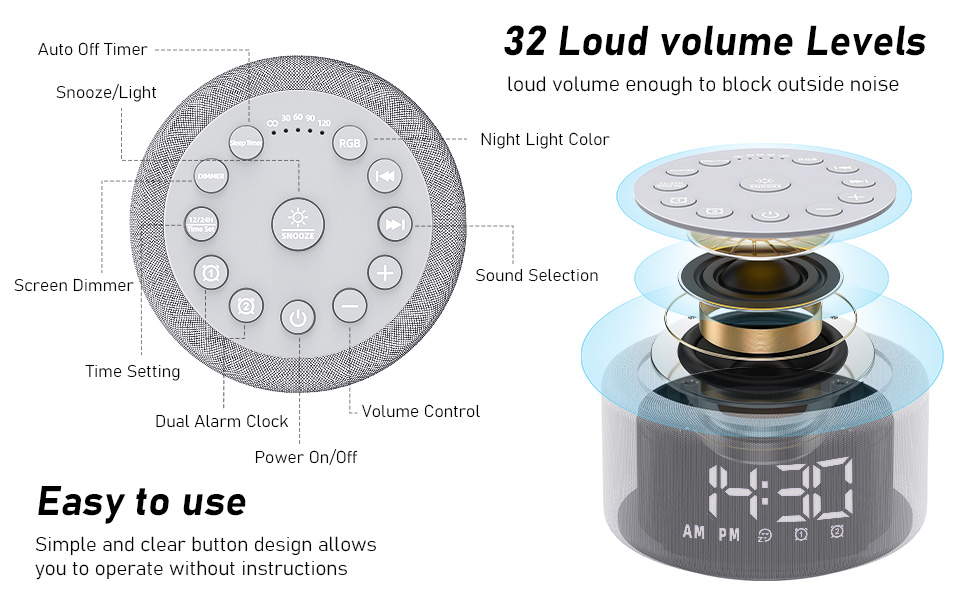
Figure 4: Button layout and functions for easy operation.
4. Пайдалану нұсқаулары
4.1. Дабылдарды орнату
- Set Alarm 1 or 2:
- Press and hold the "Alarm 1" or "Alarm 2" button to enter alarm setting mode.
- Use the "+" or "-" buttons to adjust the alarm hour.
- Press the "Next Song" button (right arrow) to move to minute adjustment.
- Use the "+" or "-" buttons to adjust the alarm minutes.
- Press the "Next Song" button again to select the alarm sound (15 options). Use "+" or "-" to cycle through sounds.
- Press the "Next Song" button again to adjust alarm volume. Use "+" or "-" to set the volume.
- Press the "Next Song" button again to confirm and exit alarm setting. The alarm icon will appear on the display.
- Turn Alarm On/Off: Short press the "Alarm 1" or "Alarm 2" button to activate or deactivate the alarm. The alarm icon will appear/disappear on the display.
- Кейінге қалдыру: When the alarm sounds, press the "Snooze" button to temporarily silence it for 9 minutes.
- Дабылды тоқтату: To turn off the alarm completely, press any button other than "Snooze" when the alarm is sounding.
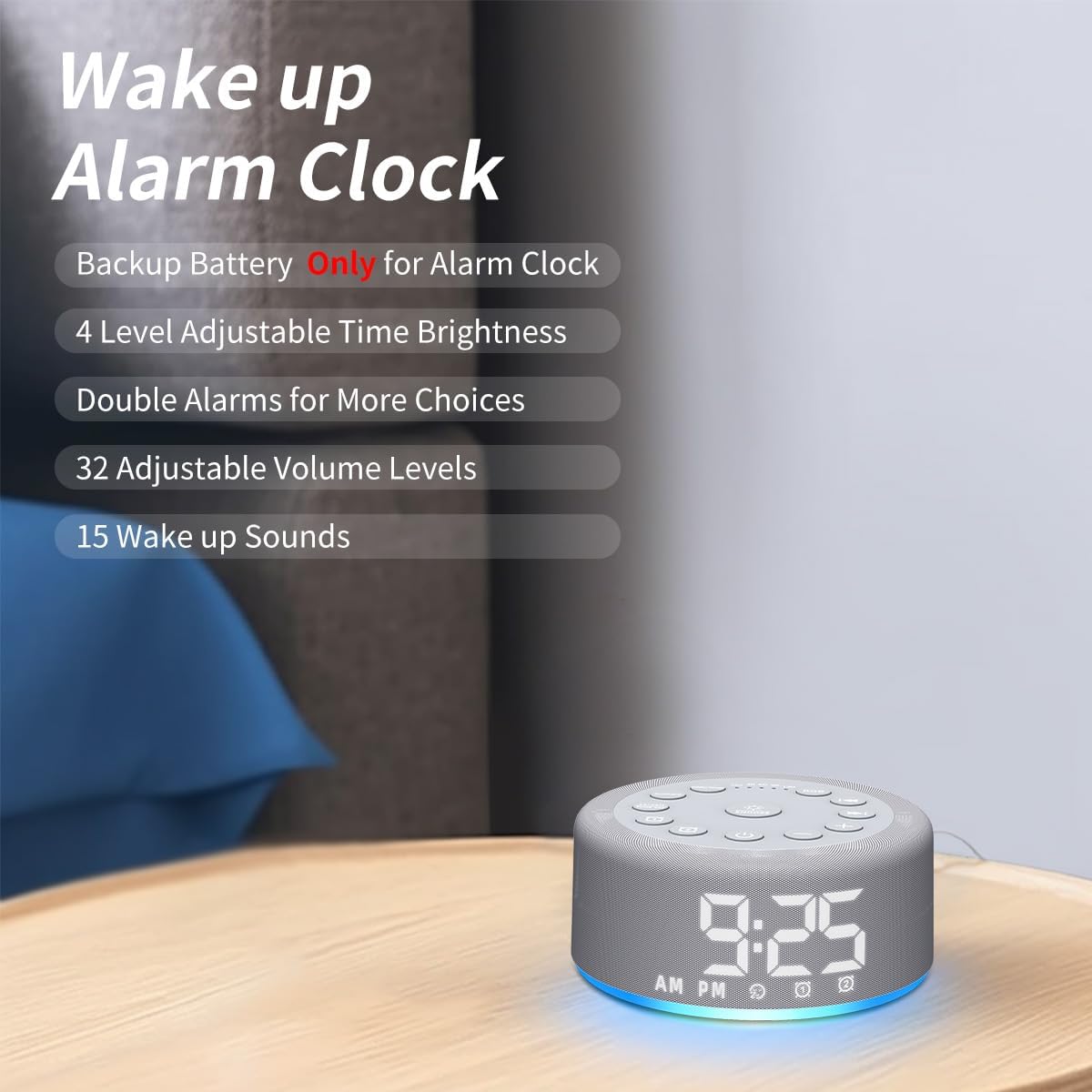
Figure 5: Key features of the alarm clock function.

6 -сурет: Мысалыamples of wake-up sounds.
4.2. Using the Sound Machine
- Қосу/өшіру: Press the power button (bottom center) to turn the sound machine on or off.
- Дыбысты таңдаңыз: Use the "Previous Song" (left arrow) or "Next Song" (right arrow) buttons to cycle through the 30 available sounds.
- Дыбыс деңгейін реттеу: Use the "+" or "-" buttons to increase or decrease the volume (32 levels).
- Ұйқы таймерін орнату: Short press the "Sleep Timer" button to set an auto-off timer for 30, 60, 90, or 120 minutes. Press repeatedly to cycle through options or select continuous play (indicated by "CO").

Figure 7: Internal speaker design and volume capabilities.
4.3. Түнгі жарықтың жұмысы
- Қосу/өшіру: Press the "RGB" button to turn the night light on or off.
- Түсті өзгерту: Short press the "RGB" button to cycle through 12 different colors.
- Жарықтықты реттеу: Use the "+" or "-" buttons to adjust the brightness of the night light (10 levels).

Figure 8: Night light features and benefits.
4.4. Жарықтықты көрсетіңіз
- Дисплей жарықтығын реттеу: Short press the "Dimmer" button to cycle through 4 levels of display brightness (low, medium, high, off).
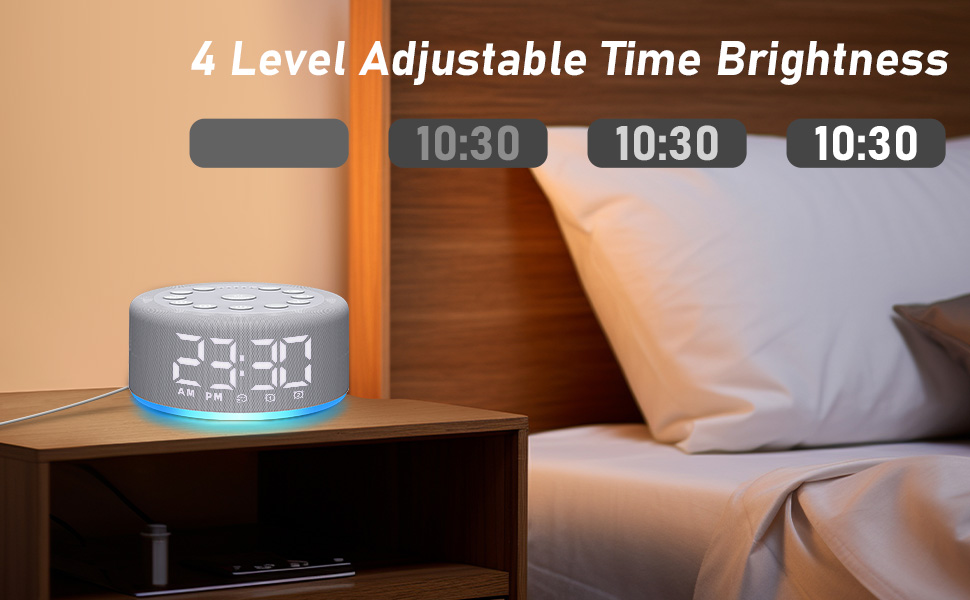
Figure 9: Adjustable time display brightness levels.
5. Техникалық қызмет көрсету
- Тазалау: Құрылғыны жұмсақ, құрғақ шүберекпен сүртіңіз. Сұйық тазалағыштарды немесе абразивті материалдарды пайдаланбаңыз.
- Сақтау орны: Ұзақ уақыт бойы пайдаланбаған кезде салқын, құрғақ жерде сақтаңыз.
- Қуат: Ensure the device remains plugged into a power source for continuous functionality, especially for the sound machine and night light features. The backup battery is solely for the alarm function during power interruptions.
6. Ақаулықтарды жою
- Құрылғы қосылмайды: Ensure the device is properly plugged into a working power outlet. Check the USB cable and adapter for damage.
- Дабыл естілмейді: Verify that the alarm is set and activated (alarm icon visible on display). Check the alarm volume setting. Ensure the device is plugged in, as the backup battery only supports the alarm function for a limited time during power outages.
- Дыбыс сапасына қатысты мәселелер: Ensure the device is placed on a flat, stable surface. The speaker is located on the bottom of the unit, so avoid placing it on soft surfaces that might muffle the sound.
- Дисплей тым ашық/жарық: Use the "Dimmer" button to adjust the display brightness to your preference.
- Параметрлер сақталмайды: The device has a memory function. If settings are not retained, ensure the device is not completely losing power for extended periods beyond the backup battery's capacity.
7. Техникалық сипаттамалар
- Өнім өлшемдері: 4.25 x 4.25 x 2.2 дюйм
- Элемент салмағы: 7.68 унция
- Модель атауы: HAC-F4
- Батареялар: 1 Lithium Polymer battery required (included, for backup alarm function)
- Өндіруші: Тыныштау
8. Кепілдік және қолдау
For warranty information or technical support, please refer to the contact details provided with your purchase or visit the official Hushing webсайт. Кез келген кепілдік талаптары үшін сатып алу түбіртегін сақтаңыз.