
Кіріспе
This manual provides essential information for the safe and effective operation of your WORKPRO Portable Tire Inflator Model W125218A. Please read this manual thoroughly before use and retain it for future reference.
The WORKPRO Portable Tire Inflator is a versatile device designed for inflating tires on cars, motorcycles, bicycles, and various sports balls. It features a digital display, automatic shut-off, multiple inflation modes, and an integrated LED light for convenience and safety.
Қауіпсіздік нұсқаулары
- Барлық нұсқауларды оқыңыз: Before operating the inflator, read and understand all safety warnings and instructions in this manual.
- Көзді қорғау: Always wear safety glasses when operating the inflator to protect against potential debris.
- Естуді қорғау: The inflator can be loud during operation. Use hearing protection, especially during prolonged use.
- Балалардан аулақ ұстаңыз: This device is not a toy. Keep it out of reach of children.
- Дұрыс пайдалану: Үрлегішті тек мақсаты бойынша пайдаланыңыз. Заттарды ұсынылған қысым шегінен тыс үрлеуге тырыспаңыз.
- Қызып кету: The inflator may become hot during extended use. Allow it to cool down between inflation cycles to prevent damage and burns. The air hose and chuck can become very hot.
- Батарея қауіпсіздігі: Do not expose the inflator to extreme temperatures or direct sunlight. Do not disassemble or modify the battery pack.
- Зарядтау: Use only the provided charging cable and a compatible power adapter. Do not charge in damp шарттар.
- Сақтау орны: Store the inflator in a dry, cool place away from flammable materials.
- Check Tire Pressure Manually: While the inflator has a digital display, it is recommended to verify tire pressure with a separate, calibrated gauge for critical applications.
Пакет мазмұны
Барлық элементтер пакетте бар екенін тексеріңіз:
- WORKPRO портативті шина үрлегіші
- Air Hose with Schrader Valve Connector
- Presta клапанының адаптері
- Шар ине адаптері
- Nozzle Adapter for Inflatables
- USB зарядтау кабелі (C түрі)
- Сақтау сөмкесі
- Пайдаланушы нұсқаулығы
Өнім аяқталдыview
Familiarize yourself with the components of your WORKPRO Portable Tire Inflator.

Сурет: Алдыңғы view of the WORKPRO Portable Tire Inflator, showing the digital display, control buttons, and air hose connection point.

Сурет: Diagram illustrating the 7500 mAh large battery capacity of the WORKPRO Portable Tire Inflator, capable of inflating multiple car tires on a single charge.
- Сандық дисплей: Shows real-time pressure, preset pressure, battery level, and mode.
- Басқару түймелері: Power, Mode selection, Increase/Decrease pressure.
- Ауа шлангінің қосылымы: Point where the inflation hose attaches.
- Жарықдиодты шам: Жарық аз жағдайда жарықтандыру үшін.
- USB-C зарядтау порты: Ішкі батареяны қайта зарядтау үшін.
- USB-A шығыс порты: Сыртқы құрылғылар үшін қуат банкі ретінде қызмет етеді.
Орнату
1. Charging the Inflator
Before first use, fully charge the inflator. The device is powered by three 2500mAh rechargeable batteries.
- Connect the provided USB-C charging cable to the inflator's charging port.
- Connect the other end of the cable to a suitable USB power adapter (not included) or a USB port.
- The digital display will indicate the charging status. A full charge typically takes 3 to 5 hours.
- Толық зарядталғаннан кейін зарядтау кабелін ажыратыңыз.
2. Ауа түтігін бекіту
Screw the air hose firmly onto the inflator's air outlet port. Ensure it is tight to prevent air leakage during operation.
Пайдалану нұсқаулары
1. Қосу / Өшіру
- Қуат қосулы: Қуат түймесін басып тұрыңыз (□) 3 секунд басыңыз. Сандық дисплей жанады.
- Қуат көзін өшіру: Қуат түймесін басып тұрыңыз (□) for 3 seconds. The display will turn off. The device will also automatically power off after a period of inactivity.
2. Selecting Inflation Mode and Pressure Unit

Сурет: Digital display of the inflator showing different preset inflation modes for car, motorcycle, bicycle, and balls, along with a manual mode.
- Режимді таңдау: Режим түймесін қысқа басыңыз (M) to cycle through the 5 available inflation modes: Car, Motorcycle, Bicycle, Ball, and Manual. Each mode has a preset default pressure value.
- Қысым бірлігі: While in any mode, long press the Mode button (M) to switch between pressure units: PSI, BAR, and KPA.
3. Мақсатты қысымды орнату
- After selecting a mode, the preset pressure will be displayed.
- Use the Increase (+) and Decrease (-) buttons to adjust the target pressure to your desired value. The maximum adjustable pressure is 150 PSI.
- The display will flash while adjusting and then stabilize, indicating the set target pressure.
4. Connecting to the Item to be Inflated
- For car/motorcycle/bicycle tires: Screw the Schrader valve connector of the air hose onto the tire valve stem. Ensure a secure, airtight connection.
- For Presta valves (bicycles): Attach the Presta valve adapter to the tire valve, then connect the Schrader valve connector to the adapter.
- For balls/inflatables: Select the appropriate adapter (ball needle or nozzle adapter) and attach it to the Schrader valve connector, then insert into the item.
- Once connected, the digital display will show the current real-time pressure of the item.
5. Starting and Stopping Inflation

Сурет: The WORKPRO Portable Tire Inflator connected to a car tire, demonstrating fast inflation capabilities, showing inflation times for different pressure ranges.
- Инфляцияны бастау: Бастау/Тоқтату түймесін басыңыз (▶) to begin inflation. The display will show the increasing real-time pressure.
- Автоматты өшіру: The inflator will automatically stop when the preset target pressure is reached.
- Қолмен тоқтату: You can manually stop inflation at any time by pressing the Start/Stop button (▶) қайтадан.
- Pressure Indicators: After connecting, the inflator uses three-color indicators:
- Қызыл: Қысым алдын ала орнатылған мәннің 110%-дан асады.
- Жасыл: Қысым алдын ала орнатылған мәннің 90%-дан 110%-ға дейін.
- Сары: Қысым алдын ала орнатылған мәннің 90%-дан төмен.

Сурет: Close-up of the inflator's digital display highlighting the three-color LED indicators for real-time pressure status (Red, Yellow, Green) and the automatic inflation stop feature.
6. Жарық диодты шамды пайдалану
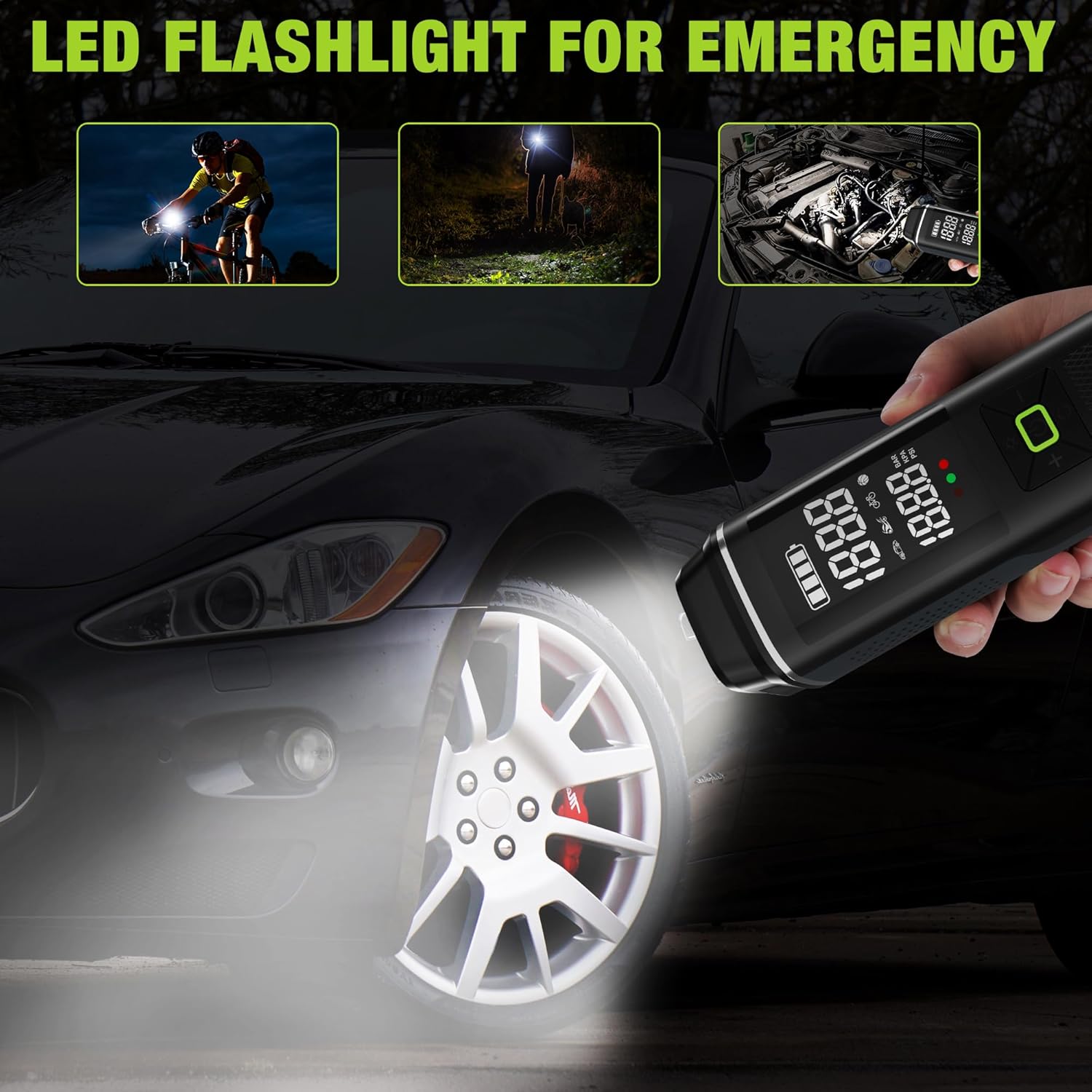
Сурет: The WORKPRO Portable Tire Inflator being used as an LED flashlight in various scenarios, including illuminating a bicycle path, a dark area, and a car engine bay.
- Short press the Light button (☀) to turn on the LED light.
- Press again to cycle through different light modes (e.g., steady light, flashing, SOS).
- Press a third time to turn off the LED light.
7. Using as a Portable Power Bank

Сурет: The WORKPRO Portable Tire Inflator connected via USB to a smartphone, demonstrating its function as a portable power bank for charging electronic devices.
- The inflator can serve as a backup power bank for your electronic devices.
- Connect your device's USB charging cable to the USB-A output port on the inflator.
- Зарядтау автоматты түрде басталады.
Техникалық қызмет көрсету
- Тазалау: Үрлегіштің сыртын жұмсақ шүберекпен сүртіңіз, damp шүберек. Қатты химиялық заттарды немесе абразивті тазартқыштарды қолданбаңыз.
- Сақтау орны: Store the inflator and its accessories in the provided storage bag in a cool, dry place when not in use.
- Батареяға күтім жасау: To prolong battery life, charge the inflator at least once every three months, even if not in regular use. Avoid fully discharging the battery frequently.
- Түтік пен адаптерді тексеріңіз: Regularly check the air hose and adapters for any signs of wear, cracks, or damage. Replace if necessary.
Ақаулықтарды жою
| Мәселе | Ықтимал себебі | Шешім |
|---|---|---|
| Инфлятор қосылмайды. | Батарея таусылды. | Инфляторды толығымен зарядтаңыз. |
| Inflator does not start inflating. | Target pressure not set; Air hose not securely connected; Battery too low. | Set target pressure; Ensure air hose is tightly screwed on; Charge the inflator. |
| Air leaks during inflation. | Air hose not securely connected; Damaged air hose/adapter. | Tighten air hose connection; Inspect and replace damaged components. |
| Үрлегіш мерзімінен бұрын тоқтайды. | Target pressure reached (auto shut-off); Overheating; Battery low. | Check target pressure; Allow unit to cool down; Charge the inflator. |
| Қысымның дұрыс емес көрсеткіші. | Бос байланыс; Сенсор мәселесі. | Ensure secure connection; Compare with a known accurate gauge. If persistent, contact support. |
Техникалық сипаттамалар
| Модель атауы | Шиналар үрлегіш |
| Үлгі нөмірі | W125218A |
| Бренд | WORKPRO |
| Тtage | 12 вольт |
| Қуат көзі | Сымды электрлік (зарядтау үшін), батареямен жұмыс істейді (жұмыс істеу үшін) |
| Арнайы мүмкіндік | Portable, Digital Display, Auto Shut-Off, LED Light, Power Bank Function |
| Материал | Пластик, алюминий |
| Максималды қысым | 150 PSI |
| Батарея сыйымдылығы | 3 x 2500 мАч (барлығы 7500 мАч) |
| Зарядтау уақыты | 3-5 сағат |
| Элемент салмағы | 930 г |
| Пакет өлшемдері | 28.3 x 13.11 x 8 см |

Сурет: The WORKPRO Portable Tire Inflator displayed with its various adapters, illustrating its wide range of applications for inflating car, motorcycle, bicycle tires, balls, and swimming rings.
Кепілдік және қолдау
WORKPRO products are manufactured to high-quality standards. For warranty information, technical support, or service inquiries, please refer to the warranty card included with your product or visit the official WORKPRO webсайт.
Кепілдік шағымдары үшін сатып алуды растайтын құжатты сақтаңыз.