
1. Кіріспе
This manual provides instructions for the setup, operation, and maintenance of your Retroid Pocket Classic handheld gaming console. The Retroid Pocket Classic is a portable Android-based gaming device featuring a 3.92-inch OLED touchscreen, designed for a versatile gaming experience.

Image 1.1: Retroid Pocket Classic consoles in white and yellow.
2. Қорапта не бар
Барлық элементтер пакетте бар екенін тексеріңіз:
- Retroid Pocket Classic Gaming Console
- Зарядтау кабелі (USB-C)
- Пайдаланушы нұсқаулығы (бұл құжат)
3. Құрылғы аяқталдыview
Familiarize yourself with the physical components and controls of your Retroid Pocket Classic.
3.1 Алдыңғы View

3.1-сурет: Алдыңғы view of the Retroid Pocket Classic.
- 3.92-inch OLED Touchscreen: The primary display for all operations and gaming.
- D-Pad: Directional input for navigation and gameplay.
- Әрекет түймелері: (A, B, X, Y or similar layout) for in-game actions.
- Бастау/таңдау түймелері: For game and system functions.
- Динамик торлары: Аудио шығысы.
3.2 Top and Back View

3.2-сурет: Жоғарғы view showing shoulder buttons and ports.
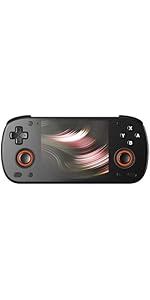
Image 3.3: Curved back design and trigger buttons.
- Иық түймелері (L1, R1): Жоғарғы жиекте орналасқан.
- Іске қосу түймелері (L2, R2): Located on the back, below the shoulder buttons.
- USB-C порты: Зарядтау және деректерді тасымалдау үшін.
- 3.5 мм аудио ұясы: Құлаққаптарды қосу үшін.
- Micro SD картасының ұясы: Сақтау орнын кеңейту үшін.
- Қуат түймесі: Құрылғыны қосу/өшіру немесе ұйқы режиміне қою үшін.
- Дыбыс деңгейі түймелері: To adjust audio output.
3.3 Internal Components (Cooling)

Image 3.4: Integrated active cooling system.
The Retroid Pocket Classic features an integrated active cooling system designed to maintain optimal performance and manage heat during extended use.
4. Орнату
4.1 Бастапқы зарядтау
Before first use, fully charge the device. Connect the provided USB-C charging cable to the console's USB-C port and the other end to a compatible USB power adapter (not included). The device has a 5000mAh battery.
4.2 Қуатты қосу/өшіру
- Қосу үшін: Экран жанғанша Қуат түймесін басып тұрыңыз.
- Қуатты өшіру үшін: Press and hold the Power button, then select "Power Off" from the on-screen options.
- Ұйықтау/Ояну үшін: Қуат түймесін қысқаша басыңыз.
4.3 Wi-Fi қосылымы
To access online features and download applications, connect to a Wi-Fi network:
- өтіңіз Параметрлер.
- таңдаңыз Желі және интернет.
- түртіңіз Сымсыз дәлдiк және оны қосыңыз.
- Тізімнен қалаған желіні таңдап, сұралса, құпия сөзді енгізіңіз.
4.4 Google тіркелгісін орнату
The Retroid Pocket Classic runs Android 14 and supports the Google Play Store. To download apps and games, you will need to sign in with a Google account during the initial setup process or later via the Settings menu.
4.5 Micro SD картасын орнату
To expand the device's storage (128GB internal), insert a Micro SD card into the designated slot. Ensure the card is inserted correctly until it clicks into place. The device supports various Micro SD card capacities.
5. Пайдалану нұсқаулары
5.1 Android интерфейсінде шарлау
The device operates on Android 14. Use the touchscreen for navigation, tapping icons to open applications, swiping to scroll, and using gestures for system controls. The D-pad and action buttons can also be used for navigation within compatible applications and games.
5.2 Downloading and Installing Applications
Applications and games can be downloaded from the Google Play Store. Open the Play Store app, search for your desired content, and follow the on-screen prompts to download and install.
Note: The Retroid Pocket Classic does not come with preloaded games. Users are responsible for acquiring and installing their own game content.
5.3 Сақтауды басқару
Кімге view and manage internal and external storage, go to Параметрлер > Сақтау. Here you can see storage usage and manage files. For optimal performance, ensure sufficient free space is available.
5.4 Bluetooth қосылымы
The device supports Bluetooth 5.1 for connecting wireless accessories such as headphones or external controllers.
- өтіңіз Параметрлер.
- таңдаңыз Қосылған құрылғылар.
- түртіңіз Жаңа құрылғыны жұптау and select your accessory from the list.
6. Техникалық қызмет көрсету
6.1 Құрылғыны тазалау
Use a soft, dry, lint-free cloth to clean the device's exterior. For the screen, a screen cleaner specifically designed for electronics can be used. Avoid using harsh chemicals or abrasive materials.
6.2 Батареяға күтім жасау
Батареяның қызмет ету мерзімін ұзарту үшін:
- Төтенше температурадан аулақ болыңыз.
- Батареяны жиі толық зарядсыздандырмаңыз.
- Store the device with a partial charge if not used for extended periods.
6.3 Бағдарламалық құралды жаңарту
Оңтайлы өнімділік пен қауіпсіздікті қамтамасыз ету үшін жүйелік жаңартуларды тексеріңіз және орнатыңыз. өтіңіз Параметрлер > Жүйе > Жүйені жаңарту қол жетімді жаңартуларды тексеру үшін.
7. Ақаулықтарды жою
7.1 Құрылғы қосылмаған
- Ensure the device is sufficiently charged. Connect it to a power source for at least 30 minutes.
- Қайта іске қосу үшін Қуат түймесін 10-15 секунд басып тұрып көріңіз.
7.2 Wi-Fi қосылымына қатысты мәселелер
- Параметрлерде Wi-Fi қосылғанын тексеріңіз.
- Wi-Fi маршрутизаторын қайта іске қосыңыз.
- Forget the network and reconnect, ensuring the password is correct.
7.3 Қолданбалардың істен шығуы немесе қатып қалуы
- Қолданбаны жауып, қайта ашыңыз.
- арқылы қолданбаның кэші мен деректерін тазалаңыз Параметрлер > Қолданбалар > [Қолданба аты] > Сақтау және кэш.
- Ensure the application is updated to its latest version.
- Құрылғыны қайта іске қосыңыз.
7.4 Экран жауап бермейді
- Restart the device by holding the Power button.
- Экранның таза және қоқыссыз екеніне көз жеткізіңіз.
8. Техникалық сипаттамалар

Image 8.1: Retroid Pocket Classic detailed specifications.
| Ерекшелік | Мәлімет |
|---|---|
| Модель атауы | RP CLASSIC |
| Процессор | G1 Gen2 (8-Core Kryo CPU, 2 Performance Cores, 6 Efficiency Cores) |
| GPU | Adreno A12 |
| Жедел Жадтау Құрылғысы | 6GB LPDDR4x @2133M |
| Сақтау | 128GB EMMC 5.1 (expandable via Micro SD card) |
| Экран | 3.92-inch AMOLED, 1240x1080 @60fps |
| Операциялық жүйе | Android 14 |
| Сымсыз дәлдiк | Wi-Fi 5 |
| Блютез | Bluetooth 5.1 |
| Интерфейс | USB-C / 3.5mm Audio Jack / TF Card Slot |
| Бейне шығысы | Жоқ |
| Батарея | 5000 мАч |
| Зарядтау жылдамдығы | 27 Вт |
| Өлшемдері | 138 x 89.8 x 26 мм (5.43 x 3.53 x 1 дюйм) |
| Салмағы | 223 г (7.9 унция) |
9. Кепілдік және қолдау
For warranty information and technical support, please refer to the official Retroid Pocket webсайтына немесе тұтынушыларға қызмет көрсетуге хабарласыңыз. Кепілдік шағымдары үшін сатып алуды растайтын құжатты сақтаңыз.
Online resources and community forums may also provide helpful information and troubleshooting tips.