
SVBONY SVGo
SVBONY SVGo Action Camera User Manual
Model: SVGo
1. Кіріспе
Thank you for choosing the SVBONY SVGo Action Camera. This manual provides essential information for setting up, operating, maintaining, and troubleshooting your new camera. Please read this manual thoroughly before using the product to ensure proper operation and to maximize its performance and lifespan. Keep this manual for future reference.

1.1-сурет: Алдыңғы view of the SVBONY SVGo Action Camera, showcasing its dual lenses and front screen.
2. Өнім аяқталдыview және Құрамдас бөліктер
The SVBONY SVGo is a versatile 4K action camera designed for various shooting conditions, including low-light environments and underwater use. It features a dual-lens system, dual IPS screens, and 6-axis electronic image stabilization (EIS).
2.1. Пакет мазмұны
Төменде тізімделген заттардың барлығы пакетіңізге қосылғанын тексеріңіз:
- Пайдаланушы нұсқаулығы (бұл құжат)
- Dual-lens sports camera (SVBONY SVGo) x1
- External battery x1
- Rabbit cage (one large and one small) x2
- Waterproof case x1
- Cycling stand x1
- Adapter stand x4
- Base spare film x2
- Universal adapter x2
- Noise reduction sponge x1
- Тазалау шүберегі x1
- Деректер кабелі x1
- Battery handle x1
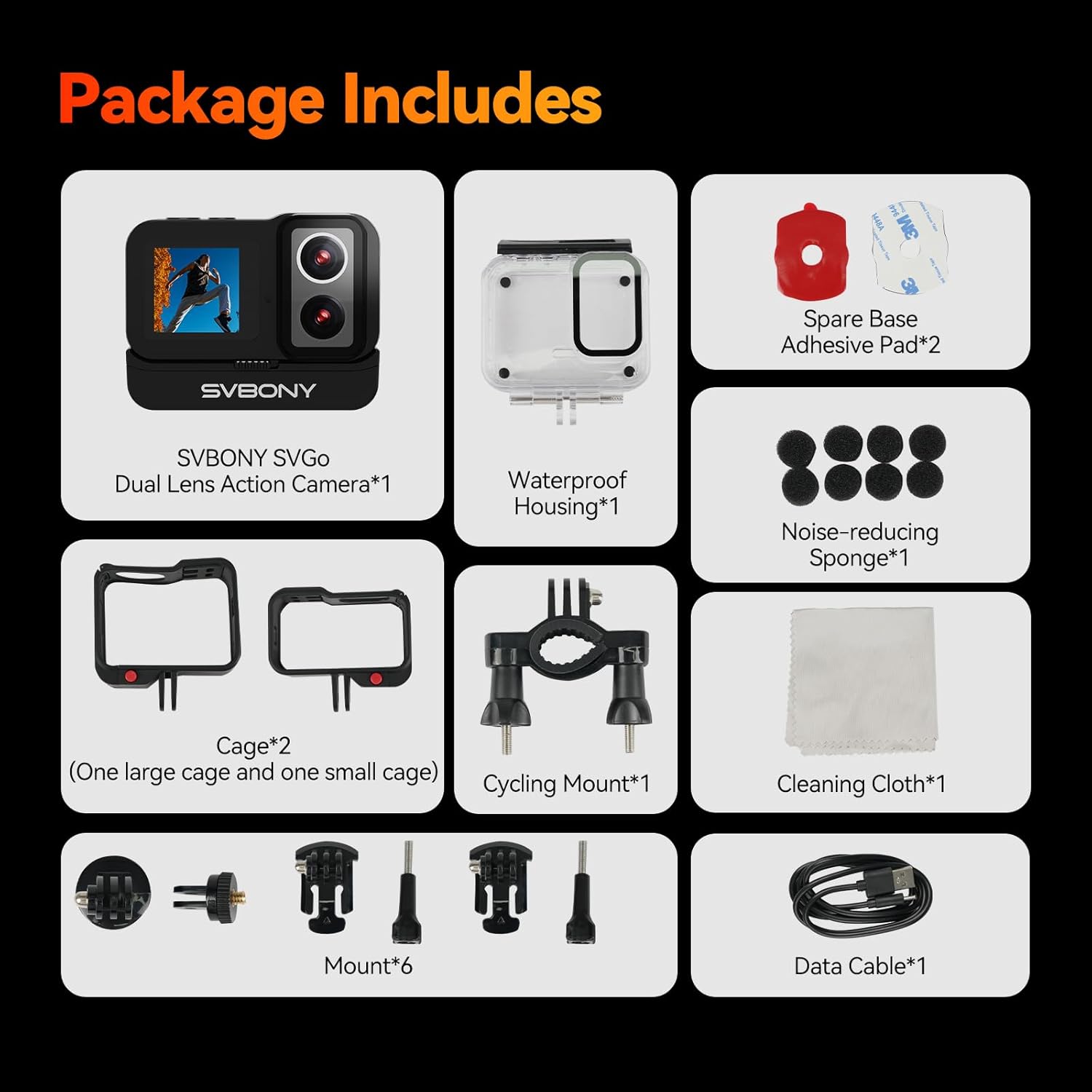
Figure 2.1: All components included in the SVBONY SVGo Action Camera retail package.
2.2. Камера мүмкіндіктері
- Қос линза жүйесі: Equipped with a high-definition lens for daytime and a dedicated night lens for brighter, clearer images in low-light conditions.
- Dual Color Screens: Features a 2.29-inch HD touchscreen for operation and a 1.3-inch front selfie screen for convenient self-recording.
- 4K/30fps High Definition: Supports ultra-HD video recording at 4K resolution and 30 frames per second.
- Ұзартылған батареяның қызмет ету мерзімі: Includes a built-in 800mAh battery and a 1050mAh external battery, providing approximately 2 hours of 4K30fps recording when both are used.
- 6-Axis EIS: Advanced Electronic Image Stabilization reduces blurring and ghosting caused by camera movement.
- 145° Wide-Angle: Captures a broad perspective, expanding the field of view.
- 30-Meter Waterproof: With the standard waterproof case, the camera has an IPX8 rating, allowing dives up to 30 meters.
- Multiple Application Functions: Includes Motion Detection, Slow Motion, Time-lapse, Pre-recording, Continuous Shooting, Quick Shot, and Zoom.
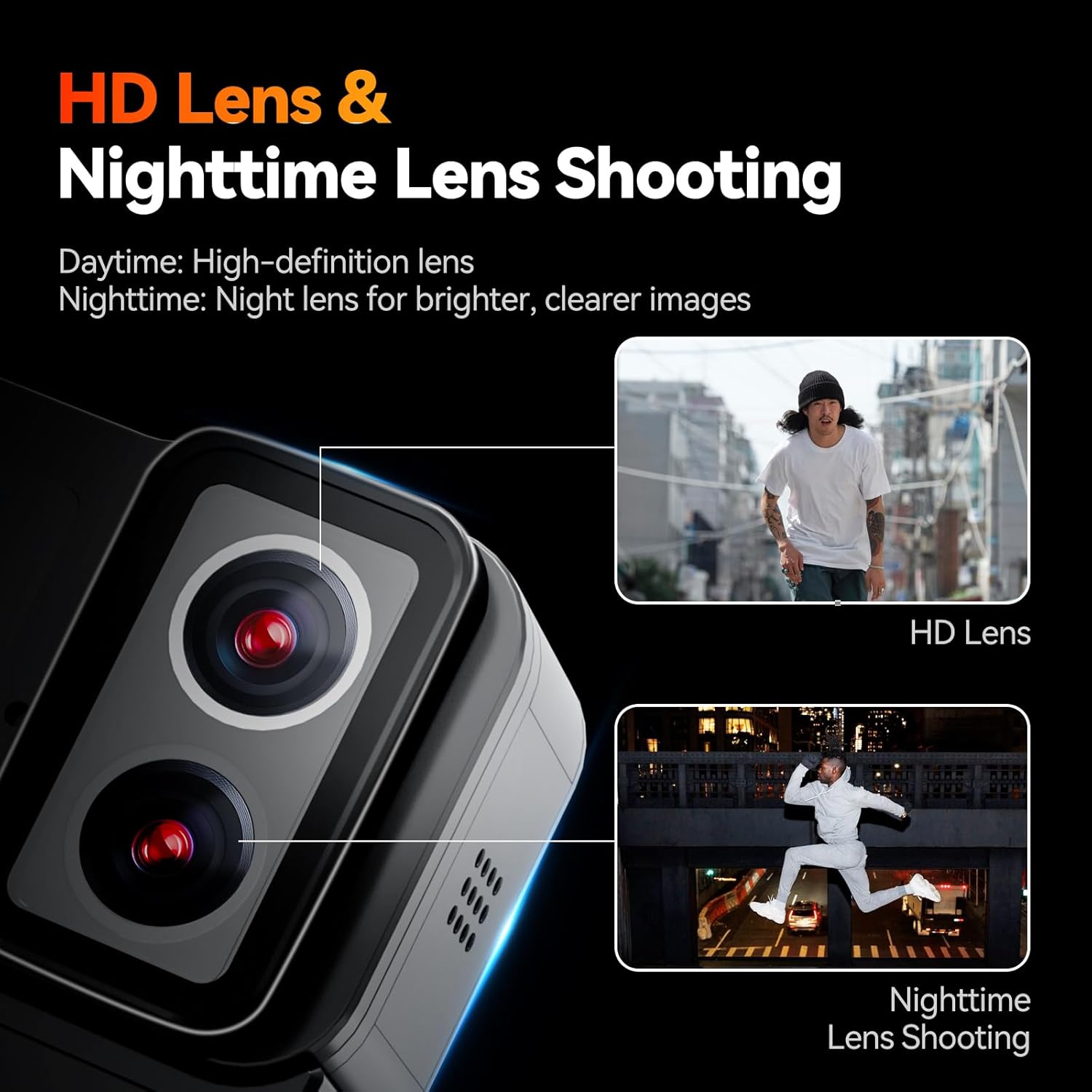
Figure 2.2: The camera's dual-lens system for optimized day and night shooting.

Figure 2.3: The camera's dual screen setup for versatile viewенгізу және бақылау.
3. Орнату
3.1. Батареяны зарядтау
The SVBONY SVGo comes with a built-in 800mAh battery and an additional 1050mAh external battery. For optimal performance, fully charge both batteries before first use.
- Connect the provided data cable to the camera's charging port.
- Connect the other end of the data cable to a USB power adapter (not included) or a computer's USB port.
- The charging indicator light will illuminate. It will turn off or change color once charging is complete.
- To charge the external battery, attach it to the camera, and charge the unit as a whole.

Figure 3.1: Battery components and their combined capacity for extended recording.
3.2. MicroSD картасын салу
The camera supports MicroSD cards up to 512GB. A high-speed card (Class 10 or UHS-I/UHS-3 recommended) is necessary for 4K recording.
- Locate the MicroSD card slot on the camera.
- Insert the MicroSD card with the gold contacts facing down until it clicks into place.
- Алу үшін картаны серіппелі шыққанша ақырын итеріңіз.
3.3. Using the Waterproof Case
The SVBONY SVGo is not waterproof without its dedicated waterproof case. Ensure the camera is securely placed inside the case and the latch is properly sealed before any water exposure.
- Open the waterproof case latch and gently place the camera inside, ensuring it fits snugly.
- Close the latch firmly until you hear a click.
- Before first use in water, perform a leak test by placing the empty case in water for 30 minutes.

Figure 3.2: The camera inside its waterproof case, ready for underwater use.
4. Пайдалану нұсқаулары
4.1. Қуатты қосу/өшіру
- Қосу үшін: Экран жанғанша Қуат/Режим түймесін бірнеше секунд басып тұрыңыз.
- Қуатты өшіру үшін: Press and hold the Power/Mode button again until the screen turns off.
4.2. Switching Screens
The camera features a rear HD touchscreen and a front selfie screen.
- To switch between the front and rear screens, hold the top mode button (often marked with 'M').
4.3. Бейне жазу және фотосуреттер түсіру
- Бейне режимі: From the main screen, select the video icon. Press the Shutter/Record button to start recording. Press again to stop.
- Фото режимі: From the main screen, select the photo icon. Press the Shutter/Record button to take a photo.
4.4. Adjusting Resolution and Frame Rate
The camera offers various resolutions and frame rates to suit your needs:
- 4K (3840*2160): 24/25/30 FPS for ultra-HD quality.
- 2K (2560*1440): 60/50/30/25/24 FPS for balanced quality and speed.
- 1080P (1920*1080): 120/100/60/50/30/25/24 FPS for slow-motion beauty.
- 720P (1280*720): 120/100/60/50/30/25/24 FPS for smooth movement.
Access these settings through the camera's menu on the touchscreen.
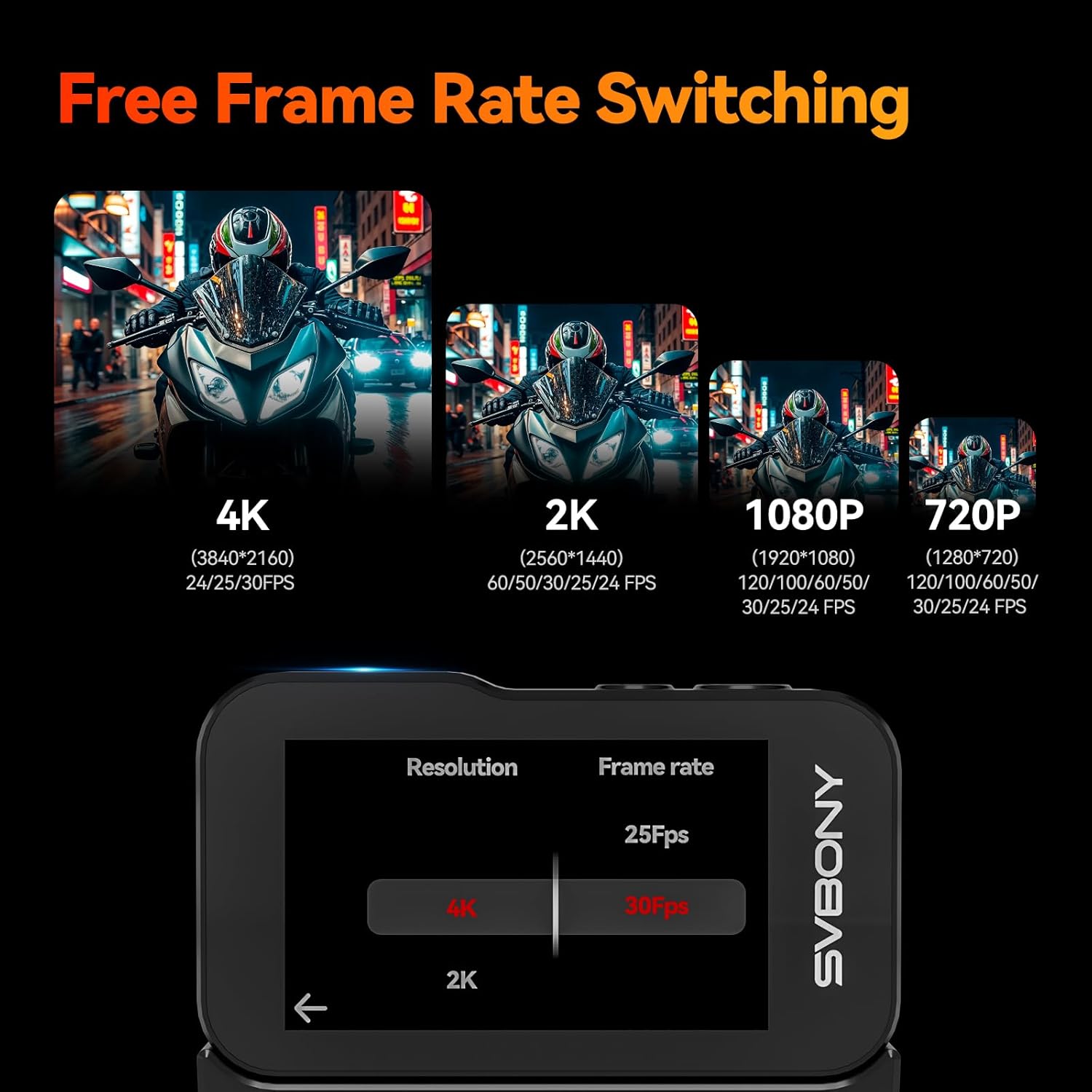
Figure 4.1: Screen interface for resolution and frame rate selection.
4.5. Арнайы мүмкіндіктер
The SVGo camera includes several advanced shooting modes:
- Қозғалысты анықтау: Starts recording automatically when motion is detected.
- Баяу қозғалыс: Records at high frame rates for smooth slow-motion playback.
- Уақыт аралығы: Captures a series of photos at set intervals to create a time-lapse video.
- Алдын-ала жазу: Captures footage before you press the record button, ensuring you don't miss a moment.
- Үздіксіз түсіру: Takes multiple photos in quick succession.
- Quick Shot: Allows for rapid photo capture.
- Масштабтау: Digitally zoom in on your subject.
- 6-Axis EIS: Automatically stabilizes footage to reduce shake and blur.
- Балық көзін түзету: Reduces or eliminates distortion effects common with wide-angle lenses, making the image closer to a standard perspective.
These features can be accessed and configured through the camera's settings menu.

4.2 -сурет: Аяқталдыview of rich application features.

Figure 4.3: Demonstration of 6-Axis EIS effectiveness.

Figure 4.4: Fisheye Correction in action.
5. Техникалық қызмет көрсету
5.1. Камераны тазалау
- Use the provided cleaning cloth or a soft, lint-free cloth to wipe the camera body and lenses.
- For stubborn smudges on lenses, use a specialized lens cleaning solution.
- Қатты химиялық заттарды немесе абразивті материалдарды қолданбаңыз.
5.2. Батареяны күту
- Батареяларды пайдаланбаған кезде салқын, құрғақ жерде сақтаңыз.
- Батареяны жиі толық зарядсыздандырудан аулақ болыңыз.
- Ұзақ уақыт сақтасаңыз, батареяны шамамен 50% сыйымдылыққа дейін зарядтаңыз.
5.3. Waterproof Case Maintenance
- After each use in water, rinse the waterproof case with fresh water and allow it to air dry.
- Inspect the O-ring seal regularly for any debris, cracks, or damage. Clean and lubricate if necessary.
6. Ақаулықтарды жою
If you encounter issues with your SVBONY SVGo Action Camera, refer to the following common problems and solutions:
| Мәселе | Ықтимал себебі | Шешім |
|---|---|---|
| Камера қосылмайды. | Төмен немесе таусылған батарея. | Charge the camera fully. |
| Камера қатып қалады немесе жауап бермей қалады. | Software glitch or full memory card. | Remove and reinsert the battery. Format the MicroSD card. |
| Бейне сапасы нашар немесе бұлыңғыр. | Dirty lens, incorrect resolution settings, or insufficient lighting. | Clean the lens. Ensure 4K or 2K resolution is selected. Use the night lens in low light. |
| MicroSD card error. | Incompatible or faulty card, or needs formatting. | Use a recommended high-speed card. Format the card in the camera. Try a different card. |
| Water leakage into the case. | Improperly sealed case or damaged O-ring. | Ensure case is properly latched. Inspect and clean the O-ring. Replace O-ring if damaged. |
7. Техникалық сипаттамалар
Detailed technical specifications for the SVBONY SVGo Action Camera:
| Ерекшелік | Техникалық сипаттама |
|---|---|
| Бренд | SVBONY |
| Модель атауы | SVGo |
| Бейнекамера түрі | Әрекет камерасы |
| Бейне түсіру рұқсаты | 4K |
| Фото сенсор технологиясы | CMOS |
| Экран өлшемі | 2.29 Inches (Rear HD Touchscreen), 1.3 Inches (Front Selfie Screen) |
| Максималды фокус ұзындығы | 3.1 миллиметр |
| Флэш жады түрі | Micro SD (up to 512GB supported) |
| Бейне түсіру пішімі | MP4 |
| Батареялар | 1 A battery required (included) - Built-in 800mAh, External 1050mAh |
| Элемент салмағы | 1.46 фунт |
| Өнім өлшемдері | 2.7 x 2.1 x 1.1 дюйм |
| Арнайы мүмкіндіктер | F2.0/F1.4 Dual Lens, Front LCD and Touch Screens, IPX8 Waterproof (with case), Low Light HDR, Underwater with EIS |
8. Кепілдік және қолдау
8.1. Кепілдік туралы ақпарат
For detailed warranty information regarding your SVBONY SVGo Action Camera, please refer to the warranty card included in your product packaging or visit the official SVBONY webсайт. Кепілдік шарттары мен шарттары аймаққа және сатып алу күніне байланысты өзгеруі мүмкін.
8.2. Тұтынушыларға қолдау көрсету
If you require further assistance, technical support, or have questions not covered in this manual, please contact SVBONY customer service through their official webсайт:
SVBONY Official Webсайт: Visit the SVBONY Store on Amazon
Please have your product model (SVGo) and purchase details ready when contacting support.