
1. Кіріспе
Thank you for choosing the Pro Breeze 40L Smart Dehumidifier. This manual provides important information regarding the safe operation, installation, use, and maintenance of your appliance. Please read this manual thoroughly before use and retain it for future reference.
This dehumidifier is designed to efficiently remove excess moisture from the air, helping to prevent mold, mildew, and condensation in spaces up to 50 m².
2. Маңызды қауіпсіздік нұсқаулары
Өрт, электр тогының соғуы және жарақат алу қаупін азайту үшін электр құрылғыларын пайдалану кезінде әрқашан негізгі қауіпсіздік шараларын орындаңыз.
- Құрылғыны іске қоспас бұрын барлық нұсқауларды мұқият оқып шығыңыз.
- томды қамтамасыз етіңізtagБағалау жапсырмасында көрсетілген e сіздің қуат көзіңізге сәйкес келедіtage.
- Құралды, қуат сымын немесе суға немесе басқа сұйықтықтарға батырмаңыз.
- Do not operate the appliance with a damaged cord or plug, or after it malfunctions or has been dropped or damaged in any manner.
- Құралды балалар мен үй жануарларының қолы жетпейтін жерде сақтаңыз.
- Always unplug the appliance when not in use, before cleaning, or before moving.
- Құрылғының тұрақты, тегіс бетке қойылғанына көз жеткізіңіз.
- Ауа кіретін немесе шығатын жерлерді жаппаңыз. Құрылғының айналасында кемінде 20 см бос орын қалдырыңыз.
- Бұл құрылғы тек үй ішінде пайдалануға арналған.
- Do not use in bathrooms or other excessively humid environments where water may splash onto the unit.
3. Өнім аяқталдыview
3.1 Құрамдас бөліктер
The Pro Breeze 40L Smart Dehumidifier features a compact design with integrated controls and a water tank. It includes a continuous drainage option and mobility wheels for easy placement.
Сурет: алдыңғы view of the Pro Breeze 40L Smart Dehumidifier, highlighting its dimensions (52cm height, 28cm depth, 35.5cm width) and key features like smart app control, laundry mode, 5.5L tank, and low energy consumption.
3.2 Басқару тақтасы және дисплей
The dehumidifier is equipped with an intuitive touch control panel and an LED display for easy operation and monitoring of humidity levels.

Image: A hand interacting with the touch control panel of the dehumidifier, showing the digital display and various function buttons.
4. Орнату
4.1 Қаптаманы ашу
- Ылғалдандырғышты қаптамасынан абайлап алыңыз.
- Барлық орауыш материалдарын, соның ішінде кез келген қорғаныс қабықшаларын немесе таспаларды алып тастаңыз.
- Құрылғыны зақымдау белгілерінің бар-жоғын тексеріңіз. Зақымдалған болса, қолданбаңыз және тұтынушыларға қолдау көрсету орталығына хабарласыңыз.
4.2 Орналастыру
Place the dehumidifier on a firm, level surface in the desired room. Ensure there is at least 20 cm of clear space around all sides of the unit to allow for proper airflow.

Image: A person easily moving the dehumidifier across a wooden floor in a living room, demonstrating its portability with four swivel wheels.
4.3 Қуат қосылымы
Қуат сымын жерге қосылған розеткаға қосыңыз. Розетканың «Техникалық сипаттамалар» бөлімінде көрсетілген қуат талаптарына сәйкес келетініне көз жеткізіңіз.
4.4 Үздіксіз дренаж (қосымша)
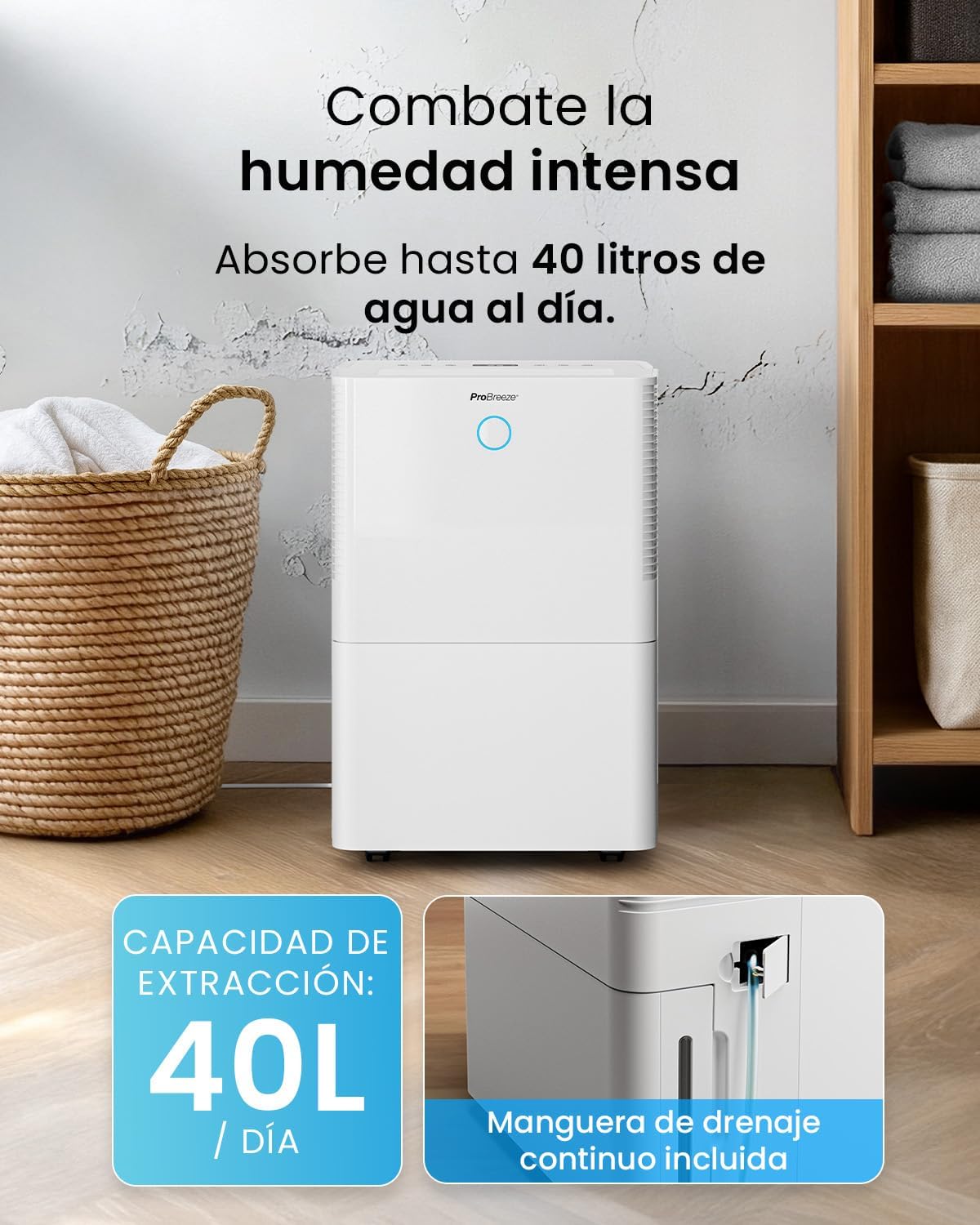
For continuous operation without needing to empty the water tank, attach the included drainage hose. Connect one end to the drainage port on the back of the unit and the other end to a suitable drain or container that is lower than the drainage port.

Сурет: жақыннан view of the dehumidifier's side, showing the continuous drainage hose connected and leading to a floor drain.
5. Пайдалану нұсқаулары
5.1 Қуатты қосу/өшіру
түймесін басыңыз Қуат құрылғыны қосу немесе өшіру үшін басқару тақтасындағы түймені басыңыз.
5.2 Қажетті ылғалдылықты орнату
The dehumidifier features an automatic sensor that continuously measures room humidity. Use the Ылғалдылық buttons to set your desired humidity level between 30% and 80%.

Image: A family relaxing in a living room with the dehumidifier operating. An overlay illustrates the humidity indicator lights: Blue for >50% (Low), Green for 50-70% (Medium), and Red for <70% (High).
5.3 Жұмыс режимдері
- Автоматты режим: Құрылғы белгіленген ылғалдылық деңгейін ұстап тұру үшін автоматты түрде жұмысын реттейді.
- Үздіксіз режим: The dehumidifier will operate continuously regardless of the humidity level, ideal for very damp шарттар.
- Кір жуу режимі: This mode is designed to accelerate the drying of clothes indoors by running at maximum fan speed and continuous dehumidification.
- Ұйқы режимі: Reduces fan speed and dims the display for quiet operation during the night.

Image: A woman smiling while placing clothes on a drying rack next to the dehumidifier, illustrating the accelerated laundry drying feature.

Image: A family watching television in a dimly lit living room, with the dehumidifier operating quietly in the foreground, indicating its silent operation and night mode features.
5.4 Таймер функциясы
пайдаланыңыз Таймер button to set a 24-hour timer for automatic power on or off. This allows you to schedule operation according to your needs.

Image: A close-up of a smartphone screen displaying the Pro Breeze app's 24-hour timer function, allowing users to schedule the dehumidifier's operation.
6. Wi-Fi қосылымы және қолданбаны басқару
The Pro Breeze 40L Smart Dehumidifier can be controlled remotely via the free Pro Breeze app, compatible with both Alexa and Google Home.
6.1 Қолданбаны орнату және жұптастыру
- Download the Pro Breeze app from your smartphone's app store.
- Follow the in-app instructions to create an account and pair your dehumidifier.
- Ensure your dehumidifier is powered on and your smartphone is connected to a 2.4GHz Wi-Fi network during the pairing process.
6.2 Қашықтан басқару құралының мүмкіндіктері
Қолданба арқылы сіз:
- Ылғалдандырғышты қосыңыз/өшіріңіз.
- Ылғалдылық параметрлерін реттеңіз.
- Select operating modes (Auto, Continuous, Laundry, Sleep).
- Set and manage the 24-hour timer.
- Monitor current room humidity.

Image: A woman using a smartphone to control the dehumidifier, with icons for Amazon Alexa and Google Home indicating voice control compatibility.
7. Техникалық қызмет көрсету
Тұрақты техникалық қызмет көрсету ылғалдандырғыштың оңтайлы өнімділігі мен ұзақ қызмет ету мерзімін қамтамасыз етеді.
7.1 Ауа сүзгісін тазалау
Ауа сүзгісін пайдалану мен ауа сапасына байланысты екі апта сайын немесе одан да жиі тазалау керек.
- Ылғалдандырғышты өшіріп, розеткадан ажыратыңыз.
- Құрылғының артқы жағындағы ауа сүзгісін алыңыз.
- Сүзгіні жылы, сабынды сумен жуыңыз. Жақсылап шайыңыз және қайта салмас бұрын оны толығымен құрғатыңыз.
- Do not operate the dehumidifier without the filter installed.
7.2 Су ыдысын босату және тазалау
When the water tank is full, the unit will automatically shut off and an indicator light will illuminate. Empty the tank and clean it regularly to prevent mold and bacteria growth.
- Құрылғының алдыңғы жағынан су ыдысын абайлап шығарыңыз.
- Жиналған суды төгіп тастаңыз.
- Clean the tank with mild detergent and water. Rinse thoroughly.
- Reinsert the dry tank firmly into the dehumidifier.

Image: The dehumidifier in operation, with an overlay indicating its 40L/day extraction capacity and the continuous drainage hose option.
7.3 Сыртқы тазалау
Ылғалдандырғыштың сыртын жұмсақ шүберекпен сүртіңіз, damp мата. Абразивті тазартқыштарды немесе еріткіштерді қолданбаңыз.
8. Ақаулықтарды жою
Ылғал құрғатқышқа қатысты мәселелерге тап болсаңыз, тұтынушыларды қолдау қызметіне хабарласпас бұрын келесі кестені қараңыз.
| Мәселе | Ықтимал себебі | Шешім |
|---|---|---|
| Ылғалдандырғыш қосылмайды. | No power; Power cord not plugged in; Water tank full or not correctly inserted. | Check power supply; Plug in power cord; Empty and reinsert water tank correctly. |
| Су жиналмайды. | Room humidity too low; Temperature too low; Air filter blocked; Continuous drainage hose connected. | Increase desired humidity setting; Ensure room temperature is above 5°C; Clean air filter; Disconnect continuous drainage hose if collecting water in tank. |
| Құрылғы шулы. | Unit not on a level surface; Air filter blocked; Fan obstruction. | Place on a flat, stable surface; Clean air filter; Check for obstructions in fan area. |
| Wi-Fi байланысы мәселелері. | Incorrect Wi-Fi password; Not connected to 2.4GHz network; Router too far. | Verify password; Connect to 2.4GHz Wi-Fi; Move unit closer to router or use a Wi-Fi extender. |
9. Техникалық сипаттамалар
- Бренд: Pro Breeze
- Модель атауы: PB-D-32W-W
- Moisture Extraction: Күніне 40 литрге дейін
- Су ыдысының сыйымдылығы: 5.3 литр
- Ұсынылатын бөлме өлшемі: 50 м² (7 300 шаршы фут) дейін
- Өлшемдері (L x W x H): 27.5 x 35.5 x 52.2 см
- Салмағы: 16.36 кг
- Жылдамдық саны: 3
- Арнайы мүмкіндіктер: Smart App Control, Automatic Humidity Sensor, Automatic Shut-off, 24-hour Timer, Laundry Mode, Sleep Mode, Continuous Drainage
- Шу деңгейі: <49дБ
10. Кепілдік және қолдау
For warranty information and customer support, please refer to the documentation included with your purchase or visit the official Pro Breeze website. Ensure you have your model number (PB-D-32W-W) and proof of purchase available when contacting support.
Өндіруші: Бір бөлшек сауда тобы