
1. Кіріспе
This manual provides detailed instructions for the Deeyaple Computer Speakers (Model: G4C). This 40W wireless soundbar is designed for desktop PCs, offering Bluetooth 5.3 and USB audio connectivity, dynamic RGB lighting, and custom EQ software. It is compatible with various devices including laptops, gaming consoles, and smartphones.

Сурет: алдыңғы view of the Deeyaple Computer Speakers, showcasing its sleek design and dynamic RGB lighting.

Image: The Deeyaple Computer Speakers integrated into a compact desktop setup, highlighting its stylish and space-saving design.
2. Пакет мазмұны
Пакетте барлық заттардың бар екенін тексеріңіз:
- Deeyaple Computer Speaker (Model: G4C)
- Қуат кабелі
- Type-C to USB Audio Cable
- Жылдам бастау нұсқаулығы
3. Орнату
3.1 Қуат қосылымы
- Connect the provided power cable to the DC IN port on the back of the speaker.
- Қуат кабелінің екінші ұшын стандартты қабырға розеткасына қосыңыз.
- Динамик автоматты түрде қосылады немесе қуат түймесін пайдаланып қосуға болады.
3.2 Audio Connection Options
The Deeyaple Computer Speakers support both Bluetooth 5.3 wireless and USB wired audio connections.
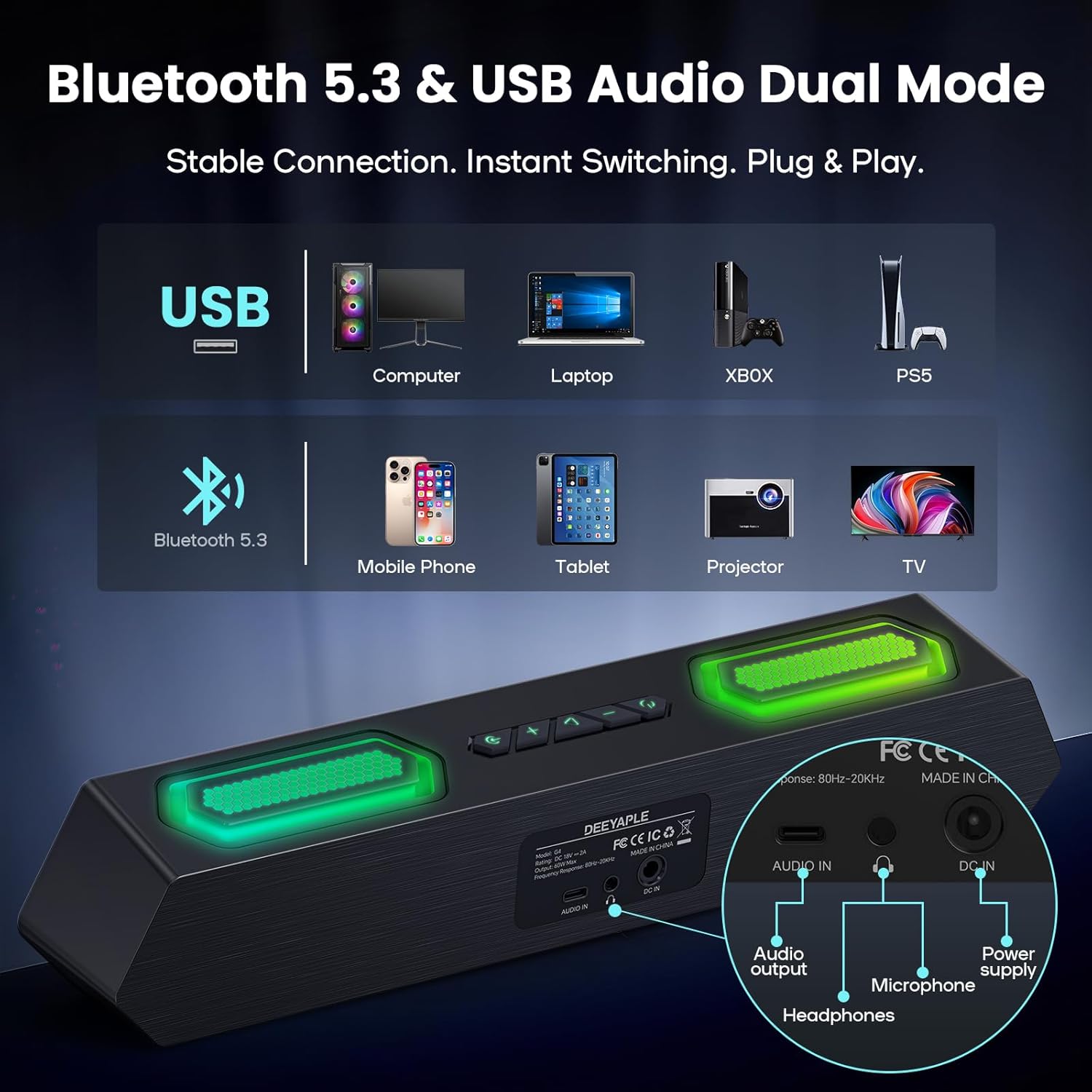
Сурет: артқы view of the speaker showing USB, Audio In, DC In ports, and compatible devices for Bluetooth and USB connections.
3.2.1 Bluetooth қосылымы
- Динамиктің қосулы екеніне көз жеткізіңіз.
- Press the Bluetooth button on the speaker to enter pairing mode (indicator light will flash).
- On your device (PC, laptop, smartphone, tablet), navigate to Bluetooth settings and search for "Deeyaple G4C".
- Жұптастырылатын динамикті таңдаңыз. Қосылғаннан кейін индикатор шамы тұрақты болып жанады.
3.2.2 USB аудио қосылымы
- Connect one end of the provided Type-C to USB Audio Cable to the USB port on the speaker.
- Connect the other end of the cable to an available USB port on your computer or compatible device.
- The speaker will automatically switch to USB audio mode. You may need to select "Deeyaple G4C" as the audio output device in your computer's sound settings.
4. Операция
4.1 Негізгі басқару элементтері
The speaker features full-button control for various functions:
- Қуат түймесі: Press and hold to turn on/off. Double-click to turn RGB lights completely off.
- Дыбысты жоғарылату / төмендету түймелері: Adjust the audio volume. The volume level will be indicated by the bottom RGB bar.
- Режим түймесі: Switch between Bluetooth and USB audio input modes.
- RGB Lighting Button: Әртүрлі RGB жарықтандыру әсерлері арқылы ауысыңыз.
4.2 Аудио ойнату
Once connected via Bluetooth or USB, audio from your device will play through the Deeyaple speakers. Use your device's media controls for play/pause and track skipping.

Image: Diagram illustrating the internal components of the speaker, including full-range drivers and bass diaphragms, highlighting 40W Hi-Fi Stereo Sound capabilities.

Image: A user engaged with a computer setup, experiencing immersive sound and dynamic RGB lighting from the Deeyaple Computer Speakers.
5. Software Control (Custom EQ & RGB Lighting)
For advanced customization of sound and lighting, download and install the dedicated PC software (often referred to as "Eduplight" or similar, check the Quick Start Guide for the exact name and download link).
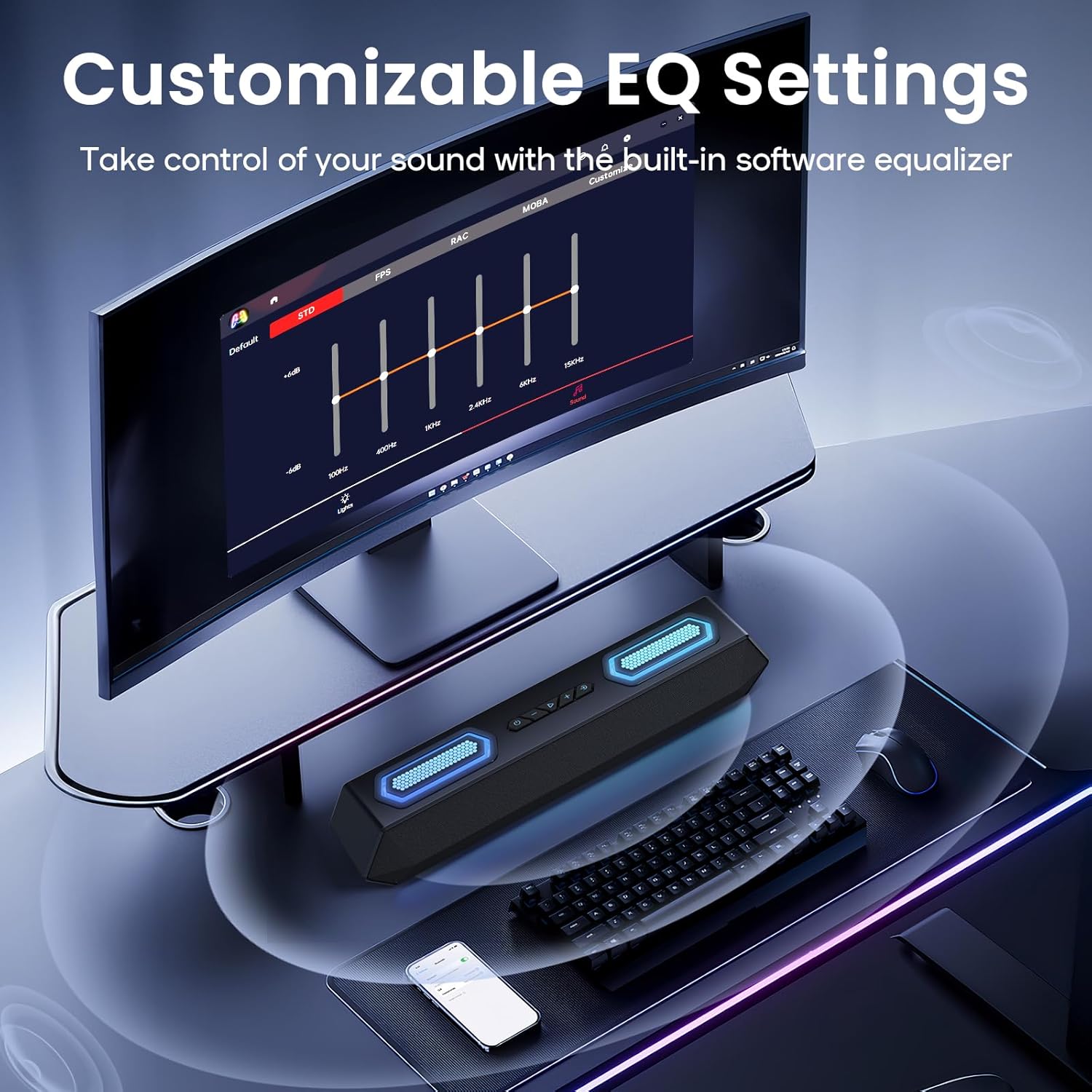
Image: Screenshot of the software interface for customizable EQ settings, showing sliders for bass, treble, and midrange adjustments.
5.1 Customizable EQ Settings
- The software allows you to adjust bass, treble, and midrange frequencies to create your preferred sound profile.
- Pre-set EQ modes may be available for different content types (e.g., gaming, music, movies).
5.2 RGB жарықтандыру режимі

Image: The Deeyaple Computer Speakers displaying various vibrant RGB lighting effects, including 12 presets and transitions controlled via PC software.
- Access 12 dynamic RGB effects through the software.
- Customize colors, brightness, and lighting patterns.
- Features include Screen Color Sync, which matches on-screen colors, and Music Reactive Lighting, which pulses with your audio.
Note: Some users have reported that the software may require an online account or login. If you prefer not to use the software, basic lighting modes can be cycled via the physical button, and volume can be controlled via your connected device.
6. Техникалық сипаттамалар
| Ерекшелік | Мәлімет |
|---|---|
| Модель атауы | G4C |
| Динамик түрі | Портативті динамик |
| Динамиктің максималды шығыс қуаты | 40 Вт |
| Қосылу технологиясы | Bluetooth 5.3, USB Audio |
| Арнайы мүмкіндіктер | Bass Boost, LED Light (RGB), Software Custom EQ, Screen Color Sync, Music Reactive Lighting |
| Үйлесімді құрылғылар | PC, Laptop, Smartphone, Tablet, Gaming Console (Xbox, PS4) |
| Түс | Қара |
| Өнім өлшемдері | 13.5"D x 2.5"W x 3.34"H |
| Элемент салмағы | 2.27 фунт |
| Нәр беруші | Сыртқы қуат адаптері |
| UPC | 850060113321 |
7. Ақаулықтарды жою
| Мәселе | Мүмкін шешім |
|---|---|
| Динамиктерден дыбыс жоқ. |
|
| Bluetooth жұптастыру сәтсіз аяқталды. |
|
| RGB шамдары жұмыс істемейді немесе тұрып қалады. |
|
| Sound quality issues (e.g., distortion, weak bass). |
|
| Software requires login/account. |
|
8. Техникалық қызмет көрсету
- Тазалау: Динамиктің бетін тазалау үшін жұмсақ, құрғақ шүберекті пайдаланыңыз. Сұйық тазалағыштарды немесе абразивті материалдарды пайдаланбаңыз.
- Сақтау орны: Динамикті салқын, құрғақ жерде, тікелей күн сәулесі мен төтенше температурадан алыс жерде сақтаңыз.
- Өңдеу: Avoid dropping the speaker or exposing it to strong impacts.
- Суға әсер ету: This product is not waterproof. Keep it away from water and high humidity.
9. Кепілдік және қолдау
For warranty information and technical support, please refer to the warranty card included with your product or visit the official Deeyaple webсайт. Кепілдік шағымдары үшін сатып алу түбіртегін сақтаңыз.
For further assistance, you may contact Deeyaple customer service through their official channels.