
NIMO NIMO N152
NIMO 15.6-inch FHD Student Laptop Instruction Manual
Model: NIMO N152
Кіріспе
This manual provides essential information for setting up, operating, maintaining, and troubleshooting your NIMO 15.6-inch FHD Student Laptop. Please read this manual thoroughly to ensure proper use and to maximize the lifespan of your device. The NIMO N152 laptop is designed for work, study, and daily life, featuring a powerful AMD Ryzen 5 3500U processor, ample memory and storage, and user-friendly features like a backlit keyboard and fingerprint reader.

Figure 1: NIMO 15.6-inch FHD Student Laptop. This image displays the silver laptop with its screen showing a vibrant desktop background, highlighting its full HD display, 32GB RAM, 1TB SSD, fingerprint reader, Type-C PD charger, and backlit keyboard features.
1. Орнату
1.1 Қораптан шығару және бастапқы тексеру
Carefully remove all components from the packaging. Verify that all items listed below are present and undamaged. If any item is missing or damaged, please contact NIMO customer support immediately.
Қорапта не бар:
- 1 x NIMO N152 ноутбугы
- 1 x Type-C 65 Вт PD жылдам зарядтағыш
- 1 x Пайдаланушы нұсқаулығы (осы құжат)
- Windows 11 Home (pre-installed)
- Кепілдік туралы ақпарат
1.2 Бастапқы қуат қосу және зарядтау
Before first use, it is recommended to fully charge your laptop. Connect the provided Type-C 65W GaN PD fast charger to the laptop's Type-C charging port and then to a power outlet. The charge LED indicator will illuminate to confirm charging. A full charge typically takes a few hours, but the fast charging feature allows for significant battery life with short charging times.

Figure 2: Type-C 65W PD Fast Charger. This image shows the compact 65W GaN PD charger and its versatility in charging not only the NIMO laptop but also other devices like tablets and smartphones, emphasizing its "One Charger for All" capability.
1.3 Operating System Setup (Windows 11)
Upon first power-on, the laptop will guide you through the Windows 11 initial setup process. Follow the on-screen prompts to configure language, region, network connection, user accounts, and privacy settings. An internet connection is required for activation and updates.
1.4 Саусақ ізін оқу құрылғысын орнату
For enhanced security and quick login, set up the integrated fingerprint reader. Navigate to Windows Settings > Accounts > Sign-in options > Fingerprint Recognition (Windows Hello Fingerprint) and follow the instructions to register your fingerprints. This allows for password-free login with a single touch.
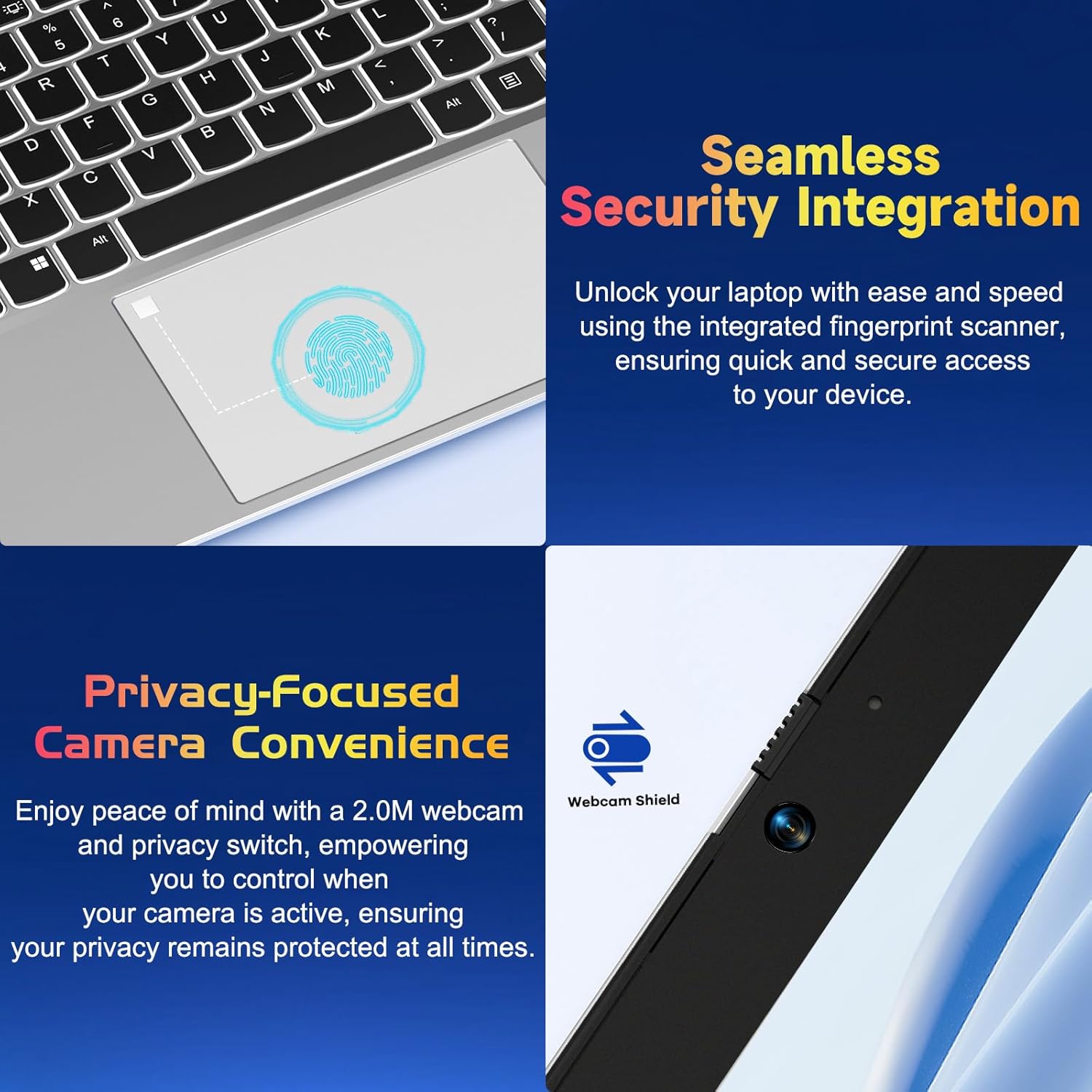
Figure 3: Seamless Security Integration and Privacy-Focused Camera. This image highlights the integrated fingerprint scanner on the touchpad for quick and secure access, and the 2.0M webcam with a privacy switch for enhanced user privacy.
2. Ноутбукті пайдалану
2.1 Қуатты басқару
- Қуат қосулы: Пернетақтаның жоғарғы оң жағында орналасқан қуат түймесін басыңыз.
- Ұйқы режимі: Қақпақты жабыңыз немесе қуат түймесін қысқа уақыт басыңыз.
- Өшіру: Go to Start > Power > Shut down in Windows.
- Қайтадан қосу: Go to Start > Power > Restart in Windows.
2.2 Пернетақта және сенсорлық тақта
The NIMO N152 features a full-size keyboard with a numeric keypad for efficient data entry. The backlit keyboard can be adjusted or turned off using the dedicated function keys (refer to keyboard legends for specific key combinations), allowing for comfortable typing in various lighting conditions.
The precision touchpad supports multi-touch gestures for intuitive navigation, including scrolling, zooming, and switching applications. Refer to Windows settings for customizing touchpad gestures.

Figure 4: Effortless Typing in Any Environment. This image showcases the laptop's backlit keyboard, responsive touchpad, integrated fingerprint reader, and numeric keypad, emphasizing ease of use in various lighting conditions.
2.3 Дисплей мүмкіндіктері
Your laptop is equipped with a 15.6-inch Full HD (1920x1080) IPS Anti-Glare display. This screen offers vibrant visuals, wide viewing angles, and reduced reflections for a comfortable viewing experience. The 85% screen-to-body ratio and micro-edge design maximize your viewаймағы.

Figure 5: Vivid Full HD Display. This image highlights the laptop's 15.6-inch FHD IPS display with 1920x1080 resolution, bright view, and eye protection features, showcasing its immersive visual quality.
The laptop also features a 180-degree lay-flat hinge, allowing the screen to lie completely flat. This feature is useful for sharing content with others or collaborating in various settings.

Figure 6: 180-degree Lay-Flat Hinge. This image demonstrates the laptop's ability to open flat, expanding usage scenarios and making content sharing easier.
2.4 Қосылым опциялары
The NIMO N152 offers a variety of ports for connecting peripherals and external devices:
- Type-C (Charge Only): Қуат енгізу үшін.
- USB 3.0 порттары (x3): Үйлесімді құрылғылармен жоғары жылдамдықты деректерді тасымалдауға арналған.
- USB 2.0 порты (x1): Стандартты USB құрылғыларын қосуға арналған.
- HDMI: Сыртқы мониторларға немесе проекторларға қосу үшін.
- C түрі (толық функция): Supports data, video output, and power delivery.
- Micro SD оқу құралы: Жадты кеңейту немесе тасымалдау үшін fileжад карталарынан.
- Headphone Combo Jack: Құлаққаптарды немесе гарнитураларды қосуға арналған.
- Кенсингтон құлпы ұясы: Физикалық қауіпсіздік үшін.

Figure 7: Expanded Connectivity Options. This image illustrates the various ports available on the NIMO laptop, including USB, HDMI, Type-C, Micro SD reader, and headphone jack, providing versatile connectivity.
2.5 Webкамера және құпиялылық
The laptop includes a 2.0 MP webcam for video calls and conferencing. For privacy, a physical privacy switch is integrated, allowing you to disable the webcam when not in use, ensuring your privacy is protected.
2.6 Өнімділік аяқталдыview
Powered by an AMD Ryzen 5 3500U processor with 4 cores and 8 threads, the NIMO N152 delivers reliable performance for daily tasks, entertainment, and light gaming. Coupled with 32GB DDR4 RAM and a 1TB PCIe SSD, it offers fast startup times, quick application loading, and efficient multitasking.

Figure 8: AMD R5 Processor. This image highlights the laptop's AMD Ryzen 5 processor, detailing its 4 cores, 8 threads, 15W power consumption, and 3.7 GHz turbo boost, indicating its capability for daily tasks and light gaming.
3. Техникалық қызмет көрсету
3.1 Ноутбукті тазалау
To maintain the laptop's appearance and functionality, regularly clean the screen, keyboard, and chassis. Use a soft, lint-free cloth slightly dampдисплейді сумен немесе экранды тазалайтын ерітіндімен жуыңыз. Пернетақта мен корпус үшін құрғақ немесе аздап тазартылған шүберекті пайдаланыңыз.amp шүберек. Қатты химиялық заттардан немесе абразивті материалдардан аулақ болыңыз.
3.2 Батареяға күтім жасау
Батареяның қызмет ету мерзімін ұзарту үшін батареяны жиі толық зарядсыздандырудан аулақ болыңыз. Мүмкіндігінше батарея зарядын 20% және 80% арасында ұстау ұсынылады. Ұзақ уақыт бойы пайдаланылмаса, ноутбукты салқын, құрғақ жерде сақтаңыз.
3.3 RAM and SSD Upgrades
The NIMO N152 laptop supports user-detachable RAM and SSD, allowing for future upgrades. If you plan to upgrade, ensure you use compatible components and follow proper anti-static precautions. Consult a professional if you are unsure about the upgrade process.

Figure 9: Expandable Memory Support. This image illustrates the laptop's support for memory expansion, showing a Micro SD card slot, indicating flexibility for storage upgrades.
4. Ақаулықтарды жою
If you encounter issues with your NIMO N152 laptop, please refer to the following common troubleshooting steps:
- Қуат жоқ: Ensure the charger is properly connected and the power outlet is functional. Try a different outlet.
- Көрсету мәселелері: If the screen is blank or flickering, try connecting an external monitor to check if the issue is with the laptop's display or graphics output. Adjust display settings in Windows.
- Пернетақта/сенсорлық тақта жауап бермейді: Restart the laptop. Check for any physical obstructions. Ensure drivers are up to date via Windows Update or NIMO support webсайт.
- Баяу өнімділік: Close unnecessary applications. Check for background processes. Ensure sufficient free space on the SSD. Consider running a disk cleanup or antivirus scan.
- Қосылу проблемалары: For Wi-Fi, ensure the router is working and the laptop is within range. For USB devices, try different ports.
For more complex issues or if the problem persists, please contact NIMO customer support.
5. Техникалық сипаттамалар
| Ерекшелік | Техникалық сипаттама |
|---|---|
| Модель атауы | NIMO N152S |
| Экранды көрсету өлшемі | 15.6 дюйм |
| Максималды экран ажыратымдылығы | 1920 x 1080 пиксель (FHD IPS) |
| Процессор | AMD Ryzen 5 3500U (3.7 ГГц) |
| Жедел Жадтау Құрылғысы | 32 ГБ DDR4 (3200 МГц) |
| Қатты диск | 1 TB PCIe SSD |
| Графикалық сопроцессор | AMD интеграцияланған графикасы |
| Операциялық жүйе | Windows 11 Home |
| Сымсыз түрі | 802.11a/b/g/n/ac |
| USB порттары | 3 x USB 3.0, 1 x USB 2.0, 2 x Type-C (1 Charge Only, 1 Full Function) |
| Батареяның орташа қызмет ету мерзімі | 5 сағат |
| Элемент салмағы | 3.8 фунт |
| Өнім өлшемдері | 14.07 x 8.98 x 0.76 дюйм |
| Түс | Күміс |
| Артқы Webкамераның ажыратымдылығы | 2 МП |
| Арнайы мүмкіндіктер | Артқы жарықтандырылған пернетақта, саусақ ізін оқу құрылғысы, HD аудио, сандық пернетақта |
6. Кепілдік және қолдау
NIMO is committed to providing excellent customer service and product support. Your NIMO N152 laptop comes with the following:
- 2-Year Manufacturer's Warranty: Қалыпты пайдалану кезіндегі материалдар мен өңдеу ақауларын жабады.
- 90-Day Hassle-Free Returns: You may return any NIMO product for any reason within 90 days of purchase.
- Partial Assembly in the USA: Demonstrates commitment to quality and local support.
For any questions, technical assistance, or warranty claims, please contact NIMO customer support. Our dedicated team is ready to assist you.

Figure 10: NIMO Customer Service. This image depicts a customer service representative with a headset, symbolizing NIMO's commitment to providing professional after-sales support.
You can also find more information and support resources on the official NIMO webсайт.
Қауіпсіздік туралы маңызды ақпарат
Please read and follow all safety instructions provided with your laptop to prevent injury or damage. This product contains chemicals known to the State of California to cause cancer and birth defects or other reproductive harm (Proposition 65 warning).
Ask a question about this manual
Ask about setup, troubleshooting, compatibility, parts, safety, or missing instructions. Manuals+ will review the question and use this page’s manual context to help answer it.