
Кіріспе
The Surfans F28 is a high-fidelity portable music player designed to deliver an immersive audio experience. Featuring dual ESS9018 DACs, a 4.4mm balanced output, and comprehensive Bluetooth 5.2 support including LDAC and aptX HD, the F28 supports a wide range of lossless audio formats. This manual provides detailed instructions for setting up, operating, maintaining, and troubleshooting your device to ensure optimal performance and longevity.

1-сурет: Алдыңғы және артқы view of the Surfans F28 HiFi Music Player.
Пакет мазмұны
Төменде тізімделген заттардың барлығы пакетіңізде бар екенін тексеріңіз:
- 1x Surfans F28 HiFi Music Player
- 1x USB-C зарядтау кабелі
- 1x 128GB Micro SD Card (pre-installed or included separately)
- 1x Пайдаланушы нұсқаулығы (осы құжат)

2-сурет: Қаптаманың әдеттегі мазмұнының иллюстрациясы.
Өнім аяқталдыview
Familiarize yourself with the various components and controls of your F28 music player.
Негізгі ерекшеліктері:
- Dual ESS9018 DACs: For high-resolution audio decoding and minimal distortion.
- 4.4 мм теңгерімді шығыс: Provides enhanced audio quality and power for demanding headphones.
- 3.5 мм бір ұшты шығыс: Standard audio output for common headphones.
- Екі бағытты Bluetooth 5.2: Supports LDAC and aptX HD for high-quality wireless audio transmission and reception.
- 3.5 дюймдік IPS сенсорлық экраны: For intuitive navigation and control.
- ALPS Analog Volume Knob: For precise volume adjustments.
- Кеңейтілетін жад: 512 ГБ дейінгі Micro SD карталарын қолдайды.
- USB-C порты: Зарядтау және деректерді тасымалдау үшін.

Figure 3: The F28 player showcasing its display and audio capabilities.

Figure 4: The dual ESS9018K2M DAC chips, central to the F28's high-fidelity audio.

Figure 5: Top panel with 4.4mm balanced and 3.5mm single-ended audio outputs, and the ALPS analog volume knob.
Орнату
1. Құрылғыны зарядтау
Before first use, fully charge the F28. Connect the included USB-C cable to the player's USB-C port and the other end to a USB power adapter (5V/1A recommended) or a computer's USB port. The charging indicator will show the charging status. A full charge typically takes several hours.
2. Micro SD картасын салу
The F28 supports Micro SD cards up to 512GB. Locate the Micro SD card slot on the bottom of the device. Gently insert the Micro SD card with the gold contacts facing down until it clicks into place. To remove, push the card in slightly until it springs out.

Figure 6: Inserting the Micro SD card and connecting via USB-C for data transfer.
3. Музыканы тасымалдау Files
Connect the F28 to your computer using the USB-C cable. The player will appear as a removable storage device. You can then drag and drop your music files directly into the Micro SD card's folders. The F28 supports various lossless formats including DSD (DSF/DFF), FLAC/WAV (up to 384kHz), AIFF/APE, as well as MP3/AAC.

Figure 7: Supported audio file formats for the F28 player.
Пайдалану нұсқаулары
1. Қуатты қосу/өшіру
- Қуат қосулы: Press and hold the power button (located on the side) until the screen illuminates.
- Қуат көзін өшіру: Press and hold the power button until a power-off prompt appears, then confirm.
2. Негізгі шарлау
The F28 features a 3.5-inch IPS touchscreen for primary navigation. Swipe gestures and taps are used to select options and move between menus. Physical buttons on the side provide additional control for playback (play/pause, next/previous track) and menu navigation.
3. Музыканы ойнату
From the main menu, select "My Music" or "Folder" to browse your audio files. Tap on a song to begin playback. The playback screen displays track information, progress, and playback controls.
4. Дыбыс деңгейін басқару
Adjust the volume using the gold-colored ALPS analog knob located on the top right of the device. Rotate clockwise to increase volume and counter-clockwise to decrease. The volume level will be displayed on the screen.
5. Bluetooth қосылымы
The F28 supports Bidirectional Bluetooth 5.2 with LDAC and aptX HD codecs for high-quality wireless audio. To pair with Bluetooth headphones or speakers:
- Go to "System Settings" and select "Bluetooth".
- Bluetooth ҚОСУ.
- Ойнатқыш қолжетімді құрылғыларды сканерлейді. Жұптастыру үшін тізімнен құрылғыңызды таңдаңыз.
The F28 can also act as a Bluetooth receiver, allowing you to stream audio from your phone or PC to the player.

Figure 8: The F28 features a Bluetooth 5.2 chip for stable and high-quality wireless connections.
6. Эквалайзер параметрлері
The F28 includes an equalizer to customize your sound. Navigate to the "Equalizer" option in the settings. You can choose from various presets or create a custom sound profile by adjusting the frequency bands.
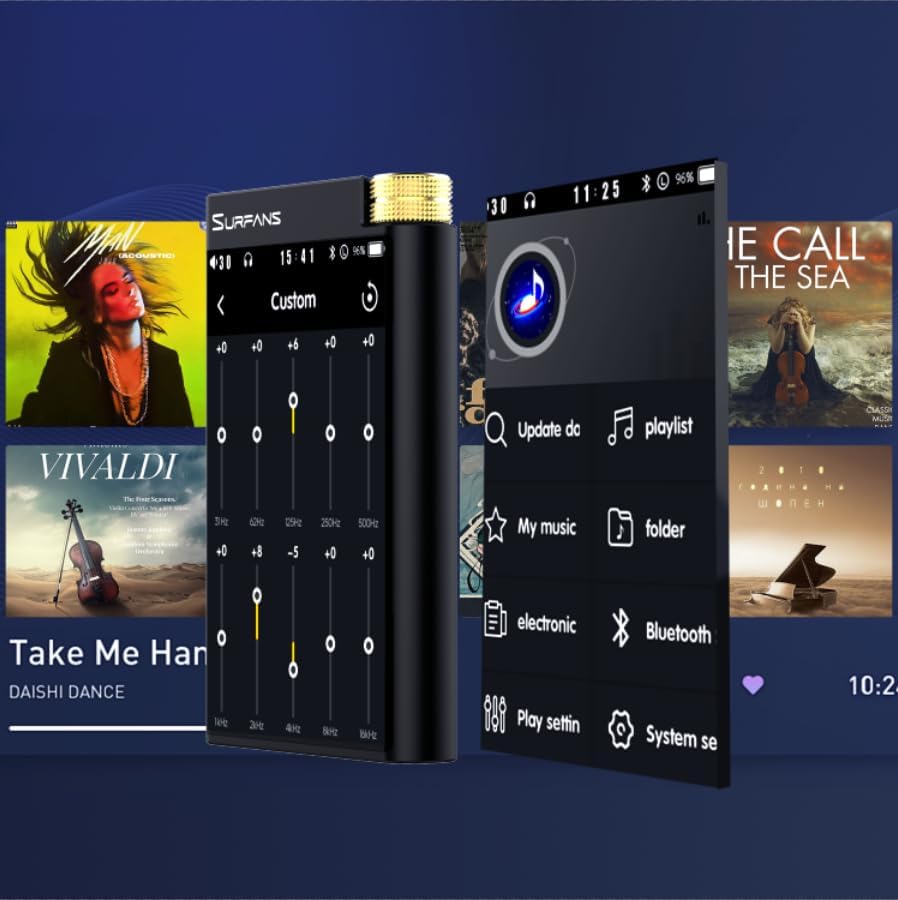
Figure 9: Customizing audio with the built-in equalizer.
7. Сыртқы құрылғыларға қосылу
Use the 4.4mm balanced or 3.5mm single-ended output to connect to headphones, amplifiers, or speakers. The USB-C port also supports USB DAC functionality, allowing the F28 to act as an external sound card for your computer.

Figure 10: The F28 can be connected to various audio systems, including acting as a USB DAC for computers.
Техникалық қызмет көрсету
- Тазалау: Құрылғыны тазалау үшін жұмсақ, құрғақ шүберекті пайдаланыңыз. Абразивті тазартқыштарды немесе еріткіштерді пайдаланбаңыз.
- Сақтау орны: Ойнатқышты салқын, құрғақ жерде, тікелей күн сәулесінен және төтенше температурадан алыс жерде сақтаңыз.
- Батареяға күтім жасау: Батареяның қызмет ету мерзімін ұзарту үшін батареяны жиі толық зарядсыздандырудан аулақ болыңыз. Ұзақ уақыт сақтасаңыз, батареяны бірнеше ай сайын шамамен 50%-ға дейін зарядтаңыз.
Ақаулықтарды жою
| Мәселе | Ықтимал себебі | Шешім |
|---|---|---|
| Құрылғы қосылмайды. | Төмен батарея; құрылғы мұздатылған. | Charge the device for at least 30 minutes. If still unresponsive, try holding the power button for 10-15 seconds for a hard reset. |
| Touchscreen is unresponsive or slow. | Бағдарламалық құралдың уақытша ақаулығы; экран қорғанысының кедергісі. | Restart the device. Ensure the screen is clean and free of debris. If using a screen protector, ensure it is properly applied and not too thick. |
| Bluetooth жұптастыру мәселелері. | Device not in pairing mode; distance; interference. | Ensure both devices are in pairing mode and within range. Turn off and on Bluetooth on both devices. Clear previous pairings if necessary. |
| Low volume via Bluetooth. | Volume settings on both devices; codec compatibility. | Increase volume on both the F28 and the connected Bluetooth device. Ensure optimal codec (LDAC/aptX HD) is selected if supported by the receiving device. |
| Музыка files not recognized or played in incorrect order. | Бұзылған files; file system indexing issue. | Қамтамасыз ету files are in supported formats. Re-scan the music library from the player's settings. If issues persist, try reformatting the Micro SD card (backup data first) and re-transferring files. Note: Some players may sort by filename alphabetically rather than track number metadata. |
Техникалық сипаттамалар
| Ерекшелік | Мәлімет |
|---|---|
| Модель атауы | F28 128G |
| Өнім өлшемдері | 0.7 x 2.6 x 4.7 дюйм |
| Элемент салмағы | 9.6 унция |
| DAC чипі | Dual ESS9018K2M |
| Қолдау көрсетілетін аудио пішімдері | DSD (DSF/DFF), FLAC/WAV (up to 384kHz/32-bit), AIFF/APE, MP3/AAC, WMA Lossless |
| Bluetooth нұсқасы | 5.2 (Bidirectional, supports LDAC/aptX HD) |
| Экран өлшемі | 3.5 дюймдік IPS сенсорлық экраны |
| Ішкі жад | 128GB (included Micro SD card) |
| Кеңейтілетін сақтау орны | Up to 512GB via Micro SD card |
| Батарея | 1x 12V battery (included), approx. 12-hour playback |
| Шығару порттары | 4.4mm Balanced, 3.5mm Single-Ended |
| Қосылу технологиясы | Aux, Bluetooth 5.2, USB-C |
| Арнайы мүмкіндік | Эквалайзер |
Кепілдік және қолдау
For warranty information and technical support, please refer to the official Surfans webсайтына өтіңіз немесе тұтынушыларға тікелей хабарласыңыз. Сатып алу түбіртегін кепілдік талаптары үшін сатып алудың дәлелі ретінде сақтаңыз.
You can visit the official Surfans Store on Amazon for more information and support: Surfans Audio Store