
1. Қауіпсіздік туралы маңызды ақпарат
Осы өнімді құрастыру және пайдалану алдында барлық қауіпсіздік нұсқауларын оқып шығыңыз және түсініңіз. Осы нұсқауларды орындамау жарақатқа немесе өнімге зақым келтіруі мүмкін.
- Always assemble the desk according to the provided instructions. Ensure the desk is fully assembled and stable before use.
- Do not exceed the maximum weight recommendation of 150 pounds for the working surface.
- Keep the desk away from heat sources and moisture to prevent damage.
- Always unplug the desk from the power source before cleaning or performing any maintenance.
- Барлық электр қосылымдарының қауіпсіз екеніне және жергілікті электр ережелеріне сәйкес келетініне көз жеткізіңіз.
2. Пакет мазмұны
Құрастыруды бастамас бұрын барлық компоненттердің бар екенін тексеріңіз. Егер қандай да бір бөліктер жоқ немесе зақымдалған болса, тұтынушыларды қолдау қызметіне хабарласыңыз.
- Жұмыс үстелі панельдері (L-тәрізді)
- 5 деңгейлі сақтау сөрелерінің панельдері
- Металл жақтаудың құрамдас бөліктері
- Built-in Power Outlet Unit (3 AC, 2 USB)
- Контроллері бар жарықдиодты жарық жолағы
- Құлаққап ілгегі
- Құрастыру жабдықтары (бұрандалар, болттар және т.б.)
- Assembly Tools (Allen wrench, screwdriver)
- Нұсқаулық
3. Құрастыру нұсқаулары
Assembly of the Pamray L-Shaped Computer Desk requires careful attention to the provided instructions. All necessary tools are included in the accessory box.
3.1 General Assembly Guidance
For a smooth assembly experience, we recommend reviewing the comprehensive installation videos available on the product page or by scanning the transparency label on the packaging. These videos provide visual guidance for each step.
- Барлық компоненттерді орауыштан шығарып, сызаттардың алдын алу үшін оларды таза, жұмсақ бетке қойыңыз.
- Identify each part using the labels and diagrams in the instruction manual.
- Follow the step-by-step diagrams carefully. Do not overtighten screws until the entire section is assembled, then tighten all connections securely.
- Ensure the 'X'-shaped back braces are correctly installed for enhanced stability.
3.2 Reversible Shelf Installation
The 5-tier side shelf can be installed on either the left or right side of the desk to suit your space and preference. The instruction manual provides specific steps for both configurations.

3.3 Power Outlet and LED Light Installation
Integrate the built-in power outlet and LED light strip during the assembly process as indicated in the manual. Ensure all cables are routed safely and neatly.

4. Орнату және пайдалану
4.1 Алғашқы орналастыру
Position the desk in your desired location, ensuring it is on a level surface. The adjustable feet can be used to stabilize the desk on uneven floors.
4.2 Using the Built-in Power Outlets
The desk is equipped with 3 AC outlets and 2 USB ports. Connect the desk's power cord to a wall outlet. You can then plug in your devices such as monitors, laptops, and chargers directly into the desk's integrated power strip.
4.3 Жарықдиодты шамдарды пайдалану
The integrated LED light strip offers extensive customization options:
- Қолданбаны басқару: Download the dedicated app to remotely control the LED lights. The app provides access to 213 dynamic multicolor lighting modes and over 10,000 color options.
- Жарықтықты реттеу: Adjust the brightness and hues to match your mood or enhance your workspace ambiance.
- Музыканы синхрондау: Some modes allow the lights to sync with music or sound.

5. Техникалық қызмет көрсету
Regular maintenance helps prolong the life and appearance of your desk.
- Тазалау: Жұмыс үстелінің беттерін жұмсақ шүберекпен сүртіңіз, damp матаны. Қаптаманы зақымдауы мүмкін абразивті тазалағыштарды немесе қатты химиялық заттарды пайдаланбаңыз.
- Құрылымдық тұтастық: Барлық бұрандалар мен болттардың берік екеніне көз жеткізу үшін оларды мезгіл-мезгіл тексеріп отырыңыз. Қажет болса, қайта қатайтыңыз.
- Электрлік компоненттер: Ensure the power cord and outlet unit are free from damage. Do not attempt to repair electrical components yourself.
- Салмақ бөлу: Distribute weight evenly across the desktop and shelves. Do not place excessively heavy items on any single point.
6. Ақаулықтарды жою
If you encounter issues with your Pamray L-Shaped Computer Desk, refer to the following common solutions:
- Үстел тербелісі: Ensure all assembly screws are fully tightened. Check if the floor is uneven and adjust the desk's leveling feet accordingly.
- Жарықдиодты шамдар жұмыс істемейді: Verify that the LED light strip is properly connected to its power source and the desk's power outlet. Check the app connection and ensure the lights are turned on.
- Қуат розеткалары жұмыс істемейді: Confirm the desk's main power cord is securely plugged into a working wall outlet. Test the wall outlet with another device.
- Жетіспейтін немесе зақымдалған бөлшектер: If you discover any missing or damaged parts during assembly, do not proceed. Contact Pamray customer support immediately for assistance.
7. Техникалық сипаттамалар
| Ерекшелік | Мәлімет |
|---|---|
| Бренд | Pamray |
| Үлгі нөмірі | S14pink49 |
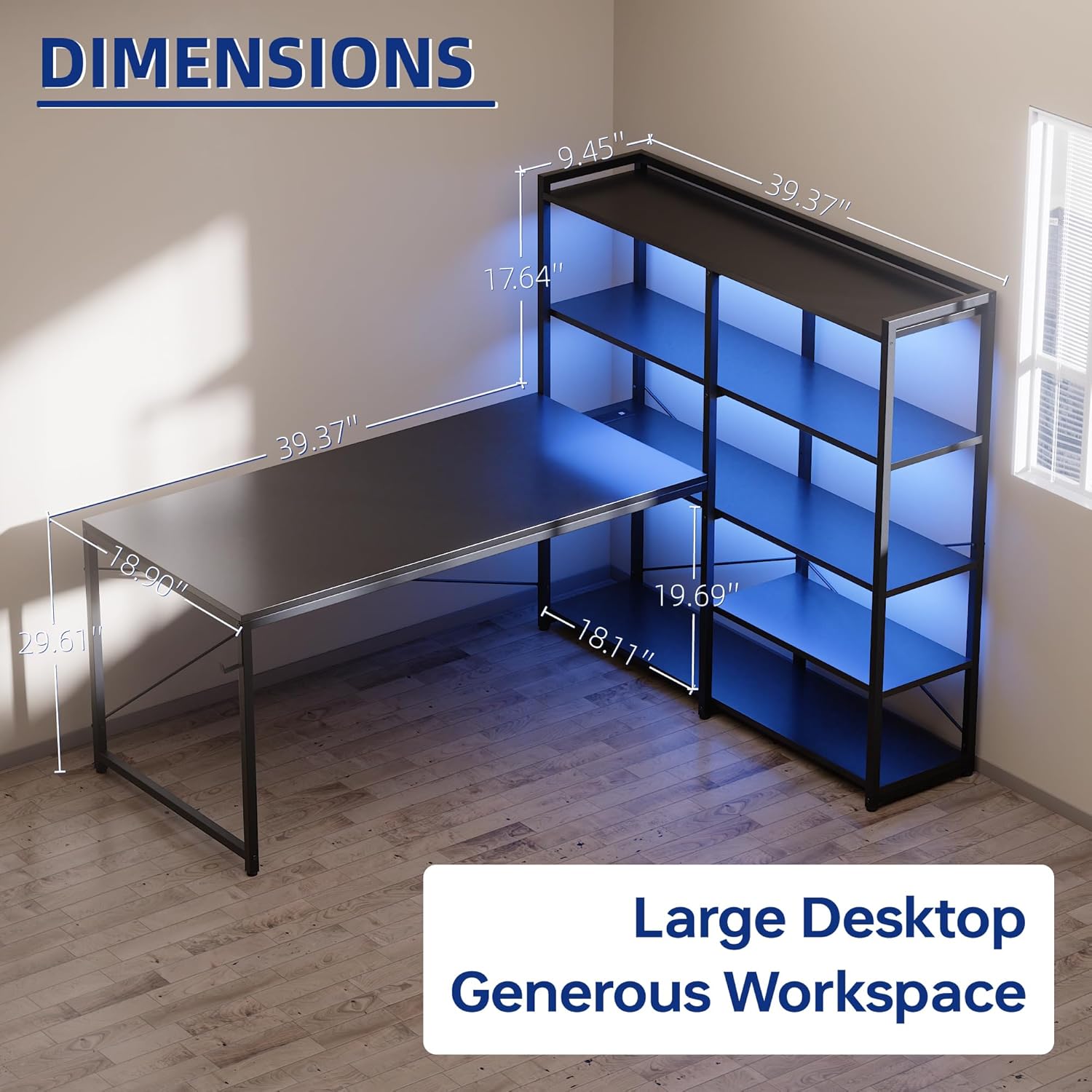
| Өнім өлшемдері | 18.9"D x 48.8"W x 29.61"H |
| Түс | Қызғылт |
| Материал түрі | Metal, Wood (FSC-Certified Tabletop) |
| Салмағы | 42.35 фунт |
| Максималды салмақ бойынша ұсыныс | 150 фунт |
| Сөрелер саны | 5-tier metal shelf (reversible) |
| Қосылған құрамдас бөліктер | Built-in Outlet, LED Lights, Headphone Hook |
| Power Outlet Specs | 3 AC Outlets (125V/12A), 2 USB Ports (5V/2A), Rated Power 1500W |
| Жарықдиодты шамдар | 213 Dynamic Multicolor Modes, 10,000+ Color Options, App Control |
| Құрастыру қажет | Yes (Tools and instructions included) |
8. Өнімнің ресми бейнесі
Watch the official product video for a visual guide on the features and assembly of the Pamray L-Shaped Computer Desk.
9. Кепілдік және қолдау
The Pamray L-Shaped Computer Desk comes with a limited warranty. For warranty details, product support, or to order replacement parts, please contact Pamray customer service.
Please have your model number (S14) and purchase information ready when contacting support.