
1. Кіріспе
This manual provides detailed instructions for the proper use and maintenance of your Oakcastle HIFI500 Remote Control. This remote is designed as a replacement or spare for the Oakcastle HIFI500 audio system, ensuring seamless control over its functions. Please read this manual thoroughly before use to ensure optimal performance and longevity of your remote control.
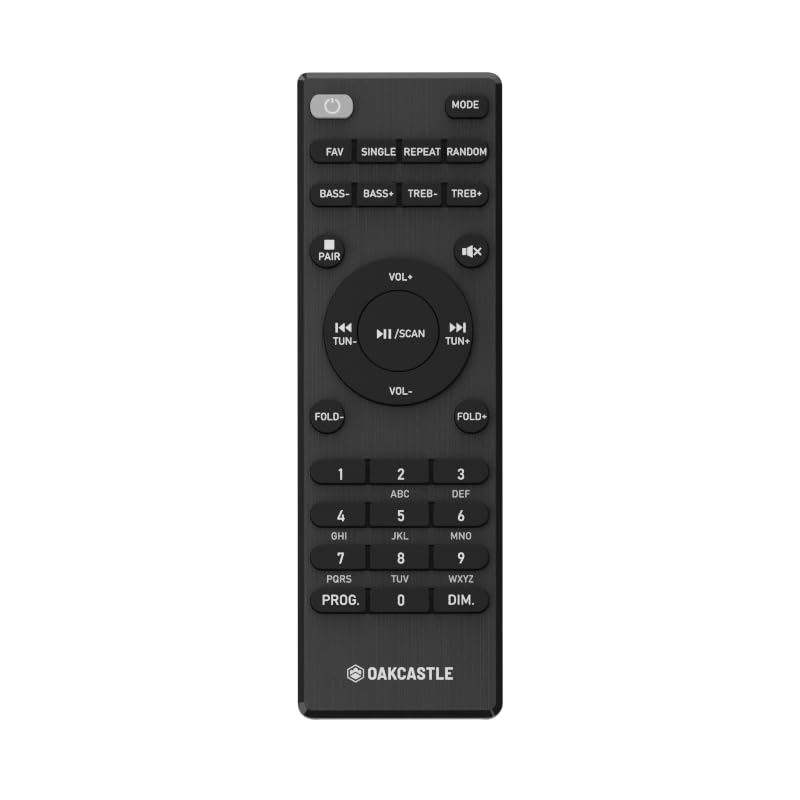
1.1-сурет: Алдыңғы view of the Oakcastle HIFI500 Remote Control. This image displays the compact design and button layout, including power, volume, source selection, and playback controls, typical for operating the HIFI500 audio system.
2. Орнату
2.1. Батареяны орнату
The Oakcastle HIFI500 Remote Control requires two AAA batteries (not included) for operation. Follow these steps to install the batteries:
- Қашықтан басқару құралының артқы жағындағы батарея бөлімін табыңыз.
- Press down on the tab and slide the battery cover downwards to open it.
- Оң (+) және теріс (-) терминалдардың бөлімнің ішіндегі белгілермен дұрыс туралануын қамтамасыз етіп, екі AAA батареясын салыңыз.
- Батарея қақпағын қауіпсіз шерткенше орнына сырғытыңыз.
Ескерту: Always use new batteries and dispose of old batteries responsibly. Do not mix old and new batteries, or different types of batteries.
2.2. Бастапқы пайдалану
Once batteries are installed, the remote control is ready for use with your Oakcastle HIFI500 audio system. Point the remote directly at the infrared (IR) receiver on your HIFI500 system. No additional pairing is typically required for this replacement remote.
3. Қашықтан басқару құралын пайдалану
The Oakcastle HIFI500 Remote Control provides full functionality for your HIFI500 audio system. Below is a general guide to common button functions:
- Қуат түймесі (⏻): Turns the HIFI500 system on or off.
- Дыбыс деңгейін жоғарылату/төмендеу (Vol+ / Vol-): Дыбыс шығысының деңгейін реттейді.
- Дыбысын өшіру (🔇): Temporarily silences the audio output.
- Source/Input (Дереккөз): Cycles through available audio inputs (e.g., CD, FM, Bluetooth, AUX).
- Playback Controls (▶ / ⏸ / ⏹ / ⏪ / ⏩): Controls media playback (Play, Pause, Stop, Rewind, Fast Forward) for compatible sources like CD or USB.
- Жылжу түймелері (▲ / ▼ / ◀ / ▶): Used to navigate menus and selections on the HIFI500 system display.
- OK/Enter түймесі: Таңдауларды растайды.
- Сандық пернетақта (0-9): For direct input of radio frequencies, track numbers, or other numerical data.
Refer to your Oakcastle HIFI500 audio system's main user manual for specific functions and advanced operations.
4. Техникалық қызмет көрсету
4.1. Тазалау
To clean your remote control, gently wipe the surface with a soft, dry cloth. For stubborn dirt, slightly dampen the cloth with water or a mild, non-abrasive cleaner. Avoid using harsh chemicals, solvents, or abrasive materials, as these can damage the remote's finish or internal components.
4.2. Батареяны ауыстыру
Replace batteries when the remote's response becomes sluggish or stops working. Follow the battery installation steps outlined in Section 2.1. Always replace both batteries simultaneously with new ones.
4.3. Сақтау
When not in use for extended periods, it is recommended to remove the batteries from the remote control to prevent leakage, which can cause damage. Store the remote in a cool, dry place away from direct sunlight and extreme temperatures.
5. Ақаулықтарды жою
If you encounter issues with your Oakcastle HIFI500 Remote Control, please refer to the following common problems and solutions:
- Қашықтан басқару пульті жауап бермейді:
- Батареялардың дұрыс полярлықпен дұрыс орнатылғанын тексеріңіз.
- Батареяларды жаңасымен ауыстырыңыз.
- Ensure there are no obstructions between the remote control and the HIFI500 system's IR receiver.
- Make sure you are within the effective range and pointing the remote directly at the HIFI500 system.
- Үзіліс функциясы:
- Бұл көбінесе батарея қуатының төмен екенін көрсетеді. Батареяларды ауыстырыңыз.
- Ensure the remote's IR emitter is clean and free from dirt or smudges.
If the problem persists after trying these solutions, please contact Oakcastle customer support.
6. Техникалық сипаттамалар
| Ерекшелік | Техникалық сипаттама |
|---|---|
| Үлгі | HIFI500 Remote Control |
| Бренд | Оккасл |
| Қосылу технологиясы | Инфрақызыл (ИК) |
| Қуат көзі | 2 x AAA батареялары (жинаққа кірмейді) |
| Қолдау көрсетілетін құрылғылардың максималды саны | 1 (Oakcastle HIFI500 Audio System) |
| Арнайы мүмкіндік | Жеңіл |
| Элемент салмағы | 2.82 унция (шамамен 80 грамм) |
| Пакет өлшемдері | 8 x 3.2 x 2.5 дюйм (шамамен 20.3 x 8.1 x 6.3 см) |
| Өндіруші | КӨПШІЛІК |
7. Кепілдік және қолдау
7.1. Кепілдік туралы ақпарат
This Oakcastle HIFI500 Remote Control is covered by a manufacturer's warranty. Please refer to the warranty card included with your original Oakcastle HIFI500 audio system or visit the official Oakcastle webегжей-тегжейлі кепілдік талаптары мен шарттары үшін сайт. Кепілдік шағымдары үшін сатып алуды растайтын құжатты сақтаңыз.
7.2. Тұтынушыларға қолдау көрсету
For technical assistance, troubleshooting beyond this manual, or warranty inquiries, please contact Oakcastle customer support. You can typically find contact information, including phone numbers, email addresses, and support portals, on the official Oakcastle webсайт.
Please have your product model (HIFI500 Remote Control) and purchase details ready when contacting support.