
1. Кіріспе
This manual provides essential instructions for the installation, operation, and maintenance of your Renogy Rover 20A MPPT Charge Controller. Please read this manual thoroughly before installation and use to ensure optimal performance and safety. Keep this manual for future reference.

Figure 1.1: Renogy Rover 20A MPPT Charge Controller
The Renogy Rover 20A MPPT Charge Controller is designed to optimize the charging process from your solar panels to your battery bank. It features Maximum Power Point Tracking (MPPT) technology, ensuring high efficiency even under varying light conditions. This controller is compatible with 12V and 24V battery systems and supports various battery types, including Gel, Sealed, Flooded, and Lithium.
2. Қауіпсіздік туралы ақпарат
Орнату және пайдалану кезінде келесі қауіпсіздік шараларын сақтаңыз:
- Алдымен батареяны зарядтау реттегішіне, содан кейін күн батареясына, ал соңында жүктемеге қосыңыз. Кері ретпен ажыратыңыз.
- Ensure all wiring is correctly sized and connections are secure to prevent loose connections that can cause excessive heating.
- Install the charge controller in a well-ventilated area, away from flammable materials and direct sunlight.
- Do not disassemble or attempt to repair the charge controller. Contact Renogy support for assistance.
- Батареялармен және электр жүйелерімен жұмыс істеген кезде көзді қорғауды қоса алғанда, тиісті жеке қорғаныс құралдарын киіңіз.
- Жүйе көлемін қамтамасыз етіңізtage максималды кіріс көлемінен аспайдыtage of the controller (100V).
3. Пакет мазмұны
Барлық элементтердің пакетке қосылғанын тексеріңіз:
- Renogy Rover 20A MPPT Solar Charge Controller
- Температура сенсорының кабелі
- Пайдаланушы нұсқаулығы (бұл құжат)
4. Өнімнің ерекшеліктері
The Renogy Rover 20A MPPT Charge Controller offers advanced features for efficient solar power management:
- Dual-Peak MPPT Technology: Achieves up to 99.9% tracking efficiency and 98% conversion efficiency, optimizing solar harvest even in partial shading or cloudy conditions.
- Батареяның кең үйлесімділігі: Supports Gel, Sealed, Flooded, and Lithium battery types.
- Температура компенсациясы: Operates effectively across a wide temperature range (-40°F to 149°F) with automatic charging adjustments to protect batteries.
- Кешенді қорғаныс: Includes TVS surge protection against lightning strikes, reverse polarity, overcharging, over-discharging, overload, and short-circuit protection.
- 4-Сtage Зарядтау: Provides precise Bulk, Absorption, Float, and Equalization charging for lead-acid batteries, extending their lifespan.
- Литий батареясын қайта іске қосу: Safely revives deeply discharged lithium batteries.
- LCD Display & Data Logging: Backlit LCD displays real-time voltage, current, and error information. Stores up to one year of performance data.
- Modbus Support: Integrates Modbus protocol for smart home solar kits and remote monitoring.
- Direct DC Load Output: Can directly power DC appliances and handle capacitive load surges. Features load scheduling via timer.
- App Monitoring (Optional): Compatible with the BT-2 module (sold separately) for monitoring via the Renogy DC Home App.
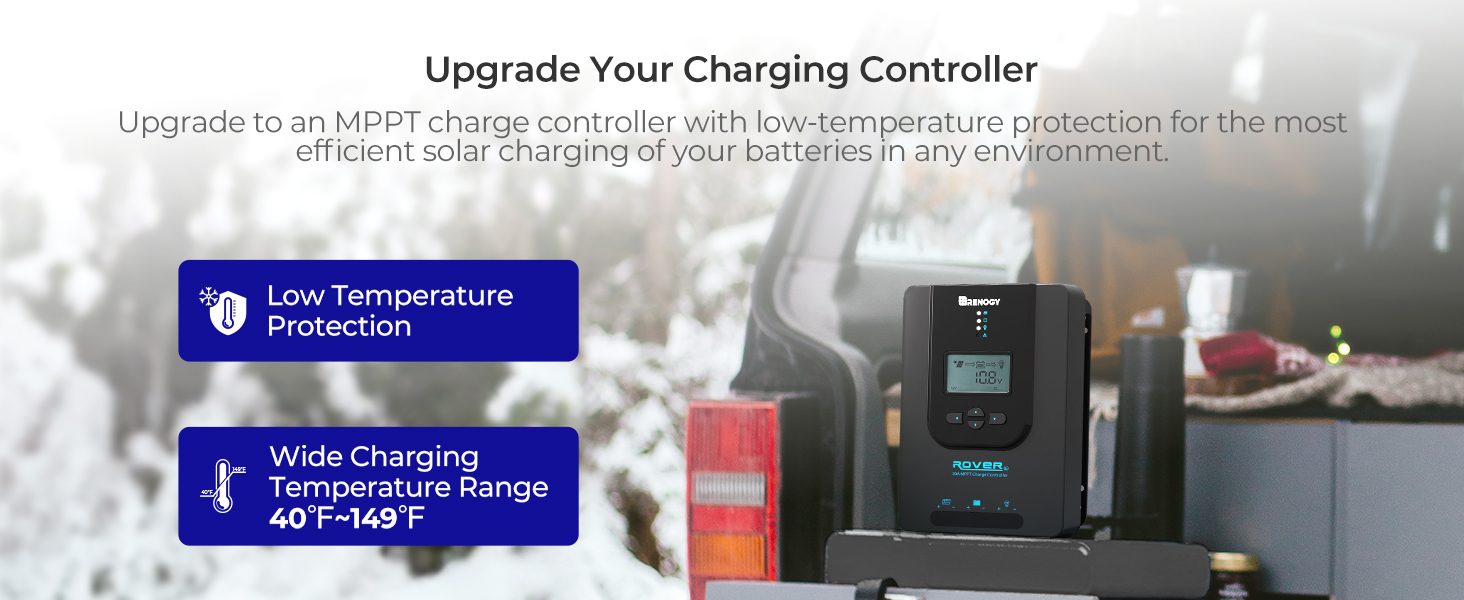
Figure 4.1: Maximizing Solar Harvest with 99% Tracking Efficiency

Figure 4.2: Charge Controller with Wide Temperature Adaptability (-40°F to 149°F)
5. Орнату және орнату
Follow these steps for proper installation of your charge controller:
- Монтаждау: Choose a dry, well-ventilated location for mounting the controller. Ensure there is sufficient clearance around the unit for heat dissipation. Mount vertically on a non-flammable surface.
- Сымдарды қосу реті:
- Connect the battery cables to the battery terminals on the charge controller. Ensure correct polarity (+ to + and - to -).
- Күн панелінің кабельдерін заряд реттегішіндегі PV терминалдарына қосыңыз. Дұрыс полярлықты қамтамасыз етіңіз.
- Connect the load cables to the load terminals on the charge controller (optional). Ensure correct polarity.
- Температура сенсоры: Connect the included temperature sensor cable to the designated port on the controller. Place the sensor near the battery to enable accurate temperature compensation for charging.
- Бастапқы қуаттандыру: Once all connections are secure, the controller will power on and display system information on the LCD.
Important: Always connect the battery first and disconnect the battery last to prevent damage to the controller.
6. Пайдалану нұсқаулары
The LCD display and buttons allow you to monitor and configure the charge controller.
6.1. LCD Display Navigation
Use the buttons on the front panel to navigate through the display screens and adjust settings. Refer to the on-screen prompts for specific actions like 'Select' or 'Enter'.
6.2. Батарея түрін таңдау
The controller automatically detects 12V/24V system voltages for non-lithium batteries. For lithium batteries, you must manually adjust the battery voltage setting through the controller's menu to ensure proper charging parameters.
6.3. Lithium Battery Activation
The controller includes a lithium battery activation function. This feature allows charging of deeply discharged lithium batteries that might otherwise be unresponsive.

Figure 6.1: Lithium Activation ON
To prevent over-activation and unnecessary activation, you can turn OFF the lithium activation function. This helps avoid potential damage to the battery if it is not intended for activation.

Figure 6.2: Lithium Activation OFF
6.4. Monitoring and Load Control
The LCD provides real-time data on solar input, battery status, and load output. You can also configure load settings, including timers for scheduled operation of connected DC appliances.
7. Техникалық қызмет көрсету
Тұрақты техникалық қызмет көрсету заряд контроллерінің ұзақ қызмет ету мерзімін және оңтайлы өнімділігін қамтамасыз етеді:
- Қосылымдарды тексеру: Periodically check all wiring connections for tightness and corrosion. Ensure no wires are frayed or damaged.
- Контроллерді тазалау: Keep the controller clean and free from dust and debris. Use a dry cloth to wipe the surface. Do not use liquids or solvents.
- Желдету: Қызып кетудің алдын алу үшін орнату аймағының жақсы желдетілуін қамтамасыз етіңіз.
- Батареяны тексеру: Regularly inspect your batteries for any signs of damage, swelling, or leaks.
8. Ақаулықтарды жою
If you encounter issues with your charge controller, refer to the following common problems and solutions:
| Мәселе | Ықтимал себебі | Шешім |
|---|---|---|
| Контроллер қосылмайды | Loose battery connection, battery voltage тым төмен | Check battery wiring and voltage. Ensure battery is connected first. |
| Күн заряды жоқ | Solar panel not connected, insufficient sunlight, incorrect polarity | Verify solar panel connections and polarity. Check for shading. |
| Жүктеме жұмыс істемейді | Load disconnected, overload, load timer active | Check load connections. Reduce load. Adjust load timer settings. |
| Қате томtage оқулар | Loose connections, faulty sensor | Check all wiring. Ensure temperature sensor is properly connected. |
For persistent issues or error codes not listed, please contact Renogy customer support.
9. Техникалық сипаттамалар
| Техникалық сипаттама | Мән |
|---|---|
| Бренд | Реногия |
| Үлгі | Rover 20A MPPT |
| Максималды зарядтау тогы | 20A |
| Жүйе томtage | 12V/24V Auto-Detect (DC) |
| Максималды PV кіріс көлеміtage | 100В |
| Бақылау тиімділігі | 99.9% |
| Түрлендіру тиімділігі | 98% |
| Дисплей түрі | СКД |
| Жұмыс температурасының диапазоны | -40°F пен 149°F (-40°C және 65°C) |
| Материал | Акрилонитрил бутадиен стирол (ABS), пластик |
| Элемент салмағы | 1.59 келі |
| UPC / GTIN | 840315237445 |
10. Кепілдік және қолдау
The Renogy Rover 20A MPPT Charge Controller comes with a 3 жылдық материал мен жұмыс кепілдігі. This warranty covers defects in materials and manufacturing under normal use.

Figure 10.1: 3-Year Material and Workmanship Warranty
For warranty claims, technical assistance, or any questions regarding your product, please contact Renogy customer support. Keep your purchase receipt as proof of purchase for warranty services.
You can find more information and contact details on the official Renogy webсайт: www.renogy.com