
1. Кіріспе
This manual provides detailed instructions for the setup, operation, maintenance, and troubleshooting of your Transformers TF-Crystal 85 Keys Mechanical Keyboard. Please read this manual thoroughly before using the product to ensure proper functionality and longevity.
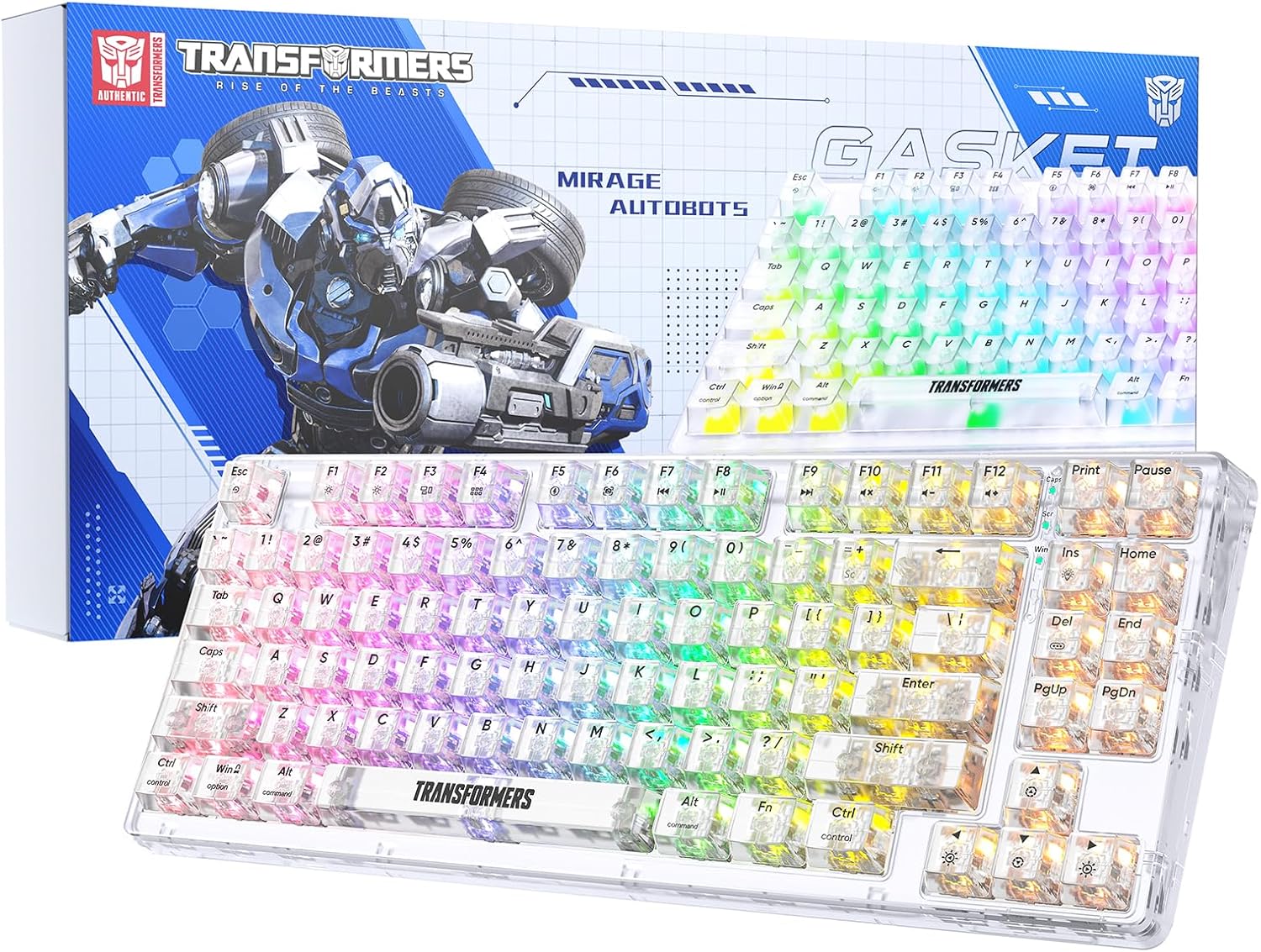
Image 1.1: Transformers TF-Crystal 85 Keys Mechanical Keyboard with its packaging, showcasing the transparent design and RGB lighting.
2. Өнім аяқталдыview
2.1 Негізгі мүмкіндіктер
- 85-Кілттер орналасуы: Compact 75% design retaining essential functions, arrow, and navigation keys.
- Үш режимді қосылым: Bluetooth 5.0, 2.4 ГГц сымсыз және USB-C сымды қосылымдарын қолдайды.
- Ыстықтай ауыстырылатын баспа платасы: Compatible with most 3-pin and 5-pin mechanical switches, allowing for easy customization and replacement.
- Linear Switches: Pre-lubricated switches with a 50 million keystroke lifespan for durability and smooth operation.
- Тығыздағыш құрылымы: Incorporates high-quality gasket materials and a silicone pad to absorb vibrations and reduce typing noise.
- Реттелетін RGB артқы жарығы: Features 20 built-in backlight modes, 16.8 million color options, and dynamic music rhythm effects.
- Programmable Driver: Enables macro customization, key function remapping, and advanced lighting control.
- Батареяның ұзақ қызмет ету мерзімі: Equipped with a 4000mAh battery, providing up to 240 hours of continuous use in 2.4GHz mode without backlighting.
- Кең үйлесімділік: Supports Mac, Windows, iOS, Android, PC, Laptop, Smartphone, Tablet, Switch, Xbox, and PlayStation.
- Мөлдір дизайн: Features transparent keycaps and base for enhanced aesthetic appeal.
3. Орнату
3.1 Пернетақтаны зарядтау
Before initial use, fully charge the keyboard. Connect the provided USB-C cable to the keyboard's USB-C port and the other end to a powered USB port (e.g., computer, wall adapter). The charging indicator will show the charging status.
3.2 2.4 ГГц сымсыз режимі арқылы қосылу
- Locate the 2.4GHz USB receiver, typically stored in a compartment on the keyboard.
- USB ресиверін компьютердегі қол жетімді USB портына қосыңыз.
- Toggle the mode switch on the keyboard to the 2.4G позиция.
- The keyboard will automatically connect to your device.
3.3 Connecting via Bluetooth 5.0 Mode
- Toggle the mode switch on the keyboard to the BT позиция.
- басып тұрыңыз Fn + 1 (немесе Fn + 2, Fn + 3) индикатор шамы тез жыпылықтағанша 3-5 секунд басып тұрыңыз, бұл жұптастыру режимін көрсетеді.
- Құрылғыда (компьютер, планшет, смартфон) Bluetooth қосыңыз және жаңа құрылғыларды іздеңіз.
- Select "TF-Crystal 85" from the list of available devices to pair.
- Once paired, the indicator light will stop flashing and remain solid. You can pair up to three Bluetooth devices using Fn + 1, Fn + 2, және Fn + 3.
3.4 Connecting via USB-C Wired Mode
- Берілген USB-C кабелін пернетақтаның USB-C портына жалғаңыз.
- USB-C кабелінің екінші ұшын компьютердегі қол жетімді USB портына жалғаңыз.
- The keyboard will automatically switch to wired mode and function without battery power.

Image 3.1: Diagram illustrating the three connection modes: Bluetooth 5.0, 2.4GHz wireless, and USB-C wired, compatible with various devices.
4. Пайдалану нұсқаулары
4.1 Режимдер арасында ауысу
Use the physical switch located on the keyboard to select between BT (Блютуз), 2.4G (2.4GHz wireless), and USB-C (wired) modes.
4.2 RGB артқы жарығын басқару
The keyboard features customizable RGB backlighting. Use the following key combinations to adjust:
- Fn + Ins: Cycle through 20 different backlight effects.
- Fn + Del: Switch backlight colors within certain modes.
- Fn + ↑ / ↓: Артқы жарықтың жарықтығын реттеңіз (5 деңгей).
- Fn + ← / →: Adjust backlight effect speed (5 levels).
- Fn + Esc (hold for 3s): Reset backlight settings to default.

Image 4.1: Visual guide for controlling RGB backlight effects, brightness, and speed using Fn key combinations.
4.3 Programmable Driver Usage
The keyboard includes a programmable driver for advanced customization. This driver allows you to:
- Макро өңдеу: Record and edit complex key sequences.
- Key Redefinition: Customize the function of individual keys.
- RGB Effect Customization: Fine-tune lighting modes, colors, and speeds, including music rhythm lighting effects.
Refer to the software's dedicated user interface for detailed instructions on using these features.

Image 4.2: Screenshot of the programmable driver interface, showing options for macro editing, RGB effects, and key redefinition.
4.4 Ыстық ауыстыру қосқыштары
The TF-Crystal 85 keyboard features a hot-swappable PCB, allowing you to change mechanical switches without soldering. This supports most 3-pin and 5-pin mechanical switches.
- Пернетақтаны өшіріңіз немесе оны құрылғыдан ажыратыңыз.
- Қажетті пернетақта қақпағын абайлап алу үшін берілген пернетақта қақпағын тартқышты пайдаланыңыз.
- Use the provided switch puller to gently grip the switch from its top and bottom clips, then pull it straight up to remove it.
- Жаңа қосқыштың түйреуіштерін ПХД саңылауларымен туралаңыз. Істіктердің түзу екеніне көз жеткізіңіз.
- Gently press the new switch into place until it clicks securely. Do not force it.
- Перне қақпағын ауыстырыңыз.

Image 4.3: Illustration of the hot-swappable feature, showing how to remove and insert 3-pin/5-pin switches and the linear switch specifications.
5. Техникалық қызмет көрсету
5.1 Пернетақтаны тазалау
- Тазалау алдында пернетақтаны барлық қуат көздерінен ажыратыңыз.
- Аздап жұмсақ, түксіз матаны пайдаланыңыз dampпернелердің қақпақтары мен корпусын сүрту үшін сумен немесе жұмсақ тазалау ерітіндісімен жабыңыз.
- Пернелер арасындағы шаң мен қоқыс үшін сығылған ауаны немесе кішкене щетканы пайдаланыңыз.
- Avoid using harsh chemicals or abrasive materials that could damage the keyboard's surface.
5.2 Батареяға күтім жасау
- Батареяны жиі толық зарядсыздандырудан аулақ болыңыз.
- Пернетақтаны ұзақ уақыт пайдаланбаған кезде салқын, құрғақ жерде сақтаңыз.
- If the keyboard will not be used for a long time, charge it to about 50% before storage.
6. Ақаулықтарды жою
| Мәселе | Ықтимал себебі | Шешім |
|---|---|---|
| Пернетақта сымсыз режимде жауап бермейді. | Low battery, incorrect mode selected, receiver not connected, Bluetooth not paired. | Charge the keyboard. Ensure the mode switch is set correctly (2.4G or BT). Re-insert the 2.4G receiver. Re-pair Bluetooth. |
| Кілттер тіркелмейді немесе екі рет терілмейді. | Faulty switch, debris under keycap, software issue. | Clean under the keycap. Try hot-swapping the switch with a known working one. Restart your computer. |
| RGB backlight not working or incorrect. | Backlight turned off, incorrect settings, software conflict. | көмегімен жарықтылықты реттеңіз Fn + ↑. Cycle modes with Fn + Ins. Reset backlight with Fn + Esc (3 секунд ұстап тұрыңыз). Check programmable driver settings. |
| Пернетақта зарядталмайды. | Faulty USB-C cable, power source issue, keyboard port damage. | Try a different USB-C cable. Use a different USB port or power adapter. Ensure the cable is fully inserted. |
7. Техникалық сипаттамалар
| Ерекшелік | Мәлімет |
|---|---|
| Үлгі нөмірі | TF-Crystal 85 |
| Кілттердің орналасуы | 85 кілт (75% ықшам) |
| Қосылу мүмкіндігі | Bluetooth 5.0, 2.4 ГГц сымсыз, USB-C сымды |
| Ауыстыру түрі | Pre-lubricated Linear Mechanical Switches |
| Өмірді ауыстыру | 50 Миллиондаған пернелер |
| Ыстық-ауыспалы | Иә (3 істікшелі/5 істікшелі үйлесімді) |
| Артқы жарық | RGB (20 modes, 16.8 million colors) |
| Батарея сыйымдылығы | 4000 мАч |
| Battery Life (2.4G, no light) | 240 сағатқа дейін |
| Battery Life (Backlit ON) | Шамамен 22 сағат |
| Өлшемдері (L x W x H) | 34.7 см x 14 см x 4.5 см |
| Үйлесімділік | Mac, Windows, iOS, Android, PC, Laptop, Smartphone, Tablet, Switch, Xbox, PlayStation |

Image 7.1: Visual representation of the keyboard's battery life: 240 hours with backlight off, 22 hours with backlight on, powered by a 4000mAh battery.
8. Кепілдік және қолдау
Transformers is committed to providing exceptional customer service. If you encounter any problems with your TF-Crystal 85 Keys Mechanical Keyboard, our after-sales support team is available to assist you. This includes technical support, exchanges, or installation guidance.
Please contact our customer service for assistance. We guarantee a hassle-free service experience.