
1. Кіріспе
The TKOWTB USB 2.0 Video Capture Card is a single-channel AV capture device designed to convert analog video and audio signals into digital format via a USB 2.0 interface. This device allows you to capture content from various analog sources such as VCRs, camcorders, and game consoles directly to your computer. It features a plug-and-play design, eliminating the need for external power supply or complex driver installations.
2. Өнімнің ерекшеліктері
- Plug and Play: Көптеген операциялық жүйелер үшін драйверді орнатудың қажеті жоқ.
- Integrated Audio Capture: Collects audio resources without requiring a separate sound card.
- USB 2.0 интерфейсі: Connects directly to your computer's USB 2.0 port, no external power supply needed.
- Wide Format Support: Supports recording to DVD+/-R/RW, DVD+/-VR, and DVD-Video formats.
- NTSC and PAL Compatibility: Supports both NTSC (720x480) and PAL (720x576) video formats.
- Операциялық жүйені қолдау: Compatible with Windows XP/Vista/7/8/8.1/10 (32/64 bit) systems.
- Gold-Plated Interfaces: Ensures stable and clear signal transmission.
3. Орнату нұсқаулығы
3.1 Connecting the Capture Card
- Connect to Video Source: Identify the video and audio output ports on your source device (e.g., VCR, camcorder, game console). The capture card provides one Composite Video input (yellow RCA) and one S-Video input, along with Stereo Audio inputs (red and white RCA). Connect the corresponding cables from your source device to the capture card.
- Компьютерге қосылу: Plug the USB 2.0 connector of the capture card into an available USB 2.0 port on your desktop PC, laptop, or all-in-one PC. The device is powered via USB, so no additional power adapter is required.

Image: This diagram illustrates the various connection points of the USB video capture card. It shows the USB interface for connecting to a computer (desktop, laptop, all-in-one PC) and the audio/video input interfaces, including S-Video and RCA (yellow for video, red/white for audio). The device is powered by the USB connection.

Сурет: А view of the TKOWTB USB Video Capture Card, highlighting its compact design and the attached RCA (composite video and stereo audio) and S-Video input connectors. The image also indicates that the device is 'Drive free' and 'Plug and play'.
3.2 Бағдарламалық құралды орнату
This device is designed to be drive-free, meaning it typically does not require manual driver installation on supported operating systems. However, you will need video capture software to record and manage the video stream. Popular options include OBS Studio, VLC Media Player, or other third-party capture applications. Ensure your chosen software is compatible with USB video capture devices.
4. Пайдалану нұсқаулары
4.1 Capturing Video and Audio
- Құрылғыны қосу көзі: Ensure your analog video source (VCR, camcorder, etc.) is powered on and playing the content you wish to capture.
- Capture бағдарламалық құралын іске қосыңыз: Open your preferred video capture software on your computer.
- Құрылғыны таңдаңыз: Within the software, locate the option to select a video input device. The TKOWTB capture card should appear as a recognized USB video device. Select it as your video and audio input source.
- Параметрлерді конфигурациялау: Adjust capture settings such as resolution (NTSC: 720x480, PAL: 720x576), frame rate, and output format within your software.
- Жазуды бастау: Initiate the recording process in your software. The video and audio from your analog source will now be digitized and saved to your computer.

Image: This image demonstrates the real-time capture capability of the device, showing a laptop screen displaying video content being captured from an old-fashioned video recorder and a video camera. The capture card is connected to the laptop and the source devices, enabling full-screen playback and acquisition.
4.2 Қолдау көрсетілетін қолданбалар
The capture card supports various applications including collection of old video tapes to computer, video from cameras or game consoles, and monitoring satellite receivers or encrypted video signals.
5. Техникалық қызмет көрсету
To ensure the longevity and optimal performance of your TKOWTB USB 2.0 Video Capture Card, follow these maintenance guidelines:
- Таза ұстаңыз: Gently wipe the device with a soft, dry cloth. Avoid using liquid cleaners or solvents.
- Элементтерден қорғаңыз: Құрылғыны ылғалдан, шаңнан және төтенше температурадан алыс ұстаңыз.
- Мұқият ұстаңыз: Құрылғыны құлатып алмаңыз немесе қатты соққыларға ұшырамаңыз.
- Кабельдерді басқару: Do not excessively bend or pull the integrated cables to prevent damage.
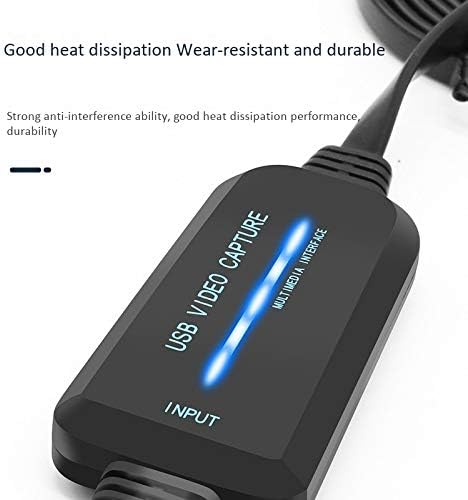
Сурет: жақыннан түсірілген view of the TKOWTB USB Video Capture Card, emphasizing its robust construction and good heat dissipation properties, indicating wear-resistant and durable design.
6. Ақаулықтарды жою
If you encounter issues with your capture card, refer to the following common problems and solutions:
- Бейне/аудио сигнал жоқ:
- Ensure all cables (RCA, S-Video, USB) are securely connected.
- Verify that the source device is powered on and playing content.
- Check your capture software settings to ensure the correct input device is selected.
- Confirm the video standard (NTSC/PAL) matches your source and software settings.
- Бейне сапасы нашар:
- The quality of the captured video is dependent on the quality of the original analog source.
- Ensure you are using high-quality cables.
- Басқа электрондық құрылғылардың кедергісін тексеріңіз.
- Құрылғыны компьютер танымайды:
- Try plugging the capture card into a different USB 2.0 port on your computer.
- Компьютеріңізді қайта іске қосыңыз.
- Ensure your operating system is supported (Windows XP/Vista/7/8/8.1/10 32/64 bit).
- Бағдарламалық қамтамасыз ету мәселелері:
- Ensure your capture software is up-to-date.
- Consult the documentation for your specific capture software.
- Жүйе талаптары:
- Minimum processor: Pentium IV 1.8G or equivalent.
- Minimum RAM: 128MB.
- Minimum free disk space: 500MB.
- Display resolution: Not lower than 1024x768.
7. Техникалық сипаттамалар
| Ерекшелік | Техникалық сипаттама |
|---|---|
| Бренд | TKOWTB |
| Модель атауы | 500039297 |
| Интерфейс | USB 2.0 |
| Бейне енгізу | 1x Composite (RCA), 1x S-Video |
| Аудио кіріс | Stereo Audio (RCA L/R) |
| Қысу стандарты | Бағдарламалық құралды қысу |
| Valid Formats | NTSC, PAL |
| Video Resolution (NTSC) | 720 x 480 |
| Video Resolution (PAL) | 720 x 576 |
| Операциялық жүйені қолдау | Windows XP/Vista/7/8/8.1/10 (32/64 bit) |
| Элемент салмағы | 128.5 грамм |
| Элемент өлшемдері (L x W x H) | 6.3 x 4.33 x 1.18 inches (815x 35x15mm) |
| Материал | Пластмасса |
| Түс | Қара |
8. Кепілдік және қолдау
For warranty information and technical support, please refer to the retailer where you purchased the product or visit the official TKOWTB webсайт. Сатып алу түбіртегін кез келген кепілдік талаптары үшін сатып алудың дәлелі ретінде сақтаңыз.