
1. Кіріспе
Thank you for choosing the TECPHILE K936 Wireless Keyboard and Mouse Combo. This product is designed to provide versatile and efficient input for multiple devices, featuring both Bluetooth 5.0 and 2.4GHz USB connectivity. This manual will guide you through the setup, operation, and maintenance of your new keyboard and mouse.
2. Пакет мазмұны
- TECPHILE K936 Wireless Keyboard
- TECPHILE Wireless Mouse
- USB Receiver (stored in the mouse battery compartment)
- USB-C зарядтау кабелі
- Keyboard Protective Cover
- Пайдаланушы нұсқаулығы
3. Өнім аяқталдыview
Familiarize yourself with the components of your TECPHILE K936 Wireless Keyboard and Mouse Combo.

3.1-сурет: The TECPHILE K936 Wireless Keyboard and Mouse Combo in Grey. The keyboard features a full layout with a numeric keypad, and the mouse is a compact, ergonomic design.

3.2-сурет: Diagram showing the dimensions of the keyboard (368mm x 121mm) and mouse (110mm x 63mm x 30mm).
Пернетақта мүмкіндіктері:
- Multi-device connectivity: 3 x Bluetooth 5.0, 1 x 2.4GHz USB
- Dedicated function keys (F1-F12) with multimedia controls
- Қайта зарядталатын 300 мАч литий батареясы
- Type-C зарядтау порты
- Automatic sleep mode for power saving
- Scissor-leg key structure for comfortable typing
- Transparent protective cover included
Тінтуірдің ерекшеліктері:
- Dual-mode connectivity: 1 x Bluetooth, 1 x 2.4GHz USB
- Optical movement detection technology
- Екі жақты дизайн
- Quiet click buttons
4. Орнату
4.1 Бастапқы зарядтау
Before first use, fully charge both the keyboard and mouse. Connect the provided USB-C charging cable to the charging port on the keyboard and mouse, and the other end to a 5V/1A power adapter (not included) or a computer USB port. The charging indicator light will show charging status and turn off when fully charged.
Note: Only use a 5V/1 Amp power adapter for charging to ensure optimal battery life.

4.1-сурет: Illustration of the keyboard's battery specifications: 2-4 hours charging time, 300mAh battery capacity, and up to 180 days standby time.
4.2 Пернетақтаны қосу
The keyboard supports up to three Bluetooth connections and one 2.4GHz USB connection.

4.2-сурет: Diagram illustrating the keyboard's ability to connect to multiple devices via Bluetooth (3 channels) and 2.4GHz USB.
2.4GHz USB Connection:
- USB қабылдағышын тінтуірдің батарея бөлімінен табыңыз.
- USB ресиверін компьютердегі немесе құрылғыдағы қол жетімді USB портына қосыңыз.
- Пернетақтаны қосыңыз. Пернетақта автоматты түрде қосылуы керек.
Bluetooth қосылымы (BT1, BT2, BT3):
- Пернетақтаны қосыңыз.
- түймесін басып тұрыңыз Fn key and one of the Bluetooth keys (BT1, BT2, немесе BT3) for 3-5 seconds until the corresponding indicator light flashes rapidly. This indicates pairing mode.
- Құрылғыда (компьютер, планшет, смартфон) Bluetooth параметрлеріне өтіп, жаңа құрылғыларды іздеңіз.
- Select "TECPHILE Keyboard" from the list of available devices to pair.
- Жұптастырылғаннан кейін индикатор шамы жыпылықтауын тоқтатады және өшпес бұрын бірнеше секунд бойы тұрақты күйінде қалады.
- Repeat for other Bluetooth channels to connect to additional devices.
4.3 Тінтуірді қосу
The mouse supports one Bluetooth connection and one 2.4GHz USB connection.
2.4GHz USB Connection:
- Ensure the USB receiver is plugged into your device.
- Switch the mouse to 2.4GHz mode using the switch on the bottom of the mouse.
- Тінтуір автоматты түрде қосылуы керек.
Bluetooth қосылымы:
- Switch the mouse to Bluetooth mode using the switch on the bottom of the mouse.
- Press and hold the Bluetooth pairing button on the bottom of the mouse for 3-5 seconds until the indicator light flashes.
- Құрылғыда Bluetooth параметрлеріне өтіп, жаңа құрылғыларды іздеңіз.
- Select "TECPHILE Mouse" from the list to pair.
5. Пайдалану нұсқаулары
5.1 Switching Between Devices (Keyboard)
To switch between connected devices on the keyboard, simply press the Fn key along with the corresponding connection key (BT1, BT2, BT3, немесе 2.4G for USB). The keyboard will switch to the selected device instantly.
5.2 Switching Between Devices (Mouse)
To switch between 2.4GHz USB and Bluetooth modes on the mouse, use the toggle switch located on the bottom of the mouse.
5.3 Function Keys (Keyboard)
The keyboard features dedicated function keys (F1-F12) that can be used in conjunction with the Fn key for various multimedia and system controls.
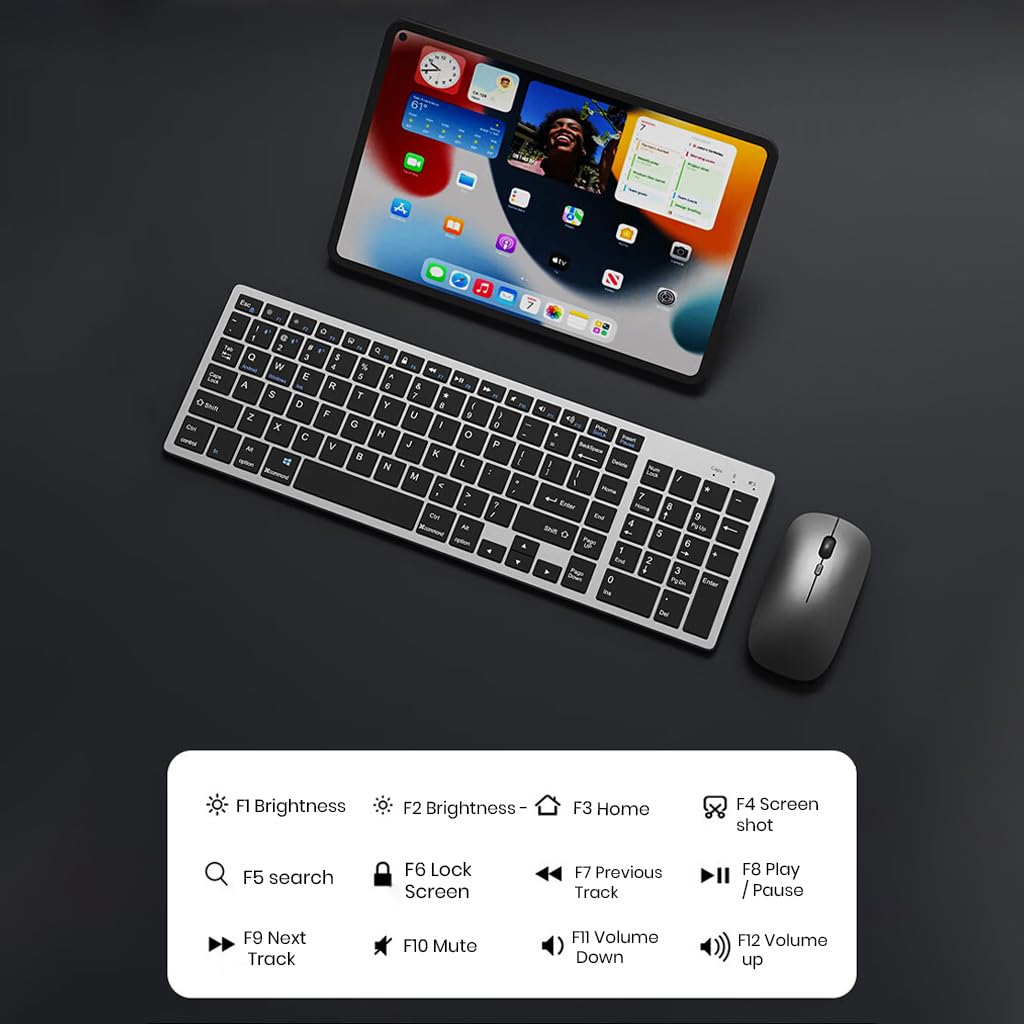
5.1-сурет: The keyboard displaying its function keys and their associated actions, such as brightness control, home, screen shot, search, lock screen, media playback, and volume control.
- Fn+F1: Жарықтық төмен
- Fn+F2: Жарықтық жоғары
- Fn+F3: Үй
- Fn+F4: Скриншот
- Fn+F5: іздеу
- Fn+F6: Экранды құлыптау
- Fn+F7: Алдыңғы трек
- Fn+F8: Ойнату/Үзіліс
- Fn+F9: Келесі трек
- Fn+F10: Дыбысты өшіру
- Fn+F11: Дыбыс деңгейін төмендету
- Fn+F12: Дыбыс деңгейін жоғарылату
5.4 Қуатты үнемдеу режимі
The keyboard and mouse are equipped with an automatic sleep mode to conserve battery life. If inactive for 10 minutes, the devices will enter sleep mode. To wake them up, simply press any key on the keyboard or move/click the mouse.

5.2-сурет: Diagram illustrating the auto-sleep mode and how to reactivate the keyboard and mouse by pressing any key.
6. Техникалық қызмет көрсету
- Тазалау: Пернетақта мен тінтуірді тазалау үшін жұмсақ, құрғақ шүберекті пайдаланыңыз. Қиын кірді тазалау үшін аздап тазалаңыз.amp құрылғыға сұйықтықтың түспеуін қамтамасыз ету үшін шүберекті пайдалануға болады.
- Қорғаныс қақпағы: Utilize the included transparent protective cover for the keyboard to guard against dust and accidental spills.
- Сақтау орны: Құрылғыларды салқын, құрғақ жерде, тікелей күн сәулесінен және төтенше температурадан алыс жерде сақтаңыз.
- Зарядтау: Always use a 5V/1A power adapter for charging to prevent damage and ensure battery longevity.

6.1-сурет: The keyboard shown with its transparent protective keyskin, designed to prevent dust and spills.
7. Ақаулықтарды жою
| Мәселе | Ықтимал себебі | Шешім |
|---|---|---|
| Keyboard/Mouse not connecting via 2.4GHz USB. | USB receiver not properly inserted, low battery, incorrect mode selected. |
|
| Пернетақта/тінтуір Bluetooth арқылы қосылмайды. | Not in pairing mode, device's Bluetooth is off, already connected to max devices, low battery. |
|
| Кешігу немесе үзіліс байланысы. | Кедергі, қабылдағыштан/құрылғыдан қашықтық, батарея зарядының аздығы. |
|
| Keyboard keys not responding. | Low battery, device in sleep mode, connection issue. |
|
8. Техникалық сипаттамалар
| Ерекшелік | Мәлімет |
|---|---|
| Бренд | ТЕХНИКАЛЫҚ |
| Үлгі | K936 |
| Қосылу технологиясы | Keyboard: 3 x Bluetooth 5.0, 1 x 2.4GHz USB; Mouse: 1 x Bluetooth, 1 x 2.4GHz USB |
| Үйлесімді құрылғылар | Ноутбук, дербес компьютер, смартфон, планшет |
| Операциялық жүйе | Android, iOS, Windows, macOS |
| Пернетақта батареясы | 300mAh Lithium Ion (Rechargeable) |
| Зарядтау порты | USB Type-C |
| Зарядтау уақыты | 2-4 сағат (шамамен) |
| Күту уақыты | 180 күнге дейін |
| Пернетақта өлшемдері (LxWxH) | 36 x 13 x 1.5 см |
| Тінтуір өлшемдері (LxWxH) | 11 x 6.3 x 3 см (шамамен) |
| Элемент салмағы | 661 г (аралас) |
| Қозғалысты анықтау технологиясы | Оптикалық |
| Қолды бағдарлау | Екі жақты |
9. Кепілдік және қолдау
TECPHILE products come with a standard warranty. For warranty claims, technical support, or any product-related inquiries, please contact TECPHILE customer service through the retailer where the product was purchased or visit the official TECPHILE webбайланыс ақпаратына арналған сайт.
Кепілдік мақсатында сатып алуды растайтын құжатты сақтаңыз.
Manufacturer/Importer: TECPHILE, 2nd Floor, A36, Block B, Naraina Industrial Area Phase 2, Naraina, New Delhi, Delhi, 110028