
1. Кіріспе
This manual provides detailed instructions for the setup, operation, and maintenance of your GIEC G5300 4K Ultra HD Blu Ray Player. Designed for an enhanced home entertainment experience, this player supports true 4K ultra-high-definition picture quality, HDR10, Dolby Vision, BT.2020 color spaces, and Dolby audio decoding for immersive visuals and sound.
2. Қауіпсіздік туралы ақпарат
- Ensure proper ventilation around the player to prevent overheating.
- Өрт немесе электр тоғының соғу қаупін азайту үшін құрылғыны жаңбырға немесе ылғалға ұшыратпаңыз.
- Avoid placing heavy objects on top of the player.
- c ашпаңызasing; барлық қызмет көрсетуді білікті мамандарға тапсырыңыз.
- Keep the player away from direct sunlight, heat sources, and strong magnetic fields.
- Құрылғымен бірге берілген қуат адаптерін ғана пайдаланыңыз.
3. Пакет мазмұны
Төменде тізімделген заттардың барлығы сіздің пакетіңізде бар екенін тексеріңіз:
- GIEC G5300 Blu-ray Player (x1)
- HDMI кабелі (x1)
- Қашықтан басқару (x1)
- Пайдаланушы нұсқаулығы (x1)
4. Өнім аяқталдыview
4.1 Алдыңғы панель

4.1-сурет: Алдыңғы view of the GIEC G5300 Blu Ray Player, showing the disc tray, display, USB port, and control buttons (power, play/pause, eject).
- Диск науасы: Insert Blu-ray or DVD discs here.
- Дисплей тақтасы: Ойнату күйі мен уақытын көрсетеді.
- USB 3.0 порты: Медиа ойнату үшін USB жад құрылғыларын қосыңыз.
- Басқару түймелері: Power On/Off, Play/Pause, Eject.
4.2 Артқы панель және қосылымдар

4.2-сурет: Артқы view of the GIEC G5300 Blu Ray Player, highlighting various input/output ports including LAN, HDMI 2.0, HDMI 1.4, USB 3.0, Coaxial, and Optical outputs.
- LAN порты: For network connection (e.g., firmware updates).
- HDMI 2.0 Output (Video/Audio): Primary HDMI output for 4K video and audio.
- HDMI 1.4 Output (Audio Only): Dedicated HDMI output for audio to an AV receiver.
- USB 3.0 Input: Медиа ойнату үшін USB жад құрылғыларын қосыңыз.
- Коаксиалды шығыс: Сандық аудио шығысы.
- Оптикалық шығыс: Сандық аудио шығысы.
5. Орнату
5.1 Қашықтан басқару пультінің батареясын орнату
Insert two AAA batteries (not included) into the remote control, ensuring correct polarity.
Video 5.1: This video demonstrates how to install batteries into the remote control and connect the Blu-ray player to a TV using an HDMI cable.
5.2 Connecting to a Display Device (TV/Projector)
- Берілген HDMI кабелінің бір ұшын ұяшыққа жалғаңыз HDMI 2.0 Output (Video/Audio) Blu-ray ойнатқышының артындағы порт.
- Connect the other end of the HDMI cable to an available HDMI input port on your TV or projector.
- For separate audio output, connect another HDMI cable from the HDMI 1.4 Output (Audio Only) port to your AV receiver, or use the Coaxial/Optical outputs.
5.3 Қуат қосылымы
- Connect the power cable to the power input on the rear of the Blu-ray player.
- Қуат кабелінің екінші ұшын қабырғадағы розеткаға қосыңыз.
- Turn on your TV/projector and select the correct HDMI input source corresponding to the port you connected the Blu-ray player to.
- Press the Power button on the Blu-ray player or remote control to turn on the unit.
6. Пайдалану нұсқаулары
6.1 Дискіні ойнату
- Ensure the player is powered on and connected to your display device.
- түймесін басыңыз ШЫҒАРУ диск науасын ашу үшін алдыңғы панельдегі немесе қашықтан басқару пультіндегі түймені басыңыз.
- Carefully place a Blu-ray or DVD disc onto the tray with the label side facing up.
- түймесін басыңыз ШЫҒАРУ button again to close the tray. The player will automatically begin loading and playing the disc.
- Қашықтан басқару құралын Ойнату, Кідірту, Тоқтату, Жылдам алға және кері айналдыру сияқты ойнату функциялары үшін пайдаланыңыз.
6.2 USB медиасын ойнату
The GIEC G5300 supports playback of various media fileUSB сақтау құрылғысынан.
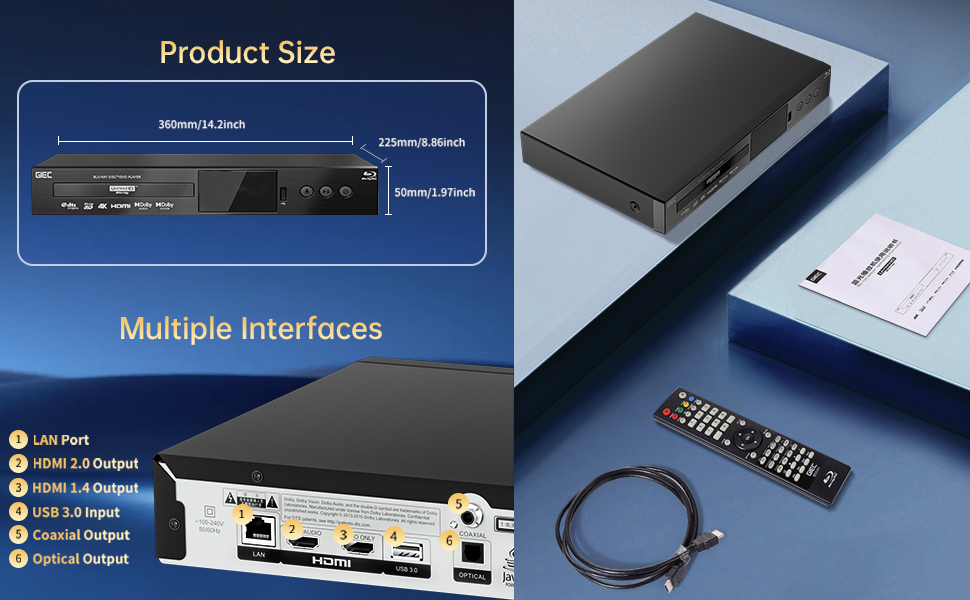
Figure 6.1: Illustration of the multiple disc, video, and audio formats supported by the player.
- Insert your USB storage device into the USB 3.0 порты on the front or rear panel.
- Navigate to the "Video," "Music," or "Photo" section on the player's main menu using the remote control.
- Қалағаныңызды таңдаңыз file from the USB device to begin playback.
Қолдау көрсетілетін форматтар:
- Диск түрлері: BD, BD-R, BD-RE, DVD-R/RW, DVD+R/RW, DVD-Video, VCD, CD, CD-R/RW.
- Бейне форматтары: MPEG-1, MPEG-2, MPEG-4, VC1, H.264, MOV, MKV, AVI, TS.
- Аудио пішімдері: AAC, APE, CUE, FLAC, OGG, MP3, WAV.
7. Ерекшеліктер
- 4K Ultra HD Playback: Experience movies and shows in stunning 4K resolution with clearer images and richer colors.
- HDR10 қолдауы: Enjoy a wider range of brightness and contrast, revealing more detail in both dark and bright scenes.
- Dolby Vision: Enhances image quality by dynamically adjusting brightness and expanding dynamic range for more detailed and vivid pictures.
- BT.2020 Color Spaces: Provides a broader color gamut than standard 1080p Blu-ray, resulting in purer, more natural, and realistic colors.
- Dolby Sound & DTS Decoding: Supports Dolby audio decoding and DTS effects for an immersive 5.1 stereo surround sound experience.
- 3D Blu-ray Playback: Compatible with 3D Blu-ray discs for an immersive three-dimensional viewing experience (requires a 3D-compatible TV and glasses).
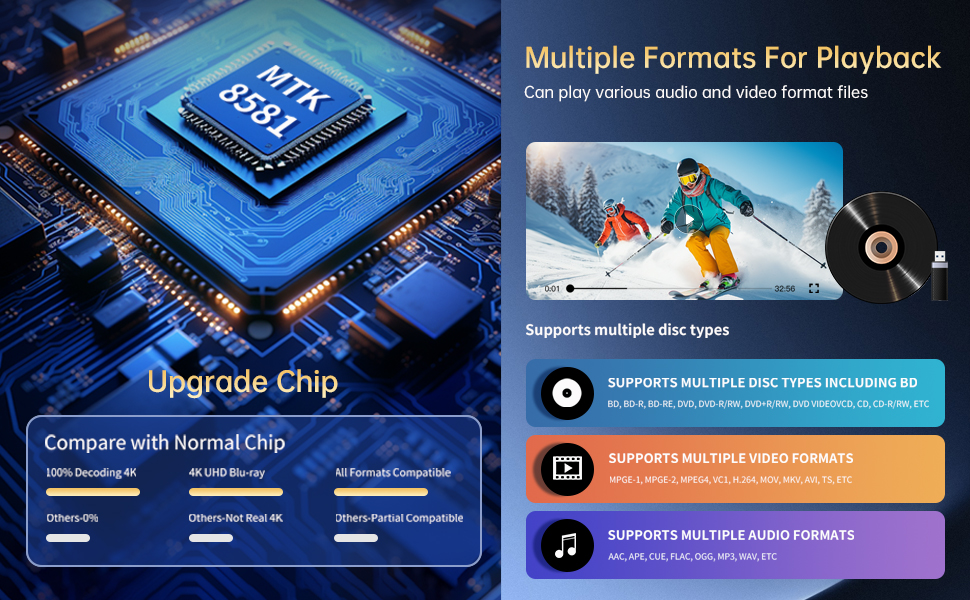
Figure 7.1: Visual comparison illustrating the difference between 8-bit (16.67 million colors) and 10-bit (1.07 billion colors) color depth, highlighting the enhanced detail and delicacy of 10-bit color.

Figure 7.2: The GIEC G5300 Blu Ray Player connected to a TV, showcasing its support for 4K UHD, 3D, HDR, HDR10+, Dolby, and Dolby Vision technologies.
8. Техникалық қызмет көрсету
- Тазалау: Use a soft, dry cloth to clean the exterior of the player. Do not use liquid or aerosol cleaners.
- Диск күтімі: Дискілерді шеттерінен ұстаңыз. Дискілерді жұмсақ, мамықсыз шүберекпен ортасынан сыртқа қарай сүртіңіз.
- Желдету: Қызып кетудің алдын алу үшін ойнатқыштың желдету саңылауларының бітелмегеніне көз жеткізіңіз.
9. Ақаулықтарды жою
If you encounter issues with your Blu-ray player, please refer to the following common solutions:
- Қуат жоқ: Check if the power cable is securely connected to both the player and the power outlet. Ensure the outlet is functional.
- Сурет/дыбыс жоқ: Verify that the HDMI cable is correctly connected to both the player and the TV/receiver. Ensure the correct HDMI input is selected on your TV/receiver.
- Диск ойнатылмайды: Check if the disc is clean and free of scratches. Ensure the disc is inserted correctly with the label side up. The player supports Region A Blu-ray discs and all region DVD discs.
- Қашықтан басқару пульті жұмыс істемейді: Check the batteries in the remote control and replace them if necessary. Ensure there are no obstructions between the remote and the player.
10. Техникалық сипаттамалар
| Ерекшелік | Мәлімет |
|---|---|
| Бренд атауы | GIEC |
| Модель атауы | G5300 |
| Элемент салмағы | 4.18 фунт (1.9 килограмм) |
| Өнім өлшемдері | 14.2 x 8.9 x 2 дюйм |
| Түс | Қара |
| Медиа түрі | Blu-Ray дискі, DVD |
| Ажыратымдылық | 3840x2160 (4K Ultra HD) |
| Арнайы мүмкіндіктер | Anti-Shock, Compact, Dust Proof, Multi-Format Playback, Surround Sound, HDR10, Dolby Vision, BT.2020 Color Spaces |
| Қосқыш түрі | HDMI (Dual Outputs), USB 3.0, Coaxial, Optical, LAN |
| Қосылу технологиясы | HDMI |
11. Кепілдік және қолдау
For warranty information or technical support, please refer to the documentation included with your purchase or contact GIEC customer service. Keep your proof of purchase for warranty claims.