
1. Кіріспе
This manual provides essential information for the installation, operation, and maintenance of your new Vetroo 850W 80 Plus Gold Full Modular ATX 3.1 Power Supply. Please read this manual thoroughly before installation and keep it for future reference.

Figure 1: Vetroo 850W Power Supply (White)
2. Өнімнің ерекшеліктері
- PCIe Gen 5.1 дайын: Meets the latest PCIE 5.1 standards for improved performance and efficiency. Backward compatible with both PCIE 4.0 and 3.0.
- Fully ATX 3.1 Compliant: Designed to meet the newest, most advanced power supply standards.
- Premium 105°C Capacitors: High-quality materials and construction ensure stable, low-temperature operation.
- 80 Plus Gold сертификаты: Meets high standards for quality and efficiency, ensuring reliable performance and energy savings.
- Толық модульдік дизайн: Allows for easy cable management and customization, reducing cable clutter by only installing necessary cables.
- Тыныш жұмыс: Features a 120mm FDB (Fluid Dynamic Bearing) fan for quiet cooling.
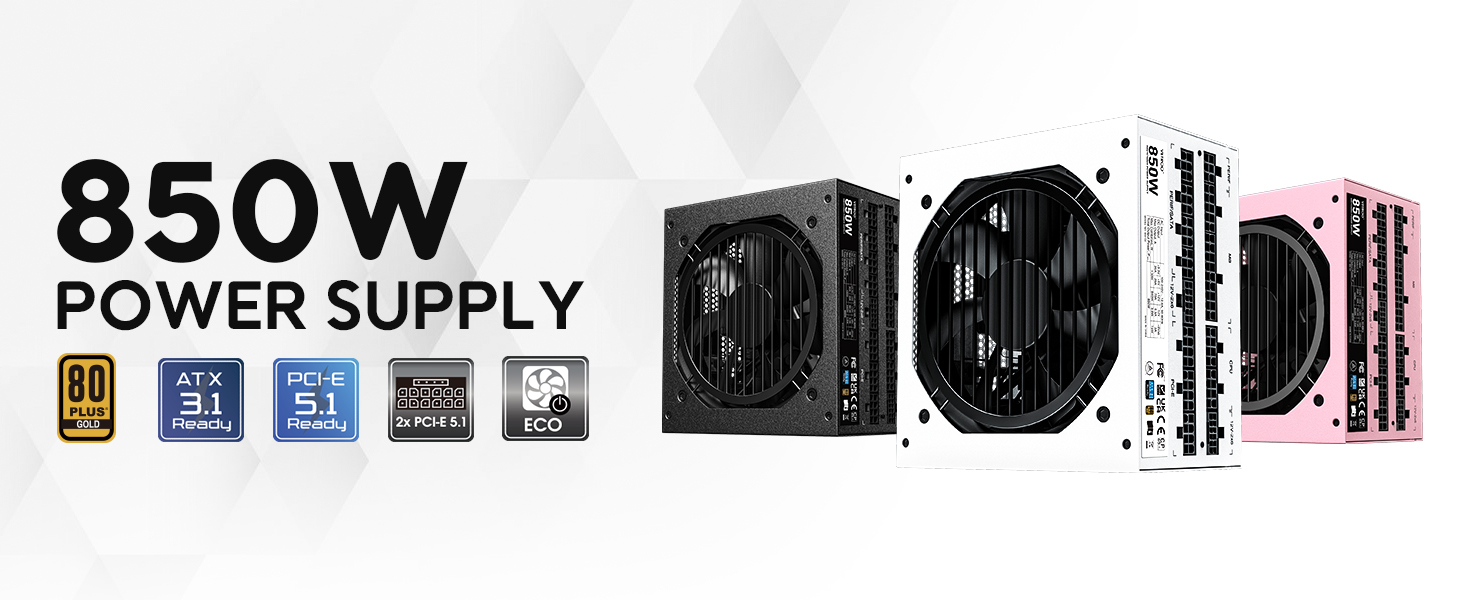
2 -сурет: Аяқталдыview of Vetroo 850W Power Supply features
3. Пакет мазмұны
Барлық компоненттер пакетте бар екеніне көз жеткізіңіз:
- Vetroo 850W Power Supply Unit
- Modular Cable Set (including 24-pin ATX, CPU, PCIe, SATA, Molex, FDD connectors)
- Айнымалы ток қуат сымы
- Орнату бұрандалары
- Кабельді басқару байланыстары
- Storage Bag for Unused Cables
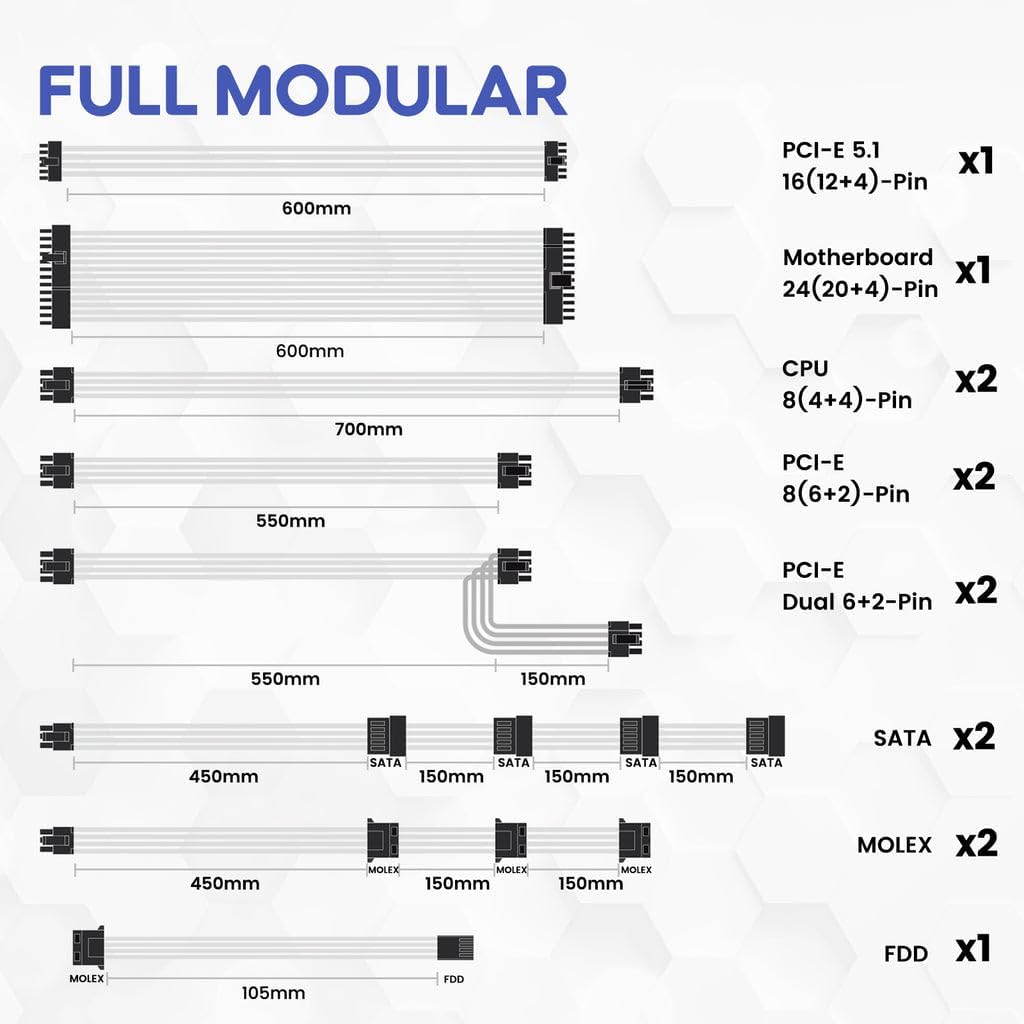
3-сурет: Қосылған модульдік кабельдер
4. Қауіпсіздік туралы ақпарат
WARNING: Improper installation or use can result in serious injury or damage to your system.
- Always disconnect the AC power cord from the wall outlet before installing or removing the power supply.
- Қуат блогын ашпаңыз. Жоғары томtages ажыратылған кезде де ішінде бар.
- Ensure all cables are securely plugged into their respective ports. Loose connections can cause damage.
- Use only the modular cables provided with this power supply. Third-party cables may not be compatible and could cause serious damage.
- Install the power supply in a well-ventilated area, away from high humidity and extreme temperatures.
5. Орнату және орнату
Follow these general steps for installing your power supply. Refer to your PC case and motherboard manuals for specific instructions.
- Жүйені дайындаңыз: Компьютердің өшірілгеніне және розеткадан ажыратылғанына көз жеткізіңіз.
- Қуат көзін орнату: Secure the power supply unit into the designated bay in your PC case using the provided mounting screws.
- Негізгі қуат кабельдерін қосу: 24 істікшелі ATX кабелін аналық платаға қосыңыз.
- CPU қуат кабельдерін қосыңыз: Connect the 8-pin (4+4) CPU power cable(s) to your motherboard.
- PCIe қуат кабельдерін қосыңыз: Connect the necessary PCIe power cables (e.g., 12V-2x6 for PCIe 5.1 GPUs, or 8-pin (6+2) for older GPUs) to your graphics card(s).

Figure 4: Dual PCIe 5.1 Connectors
- Перифериялық кабельдерді қосу: Connect SATA, Molex, and FDD cables to your storage drives and other peripherals as needed.
- Кабельдерді басқару: Utilize the fully modular design and included cable ties to route cables neatly, improving airflow and aesthetics.
- Қорытынды тексеру: Double-check all connections to ensure they are secure before closing your PC case.
Video 1: Vetroo Power Supply Installation Guide. This video demonstrates the process of installing a Vetroo power supply into a PC case, including cable connections.
6. Пайдалану нұсқаулары
After successful installation, you can power on your system.
- Қуат қосулы: Connect the AC power cord to the power supply and a wall outlet. Flip the main power switch on the power supply to the 'ON' position.
- ECO режимі: The power supply features an ECO mode switch. When 'ON', the fan will stop spinning unless the load is above approximately 50% of the rated capacity, ensuring silent operation at low loads. When 'OFF', the fan will spin continuously.

Figure 5: Power Switch and ECO Mode
7. Техникалық қызмет көрсету
Тиісті техникалық қызмет көрсету қуат көзінің ұзақ қызмет ету мерзімін және оңтайлы өнімділігін қамтамасыз етеді.
- Тазалау: Periodically clean the exterior of the power supply and the fan grille to prevent dust buildup, which can impede airflow and cooling. Use compressed air or a soft brush. Ensure the power supply is off and unplugged before cleaning.
- Желдеткіштің жұмысы: The 120mm Fluid Dynamic Bearing fan is designed for durability and quiet operation. In ECO mode, the fan may not spin at low loads; this is normal.
8. Ақаулықтарды жою
Егер сіз электр қуатымен жабдықтауда қиындықтарға тап болсаңыз, келесілерді қарастырыңыз:
- Қуат жоқ: Ensure the AC power cord is securely connected to both the power supply and the wall outlet. Verify the main power switch on the power supply is in the 'ON' position. Check your wall outlet with another device.
- System Instability/Shutdowns: This power supply includes multiple protection features (OVP, OCP, OPP, SCP, UVP, OTP) to safeguard your components. If your system is unstable or shuts down unexpectedly, it could indicate an issue with power delivery or another component. Ensure all power connections are firm.
- Желдеткіш айналмайды: If the ECO mode is enabled, the fan will not spin until the power supply reaches approximately 50% load. This is normal operation for quiet performance. If the fan does not spin under heavy load, contact support.
- Ерекше шулар: If you hear unusual noises (e.g., coil whine, grinding), power down your system immediately and contact support.
9. Техникалық сипаттамалар
| Ерекшелік | Мәлімет |
|---|---|
| Модель атауы | 850 G5 |
| Шығу Wattage | 850 Вт |
| Тиімділік сертификаты | 80 Plus алтын |
| ATX стандарты | ATX 3.1 үйлесімді |
| PCIe стандарты | PCIe Gen 5.1 дайын |
| Форма факторы | ATX |
| Салқындату әдісі | Ауа (120 мм FDB желдеткіші) |
| Модульдік түрі | Толық модульдік |
| Конденсаторлар | Premium 105°C |
| Өнім өлшемдері (L x W x H) | 5.9 x 5.5 x 3.4 дюйм |
| Элемент салмағы | 5.7 фунт (2.59 килограмм) |
| Үйлесімді құрылғылар | Дербес компьютер |
| Қорғау мүмкіндіктері | OVP (томtage Protection), OCP (Over Current Protection), OPP (Over Power Protection), SCP (Short Circuit Protection), UVP (Under Voltage Protection), OTP (Over Temperature Protection) |
10. Кепілдік және қолдау
The Vetroo 850W Power Supply comes with a 10 жылдық кепілдік, ensuring long-term reliability and peace of mind. For technical support, warranty claims, or any questions regarding your product, please visit the official Vetroo webсайтына өтіңіз немесе тұтынушыларға қызмет көрсету бөліміне хабарласыңыз.
Video 2: Vetroo 850W Power Supply - White Product Overview. Бұл бейне визуалды көрініс бередіview of the white Vetroo 850W Power Supply.