
1. Өнім аяқталдыview
The Dormakaba DP 850 is an intelligent door lock designed for enhanced security and convenience. It features a push-pull handle and an automatic motor lock body. This lock offers multiple access methods and integrated safety features.
Негізгі мүмкіндіктер мыналарды қамтиды:
- Бірнеше қол жеткізу әдістері: Fingerprint, RFID Cards, PIN Code, Bluetooth Low Energy (BLE) via mobile app, and Mechanical Override Keys.
- Innovative Push-Pull Handle: Allows for effortless operation in either direction.
- Automatic Motor Lock Body: Provides secure locking.
- Жетілдірілген қауіпсіздік мүмкіндіктері: Includes alarms for multiple failed entry attempts, high-temperature warnings, break-in attempts, and child lock functionality.
- Тұрақты құрылыс: Made with a metal body.
2. Компоненттер
Familiarize yourself with the components of your Dormakaba DP 850 Smart Door Lock:

Сурет сипаттамасы: A detailed diagram illustrating the outdoor and indoor units of the Dormakaba DP 850 Smart Door Lock. Key components are labeled with letters A through O for easy identification. The outdoor unit shows the keypad, RFID reader, fingerprint sensor, and handle. The indoor unit displays the battery compartment, emergency power terminal, and various buttons.
Outdoor Unit Components:
- Battery Warning Lamp: Батареяның төмен күйін көрсетеді.
- RFID Card Reader: For unlocking with RFID cards.
- BLE Display Lamp: Indicates Bluetooth Low Energy status.
- Status Display Lamp: Provides visual feedback on lock status.
- Пернетақта: For entering PIN codes.
- Fingerprint Sensor (DP850): For biometric unlocking.
- Outdoor Handle: The exterior push-pull handle.
- [Reset] Button: Used for resetting the lock.
Indoor Unit Components:
- Emergency Power Supply Terminal: For external power in case of battery depletion.
- [Register] Button: Used for registering new users (fingerprints, cards, PINs).
- [CLOSE] Button: For manual locking from the inside.
- Blocking Indoor Handle: A mechanism to prevent the indoor handle from operating.
- Indoor Handle: The interior push-pull handle.
- Батарея қақпағы: Батарея бөлімін қорғайды.
- Батарея: Power source for the lock.
3. Пакет мазмұны
Verify that all items are present in your Dormakaba DP 850 Smart Door Lock package:
- Dormakaba DP 850 Smart Door Lock Unit (Outdoor and Indoor)
- RFID Card(s)
- Орнату үшін бұрандалар
- Strip (likely for cable management or sealing)
- Manual Key(s) (3 keys included)
4. Орнату және орнату
Proper installation is crucial for the functionality and security of your smart door lock. It is recommended to utilize professional installation services where available.
4.1 Door Requirements
- Қолайлы есік қалыңдығы: The lock is designed for doors with a thickness between 40mm and 75mm.
- Ensure the door frame and existing mortise cutout are compatible with the DP 850 lock body dimensions.

Сурет сипаттамасы: Жақын жоспар view of a door edge with the mortise lock installed. Text overlays indicate 'Suitable Door Thickness 40-75mm' and 'Double Deadbolt Security', highlighting these key installation and security features.
4.2 Орнату қадамдары (жалпы)
While professional installation is advised, the general steps involve:
- Есікті дайындаңыз: Ensure the door is clean and the mortise cutout is correctly sized.
- Шұңқырлы құлып корпусын орнату: Insert the mortise into the door edge and secure it with screws.
- Сыртқы блокты орнату: Mount the outdoor unit, feeding necessary cables through the door.
- Install Indoor Unit: Connect the cables from the outdoor unit to the indoor unit and secure the indoor unit to the door.
- Батареяларды орнатыңыз: Open the battery cover on the indoor unit and insert the required batteries (refer to the diagram for battery location).
- Сынақ функционалдығы: After installation, test all unlocking methods and ensure the lock operates smoothly.
4.3 Free Installation Service
Dormakaba offers free installation services in multiple cities. Please refer to the provided map or contact customer support to check if your location is covered.
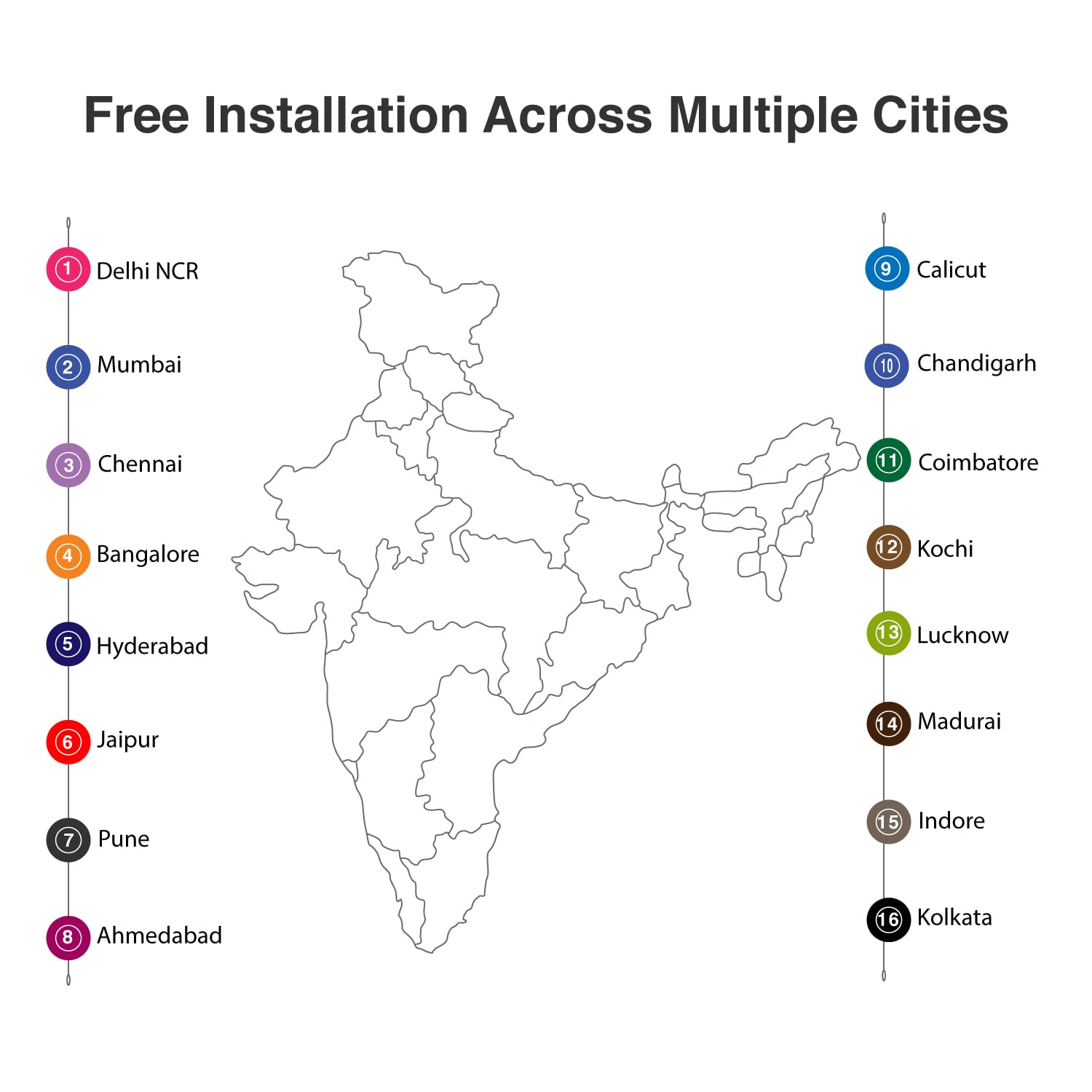
Сурет сипаттамасы: A map of India with numbered markers indicating cities where free installation services are available. These cities include Delhi NCR, Mumbai, Chennai, Bangalore, Hyderabad, Jaipur, Pune, Ahmedabad, Calicut, Chandigarh, Coimbatore, Kochi, Lucknow, Madurai, Indore, and Kolkata.
5. Пайдалану нұсқаулары
The Dormakaba DP 850 Smart Door Lock provides six methods for access control.

Сурет сипаттамасы: An infographic displaying six distinct unlocking methods for the Dormakaba DP 850 Smart Door Lock. Icons represent Fingerprint, Password, OTP (One-Time Password), Smart App (Bluetooth), Mechanical Key Override, and RFID, illustrating the versatility of access options.
5.1 Құлыпты ашу әдістері
- Саусақ ізі: Place your registered finger on the fingerprint sensor. The lock will unlock upon successful verification. Up to 100 fingerprints can be registered.
- RFID Cards: Present a registered RFID card to the RFID card reader area. The lock will unlock. Up to 100 RFID cards can be registered.
- Screen Touch PIN Code: Enter your 4-12 digit PIN code on the keypad, followed by the '#' key. The lock will unlock. Up to 4 PIN codes can be stored.
- BLE (Bluetooth Low Energy) Mobile App: Use the dedicated mobile application on a registered device to unlock the door via Bluetooth. Up to 10 mobile devices can be paired.
- Mechanical Override Keys: In case of emergency or battery failure, insert and turn one of the three provided mechanical keys to unlock the door.
- Push & Pull Handle: The innovative handle allows for intuitive opening. Simply push or pull the handle to open the door once unlocked by any of the above methods.

Сурет сипаттамасы: A visual representation of the Dormakaba DP 850 Smart Door Lock's push-pull handle mechanism. The image highlights the ergonomic design that allows the handle to be pushed or pulled for door operation, emphasizing its ease of use.
5.2 Пайдаланушыны тіркеу
To register new fingerprints, RFID cards, or PIN codes:
- түймесін басыңыз [Тіркелу] button on the indoor unit.
- Follow the voice prompts or visual cues on the lock's display.
- For fingerprints, place your finger on the sensor multiple times as instructed.
- For RFID cards, present the card to the reader.
- For PIN codes, enter your desired code and confirm it.
- Ensure successful registration is confirmed by the lock.
5.3 Есікті құлыптау
The Dormakaba DP 850 features an automatic motor lock body, which typically locks automatically after the door is closed. You can also manually lock it from the inside by pressing the [CLOSE] түймесі.
5.4 Child Lock Functionality
To activate or deactivate the child lock, locate the blocking indoor handle mechanism on the indoor unit. Engage this mechanism to prevent the indoor handle from being operated, ensuring children cannot accidentally open the door from the inside.
6. Қауіпсіздік мүмкіндіктері
The Dormakaba DP 850 Smart Door Lock incorporates several safety and alarm features to enhance security:

Сурет сипаттамасы: An infographic illustrating the various alarm features of the Dormakaba DP 850 Smart Door Lock. Icons and text describe alarms for high temperature, wrong PIN entry, low battery, high voltage prevention, and break-in attempts, highlighting the lock's comprehensive security.
- Alarm for Multiple Failed Entry Attempts: If an incorrect PIN code or unregistered fingerprint/card is attempted multiple times, an alarm will sound, and the lock may temporarily disable entry.
- High-Temperature Warning System: In case of abnormally high temperatures (e.g., fire), the lock may trigger an alarm and automatically unlock to facilitate escape.
- Break-in Attempt Alarm: If the lock detects forced entry or tampering, an alarm will be activated.
- Төмен батарея дабылы: The battery warning lamp (A) will illuminate, and an audible alert will sound when the battery level is low, prompting replacement.
- Жоғары дыбысtage Prevention: The lock is designed with protection against high voltagд толқындар.
7. Техникалық қызмет көрсету
To ensure the longevity and optimal performance of your Dormakaba DP 850 Smart Door Lock, follow these maintenance guidelines:
- Тазалау: Құлыптың бетін жұмсақ, құрғақ шүберекпен сүртіңіз. Абразивті тазартқыштарды, еріткіштерді немесе қатты химиялық заттарды пайдаланбаңыз, себебі олар әрлеу мен электрондық компоненттерді зақымдауы мүмкін.
- Батареяны ауыстыру: When the low battery alarm activates, replace all batteries promptly. Use high-quality alkaline batteries of the specified type. Refer to the Components section for battery location (O) and cover (N).
- Mechanical Key Usage: Keep the mechanical override keys in a safe, accessible location outside the secured area for emergency use. Test them periodically to ensure they function correctly.
- Саусақ ізі сенсорына күтім жасау: Саусақ ізі сенсорын таза және құрғақ ұстаңыз. Оның бетін тырнап алмаңыз.
8. Ақаулықтарды жою
If you encounter issues with your Dormakaba DP 850 Smart Door Lock, refer to the following common problems and solutions:
- Құлып жауап бермейді:
- Check battery level. Replace batteries if low.
- If completely unresponsive, use the emergency power supply terminal (I) with a 9V battery or the mechanical override key.
- Саусақ ізі танылмайды:
- Саусағыңыздың таза және құрғақ екеніне көз жеткізіңіз.
- Саусағыңызды сенсорға қайта қойып көріңіз.
- If issues persist, re-register your fingerprint.
- PIN коды жұмыс істемейді:
- Ensure you are entering the correct PIN code.
- Check if the keypad is illuminated and responsive.
- If multiple incorrect attempts trigger an alarm, wait for the lockout period to expire.
- RFID Card Not Detected:
- Ensure the card is correctly presented to the RFID reader (B).
- Verify the RFID card is registered to the lock.
- Lock Alarms Continuously:
- Identify the type of alarm (e.g., low battery, break-in, high temperature) from the status display lamp or audible cues.
- Address the underlying cause (e.g., replace batteries, secure the door).
- Door Does Not Lock Automatically:
- Check if the door is fully closed and aligned with the frame.
- Inspect the mortise and strike plate for obstructions.
If these steps do not resolve the issue, please contact Dormakaba customer support.
9. Техникалық сипаттамалар
| Ерекшелік | Техникалық сипаттама |
|---|---|
| Модель атауы | DP-850 |
| Бренд | дормакаба |
| Құлып түрі | Биометриялық, тұтқа, пернетақта |
| Материал | Металл |
| Түс | Ақ алтын |
| Элемент өлшемдері (L x W x H) | 23 x 90 x 420 миллиметр (2.3 x 9 x 42 см) |
| Элемент салмағы | 5.25 килограмм (5 кг 250 г) |
| Ұсынылатын есік қалыңдығы | 40-75 мм |
| Саусақ ізінің сыйымдылығы | 100 дейін |
| RFID картасының сыйымдылығы | 100 дейін |
| PIN код сыйымдылығы | 4-ға дейін (4-12 сан) |
| BLE Device Capacity | Up to 10 mobile devices |
| Бақылау әдісі | Түртіңіз, Дауыс |
| Қосылу протоколы | Блютез |
| Қосылған құрамдас бөліктер | RFID Card, Screws, Strip, Manual Key (3) |
10. Кепілдік туралы ақпарат
The Dormakaba DP 850 Smart Door Lock comes with a 1 жылдық кепілдік from the date of purchase. This warranty covers manufacturing defects and ensures the product functions as intended under normal use. Please retain your proof of purchase for warranty claims. For detailed terms and conditions, refer to the warranty card included in your package or contact Dormakaba customer support.
11. Қолдау және байланыс ақпараты
For technical assistance, installation queries, or warranty claims, please contact Dormakaba customer support:
- Өндіруші: Dormakaba India Private Limited
- Импорттаушы/ораушы: Build pro Technologies India Pvt.Ltd
- Refer to your product packaging or the official Dormakaba webтелефон нөмірлері мен электрондық пошта мекенжайларын қоса алғанда, ең соңғы байланыс мәліметтерін алуға арналған сайт.