
1. Өнім аяқталдыview
The ANJIELO SMART 94218B is a 4-wire video intercom system designed for enhanced home security and convenience. It features a 7-inch touchscreen indoor monitor and an HD 1080P outdoor doorbell camera. The system supports WiFi connectivity for remote access via a mobile application, allowing you to monitor and interact with visitors from anywhere. Key features include a 148° wide-angle lens, integrated infrared sensor for night vision, and robust IP65 waterproof and dustproof construction for the outdoor unit. It is compatible with 12V electronic locks for integrated access control.
2. Пакет мазмұны
Carefully unpack the box and ensure all items listed below are present and in good condition. If any items are missing or damaged, please contact customer support.

Сурет: аяқталдыview of the ANJIELO SMART 94218B package contents, including the doorbell, IC cards, wiring, user manual, screwdriver, screws, and connection lines.
- Сыртқы есік қоңырауы құрылғысы
- Indoor Monitor (7-inch Touchscreen)
- IC Cards (Multiple for access control)
- 4-Core Wiring Cable
- External Power Supply (1.2m)
- Пайдаланушы нұсқаулығы
- Бұрауыш
- Бекіту бұрандалары мен қабырға тығындары
- Connection Lines for electronic locks
3. Қауіпсіздік туралы ақпарат
Please read and understand all safety instructions before installation and operation. Failure to follow these instructions may result in electric shock, fire, or damage to the product.
- Электр қауіпсіздігі: Сымдарды немесе орнатуды бастамас бұрын электр қуатының ажыратылғанына көз жеткізіңіз. Егер сенімді болмасаңыз, барлық электр жұмыстарын білікті электрик орындауы керек.
- Суға әсер ету: While the outdoor unit is waterproof (IP65), avoid submerging it in water. Ensure all connections are sealed properly during installation.
- Температура: Do not expose the device to extreme temperatures or direct sunlight for prolonged periods, which could affect performance and lifespan.
- Тазалау: Тазалау үшін жұмсақ, құрғақ шүберекті пайдаланыңыз. Абразивті тазартқыштардан немесе еріткіштерден аулақ болыңыз.
- Балалар: Keep packaging materials and small components away from children to prevent choking hazards.
4. Өнімнің құрамдас бөліктері және өлшемдері
Familiarize yourself with the different parts of your outdoor doorbell unit and its physical dimensions.

Сурет: егжей-тегжейлі view of the outdoor doorbell unit with labels for the rain cover, IR-LED, camera, speaker, keypad, card reader, microphone, call button, and fingerprint sensor.
- Жаңбыр жамылғысы: Provides additional protection against weather elements.
- IR-LED: Түнгі көруді жарықтандыруға арналған инфрақызыл светодиодтар.
- Камера: 1080P HD camera for video capture.
- Баяндамашы: Екі жақты дыбыс байланысы үшін.
- Пернетақта: Numeric keypad for password-based unlocking.
- Картаны оқу құралы: For IC card access control.
- Микрофон: Екі жақты дыбыс байланысы үшін.
- Қоңырау түймесі: To alert the indoor monitor and mobile app.
- Саусақ ізі сенсоры: For fingerprint-based unlocking.
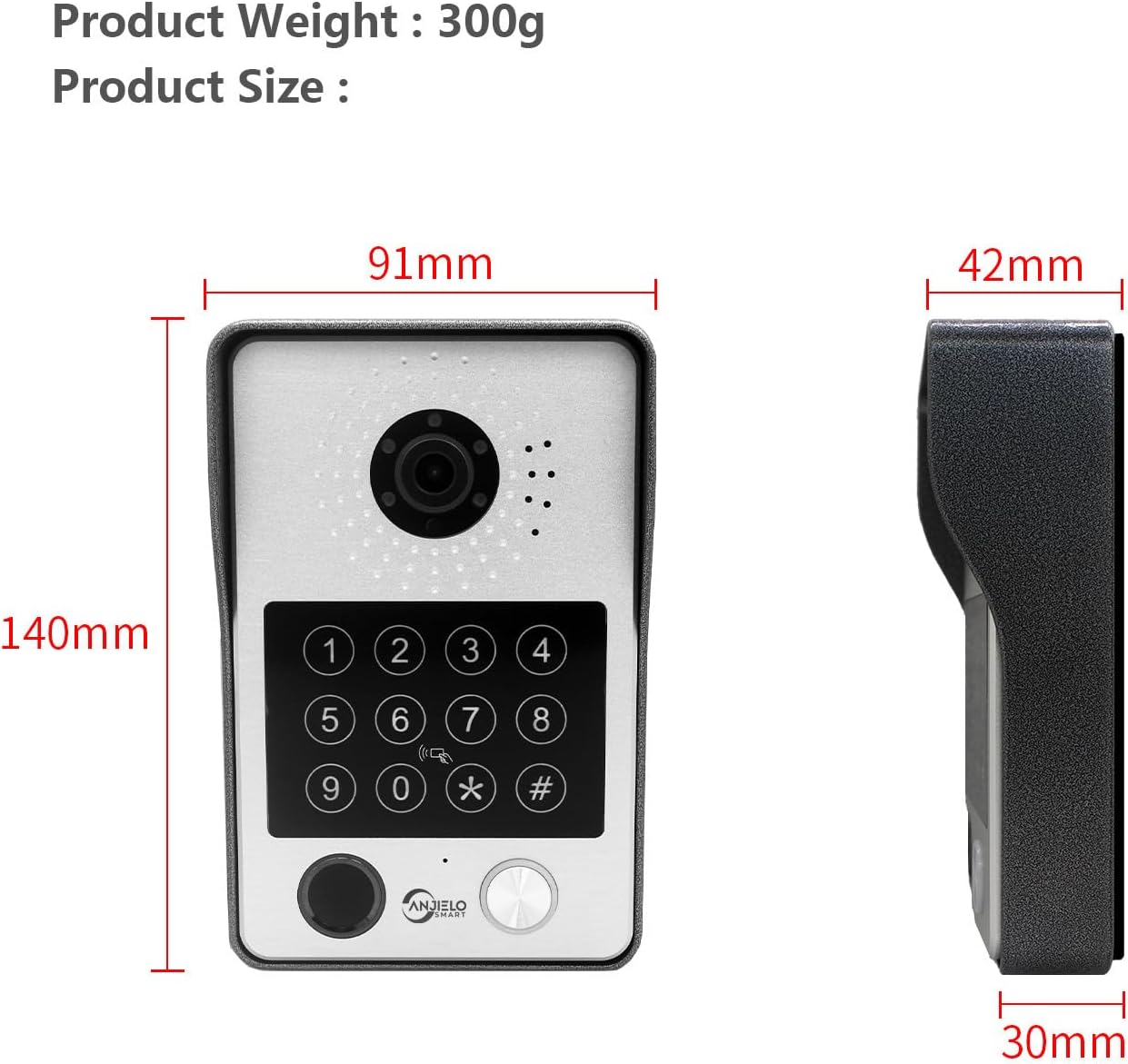
Image: Dimensions of the outdoor doorbell unit: 140mm (height) x 91mm (width) x 42mm (depth, including rain cover) / 30mm (unit depth).
5. Орнату және орнату
5.1 Сымдарды қосу нұсқаулары
The ANJIELO SMART 94218B system uses a 4-wire connection between the outdoor doorbell unit and the indoor monitor. Ensure all power is disconnected before beginning wiring.
- Сымдарды дайындаңыз: Use the provided 4-core cable to connect the outdoor unit to the indoor monitor. For extended distances, a high-quality 4-core wire is recommended.
- Қуатты қосу: Connect the external 1.2m power supply to the indoor monitor.
- Электрондық құлып қосылымы: If connecting to a 12V electronic lock, use the provided connection lines. Refer to the lock's manual for specific wiring requirements.
- Қауіпсіз қосылымдар: Қысқа тұйықталудың алдын алу үшін барлық сымдардың сенімді және оқшауланған екеніне көз жеткізіңіз.
5.2 Сыртқы блокты орнату
The outdoor unit is designed for wall mounting and features IP65 waterproofing.

Image: The outdoor unit is IP65 waterproof, dustproof, and anti-vandal, featuring an aluminum alloy shell with a rain cover.
- Орынды таңдаңыз: Select a suitable location near your door, ensuring the camera has a clear view of visitors and is at an appropriate height.
- Бұрғылау саңылаулары: Use the mounting bracket (if provided, or mark holes directly) to mark and drill holes for the mounting screws.
- Қауіпсіз блок: Attach the outdoor unit securely to the wall using the provided screws and wall plugs. Ensure the rain cover is correctly positioned.
5.3 Initial Configuration (Wi-Fi and App)
The main indoor monitor can connect to your home Wi-Fi network for remote access via the mobile application.
- Қуат қосулы: Once all wiring is complete, connect the power supply to an electrical outlet.
- Мониторды орнату: Follow the on-screen prompts on the 7-inch touchscreen monitor to complete the initial setup.
- Wi-Fi қосылымы: Navigate to the network settings on the monitor and connect to your home Wi-Fi network.
- Бағдарламаны жүктеу: Download the dedicated mobile application (e.g., Tuya APP) from your smartphone's app store.
- Құрылғыны жұптау: Follow the instructions within the app to pair your video intercom system. This typically involves scanning a QR code displayed on the monitor or entering a device ID.
6. Пайдалану нұсқаулары
6.1 5-in-1 құлпын ашу әдістері
The ANJIELO SMART 94218B offers multiple convenient ways to unlock your door.

Image: Visual representation of the five unlocking methods: Fingerprint, Password, IC Card, unlocking via the Indoor Monitor, and unlocking via the Tuya mobile application.
- Саусақ ізі: Place your registered fingerprint on the sensor on the outdoor unit.
- Құпия сөз: Enter your pre-set password on the keypad of the outdoor unit.
- IC картасы: Tap a registered IC card on the card reader area of the outdoor unit.
- Монитор: Use the unlock function on the indoor touchscreen monitor.
- Мобильді қолданба: Use the unlock function within the paired mobile application.
6.2 Two-Way Audio and Monitoring
Communicate with visitors and monitor your entrance from various devices.

Image: The system enables two-way audio communication with visitors through the indoor monitor or a connected mobile phone, showing live views on both devices.
- Қонақ қоңырауы: When a visitor presses the call button on the outdoor unit, all connected indoor monitors and paired mobile phones will ring.
- Қоңырауға жауап беру: You can answer the call from any indoor monitor or your mobile phone to see, hear, and speak with the visitor.
- Домофон функциясы: Indoor monitors support call forwarding and internal audio-only conversations between multiple monitors within the home.
6.3 Қозғалысты анықтау және жазу
The system provides security by detecting motion and recording events.

Image: The system's smart PIR motion detection sends alerts to your mobile phone and monitor when movement is detected, automatically recording video or snapshots.
- Автоматты жазу: When motion is detected or the doorbell is pressed, the camera automatically records video or captures snapshots.
- Сақтау орны: Recordings are saved to an additional Micro SD card (not included, or included as a component) for later review.
- ViewЖазбалар: Сен істе аласың view recorded events directly on the indoor monitor or through the mobile application.
6.4 Түнгі көру
The outdoor unit provides clear visibility even in low-light conditions.

Image: Comparison of day and night vision capabilities, highlighting the 1080P resolution and 148-degree wide-angle view provided by the outdoor unit's integrated IR-LEDs.
The integrated infrared sensor and IR-LEDs enable clear night vision, ensuring you can identify visitors and monitor your entrance effectively, even in complete darkness.
7. Техникалық қызмет көрсету
7.1 Күтім және тазалау
- Сыртқы блок: Periodically wipe the camera lens and keypad with a soft, damp шаң мен кірді кетіруге арналған шүберек. Қатты химиялық заттарды қолданудан аулақ болыңыз.
- Ішкі монитор: Clean the touchscreen with a microfiber cloth. Do not spray cleaning solutions directly onto the screen.
- Қосылымдар: Regularly check wiring connections for any signs of wear or corrosion, especially for outdoor components.
8. Ақаулықтарды жою
If you encounter issues with your ANJIELO SMART video intercom system, refer to the following common problems and solutions.
| Мәселе | Ықтимал себебі | Шешім |
|---|---|---|
| No power to monitor/doorbell | Power adapter unplugged; wiring issue; power outage. | Check power connections; verify power outlet; inspect wiring for damage. |
| Сыртқы блоктан бейне/аудио жоқ | Loose wiring connection; camera/microphone fault. | Ensure 4-core wiring is securely connected; restart the system. |
| Cannot unlock door | Incorrect password/fingerprint/IC card; electronic lock issue; wiring problem. | Verify credentials; check electronic lock power and wiring; ensure correct unlock method is selected. |
| Мобильді қолданба қосылмайды | Monitor not connected to Wi-Fi; incorrect app pairing; internet issue. | Check monitor's Wi-Fi status; re-pair device in app; verify home internet connection. |
| Түнгі көру қабілеті нашар | IR-LEDs obstructed or faulty; dirty camera lens. | Clean camera lens; ensure no obstructions; contact support if IR-LEDs are not functioning. |
If the problem persists after trying these solutions, please contact ANJIELO SMART customer support for further assistance.
9. Техникалық шарттар
Detailed technical specifications for the ANJIELO SMART 94218B video intercom system.
| Ерекшелік | Техникалық сипаттама |
|---|---|
| Бренд | ANJIELO SMART |
| Үлгі нөмірі | 94218B |
| Қосылу технологиясы | Сымды, сымсыз (Wi-Fi) |
| Бейне түсіру рұқсаты | 1080p |
| Арнайы мүмкіндіктер | Night Vision, Motion Detection, 5-in-1 Unlock (Fingerprint, Password, IC Card, App, Monitor) |
| Ішкі/сыртқы пайдалану | Indoor (Monitor), Outdoor (Doorbell) |
| Үйлесімді құрылғылар | Смартфон |
| Монтаж түрі | Қабырғаға аспа |
| Түс | Қара |
| Дабыл түрі | Тек қозғалыс |
| Бақылау әдісі | Қолданба |
| Қосылу протоколы | Сымсыз дәлдiк |
| Тtage | 12 вольт |
| Ватtage | 2 ватт |
| Арналар саны | 2 |
| Бейне түсіру пішімі | AVI |
| Элемент өлшемдері | 27 x 2 x 18 см |
| Unit Volume/Weight | 1.0 санау |
| Шығу елі | Қытай |
| Өндіруші | ANJIELO SMART |
10. Кепілдік және қолдау
10.1 Кепілдік туралы ақпарат
For specific warranty details regarding your ANJIELO SMART 94218B video intercom system, please refer to the warranty card included in your package or contact the seller directly. Warranty terms typically cover manufacturing defects for a specified period from the date of purchase.
10.2 Тұтынушыларды қолдау қызметі
If you require technical assistance, have questions about installation, or need to report a product issue, please contact ANJIELO SMART customer support. You can usually find contact information on the product packaging, the seller's website, or within the mobile application.