
1. Өнім аяқталдыview
The COUGAR FV150 RGB is a mid-tower gaming case designed for high-performance PC builds. It features a dual-chamber design, separating the main components from cables, storage drives, and the power supply unit (PSU) for a clean aesthetic and improved airflow. The case supports various motherboard form factors and offers extensive cooling options, including pre-installed ARGB fans.
Негізгі ерекшеліктері:
- Екі камералы дизайн: анық береді view of your build through glass panels while concealing cables and other components.
- GPU қолдауы: Accommodates graphics cards up to 400mm in length, with options for vertical GPU orientation.
- Аналық платаның үйлесімділігі: Supports Mini-ITX, Micro-ATX, and ATX motherboards.
- Engineered Bottom Fan Bracket: Simplifies fan installation by allowing attachment prior to setup.
- Extensive Fan & Water Cooling Support: Multiple fan mounting points and radiator support up to 360mm.
- Seamless RGB Synchronization: Integrated universal fan hub for easy ARGB lighting control.
- Modern I/O Panel: Includes 2 x USB Type-A and 1 x USB 3.2 Type-C ports.
- Икемді сақтау: Supports combinations of 3.5" HDDs and 2.5" SSDs.
- Магниттік шаң сүзгілері: Located on the top and right side for easy maintenance.

1.1-сурет: Бұрыштық view of the COUGAR FV150 RGB case, highlighting its dual-chamber design and pre-installed ARGB fans.
2. Орнату және орнату
Follow these steps for proper installation of your PC components into the COUGAR FV150 RGB case.
2.1 Қаптаманы ашу және бастапқы тексеру
- Қорапты орамынан абайлап алыңыз.
- Тасымалдау кезінде корпустың зақымдану белгілерін тексеріңіз.
- Remove the tempered glass side panel by unscrewing the thumb screws, if present, or by releasing the latch mechanism.
2.2 Аналық платаны орнату
- Ensure the correct standoffs are installed for your motherboard form factor (Mini-ITX, Micro-ATX, or ATX).
- Place the I/O shield into the rear opening of the case.
- Carefully align your motherboard with the standoffs and I/O shield, then secure it with screws.
2.3 Қуат блогын (PSU) орнату
- The FV150 RGB supports bottom-mount PSUs.
- Slide the PSU into its designated compartment in the secondary chamber from the rear of the case.
- Secure the PSU with screws from the exterior rear of the case.
2.4 Сақтау дискісін орнату
- Locate the drive bays in the secondary chamber.
- For 3.5" HDDs, slide the drive into the appropriate tray and secure it.
- For 2.5" SSDs, mount them to the designated brackets or trays.
2.5 Графикалық картаны (GPU) орнату
- Корпустың артқы жағындағы қажетті кеңейту ұясының қақпақтарын алып тастаңыз.
- Insert your GPU into the PCIe slot on the motherboard and secure it with screws.
- The case supports GPUs up to 400mm. For vertical GPU mounting, a separate riser cable and bracket (not included) are required.
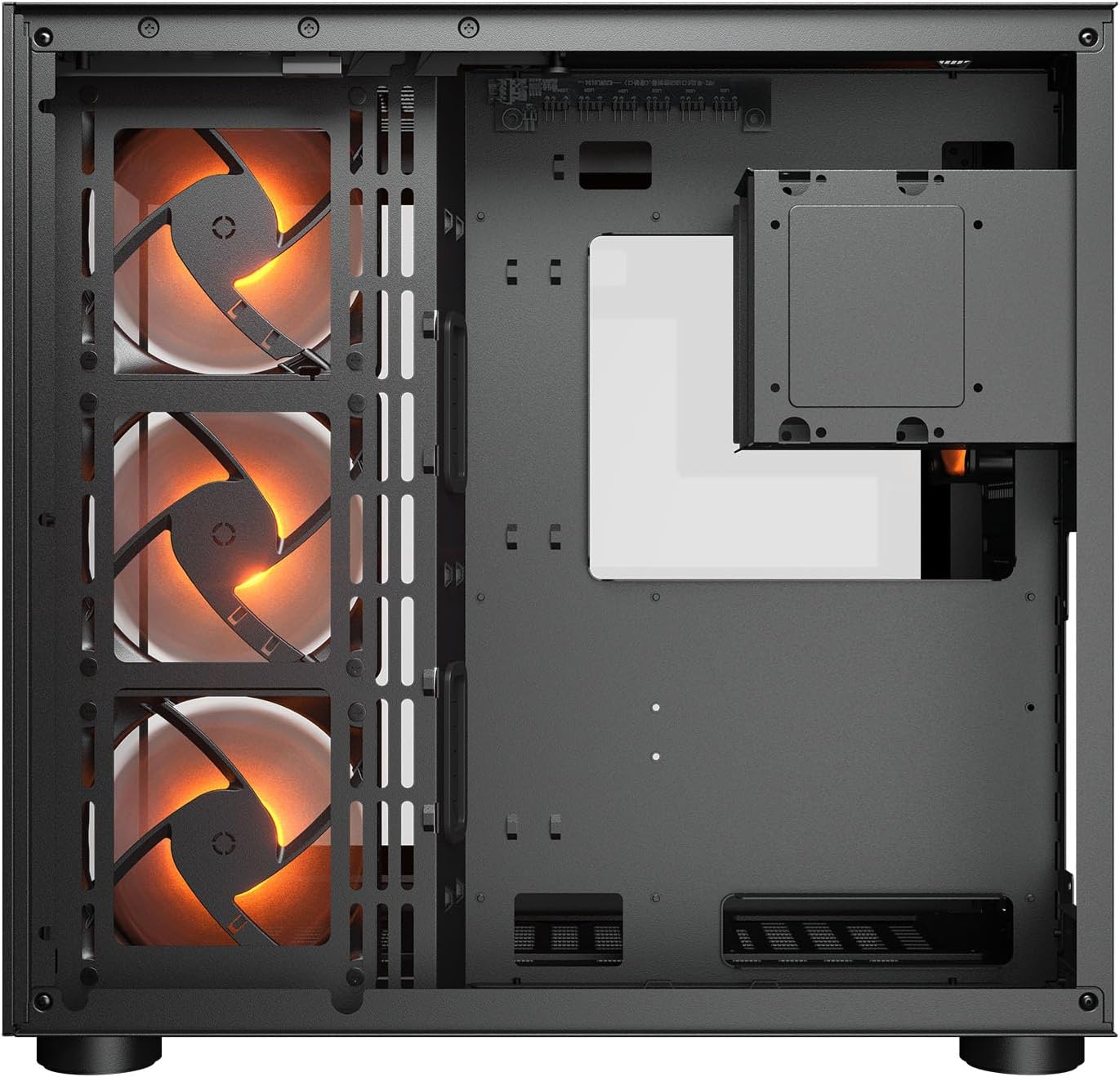
Сурет 2.1: Ішкі view illustrating the main chamber for motherboard and GPU installation, with pre-installed side fans.
2.6 Желдеткіш пен радиаторды орнату
- The case comes with 3 x 120mm ARGB side fans and 1 x 120mm ARGB rear fan pre-installed.
- Additional fans can be installed at the top (3 x 120mm or 2 x 140mm) and bottom (3 x 120mm or 2 x 140mm).
- Utilize the engineered bottom fan bracket for easier installation of bottom fans.
- For water cooling, radiators up to 360mm can be mounted on the top and 240mm on the side.

Image 2.2: Top internal view, showing potential mounting locations for additional cooling fans or radiators.
2.7 Кабельді басқару
- Route all power and data cables through the cutouts to the secondary chamber.
- пайдаланыңыз ample space and tie-down points in the secondary chamber to organize cables for optimal airflow and a clean appearance.
2.8 Connecting Front I/O Panel
- Connect the front panel cables (USB 3.2 Type-C, USB Type-A, audio, power, reset, LED) to the corresponding headers on your motherboard.
3. Пайдалану нұсқаулары
Барлық компоненттер орнатылып, қосылғаннан кейін жүйені қосуға болады.
3.1 Қуатты қосу
- PSU қосқышының «ON» күйінде екеніне көз жеткізіңіз.
- Корпустың алдыңғы I/O панеліндегі қуат түймесін басыңыз.
3.2 RGB жарықтандыруды басқару
- The integrated universal fan hub allows for easy synchronization of ARGB lighting.
- Connect the hub to your motherboard's ARGB header (5V 3-pin) to control lighting effects via motherboard software.
- Alternatively, use the dedicated RGB button on the front I/O panel to cycle through pre-set lighting modes if not connected to a motherboard header.
4. Техникалық қызмет көрсету
Тұрақты техникалық қызмет көрсету компьютер компоненттерінің оңтайлы өнімділігі мен ұзақ қызмет ету мерзімін қамтамасыз етуге көмектеседі.
4.1 Шаң сүзгісін тазалау
- The COUGAR FV150 RGB features magnetic dust filters on the top and right side, along with a ventilated bottom cover.
- Gently remove the magnetic dust filters.
- Clean them using compressed air or by rinsing with water (ensure they are completely dry before reattaching).
- Periodically clean the ventilated bottom cover.
4.2 Жалпы тазалау
- Use a soft, dry cloth to wipe down the exterior surfaces of the case.
- For tempered glass panels, use a glass cleaner and a microfiber cloth to avoid streaks.
- Аяқтауға зақым келтіруі мүмкін күшті химиялық заттарды немесе абразивті материалдарды пайдаланбаңыз.
5. Ақаулықтарды жою
Бұл бөлім сізде кездесетін жалпы мәселелердің шешімдерін береді.
5.1 Жүйе қосылмайды
- Check PSU: Ensure the power supply unit is properly connected to the wall outlet and the PSU switch is in the 'ON' position.
- Алдыңғы панель қосылымдары: Қораптағы қуат түймесінің кабелінің аналық платаның алдыңғы панелінің жоғарғы жағына дұрыс қосылғанын тексеріңіз.
- Internal Power Cables: Confirm all necessary power cables (24-pin ATX, 8-pin CPU, PCIe for GPU) are securely connected to the motherboard and components.
5.2 Желдеткіштер айналмайды немесе RGB жұмыс істемейді
- Желдеткіш қосылымдары: Ensure all fan power cables are securely connected to the fan hub or motherboard headers.
- RGB қосылымдары: Verify the ARGB cables are correctly connected to the fan hub and the hub is connected to a 5V 3-pin ARGB header on the motherboard.
- Software/Button: If connected to the motherboard, check your motherboard's RGB control software. If not, try pressing the RGB button on the case's I/O panel to cycle modes.
5.3 USB порттары жұмыс істемейді
- Ішкі USB тақырыптары: Confirm that the USB 3.0 and USB Type-C cables from the front I/O panel are correctly plugged into the corresponding headers on your motherboard.
- Motherboard Drivers: Ensure you have installed the latest chipset and USB drivers for your motherboard.
6. Техникалық сипаттамалар
Detailed technical specifications for the COUGAR FV150 RGB Gaming Case.

Image 6.1: Case dimensions for planning your setup.
| Ерекшелік | Техникалық сипаттама |
|---|---|
| Өнім атауы | FV150 RGB |
| Іс формасының факторы | Орта мұнара |
| Аналық платаның үйлесімділігі | Mini-ITX, Micro-ATX, ATX |
| Өлшемдері (ені x Y x D) | 300 x 400 x 415 мм (11.8" x 15.7" x 16.3") |
| I/O панелі | USB 3.2 Gen 2 Type-C x 1, USB-A 3.0 x 2, 4 Pole Headset Audio Jack, RGB Button |
| 3.5" Drive Bay | 2 |
| 2.5" Drive Bay | 1+1 (converted from 3.5" drive bays) |
| Кеңейту слоттары | 7+3 |
| Тік графикалық процессорды қолдау | Иә |
| Cooling Fan Support (Top) | 3 x 120 мм немесе 2 x 140 мм |
| Cooling Fan Support (Bottom) | 3 x 120 мм немесе 2 x 140 мм |
| Cooling Fan Support (Side) | 3 x 120 мм |
| Cooling Fan Support (Rear) | 1 x 120 мм |
| Pre-installed Fans (Side) | 3 x 120mm ARGB (Reversed) |
| Pre-installed Fans (Rear) | 1 x 120mm ARGB |
| Pre-installed Fan Speed | 1000 (± 10%) айналу жиілігі |
| Pre-installed Fan Connector | 5V 3 Pin (ARGB) / 3 Pin (Fan) |
| Жанкүйерлердің максималды саны | 10 |
| Water Cooling Support (Top) | 360мм / 280мм / 240мм |
| Water Cooling Support (Side) | 240мм / 120мм |
| Water Cooling Support (Rear) | 120мм |
| RGB Hub Sync with M/B | Иә |
| Макс. Графикалық карта ұзындығы | 400 мм (15.7 дюйм) |
| Макс. CPU салқындатқыш биіктігі | 180 мм (7.1 дюйм) |
| Макс. PSU ұзындығы | 210 мм (8.3 дюйм) |
| Материал | Металл |
| Элемент салмағы | 6.83 келі |
7. Кепілдік туралы ақпарат
COUGAR products are manufactured to the highest quality standards. This product is covered by a manufacturer's warranty against defects in materials and workmanship. The specific duration and terms of the warranty may vary by region and retailer. Please retain your proof of purchase for warranty claims.
For detailed warranty information, please refer to the official COUGAR webсайтына немесе жергілікті сатушыға хабарласыңыз.
8. Қолдау
If you encounter any issues or have questions regarding your COUGAR FV150 RGB Gaming Case that are not covered in this manual, please contact COUGAR customer support.
- Ресми COUGAR сайтына барыңыз webЖҚС, драйверлерді жүктеп алуға және қолдау көрсетуге арналған байланыс ақпаратына арналған сайт.
- Contact your retailer for assistance with product returns or exchanges.