
1. Өнім аяқталдыview
The MiBOXER Y3 RGB+CCT Vertical Remote provides comprehensive control over compatible RGB+CCT LED lighting systems. This remote allows for precise adjustments of RGB colors, color temperature (CCT), and brightness. Utilizing 2.4GHz wireless technology, it ensures reliable communication with your lighting devices. Its ergonomic vertical design and intuitive interface are designed for ease of use, enabling users to effortlessly customize lighting for various environments.
Негізгі ерекшеліктері:
- RGB, CCT, and Brightness Control: Adjust colors, color temperature, and brightness with ease.
- 2.4 ГГц сымсыз технология: Ensures reliable, long-range connectivity.
- Тік дизайн: Ergonomic and easy-to-use layout for quick adjustments.
- Multi-Color and Dimmable: Create customized lighting scenes with vibrant colors and dimming options.
- Жан-жақты үйлесімділік: Works with MiBOXER RGB+CCT lighting products.
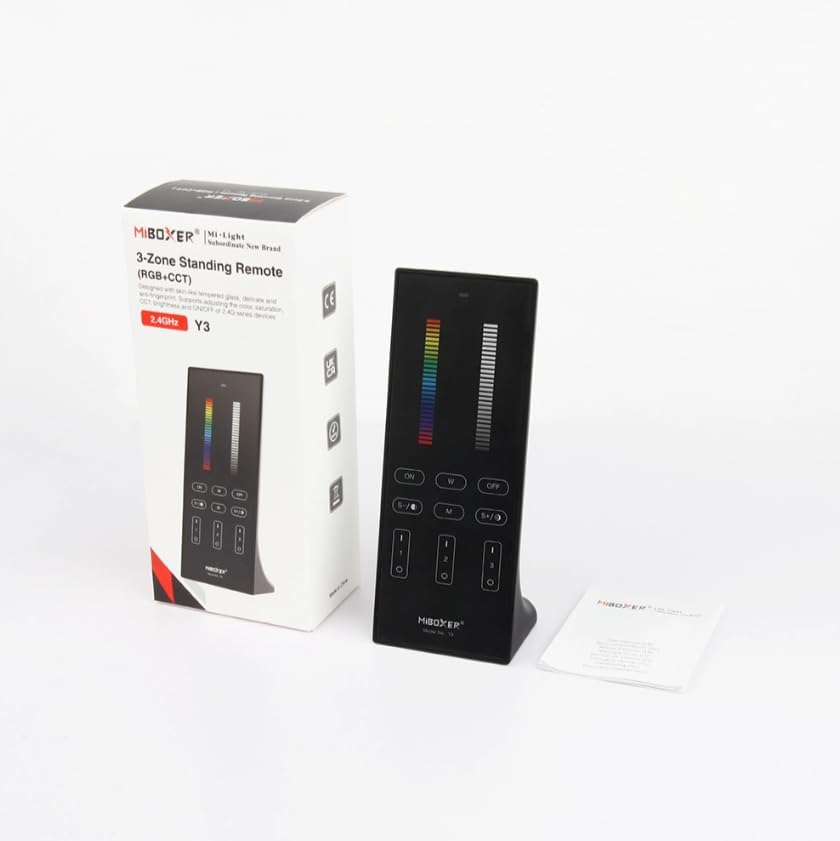
Figure 1: MiBOXER Y3 RGB+CCT Vertical Remote with its retail packaging.
2. Орнату нұсқаулары
2.1 Батареяны орнату
The MiBOXER Y3 remote requires two AAA batteries (not included). To install:
- Қашықтан басқару құралының артқы жағындағы батарея бөлігінің қақпағын табыңыз.
- Ашу үшін қақпақты төмен сырғытыңыз.
- Дұрыс полярлықты (+ және -) қамтамасыз ете отырып, екі AAA батареясын салыңыз.
- Қақпақты орнынан мықтап шерткенше сырғытыңыз.
2.2 Linking the Remote to Lighting Devices
To control your MiBOXER RGB+CCT lighting devices, the remote must be linked to them. This process typically involves a specific sequence of actions on both the remote and the lighting device. Refer to your specific MiBOXER lighting product's manual for detailed linking instructions, as the procedure may vary slightly between different light models. A common linking procedure is as follows:
- Ensure the lighting device is powered off.
- Power on the lighting device.
- Within 3 seconds of powering on the light, press the "Zone ON" button (labeled "I" or "1") on the remote for the desired zone.
- The light should flash several times, indicating successful linking.
- If linking fails, repeat the process.
To unlink a device from a zone, power on the light and within 3 seconds, press the "Zone ON" button (labeled "I" or "1") five times rapidly for the corresponding zone. The light should flash multiple times to confirm unlinking.
3. Пайдалану нұсқаулары
The MiBOXER Y3 remote features an intuitive layout for controlling various lighting parameters. Familiarize yourself with the buttons and sliders as shown in Figure 2.

Figure 2: MiBOXER Y3 Remote Control button layout and functions.
3.1 Түйме функциялары:
| Түйме/басқару | Функция |
|---|---|
| Индикатор шамы | Flashes to confirm button presses. |
| RGB сырғытпасы | Slide to select desired RGB color. |
| Жарықтық сырғытпасы | Slide to adjust light brightness (0-100%). |
| Master ON (I/ON) | Turns all linked lights ON. |
| Master OFF (O/OFF) | Turns all linked lights OFF. |
| White Light (W) | Activates pure white light mode. |
| Speed-/CCT-/Saturation- | Decreases speed in dynamic mode, decreases color temperature (warmer white), or decreases color saturation. |
| Speed+/CCT+/Saturation+ | Increases speed in dynamic mode, increases color temperature (cooler white), or increases color saturation. |
| Dynamic Mode (M) | Cycles through various dynamic lighting effects. Press repeatedly to change effects. |
| Zone ON (1, 2, 3 - "I") | Turns ON lights linked to the specific zone. Used for linking/unlinking. |
| Zone OFF (1, 2, 3 - "O") | Turns OFF lights linked to the specific zone. |
3.2 Жалпы жұмыс:
- Шамдарды қосу/өшіру: Use the "Master ON" or "Master OFF" buttons for all lights, or "Zone ON" / "Zone OFF" for specific zones.
- Adjusting Color: Slide your finger along the "RGB Slider" to select your desired color.
- Жарықтықты реттеу: Slide your finger along the "Brightness Slider" to increase or decrease the light intensity.
- Adjusting Color Temperature (CCT): In white light mode, use the "CCT-" and "CCT+" buttons to make the white light warmer or cooler.
- Динамикалық режимдер: Press the "M" button to activate dynamic lighting modes. Use "Speed-" and "Speed+" to adjust the speed of the current dynamic effect.
- Қанықтықты реттеу: In RGB mode, use "Saturation-" and "Saturation+" to adjust the intensity of the color.
4. Техникалық қызмет көрсету
Proper maintenance ensures the longevity and optimal performance of your MiBOXER Y3 remote.
- Тазалау: Wipe the remote with a soft, dry cloth. Do not use abrasive cleaners, solvents, or wet cloths, as these can damage the surface or internal components.
- Батареяны ауыстыру: Replace batteries when the indicator light becomes dim or the remote's response becomes inconsistent. Always use new AAA batteries and dispose of old batteries responsibly.
- Сақтау орны: Пультті салқын, құрғақ жерде, тікелей күн сәулесінен және жоғары температурадан алыс сақтаңыз. Ұзақ уақыт сақтасаңыз, ағып кетудің алдын алу үшін батареяларды алып тастаңыз.
- Ылғалдан аулақ болыңыз: This remote is not waterproof. Keep it away from water and high humidity environments.
5. Ақаулықтарды жою
If you encounter issues with your MiBOXER Y3 remote, refer to the following troubleshooting steps:
| Мәселе | Ықтимал себебі | Шешім |
|---|---|---|
| Remote not responding to button presses. | Өлген немесе төмен батареялар. Remote not linked to lights. Ауқымнан тыс. | Батареяларды ауыстырыңыз. Re-link the remote to the lighting devices (refer to Section 2.2). Move closer to the lighting devices. |
| Lights not changing color/brightness. | Таңдалған режим дұрыс емес. Remote not linked to the specific zone. | Ensure you are in the correct mode (e.g., RGB for color, CCT for white temperature). Verify the remote is linked to the correct zone. |
| Indicator light not flashing. | Өлген батареялар. Ішкі ақаулық. | Батареяларды ауыстырыңыз. Егер батареяны ауыстырғаннан кейін мәселе шешілмесе, тұтынушыларды қолдау қызметіне хабарласыңыз. |
| Interference with other 2.4GHz devices. | Proximity to other wireless devices. | Move the remote or other 2.4GHz devices further apart. |
6. Техникалық сипаттамалар
Technical specifications for the MiBOXER Y3 RGB+CCT Vertical Remote.
| Ерекшелік | Мәлімет |
|---|---|
| Үлгі нөмірі | Y3 |
| Бренд | MiBOXER |
| Басқару түрі | RGB+CCT Vertical Remote |
| Сымсыз технология | 2.4 ГГц |
| Нәр беруші | 2x AAA батареялары (жинаққа кірмейді) |
| Арнайы мүмкіндік | RGB/CCT/brightness dimmable |
| Элемент салмағы | 4.8 унция (шамамен 136 грамм) |
| Пакет өлшемдері | 6.5 x 3 x 2 дюйм (шамамен 16.5 x 7.6 x 5.1 см) |


Figure 3: Dimensions of the MiBOXER Y3 Remote Control and its packaging.
7. Кепілдік және қолдау
For warranty information, please refer to the documentation provided with your specific MiBOXER lighting product or contact the retailer where the product was purchased. MiBOXER products typically come with a manufacturer's warranty covering defects in materials and workmanship.
For technical support or further assistance, please visit the official MiBOXER webсайтына кіріңіз немесе олардың тұтынушыларға қызмет көрсету бөліміне хабарласыңыз. Байланыс мәліметтері әдетте өнімнің қаптамасында немесе брендтің ресми онлайн қатысуында қолжетімді.