
Кіріспе
Welcome to the user manual for your new Generic M59 Pro Max Smartwatch. This guide provides essential information on setting up, operating, maintaining, and troubleshooting your device. The M59 Pro Max Smartwatch is designed to enhance your daily life with features like advanced activity tracking, call support, smart notifications, and various sport modes.
Пакет мазмұны
Сіздің пакетіңізде келесі элементтердің барлығы бар екенін тексеріңіз:
- M59 Pro Max Smartwatch
- 7 Random Straps (Silicone, Rubber, Nylon)
- Сымсыз зарядтау кабелі
- Пайдаланушы нұсқаулығы

Image: The M59 Pro Max Smartwatch and its accessories, including a variety of interchangeable straps, neatly arranged in its packaging.
Орнату
1. Смарт сағатты зарядтау
Before first use, fully charge your smartwatch. Place the smartwatch on the wireless charging cable. The screen will indicate charging status. A full charge typically takes 2-3 hours.
2. Қуатты қосу/өшіру
- Қосу үшін: Бүйірлік түймені экран жанғанша басып тұрыңыз.
- Қуатты өшіру үшін: Бүйірлік түймені басып тұрыңыз, содан кейін экранда «Өшіру» тармағын таңдаңыз.
3. Қолданбаны орнату және жұптастыру
To unlock the full potential of your smartwatch, download the companion fitness tracker application on your smartphone or tablet. Refer to the Quick Start Guide for the specific app name or QR code.
- Download and install the app from your device's app store.
- Смартфонда Bluetooth қосыңыз.
- Open the app and follow the on-screen instructions to pair your M59 Pro Max Smartwatch. Ensure the smartwatch is powered on and near your phone during pairing.
Пайдалану нұсқаулары
Негізгі навигация
The M59 Pro Max features a 2-inch HD touchscreen display for intuitive interaction. Swipe left, right, up, or down to navigate through menus and access different functions. Tap to select items.
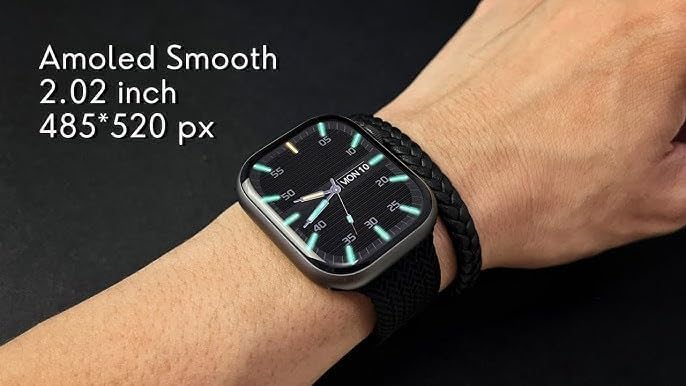
Image: The M59 Pro Max Smartwatch worn on a wrist, showcasing its vibrant 2.02-inch AMOLED display with a resolution of 485x520 pixels.
Қоңыраулар мен хабарландырулар
Once paired via Bluetooth, you can manage calls and receive notifications directly on your smartwatch.
- Қоңырау шалу: Use the dialer on the watch or access your phone's contacts through the watch interface.
- Қоңырауларды қабылдау: Кіріс қоңырауларға тікелей білегіңізден жауап беріңіз немесе қабылдамаңыз.
- Хабарландырулар: View messages, app alerts, and other notifications.
Fitness Tracking and Sport Modes
The smartwatch offers comprehensive fitness tracking and multiple sport modes.
- Әрекетті бақылау: Қадамдарды, қашықтықты және жағылған калорияларды бақылайды.
- Жүрек соғу жиілігінің мониторы: Нақты уақыттағы жүрек соғу жиілігі деректерін береді.
- Ұйқыны бақылау: Analyzes sleep patterns and duration.
- Спорт режимдері: Select from various activities like running, cycling, and more to track specific workout data.
NFC and GPT Features
The M59 Pro Max supports NFC for convenient transactions and GPT for enhanced interaction. Refer to the companion app for specific setup and usage instructions for these advanced features.
Техникалық қызмет көрсету
Тазалау
Wipe the smartwatch and straps regularly with a soft, dry cloth. For stubborn dirt, a slightly damp матаны қолдануға болады. Қатты химиялық заттардан немесе абразивті материалдардан аулақ болыңыз.
Суға төзімділік
The M59 Pro Max is water repellent. This means it can withstand splashes, sweat, and light rain. It is not suitable for swimming, showering, or diving. Avoid prolonged exposure to water.
Бау күтімі
The included straps are made of silicone, rubber, and nylon. Clean them according to their material type. Ensure straps are dry before reattaching to the watch.
Ақаулықтарды жою
Егер сіз ақылды сағатыңызбен проблемаларға тап болсаңыз, келесі шешімдерді қолданып көріңіз:
- Smartwatch not powering on: Құрылғының толық зарядталғанына көз жеткізіңіз.
- Смартфонмен жұптастыру мүмкін емес: Make sure Bluetooth is enabled on your phone and the smartwatch is within range. Try restarting both devices.
- Inaccurate fitness data: Ensure the watch is worn snugly on your wrist. Calibrate the app if available.
- Хабарландырулар көрсетілмейді: Check app permissions on your smartphone and ensure notifications are enabled for the companion app.
- Экран жауап бермейді: Ақылды сағатты қайта іске қосып көріңіз.
For further assistance, please refer to the support section of the companion application or contact your retailer.
Техникалық сипаттамалар
| Модель атауы | M59 Pro Max |
| Бренд атауы | Жалпы |
| Операциялық жүйе | Меншікті ОЖ |
| Экран өлшемі | 2 дюйм |
| Дисплей түрі | OLED |
| Ажыратымдылық | 240 x 280 |
| Қосылу технологиясы | Bluetooth, ұялы байланыс (LTE) |
| Сымсыз байланыс стандарты | Блютез |
| Қосылу мүмкіндіктері | NFC, Bluetooth, Cellular |
| Арнайы мүмкіндіктер | Advanced Activity Tracking, Call and Chat Support |
| Батарея ұяшығының құрамы | Литий-ион |
| GPS | GPS жоқ |
| Элемент пішіні | Дөңгелек |
| Жолақ материалының түрі | Silicone, Rubber, Nylon |
| Суға төзімділік деңгейі | Су репеллент |
| Спорт түрі | Бірнеше спорт түрі |
| Адам интерфейсін енгізу | Сенсорлық экран |
| Қолдау көрсетілетін қолданба | Фитнес трекер |
| Контроллер түрі | Дауыспен басқару |
| Есептегіш түрі | Heart Rate Monitor, Sleep Duration, Step Count |
| Жабу түрі | Тоға |
| Түс | Қара |
| Жолақ түсі | Қара |
| Үйлесімді құрылғылар | Смартфон, планшет |
| Үйлесімді телефон үлгілері | All current smartphone models |
Кепілдік және қолдау
Кепілдік туралы ақпарат
This product is provided without an explicit warranty. Please check with your retailer regarding their return and exchange policies.
Тұтынушыларды қолдау
For any questions or issues not covered in this manual, please contact the retailer where you purchased the product or refer to the support section within the companion application.